No audio but the green sound bar on the volume control is moving?

Zziko0

New member
Local time
9:04 PM
Messages
11
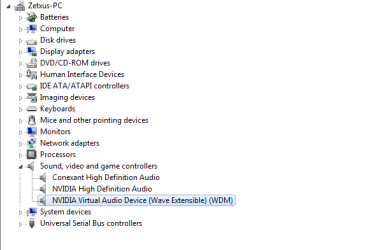
Hey there! A few days ago I changed my hdd because the last one got corrupted and had a lot of bad sectors so I installed a new windows 7 OS. Everything was smooth until the sound suddenly stopped. I wasn't doing anything in particular. I noticed the green bar on the volume control is moving but I had no sound. I plugged headphones in - same thing. Anyways it fixed with a reboot and I thought it was a one time bug. But it happened 4 times already and the only other thing that fixes it beside rebooting is uninstalling the sound device from the device manager and installing it again. What is causing this? I downloaded my Realtek drivers and I ran them with the setup.exe file and they are currently installed on my PC but they don't seem to do anything. These are pictures from the various things I wanted you to see that look normal:

imgur: the simple image sharer

What may be causing this and how can I fix it?
 

My Computer My Computer

At a glance

Windows 7 Ultimate 64 bit
Computer type
Laptop
OS
Windows 7 Ultimate 64 bit
Welcome to the Windows 7 Forum.

The first thing I see is you do not have the correct sound driver installed. I don't know what your hardware is but what is listed is the "High Definition Audio Device" which is the Windows installed generic sound driver. You should install the correct driver from your PC vendor.

In addition I see the NVIDIA Virtual Audio Device and that has caused some problems in the past. Temporarily disable that in the Device Manager and see if that helps.

Please fill in the "My System Specs". It helps us to try and help you.

Also, here is the instructions on posting screen shots on this forum:
http://www.sevenforums.com/tutorials/9733-screenshots-files-upload-post-seven-forums.html
 

My Computer My Computer

At a glance

Windows 10 64 bitIntel i7 6700K16GB Corsair DominatorIntel CPU Graphics
Computer type
PC/Desktop
Computer Manufacturer/Model Number
My Own Build
OS
Windows 10 64 bit
CPU
Intel i7 6700K
Motherboard
ASUS ROG Maximus VIII Hero
Memory
16GB Corsair Dominator
Graphics Card(s)
Intel CPU Graphics
Sound Card
RealTek
Monitor(s) Displays
27" Dell S2719dgf
Screen Resolution
2560X1440
Hard Drives
1 TB Samsung 850 EVO SSD for Win 10 Pro
500GB Samsung 850 EVO SSD for Win 10 Insider
2 TB drive for backup
PSU
EVGA Supernova 750G2
Case
BeQuiet Silent Base 600
Cooling
Deepcool Captain 120EX
Keyboard
Microsoft Wireless 2000
Mouse
Microsoft wireless
Internet Speed
100 MB/sec (Cable)
Antivirus
Microsoft Defender and Malwarebytes
Browser
Edge/Firefox
Other Info
Cakewalk (Sonar) by BandLab and Studio One 4.1 Pro recording studio software. MOTU 896Mk3 Hybrid recording interface, Frontier Tranzport wireless control unit, Behringer X-Touch Control Surface.
Five USB connected optical drives for CD Audio production using Nero BurningROM
Sorry for the bad format of my post but I am really angry. Did everything you told me and nothing helped. I managed to put a proper driver for my device but again the sound is now gone and I have to reboot again.. here's a picture of the new driver:

driver3.png
 

My Computer My Computer

At a glance

Windows 7 Ultimate 64 bit
Computer type
Laptop
OS
Windows 7 Ultimate 64 bit
The NVIDIA Virtual Audio Device does not show as disabled in your screen shot. Disable that and see what happens.

Do you have anything connected to the HDMI port on the video card? If you do, Windows (in most cases) will automatically switch the Default Audio Playback Device from the "Speakers" (PC Audio) to the HDMI.
 

My Computer My Computer

At a glance

Windows 10 64 bitIntel i7 6700K16GB Corsair DominatorIntel CPU Graphics
Computer type
PC/Desktop
Computer Manufacturer/Model Number
My Own Build
OS
Windows 10 64 bit
CPU
Intel i7 6700K
Motherboard
ASUS ROG Maximus VIII Hero
Memory
16GB Corsair Dominator
Graphics Card(s)
Intel CPU Graphics
Sound Card
RealTek
Monitor(s) Displays
27" Dell S2719dgf
Screen Resolution
2560X1440
Hard Drives
1 TB Samsung 850 EVO SSD for Win 10 Pro
500GB Samsung 850 EVO SSD for Win 10 Insider
2 TB drive for backup
PSU
EVGA Supernova 750G2
Case
BeQuiet Silent Base 600
Cooling
Deepcool Captain 120EX
Keyboard
Microsoft Wireless 2000
Mouse
Microsoft wireless
Internet Speed
100 MB/sec (Cable)
Antivirus
Microsoft Defender and Malwarebytes
Browser
Edge/Firefox
Other Info
Cakewalk (Sonar) by BandLab and Studio One 4.1 Pro recording studio software. MOTU 896Mk3 Hybrid recording interface, Frontier Tranzport wireless control unit, Behringer X-Touch Control Surface.
Five USB connected optical drives for CD Audio production using Nero BurningROM
That's because I already disabled it before that and nothing happened. And I have nothing connected. Windows is not switching the audio to nothing it just dissappears -.-
 

My Computer My Computer

At a glance

Windows 7 Ultimate 64 bit
Computer type
Laptop
OS
Windows 7 Ultimate 64 bit
You originally stated "RealTek" but I now see Conexant. Which is correct?

Also, if your PC is Intel, download the Intel motherboard chipset drivers and install them. The chipset drivers can affect sound and other devices.

If uninstalling/reinstalling fixes it, many times that indicates a corruption in Windows. Unfortunately a complete new install may be required to fix it.
 

My Computer My Computer

At a glance

Windows 10 64 bitIntel i7 6700K16GB Corsair DominatorIntel CPU Graphics
Computer type
PC/Desktop
Computer Manufacturer/Model Number
My Own Build
OS
Windows 10 64 bit
CPU
Intel i7 6700K
Motherboard
ASUS ROG Maximus VIII Hero
Memory
16GB Corsair Dominator
Graphics Card(s)
Intel CPU Graphics
Sound Card
RealTek
Monitor(s) Displays
27" Dell S2719dgf
Screen Resolution
2560X1440
Hard Drives
1 TB Samsung 850 EVO SSD for Win 10 Pro
500GB Samsung 850 EVO SSD for Win 10 Insider
2 TB drive for backup
PSU
EVGA Supernova 750G2
Case
BeQuiet Silent Base 600
Cooling
Deepcool Captain 120EX
Keyboard
Microsoft Wireless 2000
Mouse
Microsoft wireless
Internet Speed
100 MB/sec (Cable)
Antivirus
Microsoft Defender and Malwarebytes
Browser
Edge/Firefox
Other Info
Cakewalk (Sonar) by BandLab and Studio One 4.1 Pro recording studio software. MOTU 896Mk3 Hybrid recording interface, Frontier Tranzport wireless control unit, Behringer X-Touch Control Surface.
Five USB connected optical drives for CD Audio production using Nero BurningROM
It's Conexant I got the wrong laptop in mind last time. I have already installed the chipset drivers. Hooray another day will go in reinstalling and downloading stuff if this goes on. Awesome.
 

My Computer My Computer

At a glance

Windows 7 Ultimate 64 bit
Computer type
Laptop
OS
Windows 7 Ultimate 64 bit
Just found some strange thing. Is this supposed to be like that : driver5.png


As you can see I have the conexant driver but it shows the old ones as drivers too. Shouldn't they be gone after installing the new ones?
 

My Computer My Computer

At a glance

Windows 7 Ultimate 64 bit
Computer type
Laptop
OS
Windows 7 Ultimate 64 bit
I just looked at my RealTek audio. There are RealTek files listed and Windows system files, so what you are seeing is probably OK.
 

My Computer My Computer

At a glance

Windows 10 64 bitIntel i7 6700K16GB Corsair DominatorIntel CPU Graphics
Computer type
PC/Desktop
Computer Manufacturer/Model Number
My Own Build
OS
Windows 10 64 bit
CPU
Intel i7 6700K
Motherboard
ASUS ROG Maximus VIII Hero
Memory
16GB Corsair Dominator
Graphics Card(s)
Intel CPU Graphics
Sound Card
RealTek
Monitor(s) Displays
27" Dell S2719dgf
Screen Resolution
2560X1440
Hard Drives
1 TB Samsung 850 EVO SSD for Win 10 Pro
500GB Samsung 850 EVO SSD for Win 10 Insider
2 TB drive for backup
PSU
EVGA Supernova 750G2
Case
BeQuiet Silent Base 600
Cooling
Deepcool Captain 120EX
Keyboard
Microsoft Wireless 2000
Mouse
Microsoft wireless
Internet Speed
100 MB/sec (Cable)
Antivirus
Microsoft Defender and Malwarebytes
Browser
Edge/Firefox
Other Info
Cakewalk (Sonar) by BandLab and Studio One 4.1 Pro recording studio software. MOTU 896Mk3 Hybrid recording interface, Frontier Tranzport wireless control unit, Behringer X-Touch Control Surface.
Five USB connected optical drives for CD Audio production using Nero BurningROM
I still don't get why it is not working.. I tried everything I know and still it stops and starts whenever it wants. My windows shouldn't be the problem but it probably is because there is nothing else that I can try. If someone thinks of something please tell me I would hate to have to get a new flash drive just to install a windows because my last flash one got trashed.
 

My Computer My Computer

At a glance

Windows 7 Ultimate 64 bit
Computer type
Laptop
OS
Windows 7 Ultimate 64 bit
Help

Hey my name is Shaio Fencski, I'm 13 years old and know alot about computers. The only reason a sound system would not be working is either it is sending it to another speaker that is virtual and just keeps switching or that your computer power options are turning the sound driver off, yes of course the volume moves but it moves even when a sound driver is not installed, all systems come with a sound system and all of them can be disabled, I would try to get a sound splitter and plug one end into a surround sound system or bom box or somthing, and the other end into headphones or ear buds. if both of them create sound then your computer and drivers are fine, if only 1 or none of them make sound then there is somthing really wrong with the computer, and I would suggest getting a new one.
 

My Computer My Computer

At a glance

Windows 8 64 bit2.5GHz4GB3D
Computer type
Laptop
Computer Manufacturer/Model Number
Gateway
OS
Windows 8 64 bit
CPU
2.5GHz
Memory
4GB
Graphics Card(s)
3D
Hard Drives
420GB
Antivirus
Windows Security and SpyBot
Browser
Google Chrome
Click run and enter "services.msc" without qoutes. Look for Windows Audio. At the left side, click Start if it is Stop, otherwise click Restart. Hope this help. Post back if it solved your problem.


-Jethro.
 

My Computer My Computer

At a glance

Windows 7 Home Premium 32-bitIntel(R) Atom(TM) CPU N2600 @ 1.60GHz2.00 GBIntel(R) Graphics Media Accelerator 3600 Series
Computer type
Laptop
Computer Manufacturer/Model Number
Neo
OS
Windows 7 Home Premium 32-bit
CPU
Intel(R) Atom(TM) CPU N2600 @ 1.60GHz
Motherboard
CLEVO CO. W210CUQ
Memory
2.00 GB
Graphics Card(s)
Intel(R) Graphics Media Accelerator 3600 Series
Sound Card
(1) VIA High Definition Audio (2) Intel(R) Display Audio
Hard Drives
Hitachi HTS543232A7A384 ATA Device
Antivirus
Avast!/Malwarebytes (Free)
Browser
Firefox/Pale Moon
Click run and enter "services.msc" without qoutes. Look for Windows Audio. At the left side, click Start if it is Stop, otherwise click Restart. Hope this help. Post back if it solved your problem.


-Jethro.

Today it happened again - the sound went off and I tried that method. I opened services.msc and it said "Started" so I restarted it and it worked. What does that mean?
 

My Computer My Computer

At a glance

Windows 7 Ultimate 64 bit
Computer type
Laptop
OS
Windows 7 Ultimate 64 bit
I can't figure out the rason yet. I'll try to examine it.

But you can do this:

Go to services.msc again. Double click Windows Audio. Please check if the Startup Type is set to Automatic. If not, please change it. Then restart the PC/Laptop. Check if it occurs again.


-Jethro.
 
Last edited:

My Computer My Computer

At a glance

Windows 7 Home Premium 32-bitIntel(R) Atom(TM) CPU N2600 @ 1.60GHz2.00 GBIntel(R) Graphics Media Accelerator 3600 Series
Computer type
Laptop
Computer Manufacturer/Model Number
Neo
OS
Windows 7 Home Premium 32-bit
CPU
Intel(R) Atom(TM) CPU N2600 @ 1.60GHz
Motherboard
CLEVO CO. W210CUQ
Memory
2.00 GB
Graphics Card(s)
Intel(R) Graphics Media Accelerator 3600 Series
Sound Card
(1) VIA High Definition Audio (2) Intel(R) Display Audio
Hard Drives
Hitachi HTS543232A7A384 ATA Device
Antivirus
Avast!/Malwarebytes (Free)
Browser
Firefox/Pale Moon
I can't figure out the rason yet. I'll try to examine it.

But you can do this:

Go to services.msc again. Double click Windows Audio. Please check if the Startup Type is set to Automatic. If not, please change it. Then restart the PC/Laptop. Check if it occurs again.


-Jethro.

Yes it is set on automatic. One more thing - I have Windows audio endpoint builder. I have no idea what it is since I am nowhere near good on OS architecture. Should I check something on it too?
 

My Computer My Computer

At a glance

Windows 7 Ultimate 64 bit
Computer type
Laptop
OS
Windows 7 Ultimate 64 bit
Just installed a brand new windows copy. Went well for 2 hours and the EXACT same problem. I was not doing anything in particular. I didn't even run windows updates just in case but the problem is here again. Why is this happening... I just don't get it.
 

My Computer My Computer

At a glance

Windows 7 Ultimate 64 bit
Computer type
Laptop
OS
Windows 7 Ultimate 64 bit
Guys please I am desperate and I spent $100 on a HDD a few days ago for this laptop.. I don't want to buy a new one as the " 13 year old guy who knows a lot about computers" said..

P.S. The restart thing that theneves told me to use is working for about 10-20 seconds now.
 

My Computer My Computer

At a glance

Windows 7 Ultimate 64 bit
Computer type
Laptop
OS
Windows 7 Ultimate 64 bit
Did you consider the suggestions above - by fireberd and ShaioF?

I guess the problem is your hardware. I think it is the cause of the problem, since you said that you installed a new copy of your Windows. I am not very knowledgeable when it comes to hardware. I guess someone here can help.


-Jethro
 

My Computer My Computer

At a glance

Windows 7 Home Premium 32-bitIntel(R) Atom(TM) CPU N2600 @ 1.60GHz2.00 GBIntel(R) Graphics Media Accelerator 3600 Series
Computer type
Laptop
Computer Manufacturer/Model Number
Neo
OS
Windows 7 Home Premium 32-bit
CPU
Intel(R) Atom(TM) CPU N2600 @ 1.60GHz
Motherboard
CLEVO CO. W210CUQ
Memory
2.00 GB
Graphics Card(s)
Intel(R) Graphics Media Accelerator 3600 Series
Sound Card
(1) VIA High Definition Audio (2) Intel(R) Display Audio
Hard Drives
Hitachi HTS543232A7A384 ATA Device
Antivirus
Avast!/Malwarebytes (Free)
Browser
Firefox/Pale Moon
Back
Top