No Audio help.

otakulou

New member
Local time
5:52 PM
Messages
7
Hi there, I've got a slightly serious problem. I have a Dell Inspiron One with windows 7, I've only had it for four months so there is no reason I should have the problem I'm having. We are recieving NO sound output, none, nada, zip, zilch. It worked great up until nine days ago. I've checked EVERYTHING I can think of to check. I've spent hours browsing forums and help topics, trying their solutions, only to come out still in silence. I dont know where on the comp. to find all of the info needed for you guys to successfully help me, so if someone could please tell me how to find all of the information, so I can post it, that would be great. And if you have any early suggestions for the sound issue, please PLEASE post them. ^.^


Thanks so much for all of your help,

Lou
 

My Computer

Computer Manufacturer/Model Number
Dell Inc./ Inspiron One 19A
OS
Microsoft Windows Home Premium
CPU
Pentium Dual-Core CPU E5300 @ 2.60GHz, 2593MHz
Memory
4.00GB
Sound Card
Conexant Pebble High Definition SmartAudio
Screen Resolution
1366x768
Hard Drives
Drive: C:
Description: Local Fixed Disk
Size:581.48GB
Free space:547.33GB

Volume name: OS
Volume Serial Number: 621C5988
hello can you fill your specs and did you already check the driver sound card is already installed into your systems.
 

My Computer

Computer Manufacturer/Model Number
built up
OS
windows 7
CPU
Phenom II AMD Dragon 3.5Ghz
Memory
DDR3 4GB
Graphics Card(s)
ATI Radeon 512Mb
Monitor(s) Displays
HP L1506
Screen Resolution
1152 x 864
Hard Drives
WDC 1 TB SATA-II Green Power
Keyboard
HP wireless keyboard
Mouse
HP Optic
Internet Speed
1GB
hello can you fill your specs and did you already check the driver sound card is already installed into your systems.


Specs? I'm sorry I dont know what that is, sorry sorry sorry. >.<' I believe the sound card is there....but how can I tell? I'm sorry, I'm not really good with computers. XD
 

My Computer

Computer Manufacturer/Model Number
Dell Inc./ Inspiron One 19A
OS
Microsoft Windows Home Premium
CPU
Pentium Dual-Core CPU E5300 @ 2.60GHz, 2593MHz
Memory
4.00GB
Sound Card
Conexant Pebble High Definition SmartAudio
Screen Resolution
1366x768
Hard Drives
Drive: C:
Description: Local Fixed Disk
Size:581.48GB
Free space:547.33GB

Volume name: OS
Volume Serial Number: 621C5988
The first thing to do when registering with our forum (especially if you have an issue you want assistance with) is to fill out your system specs. This allows our knowledgeable members to assist you better with your issue. It is very simple to do: please follow these steps below

First click on UserCP


Next click on Edit System Spec


Now you will see various fields for different types of hardware. Don't worry if you have no idea what kind of hardware it is asking for or the brand you have as I will explain how to get Windows to list it for you. For now keep that window open

Now click on start and type msinfo32.exe in the search field and press enter

Now you should have a window resembling mine below


With this information in hand lets start to fill out the specs

System Manufacture/Model Number
As you see in my screen shot I have no listing due to my laptop being a custom build (I made it myself). For most people out there usually this will list a name brand like Dell and a model like 1525.


OS
OS or Operating System for short is the main program that drive's your computer...notable example here being the Windows Operating System developed by Microsoft Corporation. Notice that I am running Windows 7 Ultimate x64;)


CPU
CPU or Central Processing Unit (Processor) is the brain of the computer. Notice that I have an Intel Core 2 Duo T9300 2.5GHz


Motherboard
The motherboard is where all the hardware parts of the computer are connected to. Mine is a custom build JFT02

Memory
Memory is what allows applications to run on your computer. The more memory you have the faster an application start. I have 4GB of Memory


Graphics Card(s)
A graphics card/cards allow the computer to display an image to a monitor and allow you to play games. Notice I have a NVIDIA 8600M GT 512MB


Sound Card(s)
A sound card/cards allow the computer to play sound. Notice I have an HD Audio Device


Screen Resolution
This is the output measurement of the image being displayed by your monitor. Mine is 1680*1050


Hard Drives
Hard Drives are the primary storage of the computer (think of how this relates to a stomach on a human being). This is where your documents/music/photos/videos are located. Notice mine is a Seagate 7200RPM 120GB


http://www.sevenforums.com/tutorials/9733-how-post-screenshot-seven-forums.html << this for screenshot.
 

My Computer

Computer Manufacturer/Model Number
built up
OS
windows 7
CPU
Phenom II AMD Dragon 3.5Ghz
Memory
DDR3 4GB
Graphics Card(s)
ATI Radeon 512Mb
Monitor(s) Displays
HP L1506
Screen Resolution
1152 x 864
Hard Drives
WDC 1 TB SATA-II Green Power
Keyboard
HP wireless keyboard
Mouse
HP Optic
Internet Speed
1GB

My Computer

Computer Manufacturer/Model Number
Self-built on 31/1/11
OS
Windows 7 Ultimate 64 bit
CPU
Intel i5 2400 @ 3.80 GHz
Motherboard
Ashrock P67 Extreme 4
Memory
Mushkin Silverline 996768 4GB
Graphics Card(s)
MSI GTX 460 760MB Cyclone Overclocked
Sound Card
Integrated
Monitor(s) Displays
Asus VH202T 20" Widescreen
Screen Resolution
1600x900
Hard Drives
SSD: OCZ Vertex 2 60GB
HDD: Hitachi Deskstar 7K1000.C 500GB
PSU
Silverstone Strider 500W
Case
Zalman Z9 Plus
Cooling
Cooler Master Hyper 212 Plus
Keyboard
Logitech Wireless Keyboard MK520
Mouse
Logitech M310
Internet Speed
3 Mbps
Other Info
UEFI: Ashrock P67/
Network Card :TP-Link WN350GD/
WEI: 7.4/
ODD: Lite-On IHAS324
Thank you so much, I shall fill them out now!
 

My Computer

Computer Manufacturer/Model Number
Dell Inc./ Inspiron One 19A
OS
Microsoft Windows Home Premium
CPU
Pentium Dual-Core CPU E5300 @ 2.60GHz, 2593MHz
Memory
4.00GB
Sound Card
Conexant Pebble High Definition SmartAudio
Screen Resolution
1366x768
Hard Drives
Drive: C:
Description: Local Fixed Disk
Size:581.48GB
Free space:547.33GB

Volume name: OS
Volume Serial Number: 621C5988
okay, I filled out what you said. ^_^
 

My Computer

Computer Manufacturer/Model Number
Dell Inc./ Inspiron One 19A
OS
Microsoft Windows Home Premium
CPU
Pentium Dual-Core CPU E5300 @ 2.60GHz, 2593MHz
Memory
4.00GB
Sound Card
Conexant Pebble High Definition SmartAudio
Screen Resolution
1366x768
Hard Drives
Drive: C:
Description: Local Fixed Disk
Size:581.48GB
Free space:547.33GB

Volume name: OS
Volume Serial Number: 621C5988
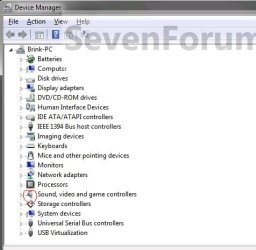
can you capture your device manager? to see your driver is installed well or not.
untitled.JPG
 

My Computer

Computer Manufacturer/Model Number
built up
OS
windows 7
CPU
Phenom II AMD Dragon 3.5Ghz
Memory
DDR3 4GB
Graphics Card(s)
ATI Radeon 512Mb
Monitor(s) Displays
HP L1506
Screen Resolution
1152 x 864
Hard Drives
WDC 1 TB SATA-II Green Power
Keyboard
HP wireless keyboard
Mouse
HP Optic
Internet Speed
1GB
Have you installed any software 9 days ago. Since thats when your audio driver stopped working. The software might be conflicting with the audio driver.
 

My Computer

Computer Manufacturer/Model Number
Self-built on 31/1/11
OS
Windows 7 Ultimate 64 bit
CPU
Intel i5 2400 @ 3.80 GHz
Motherboard
Ashrock P67 Extreme 4
Memory
Mushkin Silverline 996768 4GB
Graphics Card(s)
MSI GTX 460 760MB Cyclone Overclocked
Sound Card
Integrated
Monitor(s) Displays
Asus VH202T 20" Widescreen
Screen Resolution
1600x900
Hard Drives
SSD: OCZ Vertex 2 60GB
HDD: Hitachi Deskstar 7K1000.C 500GB
PSU
Silverstone Strider 500W
Case
Zalman Z9 Plus
Cooling
Cooler Master Hyper 212 Plus
Keyboard
Logitech Wireless Keyboard MK520
Mouse
Logitech M310
Internet Speed
3 Mbps
Other Info
UEFI: Ashrock P67/
Network Card :TP-Link WN350GD/
WEI: 7.4/
ODD: Lite-On IHAS324
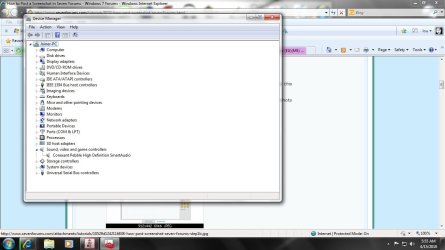
yes, but I installed it afterward. One several other forums, and post they had "recommended" programs and such to fix it. none of them worked however. I'm working on getting that screenshot up.
 

My Computer

Computer Manufacturer/Model Number
Dell Inc./ Inspiron One 19A
OS
Microsoft Windows Home Premium
CPU
Pentium Dual-Core CPU E5300 @ 2.60GHz, 2593MHz
Memory
4.00GB
Sound Card
Conexant Pebble High Definition SmartAudio
Screen Resolution
1366x768
Hard Drives
Drive: C:
Description: Local Fixed Disk
Size:581.48GB
Free space:547.33GB

Volume name: OS
Volume Serial Number: 621C5988

Attachments

  • Scrnshot.jpg
    Scrnshot.jpg
    89.2 KB · Views: 22

My Computer

Computer Manufacturer/Model Number
Dell Inc./ Inspiron One 19A
OS
Microsoft Windows Home Premium
CPU
Pentium Dual-Core CPU E5300 @ 2.60GHz, 2593MHz
Memory
4.00GB
Sound Card
Conexant Pebble High Definition SmartAudio
Screen Resolution
1366x768
Hard Drives
Drive: C:
Description: Local Fixed Disk
Size:581.48GB
Free space:547.33GB

Volume name: OS
Volume Serial Number: 621C5988

My Computer

Computer Manufacturer/Model Number
Self-built on 31/1/11
OS
Windows 7 Ultimate 64 bit
CPU
Intel i5 2400 @ 3.80 GHz
Motherboard
Ashrock P67 Extreme 4
Memory
Mushkin Silverline 996768 4GB
Graphics Card(s)
MSI GTX 460 760MB Cyclone Overclocked
Sound Card
Integrated
Monitor(s) Displays
Asus VH202T 20" Widescreen
Screen Resolution
1600x900
Hard Drives
SSD: OCZ Vertex 2 60GB
HDD: Hitachi Deskstar 7K1000.C 500GB
PSU
Silverstone Strider 500W
Case
Zalman Z9 Plus
Cooling
Cooler Master Hyper 212 Plus
Keyboard
Logitech Wireless Keyboard MK520
Mouse
Logitech M310
Internet Speed
3 Mbps
Other Info
UEFI: Ashrock P67/
Network Card :TP-Link WN350GD/
WEI: 7.4/
ODD: Lite-On IHAS324
Alright I scanned it, nothing came up.....
 

My Computer

Computer Manufacturer/Model Number
Dell Inc./ Inspiron One 19A
OS
Microsoft Windows Home Premium
CPU
Pentium Dual-Core CPU E5300 @ 2.60GHz, 2593MHz
Memory
4.00GB
Sound Card
Conexant Pebble High Definition SmartAudio
Screen Resolution
1366x768
Hard Drives
Drive: C:
Description: Local Fixed Disk
Size:581.48GB
Free space:547.33GB

Volume name: OS
Volume Serial Number: 621C5988
Alright I scanned it, nothing came up.....
Have you updated the driver? I couldn't find the driver on the web so the only other way to update it is by right clicking it in device manager and selecting check for updates.

It could be a virus thats blocking your sound (but i don't think thats the cause). If you have a anti-virus scan your computer.
 

My Computer

Computer Manufacturer/Model Number
Self-built on 31/1/11
OS
Windows 7 Ultimate 64 bit
CPU
Intel i5 2400 @ 3.80 GHz
Motherboard
Ashrock P67 Extreme 4
Memory
Mushkin Silverline 996768 4GB
Graphics Card(s)
MSI GTX 460 760MB Cyclone Overclocked
Sound Card
Integrated
Monitor(s) Displays
Asus VH202T 20" Widescreen
Screen Resolution
1600x900
Hard Drives
SSD: OCZ Vertex 2 60GB
HDD: Hitachi Deskstar 7K1000.C 500GB
PSU
Silverstone Strider 500W
Case
Zalman Z9 Plus
Cooling
Cooler Master Hyper 212 Plus
Keyboard
Logitech Wireless Keyboard MK520
Mouse
Logitech M310
Internet Speed
3 Mbps
Other Info
UEFI: Ashrock P67/
Network Card :TP-Link WN350GD/
WEI: 7.4/
ODD: Lite-On IHAS324
AFAIK, System Restore is reversible (as it is in XP.]

As a temporary diagnosis step, how about doing a System Restore to a time "more than 10 days ago". Check that the sound is still working. If it is, then some recent event has messed up the audio. If not then the problem is something more fundamental. But, whatever the result, undo the System Restore to bring you back to "today".

And what programs have you installed since that date?
 

My Computer

Computer type
PC/Desktop
Computer Manufacturer/Model Number
Scan 3XS P55 liteDAW
OS
Windows Home Premium (64)
CPU
Intel Core i7 860
Motherboard
Gigabyte GA-P55A-UD4
Memory
8GB (4x2GB) Corsair TwinX XMS3
Graphics Card(s)
1GB Gainward 9500 GT
Sound Card
M-Audio Delta 66
Monitor(s) Displays
Acer v223wBBd
Screen Resolution
1680 x 1050
Hard Drives
1 x 500 GB WD Barracuda (OS+Docs)
2 x 1TB Samsung Spinpoint F3 (Data)
PSU
Enermax EMD625AWT II - 625W Enermax Modu82+ II
Case
Fractal Design Define R2 Black
Cooling
Prolima Megahalems Super 6 Heatpipe Tower Cooler
Keyboard
Microsoft Digital Media Pro
Mouse
Belkin Optical Ergo
Internet Speed
8 Mbps nominal (14.9 achieved !)
Other Info
Digital Audio Workstation
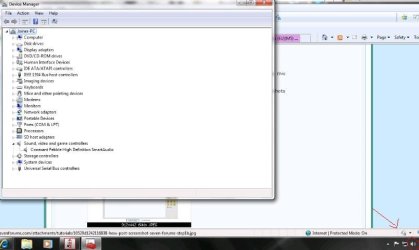
oki i saw you have installed your driver.because that notif to the icon
untitled.JPG

try to /SFC SCANNOW
 

My Computer

Computer Manufacturer/Model Number
built up
OS
windows 7
CPU
Phenom II AMD Dragon 3.5Ghz
Memory
DDR3 4GB
Graphics Card(s)
ATI Radeon 512Mb
Monitor(s) Displays
HP L1506
Screen Resolution
1152 x 864
Hard Drives
WDC 1 TB SATA-II Green Power
Keyboard
HP wireless keyboard
Mouse
HP Optic
Internet Speed
1GB
Back
Top