No audio ouput from PC, using Asus Xonar DGX Soundcard.

sw311

New member
Local time
2:38 PM
Messages
2
Hey guys, hope you can help me here.

There is no audio output from my PC, it's been this way for months, but only now have I decided to deal with it. I have a Asus Xonar DGX sound card, and I am getting no output from both the front case audio output, nor the back.

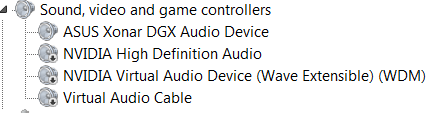
My Device Manager reports no errors.
Pq5VhO4.png


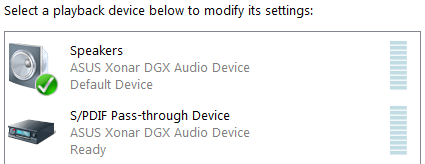
These are my playback devices.
tVTUeSj.png


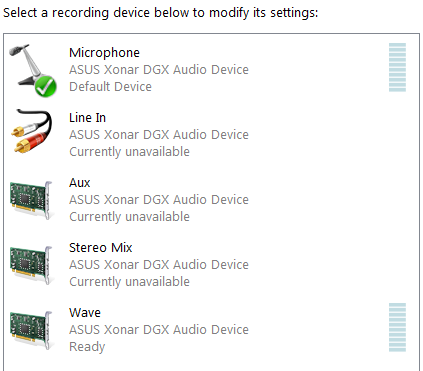
These are my recording devices.
38wyhKq.png


Any troubleshooting ideas?

Thanks a lot guys,
Sam.
 

My Computer My Computer

At a glance

Windows 7 Ultimate x64i7 4770k16GN 1600mHz KingstonAsus GTX 660Ti
Computer type
PC/Desktop
Computer Manufacturer/Model Number
Custom
OS
Windows 7 Ultimate x64
CPU
i7 4770k
Motherboard
Asus Maximus VII Hero
Memory
16GN 1600mHz Kingston
Graphics Card(s)
Asus GTX 660Ti
Hard Drives
1 x 1TB Seagate Barracuda
1 x 1TB 2.5" Seagate
Antivirus
MalwareBytes
Browser
Chrome
First suggestion, "refresh" the ASUS device. In the Device Manager, RIGHT click on the ASUS entry and then LEFT click "Uninstall". DO NOT uninstall the drivers. Restart the PC and when Windows starts it will detect and reinstall the ASUS. This fixes a lot of different problems and may take care of yours.

Related, but probably not your problem, the Stereo Mix should be set as the default Recording Device. As it is now its "Unavailable". The "refresh" may fix that problem too.
 

My Computer My Computer

At a glance

Windows 10 64 bitIntel i7 6700K16GB Corsair DominatorIntel CPU Graphics
Computer type
PC/Desktop
Computer Manufacturer/Model Number
My Own Build
OS
Windows 10 64 bit
CPU
Intel i7 6700K
Motherboard
ASUS ROG Maximus VIII Hero
Memory
16GB Corsair Dominator
Graphics Card(s)
Intel CPU Graphics
Sound Card
RealTek
Monitor(s) Displays
27" Dell S2719dgf
Screen Resolution
2560X1440
Hard Drives
1 TB Samsung 850 EVO SSD for Win 10 Pro
500GB Samsung 850 EVO SSD for Win 10 Insider
2 TB drive for backup
PSU
EVGA Supernova 750G2
Case
BeQuiet Silent Base 600
Cooling
Deepcool Captain 120EX
Keyboard
Microsoft Wireless 2000
Mouse
Microsoft wireless
Internet Speed
100 MB/sec (Cable)
Antivirus
Microsoft Defender and Malwarebytes
Browser
Edge/Firefox
Other Info
Cakewalk (Sonar) by BandLab and Studio One 4.1 Pro recording studio software. MOTU 896Mk3 Hybrid recording interface, Frontier Tranzport wireless control unit, Behringer X-Touch Control Surface.
Five USB connected optical drives for CD Audio production using Nero BurningROM
First suggestion, "refresh" the ASUS device. In the Device Manager, RIGHT click on the ASUS entry and then LEFT click "Uninstall". DO NOT uninstall the drivers. Restart the PC and when Windows starts it will detect and reinstall the ASUS. This fixes a lot of different problems and may take care of yours.

Related, but probably not your problem, the Stereo Mix should be set as the default Recording Device. As it is now its "Unavailable". The "refresh" may fix that problem too.

Thanks for the suggestion, but it hasn't helped. Do you have any other ideas?
 

My Computer My Computer

At a glance

Windows 7 Ultimate x64i7 4770k16GN 1600mHz KingstonAsus GTX 660Ti
Computer type
PC/Desktop
Computer Manufacturer/Model Number
Custom
OS
Windows 7 Ultimate x64
CPU
i7 4770k
Motherboard
Asus Maximus VII Hero
Memory
16GN 1600mHz Kingston
Graphics Card(s)
Asus GTX 660Ti
Hard Drives
1 x 1TB Seagate Barracuda
1 x 1TB 2.5" Seagate
Antivirus
MalwareBytes
Browser
Chrome
Power off the PC and "reseat" (unplug then plug back in) the ASUS sound card.

And the obvious, are the speakers working? and are they correctly connected to the ASUS card? (I have to ask).
 

My Computer My Computer

At a glance

Windows 10 64 bitIntel i7 6700K16GB Corsair DominatorIntel CPU Graphics
Computer type
PC/Desktop
Computer Manufacturer/Model Number
My Own Build
OS
Windows 10 64 bit
CPU
Intel i7 6700K
Motherboard
ASUS ROG Maximus VIII Hero
Memory
16GB Corsair Dominator
Graphics Card(s)
Intel CPU Graphics
Sound Card
RealTek
Monitor(s) Displays
27" Dell S2719dgf
Screen Resolution
2560X1440
Hard Drives
1 TB Samsung 850 EVO SSD for Win 10 Pro
500GB Samsung 850 EVO SSD for Win 10 Insider
2 TB drive for backup
PSU
EVGA Supernova 750G2
Case
BeQuiet Silent Base 600
Cooling
Deepcool Captain 120EX
Keyboard
Microsoft Wireless 2000
Mouse
Microsoft wireless
Internet Speed
100 MB/sec (Cable)
Antivirus
Microsoft Defender and Malwarebytes
Browser
Edge/Firefox
Other Info
Cakewalk (Sonar) by BandLab and Studio One 4.1 Pro recording studio software. MOTU 896Mk3 Hybrid recording interface, Frontier Tranzport wireless control unit, Behringer X-Touch Control Surface.
Five USB connected optical drives for CD Audio production using Nero BurningROM
Hey guys, hope you can help me here.

Hi Sam. I had exactly this problem installing this sound card in a Dell Vostro 260S PC. Tried everything including reseating the soundcard in the slot to no avail. Was just about to give up and try it in another PC but thought I'd give it one more shot in another PCIE slot which finally solve my problem. I've no idea why it works in one slot and not the other.
 

My Computer My Computer

At a glance

Win 7 Pro 64bit
Computer type
PC/Desktop
OS
Win 7 Pro 64bit
Back
Top