No audio!

Minas

New member
Local time
1:46 PM
Messages
2
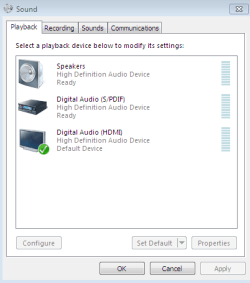
Hello, i recently upgraded to windows 7 ultimate 32 bit on my computer from xp and since then i am having trouble with the audio. In the playback menu it says that it should be working fine and the device manager is stating that the latest version is installed on the driver. I have tried connecting A HDMI cable and a SPDIF cable and still no luck. When i connect my earphones to it, i can clearly hear sounds through the earphones, please help me.
 

Attachments
  • Capture.PNG
    Capture.PNG
    8.7 KB · Views: 2

My Computer

OS
Windows 7 Ultimate 64 bit
You're routing the HDMI cable to what brand/model number?
 

My Computer

Computer type
PC/Desktop
Computer Manufacturer/Model Number
Custom Build
OS
Windows 7 Home Premium 64 bit
CPU
Intel Core i7-4790
Motherboard
GA-Z87X-D3H
Memory
G.SKILL 8GB (2 x 4GB) DDR3 F3-10666CL9D-8GBNT
Graphics Card(s)
AMD Radeon R7 250
Sound Card
Realtek ALC892
Monitor(s) Displays
Samsung UN32EH5000, Dell 1703FPT
Screen Resolution
1920 x 1080, 1280 x 1024
Hard Drives
WD5003AZEX
WD10EZEX
Samsung HD103SJ
Samsung 128 GB 840 PRO
PSU
SeaSonic M12II SS-500GM
Case
Fractal Design Define R4
Cooling
Zalman CNPS9900ALED
Keyboard
Logitech K800
Mouse
Logitech M705
Internet Speed
16 Mbps
Antivirus
Avast
Browser
Firefox
Other Info
Bose Companion 2 Multimedia Speakers
Welcome to Seven Forums.

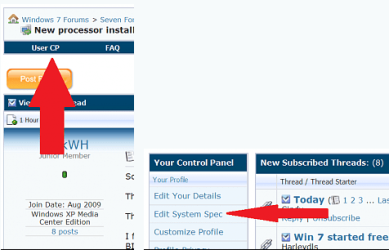
Could we get you to fill in all your system specs? It will help in the long run.


You can use this program to help Speccy - Download
Thanks much appreciated
Fabe
 

Attachments

  • usercp 1.png
    usercp 1.png
    32.5 KB · Views: 0

My Computer

Computer Manufacturer/Model Number
Self Built
OS
Windows 7 ultimate 64 bit / XP Home sp3
CPU
intel Core 2 Duo E8400 3.0ghz
Motherboard
Asus P5ND bios 1401
Memory
8 gigs 1066 OCZ Fata1ty
Graphics Card(s)
EVGA GTX 580 Call of Duty Black Ops Edition
Sound Card
Creative Soundblaster Audigy 2zs
Monitor(s) Displays
Asus 24in LCD's 2MS X2
Screen Resolution
1920x1080p @60Hz
Hard Drives
WD Caviar 500 Black/ WD Caviar 200 Blue
PSU
OCZ 700W GameXtreme
Case
NZXT Apollo
Cooling
Corsair H50 CPU/120mm x3 /60mm x2 /Corsair Dominator Ram
Keyboard
Logitech Bluetooth Wireless MX5000
Mouse
Logitech Bluetooth Wireless MX1000
Internet Speed
Download 19.83 Upload 0.97
Other Info
Logitech Z2300 Speakers/ Bose Noise Cancelling Headphones/Avermedia PCI-e Hybrid TV Bravo/Epson NX415 all in one/ 4 Port Powered USB Hub/ LG 10x Bluray Burner /TSST Corp DVDRW External
Hello, i recently upgraded to windows 7 ultimate 32 bit on my computer from xp and since then i am having trouble with the audio. In the playback menu it says that it should be working fine and the device manager is stating that the latest version is installed on the driver. I have tried connecting A HDMI cable and a SPDIF cable and still no luck. When i connect my earphones to it, i can clearly hear sounds through the earphones, please help me.

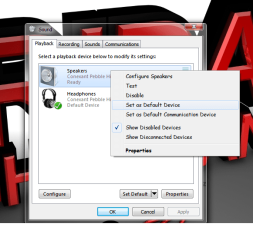
Hey Buddy, Try Setting The Default Device To Your Speakers... Its Set To The HDMI... Is That What Are You Are Trying? Or Are You Trying To Get It Through Your Speakers Connected To The Computer?

Try This..
Right Click And Try Setting Default Device
|
|
|
V
 

Attachments

  • Untitled.png
    Untitled.png
    38.6 KB · Views: 3

My Computer

Computer Manufacturer/Model Number
Compaq Presario CQ60
OS
Windows 7 Home Premium 64 bit SP1
CPU
[01]: Intel64 GenuineIntel 2.20 GHz
Motherboard
Hewlett-Packard 3612 (CPU)
Memory
2.0GB Dual-Channel DDR2 @ 332MHz (5-5-5-14)
Graphics Card(s)
Mobile Intel(R) GMA 4500M (797MB Memory)(64 Dedicated)
Sound Card
Conexant Pebble High Definition SmartAudio
Screen Resolution
1366x768 HD Intel 4 Series Express
Hard Drives
245GB High Speed TOSHIBA Disk Drive ATA Device (SATA) (Primary)
Cooling
Stock, w/ High Quality Cooling Pad.
Mouse
Synaptics Touchpad V 7.0
Internet Speed
Around 10 to 20 MB Per Sec. Comcast Internet.
Hello, i recently upgraded to windows 7 ultimate 32 bit on my computer from xp and since then i am having trouble with the audio. In the playback menu it says that it should be working fine and the device manager is stating that the latest version is installed on the driver. I have tried connecting A HDMI cable and a SPDIF cable and still no luck. When i connect my earphones to it, i can clearly hear sounds through the earphones, please help me.

Hey Buddy, Try Setting The Default Device To Your Speakers... Its Set To The HDMI... Is That What Are You Are Trying? Or Are You Trying To Get It Through Your Speakers Connected To The Computer?

Try This..
Right Click And Try Setting Default Device
|
|
|
V
i tried that in many different combinations already, actually i just tested out another pair of speakers i have and it worked perfectly fine, its just this home theater system i have is not working. It used to work on XP, no longer the case for 7. i will continue to try to fix it.
 

My Computer

OS
Windows 7 Ultimate 64 bit
Could You Try To Reinstall The Audio Driver?

Go To The Device Manager, And Uninstall The Software.. NOT The sound card. When Windows Starts it Will Say "Hey, I Need To Install This Audio Device" It Will Install Your Audio Driver Again
 

My Computer

Computer Manufacturer/Model Number
Compaq Presario CQ60
OS
Windows 7 Home Premium 64 bit SP1
CPU
[01]: Intel64 GenuineIntel 2.20 GHz
Motherboard
Hewlett-Packard 3612 (CPU)
Memory
2.0GB Dual-Channel DDR2 @ 332MHz (5-5-5-14)
Graphics Card(s)
Mobile Intel(R) GMA 4500M (797MB Memory)(64 Dedicated)
Sound Card
Conexant Pebble High Definition SmartAudio
Screen Resolution
1366x768 HD Intel 4 Series Express
Hard Drives
245GB High Speed TOSHIBA Disk Drive ATA Device (SATA) (Primary)
Cooling
Stock, w/ High Quality Cooling Pad.
Mouse
Synaptics Touchpad V 7.0
Internet Speed
Around 10 to 20 MB Per Sec. Comcast Internet.
Back
Top