No audio

psih

New member
Local time
1:47 PM
Messages
6
First of all hi 2 all and sorry if i created post with similar problem here.
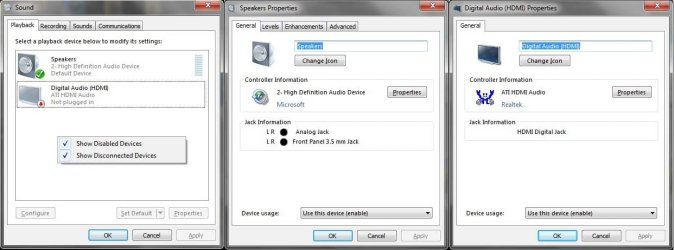
I've got notebook Sony Vaio VPCEE23FX with Win7 Home Premium x64. Graphics card is Radeon 4200, sound is seems to be Realtek.
Once all sounds in system are just disappeared. I think the reason is in automatic update, but not sure. Tried to download drivers form official site, then from other sites, installed some new codecs, there is still no audio. Can't make system restore, no up-to date. Please help anybody, my note works without any sound at all, getting sick of it. :cry:
 

Attachments

  • 01.jpg
    01.jpg
    82.8 KB · Views: 23
  • 02.jpg
    02.jpg
    47.5 KB · Views: 22

My Computer

OS
Windows 7 Home Premium x64
Hello psih, welcome to the forums.

Could you upload screenshots of Speaker Properties (levels and advanced Tabs)?

Maybe your problem is a misconfiguration, because those screenshots look fine :)
 

My Computer

Computer type
PC/Desktop
OS
Windows
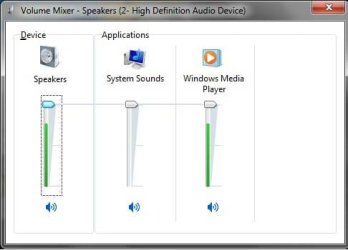
Punkster, here made a screenshot while WMP is playing a music.
 

Attachments

  • 03.jpg
    03.jpg
    30.7 KB · Views: 5

My Computer

OS
Windows 7 Home Premium x64
Hehe you got me wrong, the 1st attachment in your 1st post, the middle one, Speaker Properties, i need the Levels and Advanced tabs, please. These ones

Sorry about the spanish language, it's what i got :p
 

My Computer

Computer type
PC/Desktop
OS
Windows
here)
 

Attachments

  • 05.jpg
    05.jpg
    68 KB · Views: 20

My Computer

OS
Windows 7 Home Premium x64
Hmm! nothing seems to be misconfigurated :huh: do you have the latest realtek drivers?

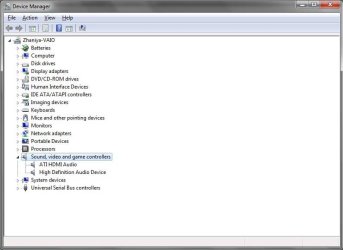
Try this, Go to device manager, right click the Realtek HD Audio and click Uninstall Device, reboot your PC and let windows choose the drivers... if that doesnt work, i'd say go for the latest drivers.

Realtek

Choose the one that fits your specs, download and try.
 

My Computer

Computer type
PC/Desktop
OS
Windows
Punkster, i've already downloaded latest drivers from there. Someone told me that audio driver concerns with video, so also downloaded latest ATi CCC. Still don't have sound. Any ideas?
 

My Computer

OS
Windows 7 Home Premium x64
It could be a problem with the video but you don't have any HDMI device connected as you can see in the screenshot, so the video card here is not a factor :huh:

Have you tried disabling all the unneeded devices from the Realtek Manager?
 

My Computer

Computer type
PC/Desktop
OS
Windows
Punkster, where is the Realtek Manager? I've deleted everything that contains audio in safe mode. Maybe reinstall windows? Have you got some distr of windows 7? by the way what's the difference between x32 and x64?
I'm afraid thay i'll have to install winXP...(
 

My Computer

OS
Windows 7 Home Premium x64
Punkster, reinstalled Windows 7... all hardware are working properly. There is no problem in device manager. Still got no sound.
 

My Computer

OS
Windows 7 Home Premium x64
Question, did you install the chipset drivers when you did the os, there is an order for this, os, chipset, video, then sound drivers. Next make sure your not running on digital output probably need anolog
 

My Computer

Computer Manufacturer/Model Number
Dell XPS 730
OS
Windows 7 Home Premium 64 bit
CPU
Intel Core 2 quad Extreme Q9770 @ 3.2 GHz
Memory
4x2 GB Muskin 1600 MHz ram
Graphics Card(s)
NVidia GTX 250
Sound Card
Soundblaster X-Fi Fatality Champion
Monitor(s) Displays
2 Dell 2007WFP Ultrascans
Screen Resolution
3360 x 1050
Hard Drives
WD Black 1TB sata, 2-WD Black 500 sata, 2-Seagate 500 Go external
PSU
1000 Watt
Cooling
air
Keyboard
MS Natrual Keyboard Pro
Mouse
Logitech Wireless Trackball
Internet Speed
DSL Elite
Granted you installed the Realtek driver, have you checked the laptop itself.....buttons, sliders, jacks, to see if there is something that may be muting the sound.
 

My Computer

Computer type
PC/Desktop
Computer Manufacturer/Model Number
Custom Build
OS
Windows 7 Home Premium 64 bit
CPU
Intel Core i7-4790
Motherboard
GA-Z87X-D3H
Memory
G.SKILL 8GB (2 x 4GB) DDR3 F3-10666CL9D-8GBNT
Graphics Card(s)
AMD Radeon R7 250
Sound Card
Realtek ALC892
Monitor(s) Displays
Samsung UN32EH5000, Dell 1703FPT
Screen Resolution
1920 x 1080, 1280 x 1024
Hard Drives
WD5003AZEX
WD10EZEX
Samsung HD103SJ
Samsung 128 GB 840 PRO
PSU
SeaSonic M12II SS-500GM
Case
Fractal Design Define R4
Cooling
Zalman CNPS9900ALED
Keyboard
Logitech K800
Mouse
Logitech M705
Internet Speed
16 Mbps
Antivirus
Avast
Browser
Firefox
Other Info
Bose Companion 2 Multimedia Speakers
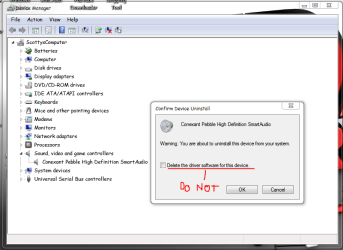
Did You Ever Think About Reinstalling The Whole Driver? Uninstall And Reinstall From Device Manager? After You Restart The Computer Should Recognize The Difference With No Audio.. So The Drivers Will Install The Software Onto Your Computer After You Restart Your System.. Thats What I Did Give It A Try.. Do Not Uninstall The Driver Itself... Uninstall The Software.
Capture.PNG
This Worked For My Machine. It Should For Yours.. Then Restart.
 

My Computer

Computer Manufacturer/Model Number
Compaq Presario CQ60
OS
Windows 7 Home Premium 64 bit SP1
CPU
[01]: Intel64 GenuineIntel 2.20 GHz
Motherboard
Hewlett-Packard 3612 (CPU)
Memory
2.0GB Dual-Channel DDR2 @ 332MHz (5-5-5-14)
Graphics Card(s)
Mobile Intel(R) GMA 4500M (797MB Memory)(64 Dedicated)
Sound Card
Conexant Pebble High Definition SmartAudio
Screen Resolution
1366x768 HD Intel 4 Series Express
Hard Drives
245GB High Speed TOSHIBA Disk Drive ATA Device (SATA) (Primary)
Cooling
Stock, w/ High Quality Cooling Pad.
Mouse
Synaptics Touchpad V 7.0
Internet Speed
Around 10 to 20 MB Per Sec. Comcast Internet.
I have the exact same problem. I just installed today windows 7 and when it started I didn't have sound. Driver seems installed but I hear nothing, and I downloaded the latest realtek update but still nothing. and when I look at the volume mixer when I play something I get bars up and down but I hear nothing.
I don't want to go back to XP there has to be a solution any help will do.
 

My Computer

OS
Windows 7
CPU
5300 Dual Core
Memory
4 gb
Graphics Card(s)
Geforce 9400GT 1024 mb
Back
Top