
kufungster
New member
- Local time
- 9:59 AM
- Messages
- 4
Let me first state, yes, I have read the other threads related to this issue - nothing seems to be working for me. Trying to get the install wizard for a USB prepaid internet drive (aka dongle) to appear. Operating Home premium 64bit.
Shell Hardware Detection set to start & automatic - confirmed
Control Panel -> Autoplay -> "Use autoplay for all media and devices" ticked - confirmed
Refer to 3rd page, 2nd post of user easyIsle of this thread: http://www.sevenforums.com/general-discussion/27326-no-autorun-3.html.
I have NO subfolders within "policies" for hkey_current_user, let alone an "explorer" subfolder.
I DO have an "explorer" subfolder within "policies" for hkey_local_machine, however no key for "NoDriveTypeAutoRun" exists within this folder. I have tried creating a new DWORD within this folder with name "NoDriveTypeAutoRun", and have given this a decimal value of 0 and also 145, neither of which has worked.
I have found microsoft fix it 50475 from here: How to disable the Autorun functionality in Windows, however, when I try to install this I am presented with this error:
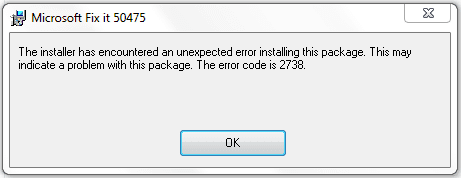
I from here have tried to install fix it 50181 as per the directions in this article: Error Code 2738 When Running A Microsoft Fix it Solution! - Microsoft Fix it BLOG - Site Home - TechNet Blogs, though this successfully installed it did nothing to address the 2738 error that shows up when trying to install fix it 50475.
On a curious note, an icon for the USB drive appears in Devices & Printers, but no icon appears for it in My Computer. The drive is definitely functioning normally, have tested in other computer.
Shell Hardware Detection set to start & automatic - confirmed
Control Panel -> Autoplay -> "Use autoplay for all media and devices" ticked - confirmed
Refer to 3rd page, 2nd post of user easyIsle of this thread: http://www.sevenforums.com/general-discussion/27326-no-autorun-3.html.
I have NO subfolders within "policies" for hkey_current_user, let alone an "explorer" subfolder.
I DO have an "explorer" subfolder within "policies" for hkey_local_machine, however no key for "NoDriveTypeAutoRun" exists within this folder. I have tried creating a new DWORD within this folder with name "NoDriveTypeAutoRun", and have given this a decimal value of 0 and also 145, neither of which has worked.
I have found microsoft fix it 50475 from here: How to disable the Autorun functionality in Windows, however, when I try to install this I am presented with this error:
I from here have tried to install fix it 50181 as per the directions in this article: Error Code 2738 When Running A Microsoft Fix it Solution! - Microsoft Fix it BLOG - Site Home - TechNet Blogs, though this successfully installed it did nothing to address the 2738 error that shows up when trying to install fix it 50475.
On a curious note, an icon for the USB drive appears in Devices & Printers, but no icon appears for it in My Computer. The drive is definitely functioning normally, have tested in other computer.
Last edited:
My Computer
- OS
- windows 7 home premium 64bit
