- Local time
- 12:04 AM
- Messages
- 95
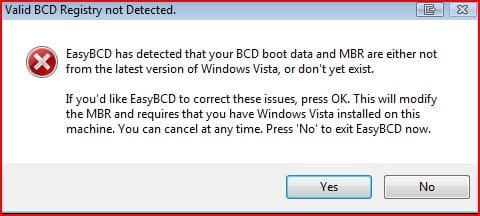
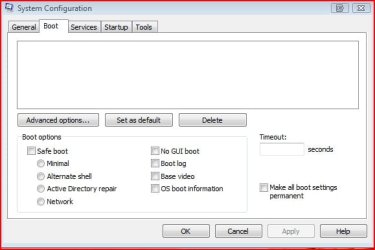
I am dual booting Win7 64 and Vista and using EASYBCD in each operating system. I am able to Boot into either program with no problems. However When I start EasyBCD in Vista I get the Vista1 and Vista2 screenshots. The Vista3 is what My msconfig tab in the Vista operating system looks like.
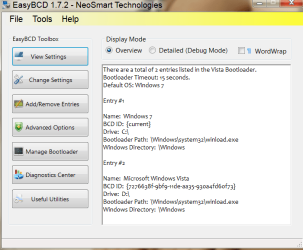
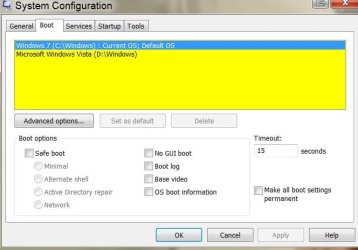
When In Win7 operating system and use EasyBCD I get the Win7 1 screenshot. My msconfig boot tab in Win7 looks like Win7 2. Let me add that I'm using a product called RollbackRx (ONLY) on the Win 7 operating system, both systems are on seperate harddrives. What do I have to do to get the boot files to be seen in the Vista msconfig boot tab, and the EasyBCD view settings window?
PS....The attachments didn't come out in a 1,2,3,4 order like I tried to make them do.
When In Win7 operating system and use EasyBCD I get the Win7 1 screenshot. My msconfig boot tab in Win7 looks like Win7 2. Let me add that I'm using a product called RollbackRx (ONLY) on the Win 7 operating system, both systems are on seperate harddrives. What do I have to do to get the boot files to be seen in the Vista msconfig boot tab, and the EasyBCD view settings window?
PS....The attachments didn't come out in a 1,2,3,4 order like I tried to make them do.
Attachments

My Computer
- Computer Manufacturer/Model Number
- White Box
- OS
- Dual Booting Windows Vista32 bit And Windows 7 Home premium (x64) (build 7600)
- CPU
- ntel(R) Core(TM)2 Quad CPU Q6700 @ 2.66GHz (4 CPUs),
- Motherboard
- Board: ASUSTeK Computer INC. P5B-Premium Rev 1.xx Bus Clock:
- Memory
- 3072MB RAM Available OS Memory: 2816MB RAM
- Graphics Card(s)
- MSI RX1600Pro (MS-V040);VisionTek RADEON X1300 PCI SFF
- Sound Card
- SoundMAX Integrated Digital HD Audio
- Monitor(s) Displays
- Envision SP2107W [Monitor] (22.0"vis, s/n B7976JA007061, Jun
- Screen Resolution
- 1680x1050
- Hard Drives
- PLEXTOR DVDR PX-712A ATA Device [CD-ROM drive]
3.5" format removeable media [Floppy drive]
INTEL SSDSA2MH080G1GC [Hard drive] (80.03 GB) -- drive 2, s/n CVEM926000FK080DGN, rev 045C8820, SMART Status: Healthy
IOMEGA ZIP 100 SCSI Disk Device -- d
- PSU
- Have 2 PSU's Installed
- Case
- Coolmaster
- Keyboard
- Microsoft Internet Keyboard Pro Hot Keys
- Mouse
- Logitec MX500
- Internet Speed
- DSL
- Other Info
- Rollback Rx system repair software by Horizon Data Systems
Texas Instruments 1394 OHCI Compliant Host Controller
Acronis True Image Backup Archive Explorer
HID-compliant device
Microsoft PS/2 Mouse
General Purpose USB Hub
Microsoft Internet Keyboard Pro Composite Device
USB Mass Storage Device
USB Root Hub (7x)
B:\