Solved No Bootable device error, MBR messed or missing or a hibernation issue

renderman34

New member
Local time
6:38 AM
Messages
3
This is my first Post here, I need some help! I have a Dell M90 with win7 64bit…installed two + years ago…SP1 and current updates as of a 2 months ago.

I have backed up my data consistently, typically once a week to an external drive + BU images, so no worries their but I am unable to restore the back up images, or use restore points. They both fail.

The computer has worked great until the other day…when I turned on and at boot after a long POST I get the Black Screen…with blinking cursor in upper left for about one or two min then the message with beep:

“No bootable devices—Strike F1 to retry boot, F2 for setup utility
Press F5 to run onboard diagnostics.”

FI returns the same message as above
F2 opens BIOS set up
F5 does nothing

I see that there is no hard drive detected by the BIOS.

This is where it gets fishy though.

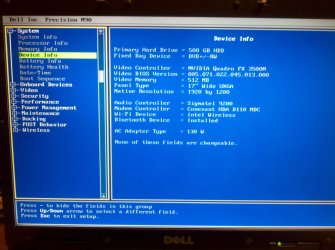
I found that, through trial and error, if I scroll down in BIOS to “POST behavior” and enable or disable virtualization (doesn’t matter which) save and exit BIOS the machine boots “normally” but very slowly…hangs on Dell POST screen for about three minutes then runs "fine".

So for some reason switching on virtualization in BIOS causes to recognizes the hard drive all of the sudden…

I can "restart" the computer and it restarts. But if I shut down and restart I get the "No bootable device" error agian and have to go through same, (enable or disable virtualization in BIOS)

I can also F8 and boot into safe mode from POST.

I have reseated the drive, and I have two other older drives, from same Dell M90 that boot fine with Win XP Pro.

I have tried to restore using system restore point’s options and or with restoring images…but they have failed.

I would like to FIX to boot normally, instead of going into BIOS and switching off or on the POST behavior if possible and want to avoid rebuilding the system (clean install) as I have some software that I no longer have the discs for to restore.

When I boot from Win 7 DVD or repair disc the hard drive is not recognized, maybe I’m missing a step,
Fixmbr, fixboot, scanos, rebuildbcd ect. dont work as recommended elsewhere in this fourm.

I have combed the forum for MBR knowledge base articles and windows support didn’t help other than to say disable some updates from back in March but that didn’t help or work…

It seems like this is a Master Boot Record (MBR) issue but I havnt been able to resolve? Or could this be a hibernation sleep problem?
Is there a way to “FIX”?

See attached image-walk through

Thanks in advance for any help or advise or help that may come my way.
 

Attachments

Last edited:

My Computer

Computer type
Laptop
Computer Manufacturer/Model Number
Dell Precision M90
OS
Windows 7 Professional x64
CPU
Intel(R) Core(TM)2 CPU T7200 @ 2.00GHz (dual core)
Motherboard
Dell Precision M90
Memory
4096MB (3326MB useable)
Graphics Card(s)
NVIDIA Quadro FX 3500M
Hard Drives
Seagate Momentus XT ST95005620AS 500GB 7200 RPM 32MB Cache SATA 3.0Gb/s with NCQ 2.5" Solid State Hybrid Drive
Antivirus
AVG internet Secyrity 2013
Browser
Firefox 22.0, IE 10.0.7
Run Dell Diagnostics to test the hardware: Dell Diagnostics Utility - How to Run the

Confirm the Active partition and then run a few Startup Repairs with reboots to check over the boot files.

Compare your install to the perfect install in Clean Reinstall - Factory OEM Windows 7 and if it varies much or you think could benefit by the Best Practices compiled from helping with thousands of installs here, I would follow those steps to get a perfect install.

Since Recovery partition will not run after reinstall, i would delete it and all other partitions during Clean Install Windows 7 Steps 7 and 8, except the Dell OEM Tools partition if diagnostics will in fact boot and run. Not having done this when you installed before might be causing you problems.

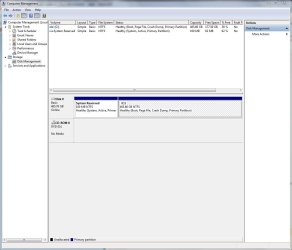
If you'd prefer to try to repair this install then in addition to the first suggestions given post back a screenshot of Disk Management - Post a Screen Capture Image
 
This is my first Post here, I need some help! I have a Dell M90 with win7 64bit…installed two + years ago…SP1 and current updates as of a 2 months ago.

I have backed up my data consistently, typically once a week to an external drive + BU images, so no worries their but I am unable to restore the back up images, or use restore points. They both fail.

The computer has worked great until the other day…when I turned on and at boot after a long POST I get the Black Screen…with blinking cursor in upper left for about one or two min then the message with beep:

“No bootable devices—Strike F1 to retry boot, F2 for setup utility
Press F5 to run onboard diagnostics.”

FI returns the same message as above
F2 opens BIOS set up
F5 does nothing

I see that there is no hard drive detected by the BIOS.

This is where it gets fishy though.

I found that, through trial and error, if I scroll down in BIOS to “POST behavior” and enable or disable virtualization (doesn’t matter which) save and exit BIOS the machine boots “normally” but very slowly…hangs on Dell POST screen for about three minutes then runs "fine".

So for some reason switching on virtualization in BIOS causes to recognizes the hard drive all of the sudden…

I can "restart" the computer and it restarts. But if I shut down and restart I get the "No bootable device" error agian and have to go through same, (enable or disable virtualization in BIOS)

I can also F8 and boot into safe mode from POST.

I have reseated the drive, and I have two other older drives, from same Dell M90 that boot fine with Win XP Pro.

I have tried to restore using system restore point’s options and or with restoring images…but they have failed.

I would like to FIX to boot normally, instead of going into BIOS and switching off or on the POST behavior if possible and want to avoid rebuilding the system (clean install) as I have some software that I no longer have the discs for to restore.

When I boot from Win 7 DVD or repair disc the hard drive is not recognized, maybe I’m missing a step,
Fixmbr, fixboot, scanos, rebuildbcd ect. dont work as recommended elsewhere in this fourm.

I have combed the forum for MBR knowledge base articles and windows support didn’t help other than to say disable some updates from back in March but that didn’t help or work…

It seems like this is a Master Boot Record (MBR) issue but I havnt been able to resolve? Or could this be a hibernation sleep problem?
Is there a way to “FIX”?

See attached image-walk through

Thanks in advance for any help or advise or help that may come my way.

Hi renderman34,

Welcome to Seven forums.

From your description it seems to be the harddrive failure on the system. You should try running the diagnostics from the disk provided with the system. Please check the link below:

http://dell.to/164mwx3

Using Windows 7 disk boot to the command prompt and then perform clean disk:

http://www.sevenforums.com/tutorials/52129-disk-clean-clean-all-diskpart-command.html

And then perform a clean installation and let us know what happens:

http://www.sevenforums.com/tutorials/1649-clean-install-windows-7-a.html

Keep us posted with the results so we can advise you further.
 

My Computer

Computer type
PC/Desktop
OS
Winndows 7 32 bit
Thanks for the advice,

I am running the Dell diagnostics utilities now, at first I was unable to get the diagnostics to boot and run.
then I ran from a boot-able USB.

I would like to try to repair this install instead of doing a clean install because as I mentioned have some mission critical programs, a CNC controller interface, that I no longer have access to the install discs.

This computer, Dell Precision M90, is long in the tooth, purchased in Oct 2006, but I need to keep it running a least for the next 2-3 more months when then I will be purchasing a new CNC machine, and new workstation.

I have attached the screen shot of the disc management window for reference as requested.
 

Attachments

  • Disk Managment Capture.JPG
    Disk Managment Capture.JPG
    131 KB · Views: 4

My Computer

Computer type
Laptop
Computer Manufacturer/Model Number
Dell Precision M90
OS
Windows 7 Professional x64
CPU
Intel(R) Core(TM)2 CPU T7200 @ 2.00GHz (dual core)
Motherboard
Dell Precision M90
Memory
4096MB (3326MB useable)
Graphics Card(s)
NVIDIA Quadro FX 3500M
Hard Drives
Seagate Momentus XT ST95005620AS 500GB 7200 RPM 32MB Cache SATA 3.0Gb/s with NCQ 2.5" Solid State Hybrid Drive
Antivirus
AVG internet Secyrity 2013
Browser
Firefox 22.0, IE 10.0.7
Last edited:
Thanks for the advice,

I am running the Dell diagnostics utilities now, at first I was unable to get the diagnostics to boot and run.
then I ran from a boot-able USB.

I would like to try to repair this install instead of doing a clean install because as I mentioned have some mission critical programs, a CNC controller interface, that I no longer have access to the install discs.

This computer, Dell Precision M90, is long in the tooth, purchased in Oct 2006, but I need to keep it running a least for the next 2-3 more months when then I will be purchasing a new CNC machine, and new workstation.

I have attached the screen shot of the disc management window for reference as requested.

Hi renderman34,

Thanks for your reply. I understand that you have started performing the diagnostics. Please let me know the results of the diagnostics so we can advise you further.

Also, I understand that you do not wish to re-install windows as you have some critical data on system. I believe it would be better you make a backup of the data by booting from a different harddrive.

Also, as you mention other harddrive boot fine and this once causes the issue then it seems could be harddrive failure and your last resort would be do a clean re-installation of windows.

You can also request the backup discs for your system at the link below:

http://dell.to/Zj7oHA

Keep us posted with the results so we can advise you further.
 

My Computer

Computer type
PC/Desktop
OS
Winndows 7 32 bit
Solved

OK, I'm back.

Thanks for the advise that has been presented.

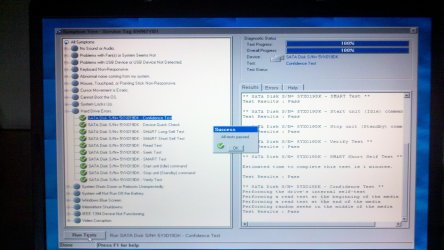
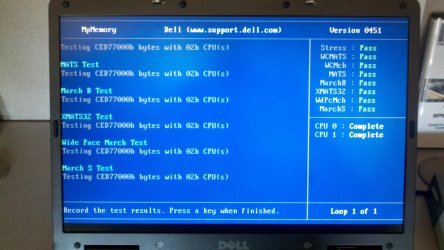
I ran Dell Diagnostics and it came up with no errors and passed all tests, see attached.
I ran the test several times and it passed all tests each time that I ran them.

I did requested the systems disc from Dell, though the system originally had XP on it.

I then went back and tried the advise from this post again...

no boot sector on internal hard drive - Microsoft Community

I shut down and tried boot with the Windows disk again, and from the Command Prompt again ran

bootrec /fixmbr,
bootrec /fixboot!
and ran StartUp Repair THREE times in succession.

per instructions from "no boot sector on internal hard drive" Post and elsewhere. This time it worked!

Then from another post that I remembered seeing, I think it was on Dell Support. I will try to find it again for this thread. I switched in bios POST BEHAVIOR > FAST BOOT setting for start up from MINIMAL to THROUGH...

Then restarted and now the system recognizes the hard drive in BIOS again and boots Win 7 again with out have to change other BIOS setting... like before.

I shut down (not restart) and still works. Things seem ok now.

I ran Virus scan again, and came clean. Then ran Windows defender and it cam clean

I then restarted with a CHKDSK and got no errors.

Then re-ran Dell diagnostics again and got no errors.

I also created a new restore point.

Right now I'm running a new back-up / Image.

I rebooted and set BIOS-- FAST BOOT back to the default BIOS HDD setting to "MINIMAL" and now system runs through POST and starts much quicker 25-30 seconds instead of 120+seconds.

Next I will clone the Segate Drive to a new one that I ordered yesterday, it should be here Monday.

I will use this current "questionable" HDD as a secondary BU if cloning goes OK.

So it looks like I had MBR issue, I guess?

I will mark as solved.

Thanks again!
 

Attachments

  • 2013-08-21 08.14.28.jpg
    2013-08-21 08.14.28.jpg
    552.5 KB · Views: 1
  • 2013-08-20 14.03.05.jpg
    2013-08-20 14.03.05.jpg
    619.9 KB · Views: 2
  • 2013-08-23_20-49-16_715.jpg
    2013-08-23_20-49-16_715.jpg
    510.3 KB · Views: 0
  • 2013-08-23 22.35.44.jpg
    2013-08-23 22.35.44.jpg
    469.6 KB · Views: 1
Last edited:

My Computer

Computer type
Laptop
Computer Manufacturer/Model Number
Dell Precision M90
OS
Windows 7 Professional x64
CPU
Intel(R) Core(TM)2 CPU T7200 @ 2.00GHz (dual core)
Motherboard
Dell Precision M90
Memory
4096MB (3326MB useable)
Graphics Card(s)
NVIDIA Quadro FX 3500M
Hard Drives
Seagate Momentus XT ST95005620AS 500GB 7200 RPM 32MB Cache SATA 3.0Gb/s with NCQ 2.5" Solid State Hybrid Drive
Antivirus
AVG internet Secyrity 2013
Browser
Firefox 22.0, IE 10.0.7
OK, I'm back.

Thanks for the advise that has been presented.

I ran Dell Diagnostics and it came up with no errors and passed all tests, see attached.
I ran the test several times and it passed all tests each time that I ran them.

I did requested the systems disc from Dell, though the system originally had XP on it.

I then went back and tried the advise from this post again...

no boot sector on internal hard drive - Microsoft Community

I shut down and tried boot with the Windows disk again, and from the Command Prompt again ran

bootrec /fixmbr,
bootrec /fixboot!
and ran StartUp Repair THREE times in succession.

per instructions from "no boot sector on internal hard drive" Post and elsewhere. This time it worked!

Then from another post that I remembered seeing, I think it was on Dell Support. I will try to find it again for this thread. I switched in bios POST BEHAVIOR > FAST BOOT setting for start up from MINIMAL to THROUGH...

Then restarted and now the system recognizes the hard drive in BIOS again and boots Win 7 again with out have to change other BIOS setting... like before.

I shut down (not restart) and still works. Things seem ok now.

I ran Virus scan again, and came clean. Then ran Windows defender and it cam clean

I then restarted with a CHKDSK and got no errors.

Then re-ran Dell diagnostics again and got no errors.

I also created a new restore point.

Right now I'm running a new back-up / Image.

I rebooted and set BIOS-- FAST BOOT back to the default BIOS HDD setting to "MINIMAL" and now system runs through POST and starts much quicker 25-30 seconds instead of 120+seconds.

Next I will clone the Segate Drive to a new one that I ordered yesterday, it should be here Monday.

I will use this current "questionable" HDD as a secondary BU if cloning goes OK.

So it looks like I had MBR issue, I guess?

I will mark as solved.

Thanks again!

Hi renderman34,

Its great to hear that the issue has been resolved to your satisfaction. We truly appreciate the time taken by you to share the resolution as I am sure it would help other users as well.

It could be MBR corruption issue. However, we would still advise to make a backup of the data so that you don't lose important data when this harddrive fails.

If you have any further queries, please feel free to contact us.
 

My Computer

Computer type
PC/Desktop
OS
Winndows 7 32 bit
Back
Top