Solved No bootmanager after install

alfay13

New member
Local time
2:44 PM
Messages
6
So I did a clean install of Win 7 Pro x64 on a new SSD(Q:) that I was replacing the HDD(C:) with. The HDD was still installed when I installed on the SDD. Now I can't remove the HDD or the system will not boot. I get dual boot options when it is installed, but without I cannot run the SSD(Q:) as a standalone install. How can I remedy this? I know booting from the DVD and repairing, but I tried that twice and there was no change.

Any insight would be greatly appreciated!
 

My Computer

Computer type
PC/Desktop
Computer Manufacturer/Model Number
Custom Build
OS
Windows 7 Pro x64
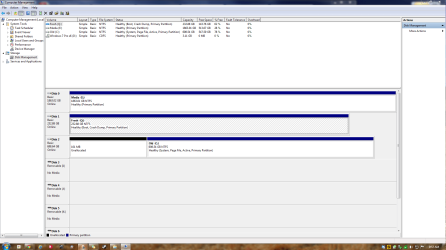
While booted from SSD: Post screenshot of disk management with all fields visible.
You don't want it dual boot... but single boot I assume(?)
 

My Computer

Computer type
Laptop
Computer Manufacturer/Model Number
ACER ASPIRE 5742G
OS
Microsoft Windows 7 Home Premium 64-bits 7601 Multiprocessor Free Service Pack 1
CPU
Intel(R) Core(TM) i3 CPU M 370 @ 2.40GHz
Motherboard
Acer Aspire 5742G
Memory
4,00 GB
Graphics Card(s)
ATI Mobility Radeon HD 5400 Series
Sound Card
(1) AMD High Definition Audio Device (2) Realtek High Defi
Screen Resolution
1366 x 768 x 32 bits (4294967296 colors) @ 60 Hz
Hard Drives
WDC WD5000BEVT-22ZAT0
While booted from SSD: Post screenshot of disk management with all fields visible.
You don't want it dual boot... but single boot I assume(?)

That's correct. I want to remove the old HDD and completely format it for another build leaving the SSD and my HDD I use for media.

Here's my disk management info.

arj2.jpg
 

My Computer

Computer type
PC/Desktop
Computer Manufacturer/Model Number
Custom Build
OS
Windows 7 Pro x64
I miss disk0 and disk1 in screenshot! Post that as well
An be sure you did boot to SSD!
 

My Computer

Computer type
Laptop
Computer Manufacturer/Model Number
ACER ASPIRE 5742G
OS
Microsoft Windows 7 Home Premium 64-bits 7601 Multiprocessor Free Service Pack 1
CPU
Intel(R) Core(TM) i3 CPU M 370 @ 2.40GHz
Motherboard
Acer Aspire 5742G
Memory
4,00 GB
Graphics Card(s)
ATI Mobility Radeon HD 5400 Series
Sound Card
(1) AMD High Definition Audio Device (2) Realtek High Defi
Screen Resolution
1366 x 768 x 32 bits (4294967296 colors) @ 60 Hz
Hard Drives
WDC WD5000BEVT-22ZAT0
Derp...thanks for your help! I am currently booted into the Win 7 Pro on the SSD.

c0y9.jpg
 

My Computer

Computer type
PC/Desktop
Computer Manufacturer/Model Number
Custom Build
OS
Windows 7 Pro x64
Can you make the snips in .png and uplaod them with the paperclip to the forum. Then they are more readable.

Since you did not disconnect the HDD during the SSD installation, your SSD bootmgr probably landed on the HDD. You can copy it to the SSD OS partition with this - but make sure you get the right partition on the SSD.

http://www.sevenforums.com/tutorials/209885-bootmgr-move-c-easybcd.html
 

My Computer

Computer Manufacturer/Model Number
HP, Dell, Gateway, Toshiba - 4 laptops and 2 desktops
OS
Vista, Windows7, Mint Mate, Zorin, Windows 8
CPU
from 1.6GHz Duo to i7
Monitor(s) Displays
2x HP w2207
Hard Drives
5x HDD, 7x SSD, 12x Externals
Keyboard
with trackball - no mices
Mouse
Trackball mice
Internet Speed
DSL 6000
Not only were the other HD's not unplugged, you ran the Win7 installer from the OS which means the C letter was blocked so it could not be used for the new install. Win7 normally always boots as C if it is correctly installed from boot.

So what I would do is unplug all other HD's and do a Clean Install Windows 7 to the SSD.

If you don't mind having Win7 on the SSD on Q, then move the Paging File to Q: Change Virtual Memory Paging File

Mark the Q partition Active: Partition - Mark as Active (Method Two)

Power down to unplug all other HD's, then boot into Win7 installer to run Startup Repair - Run 3 Separate Times until Win7 starts and holds the System Active Boot flags.
 
Okay lets try that attachment, better? Sorry it's literally my first post here!
 

Attachments

  • Capture.PNG
    Capture.PNG
    65.9 KB · Views: 2

My Computer

Computer type
PC/Desktop
Computer Manufacturer/Model Number
Custom Build
OS
Windows 7 Pro x64

My Computer

Computer type
Laptop
Computer Manufacturer/Model Number
ACER ASPIRE 5742G
OS
Microsoft Windows 7 Home Premium 64-bits 7601 Multiprocessor Free Service Pack 1
CPU
Intel(R) Core(TM) i3 CPU M 370 @ 2.40GHz
Motherboard
Acer Aspire 5742G
Memory
4,00 GB
Graphics Card(s)
ATI Mobility Radeon HD 5400 Series
Sound Card
(1) AMD High Definition Audio Device (2) Realtek High Defi
Screen Resolution
1366 x 768 x 32 bits (4294967296 colors) @ 60 Hz
Hard Drives
WDC WD5000BEVT-22ZAT0
Yeah I did, the burned DVD wouldn't boot for some reason, so I designated another drive letter (Q). Didn't think it should matter for my purposes, other than changing the boot partition was more involved than I thought!
 

My Computer

Computer type
PC/Desktop
Computer Manufacturer/Model Number
Custom Build
OS
Windows 7 Pro x64
Yeah I did, the burned DVD wouldn't boot for some reason, so I designated another drive letter (Q). Didn't think it should matter for my purposes, other than changing the boot partition was more involved than I thought!
It doesn't matter at all. But bad written procedures reference directly to C. And most tutorials write about C:\windows, C:\Program Files and so on.
 

My Computer

Computer type
Laptop
Computer Manufacturer/Model Number
ACER ASPIRE 5742G
OS
Microsoft Windows 7 Home Premium 64-bits 7601 Multiprocessor Free Service Pack 1
CPU
Intel(R) Core(TM) i3 CPU M 370 @ 2.40GHz
Motherboard
Acer Aspire 5742G
Memory
4,00 GB
Graphics Card(s)
ATI Mobility Radeon HD 5400 Series
Sound Card
(1) AMD High Definition Audio Device (2) Realtek High Defi
Screen Resolution
1366 x 768 x 32 bits (4294967296 colors) @ 60 Hz
Hard Drives
WDC WD5000BEVT-22ZAT0
Easy BCD worked flawlessly. All set now. Thanks for the help!
 

My Computer

Computer type
PC/Desktop
Computer Manufacturer/Model Number
Custom Build
OS
Windows 7 Pro x64
You are welcome
 

My Computer

Computer Manufacturer/Model Number
HP, Dell, Gateway, Toshiba - 4 laptops and 2 desktops
OS
Vista, Windows7, Mint Mate, Zorin, Windows 8
CPU
from 1.6GHz Duo to i7
Monitor(s) Displays
2x HP w2207
Hard Drives
5x HDD, 7x SSD, 12x Externals
Keyboard
with trackball - no mices
Mouse
Trackball mice
Internet Speed
DSL 6000
Easy BCD worked flawlessly. All set now. Thanks for the help!
But still dual boot I assume. You can remove all boot entries pointing to old C from bcd menu. Do it using easybcd
 

My Computer

Computer type
Laptop
Computer Manufacturer/Model Number
ACER ASPIRE 5742G
OS
Microsoft Windows 7 Home Premium 64-bits 7601 Multiprocessor Free Service Pack 1
CPU
Intel(R) Core(TM) i3 CPU M 370 @ 2.40GHz
Motherboard
Acer Aspire 5742G
Memory
4,00 GB
Graphics Card(s)
ATI Mobility Radeon HD 5400 Series
Sound Card
(1) AMD High Definition Audio Device (2) Realtek High Defi
Screen Resolution
1366 x 768 x 32 bits (4294967296 colors) @ 60 Hz
Hard Drives
WDC WD5000BEVT-22ZAT0

My Computer

Computer Manufacturer/Model Number
HP, Dell, Gateway, Toshiba - 4 laptops and 2 desktops
OS
Vista, Windows7, Mint Mate, Zorin, Windows 8
CPU
from 1.6GHz Duo to i7
Monitor(s) Displays
2x HP w2207
Hard Drives
5x HDD, 7x SSD, 12x Externals
Keyboard
with trackball - no mices
Mouse
Trackball mice
Internet Speed
DSL 6000
Please post back another screenshot of Disk Management - Post a Screen Capture Image.

I gave you the steps to do this correctly. If you used EasyBCD then you'll not have Repair My Computer rewritten to the F8 boot menu. It requires Startup Repair x3 to do this fully and correctly.

Your SSD Win7 should be marked System Active Boot in Disk Mgmt.

It should be set first HD to boot in BIOS setup, and should be able to boot without the other HD.
 
Back
Top