Solved no commands working on windows 7 pro 64 bit cmd

ashwin19

New member
Local time
12:56 PM
Messages
11
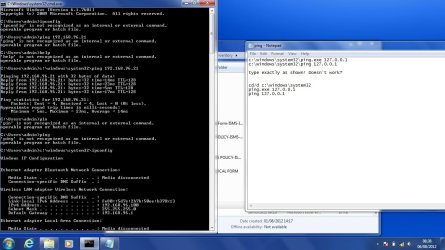
just purchased two laptop dell with windows 7 professional 64 bit, everything work perfect in the os, but when using cmd, every commands that is being used, getting "is not recognized as an internal or external command" for example in cmd you type "ping followed by the ip address" you get that its not recognised, even if type help, nothing happen, can someone help me how to make the cmd work again...thanks
 

My Computer My Computer

OS
win 7 pro 64 bit
Just a simple command like DIR doesn't work?
 

My Computer My Computer

Computer type
Laptop
Computer Manufacturer/Model Number
ACER ASPIRE 5742G
OS
Microsoft Windows 7 Home Premium 64-bits 7601 Multiprocessor Free Service Pack 1
CPU
Intel(R) Core(TM) i3 CPU M 370 @ 2.40GHz
Motherboard
Acer Aspire 5742G
Memory
4,00 GB
Graphics Card(s)
ATI Mobility Radeon HD 5400 Series
Sound Card
(1) AMD High Definition Audio Device (2) Realtek High Defi
Screen Resolution
1366 x 768 x 32 bits (4294967296 colors) @ 60 Hz
Hard Drives
WDC WD5000BEVT-22ZAT0
What does work?
Code:
c:\windows\system32\ping.exe   127.0.0.1
c:\windows\system32\ping     127.0.0.1
dir
path
 

My Computer My Computer

Computer type
Laptop
Computer Manufacturer/Model Number
ACER ASPIRE 5742G
OS
Microsoft Windows 7 Home Premium 64-bits 7601 Multiprocessor Free Service Pack 1
CPU
Intel(R) Core(TM) i3 CPU M 370 @ 2.40GHz
Motherboard
Acer Aspire 5742G
Memory
4,00 GB
Graphics Card(s)
ATI Mobility Radeon HD 5400 Series
Sound Card
(1) AMD High Definition Audio Device (2) Realtek High Defi
Screen Resolution
1366 x 768 x 32 bits (4294967296 colors) @ 60 Hz
Hard Drives
WDC WD5000BEVT-22ZAT0
@Kaktussoft i've tried the simple command DIR, it works ... but, ping, ipconfig,help..etc..doesn't work
 

My Computer My Computer

OS
win 7 pro 64 bit
c:\windows\system32\ping.exe 127.0.0.1
c:\windows\system32\ping 127.0.0.1

type exactly as shown! Doesn't work?
 

My Computer My Computer

Computer type
Laptop
Computer Manufacturer/Model Number
ACER ASPIRE 5742G
OS
Microsoft Windows 7 Home Premium 64-bits 7601 Multiprocessor Free Service Pack 1
CPU
Intel(R) Core(TM) i3 CPU M 370 @ 2.40GHz
Motherboard
Acer Aspire 5742G
Memory
4,00 GB
Graphics Card(s)
ATI Mobility Radeon HD 5400 Series
Sound Card
(1) AMD High Definition Audio Device (2) Realtek High Defi
Screen Resolution
1366 x 768 x 32 bits (4294967296 colors) @ 60 Hz
Hard Drives
WDC WD5000BEVT-22ZAT0
cd/d c:\windows\system32
ping.exe 127.0.0.1
ping 127.0.0.1
 

My Computer My Computer

Computer type
Laptop
Computer Manufacturer/Model Number
ACER ASPIRE 5742G
OS
Microsoft Windows 7 Home Premium 64-bits 7601 Multiprocessor Free Service Pack 1
CPU
Intel(R) Core(TM) i3 CPU M 370 @ 2.40GHz
Motherboard
Acer Aspire 5742G
Memory
4,00 GB
Graphics Card(s)
ATI Mobility Radeon HD 5400 Series
Sound Card
(1) AMD High Definition Audio Device (2) Realtek High Defi
Screen Resolution
1366 x 768 x 32 bits (4294967296 colors) @ 60 Hz
Hard Drives
WDC WD5000BEVT-22ZAT0
i've just used the above command that you give to me in cmd,
(cd/d c:\windows\system32
ping.exe 127.0.0.1
ping 127.0.0.1)
it work perfectly, i can ping, use ipconfig, etc.., but when i again close the cmd prompt, and open it again, it doesn't work directly, i've to change again to"cd/d c:\windows\system32" and then use the cmd,
can't i put it default on the cmd to cd/d c:\windows\system32.... please reply back

thanks for
 

My Computer My Computer

OS
win 7 pro 64 bit
Simply a problem with your default search path!
In command prompt
PATH
post output

SET
post output
I'm interested if this is listed:
SystemDrive=C:
SystemRoot=C:\Windows
 

My Computer My Computer

Computer type
Laptop
Computer Manufacturer/Model Number
ACER ASPIRE 5742G
OS
Microsoft Windows 7 Home Premium 64-bits 7601 Multiprocessor Free Service Pack 1
CPU
Intel(R) Core(TM) i3 CPU M 370 @ 2.40GHz
Motherboard
Acer Aspire 5742G
Memory
4,00 GB
Graphics Card(s)
ATI Mobility Radeon HD 5400 Series
Sound Card
(1) AMD High Definition Audio Device (2) Realtek High Defi
Screen Resolution
1366 x 768 x 32 bits (4294967296 colors) @ 60 Hz
Hard Drives
WDC WD5000BEVT-22ZAT0
there is C:\Users\name
that all..when i type ping (ip) it says is not recognized as an internal or external command
but when i type C:\cd/d c:\windows\system32\ ping (ip) it work well, all command that i enters..works perfect...
why?? is there something that should be done, or to change, please give me a possible solution why the cmd is behaving like that..
regards
 

My Computer My Computer

OS
win 7 pro 64 bit
You need to modify your PATH environment variable to at least include: %SystemRoot%\system32

To do that, right-click on My Computer, then select Properties, then Advanced system settings. On the Properties dialog select Environment Variables. In the System variables box, scroll until you find the PATH variable then select it and click on the Edit button. Add (don't replace) this to what exists there already: %SystemRoot%\system32 (if appending to the end of the existing PATH make sure you put a semicolon ; in to seperate the values).
 

My Computer My Computer

Computer type
PC/Desktop
Computer Manufacturer/Model Number
Home Built desktop, Dell G15 5511 Gaming laptop,MS Surface Pro 7 tablet
OS
W10 Pro desktop, W11 laptop, W11 Pro tablet (all 64-bit)
CPU
3.7Ghz 8700K i7, i7-11800H, i7-1065G7
Motherboard
ASUS TUF Z370-Pro Gaming in desktop
Memory
16G desktop, 16G laptop, 4G tablet
Graphics Card(s)
AMD Radeon RX580, RTX 3060, Intel Iris Plus
Sound Card
High Definition Audio (Built-in to mobo)
Monitor(s) Displays
Samsung U32J59 32" (2x), 15.6", 12"
Screen Resolution
3840x2160, 3840x2160, 1920x1080, 2160x1440
Hard Drives
500G SSD for OS; 2T, 10T & 15T HDDs for Data on Desktop, 1TB SSD laptop, 128G SSD tablet.
PSU
Corsair CX 750M
Case
Antec 100
Cooling
CM 212+
Keyboard
IBM Model M - used continuously since 1986
Mouse
Microsoft Pro IntelliMouse
Internet Speed
400M down 8M up
Antivirus
Windows Defender
Browser
FireFox
Other Info
Built my first computer (8Mhz 8088cpu, 640K RAM, 20MB HDD, 2 360K floppy drives) in 1985 and have been building them for myself, relatives and friends ever since.
there is C:\Users\name
that all..when i type ping (ip) it says is not recognized as an internal or external command
but when i type C:\cd/d c:\windows\system32\ ping (ip) it work well, all command that i enters..works perfect...
why?? is there something that should be done, or to change, please give me a possible solution why the cmd is behaving like that..
regards
In command prompt
SET

Post screenshot
 

My Computer My Computer

Computer type
Laptop
Computer Manufacturer/Model Number
ACER ASPIRE 5742G
OS
Microsoft Windows 7 Home Premium 64-bits 7601 Multiprocessor Free Service Pack 1
CPU
Intel(R) Core(TM) i3 CPU M 370 @ 2.40GHz
Motherboard
Acer Aspire 5742G
Memory
4,00 GB
Graphics Card(s)
ATI Mobility Radeon HD 5400 Series
Sound Card
(1) AMD High Definition Audio Device (2) Realtek High Defi
Screen Resolution
1366 x 768 x 32 bits (4294967296 colors) @ 60 Hz
Hard Drives
WDC WD5000BEVT-22ZAT0
@strollin i've add the variable tht you've said, but remain the same, the cmd remain the same,
 

My Computer My Computer

OS
win 7 pro 64 bit
Simply a problem with your default search path!
In command prompt
PATH
post output

SET
post output
I'm interested if this is listed:
SystemDrive=C:
SystemRoot=C:\Windows
Please post output then I can see what's wrong
 

My Computer My Computer

Computer type
Laptop
Computer Manufacturer/Model Number
ACER ASPIRE 5742G
OS
Microsoft Windows 7 Home Premium 64-bits 7601 Multiprocessor Free Service Pack 1
CPU
Intel(R) Core(TM) i3 CPU M 370 @ 2.40GHz
Motherboard
Acer Aspire 5742G
Memory
4,00 GB
Graphics Card(s)
ATI Mobility Radeon HD 5400 Series
Sound Card
(1) AMD High Definition Audio Device (2) Realtek High Defi
Screen Resolution
1366 x 768 x 32 bits (4294967296 colors) @ 60 Hz
Hard Drives
WDC WD5000BEVT-22ZAT0
@Kaktussoft please find attach a printscreen of my cmd, you'll see when i ping normally, it says its not recognised, but when i put c:\windows\system32\ping.exe "ip" it works again,
 

Attachments

  • 2.jpg
    2.jpg
    118.5 KB · Views: 24

My Computer My Computer

OS
win 7 pro 64 bit

My Computer My Computer

Computer type
Laptop
Computer Manufacturer/Model Number
ACER ASPIRE 5742G
OS
Microsoft Windows 7 Home Premium 64-bits 7601 Multiprocessor Free Service Pack 1
CPU
Intel(R) Core(TM) i3 CPU M 370 @ 2.40GHz
Motherboard
Acer Aspire 5742G
Memory
4,00 GB
Graphics Card(s)
ATI Mobility Radeon HD 5400 Series
Sound Card
(1) AMD High Definition Audio Device (2) Realtek High Defi
Screen Resolution
1366 x 768 x 32 bits (4294967296 colors) @ 60 Hz
Hard Drives
WDC WD5000BEVT-22ZAT0
@Kaktussoft the set and path output is the same, please find attach a print screen of the cmd output
 

Attachments

  • Untitled.jpg
    Untitled.jpg
    117.9 KB · Views: 19

My Computer My Computer

OS
win 7 pro 64 bit
The first character of path output is: ;
remove the first semicolon.
At the and of path is ; %SystemRoot%\system32
remove the space after ;

Now open a new command prompt and it should work
 

My Computer My Computer

Computer type
Laptop
Computer Manufacturer/Model Number
ACER ASPIRE 5742G
OS
Microsoft Windows 7 Home Premium 64-bits 7601 Multiprocessor Free Service Pack 1
CPU
Intel(R) Core(TM) i3 CPU M 370 @ 2.40GHz
Motherboard
Acer Aspire 5742G
Memory
4,00 GB
Graphics Card(s)
ATI Mobility Radeon HD 5400 Series
Sound Card
(1) AMD High Definition Audio Device (2) Realtek High Defi
Screen Resolution
1366 x 768 x 32 bits (4294967296 colors) @ 60 Hz
Hard Drives
WDC WD5000BEVT-22ZAT0
You need to modify your PATH environment variable to at least include: %SystemRoot%\system32

To do that, right-click on My Computer, then select Properties, then Advanced system settings. On the Properties dialog select Environment Variables. In the System variables box, scroll until you find the PATH variable then select it and click on the Edit button. Add (don't replace) this to what exists there already: %SystemRoot%\system32 (if appending to the end of the existing PATH make sure you put a semicolon ; in to seperate the values).

You added
Code:
; %SystemRoot%\system32
instead of
;%SystemRoot%\system32
remove that extra space!
 

My Computer My Computer

Computer type
Laptop
Computer Manufacturer/Model Number
ACER ASPIRE 5742G
OS
Microsoft Windows 7 Home Premium 64-bits 7601 Multiprocessor Free Service Pack 1
CPU
Intel(R) Core(TM) i3 CPU M 370 @ 2.40GHz
Motherboard
Acer Aspire 5742G
Memory
4,00 GB
Graphics Card(s)
ATI Mobility Radeon HD 5400 Series
Sound Card
(1) AMD High Definition Audio Device (2) Realtek High Defi
Screen Resolution
1366 x 768 x 32 bits (4294967296 colors) @ 60 Hz
Hard Drives
WDC WD5000BEVT-22ZAT0
Yes, that extra space is causing a problem.
 

My Computer My Computer

Computer type
PC/Desktop
Computer Manufacturer/Model Number
Home Built desktop, Dell G15 5511 Gaming laptop,MS Surface Pro 7 tablet
OS
W10 Pro desktop, W11 laptop, W11 Pro tablet (all 64-bit)
CPU
3.7Ghz 8700K i7, i7-11800H, i7-1065G7
Motherboard
ASUS TUF Z370-Pro Gaming in desktop
Memory
16G desktop, 16G laptop, 4G tablet
Graphics Card(s)
AMD Radeon RX580, RTX 3060, Intel Iris Plus
Sound Card
High Definition Audio (Built-in to mobo)
Monitor(s) Displays
Samsung U32J59 32" (2x), 15.6", 12"
Screen Resolution
3840x2160, 3840x2160, 1920x1080, 2160x1440
Hard Drives
500G SSD for OS; 2T, 10T & 15T HDDs for Data on Desktop, 1TB SSD laptop, 128G SSD tablet.
PSU
Corsair CX 750M
Case
Antec 100
Cooling
CM 212+
Keyboard
IBM Model M - used continuously since 1986
Mouse
Microsoft Pro IntelliMouse
Internet Speed
400M down 8M up
Antivirus
Windows Defender
Browser
FireFox
Other Info
Built my first computer (8Mhz 8088cpu, 640K RAM, 20MB HDD, 2 360K floppy drives) in 1985 and have been building them for myself, relatives and friends ever since.
:@Kaktussoft & @strollin : I've added the ;%SystemRoot%\system32 variable, on the laptop, and the cmd work perfectly, all command that i'm using working perfectly, thanks for the support
 

My Computer My Computer

OS
win 7 pro 64 bit
Back
Top