Solved No connection to private server and site

elrander

New member
Local time
3:45 AM
Messages
9
Hello,

When I try to connect to my own server (Nginx) and Web site with my private and public static IP addresses I receive a message telling me that the waiting time is exceeded (in French (my mother tongue): 'Le délai d'attente est dépassé'). My server can be reached on port 80 and redirects calls to my web site on port 8080. Both my ISP, who says he has no problem connecting to both on Windows 7 and Windows 10, on PCs as well as smartphones, and outside users were able to connect. However, even after I checked all IIS parameters to ensure that they were activated and made a complete update of the OS, I still can't connect to my server and site. Did I miss something in configuring my network or other parameters?

I would very much appreciate any hint or hindsight helping me to solve this problem.

Thank you.
 

My Computer My Computer

Computer type
PC/Desktop
Computer Manufacturer/Model Number
ASUS
OS
Windows 7 Home 64-bit
CPU
Intel® Core™ i3-2100 CPU @ 3.10GHz × 4
Memory
7.8 Gio
Graphics Card(s)
Gallium 0.4 on NVCF
Hard Drives
C:\
Browser
Firefox
I am not familiar with nginx. Are you hosting it in your own network? And you can't connect yourself from inside?

What are the port forwarding rules? Did you configure firewall accordingly? Are you trying to access by port 80 or 8080?

Can you connect with the public IP?

Maybe more...
 

My Computer My Computer

Computer type
PC/Desktop
Computer Manufacturer/Model Number
Custom Build
OS
Windows 7 Ultimate x64 SP1
CPU
AMD Phenom 2 1090T
Motherboard
Gigabyte GA-890FXA-UD5
Memory
2x8GB Kingston HyperX Fury Black 1600Mhz Unganged
Graphics Card(s)
MSI GTX 970 Gaming 4G
Sound Card
Realtek On-Board HD 7.1 Audio / Logitech G35
Monitor(s) Displays
3xAcer GD245HQ
Screen Resolution
1920x1080
Hard Drives
Samsung 850 Pro 512GB SSD - OS /
WD Caviar Black SATA 3 - 1 TBx2 - Dynamic RAID 0 /
WD Caviar Green SATA 2 - 640GBx2 - Dynamic RAID 0 /
WD Caviar Green SATA 2 - 640GB - Internal Backup /
Seagate Barracude SATA 3 - 3TB - External Backup/ Sync
PSU
HighPower 1000W
Case
Cooler Master HAF 932
Cooling
Noctua NH-D14
Keyboard
Logitech G19
Mouse
Logitech G500
Internet Speed
100/4 Mbit Cable (100GB quota)
Antivirus
ZoneAlarm Extreme Security / MBAM Pro / MBAE Free / SAS Free
Browser
IE 11 - Firefox - Chrome
Other Info
Logitech F710/ G27/ G940/ Z5500 // TrackIR 5 // Nvidia 3D Surround Vision
Hello GoKay,

Thank you for your reply. Nginx is a reverse proxy server, considered to be a concurrent to Apache. I am using it as a private server on Ubuntu Linux (there is also a Windows version, but I haven't tried it as it still is in a beta stage). I have no problem connecting to my server either from my private IP address (or in localhost mode) or from my public IP address under Ubuntu. Nor have my ISP and the outside users who already were able to connect to it, both from Windows 7 and Windows 10, on PC and smartphones. However, I am still unable to connect to my server from Windows 7.

Nginx uses port 80 and redirects to 8080, which is my web site's port. Since others were able to connect to my site from Windows 7 and 10 without problem, I must have missed something basic in my own configuration of Windows 7, but still can't figure out what it is.

Any clue or hindsight would therefore be very much appreciated.

I hope these few indications will have answered your questions.

Thank you again for your message.
 

My Computer My Computer

Computer type
PC/Desktop
Computer Manufacturer/Model Number
ASUS
OS
Windows 7 Home 64-bit
CPU
Intel® Core™ i3-2100 CPU @ 3.10GHz × 4
Memory
7.8 Gio
Graphics Card(s)
Gallium 0.4 on NVCF
Hard Drives
C:\
Browser
Firefox
Ok, couple things to try:
- What security software are you using? Try disabling them for the test
- Can you access with another browser?
- Try in Safe Mode with Networking.
- Can you telnet either? You have to enable Telnet Client in Programs and Features - Add remove Windows components
 

My Computer My Computer

Computer type
PC/Desktop
Computer Manufacturer/Model Number
Custom Build
OS
Windows 7 Ultimate x64 SP1
CPU
AMD Phenom 2 1090T
Motherboard
Gigabyte GA-890FXA-UD5
Memory
2x8GB Kingston HyperX Fury Black 1600Mhz Unganged
Graphics Card(s)
MSI GTX 970 Gaming 4G
Sound Card
Realtek On-Board HD 7.1 Audio / Logitech G35
Monitor(s) Displays
3xAcer GD245HQ
Screen Resolution
1920x1080
Hard Drives
Samsung 850 Pro 512GB SSD - OS /
WD Caviar Black SATA 3 - 1 TBx2 - Dynamic RAID 0 /
WD Caviar Green SATA 2 - 640GBx2 - Dynamic RAID 0 /
WD Caviar Green SATA 2 - 640GB - Internal Backup /
Seagate Barracude SATA 3 - 3TB - External Backup/ Sync
PSU
HighPower 1000W
Case
Cooler Master HAF 932
Cooling
Noctua NH-D14
Keyboard
Logitech G19
Mouse
Logitech G500
Internet Speed
100/4 Mbit Cable (100GB quota)
Antivirus
ZoneAlarm Extreme Security / MBAM Pro / MBAE Free / SAS Free
Browser
IE 11 - Firefox - Chrome
Other Info
Logitech F710/ G27/ G940/ Z5500 // TrackIR 5 // Nvidia 3D Surround Vision
Hello GokAy,

>- What security software are you using? Try disabling them for the test

I disabled all security programs but connections still fail.

>- Can you access with another browser?

Yes (with Chrome) but only under Ubuntu. My ISP has also successfully connected with IE and Firefox.

>- Try in Safe Mode with Networking.

In Safe Mode with Networking (as well as in Safe Mode only) I am redirected to the IIS7 welcome page.

>- Can you telnet either? You have to enable Telnet Client in Programs and Features - Add remove Windows components

The 'telnet' command with my public IP adress and/or my domain name sends me to my router's configuration page, asking me to login first. This is a problem we already have encountered with my ISP when we configured my router, but it hasn't been solved yet. Perhaps this might be the cause?
 

My Computer My Computer

Computer type
PC/Desktop
Computer Manufacturer/Model Number
ASUS
OS
Windows 7 Home 64-bit
CPU
Intel® Core™ i3-2100 CPU @ 3.10GHz × 4
Memory
7.8 Gio
Graphics Card(s)
Gallium 0.4 on NVCF
Hard Drives
C:\
Browser
Firefox
Please try with Chrome or Firefox under Windows, so we can see if it is OS-wide or IE issue. Maybe you have a proxy setup for IE?
 

My Computer My Computer

Computer type
PC/Desktop
Computer Manufacturer/Model Number
Custom Build
OS
Windows 7 Ultimate x64 SP1
CPU
AMD Phenom 2 1090T
Motherboard
Gigabyte GA-890FXA-UD5
Memory
2x8GB Kingston HyperX Fury Black 1600Mhz Unganged
Graphics Card(s)
MSI GTX 970 Gaming 4G
Sound Card
Realtek On-Board HD 7.1 Audio / Logitech G35
Monitor(s) Displays
3xAcer GD245HQ
Screen Resolution
1920x1080
Hard Drives
Samsung 850 Pro 512GB SSD - OS /
WD Caviar Black SATA 3 - 1 TBx2 - Dynamic RAID 0 /
WD Caviar Green SATA 2 - 640GBx2 - Dynamic RAID 0 /
WD Caviar Green SATA 2 - 640GB - Internal Backup /
Seagate Barracude SATA 3 - 3TB - External Backup/ Sync
PSU
HighPower 1000W
Case
Cooler Master HAF 932
Cooling
Noctua NH-D14
Keyboard
Logitech G19
Mouse
Logitech G500
Internet Speed
100/4 Mbit Cable (100GB quota)
Antivirus
ZoneAlarm Extreme Security / MBAM Pro / MBAE Free / SAS Free
Browser
IE 11 - Firefox - Chrome
Other Info
Logitech F710/ G27/ G940/ Z5500 // TrackIR 5 // Nvidia 3D Surround Vision
I tried with Chrome, Firefox, Safari and Opera, but failed to connect with all of them. I also activated the proxy server option (under IE's tools->Internet options->Network parameters) and entered my private and public IP addresses with port 80 as a test, but didn't succeed either (I unchecked again the proxy server option afterwards). Did I miss something in IE's configuration?
 

My Computer My Computer

Computer type
PC/Desktop
Computer Manufacturer/Model Number
ASUS
OS
Windows 7 Home 64-bit
CPU
Intel® Core™ i3-2100 CPU @ 3.10GHz × 4
Memory
7.8 Gio
Graphics Card(s)
Gallium 0.4 on NVCF
Hard Drives
C:\
Browser
Firefox
Ok, try this one too please - with Firefox download ZenMate (don't register) and see if you can open with the public IP. It will simulate your Windows 7 as coming from outside the network.

Check what IP address your Ubuntu and Windows machines are getting.
On Ubuntu terminal: ifconfig
On Windows: ipconfig -all

Paste, photo etc here
 

My Computer My Computer

Computer type
PC/Desktop
Computer Manufacturer/Model Number
Custom Build
OS
Windows 7 Ultimate x64 SP1
CPU
AMD Phenom 2 1090T
Motherboard
Gigabyte GA-890FXA-UD5
Memory
2x8GB Kingston HyperX Fury Black 1600Mhz Unganged
Graphics Card(s)
MSI GTX 970 Gaming 4G
Sound Card
Realtek On-Board HD 7.1 Audio / Logitech G35
Monitor(s) Displays
3xAcer GD245HQ
Screen Resolution
1920x1080
Hard Drives
Samsung 850 Pro 512GB SSD - OS /
WD Caviar Black SATA 3 - 1 TBx2 - Dynamic RAID 0 /
WD Caviar Green SATA 2 - 640GBx2 - Dynamic RAID 0 /
WD Caviar Green SATA 2 - 640GB - Internal Backup /
Seagate Barracude SATA 3 - 3TB - External Backup/ Sync
PSU
HighPower 1000W
Case
Cooler Master HAF 932
Cooling
Noctua NH-D14
Keyboard
Logitech G19
Mouse
Logitech G500
Internet Speed
100/4 Mbit Cable (100GB quota)
Antivirus
ZoneAlarm Extreme Security / MBAM Pro / MBAE Free / SAS Free
Browser
IE 11 - Firefox - Chrome
Other Info
Logitech F710/ G27/ G940/ Z5500 // TrackIR 5 // Nvidia 3D Surround Vision
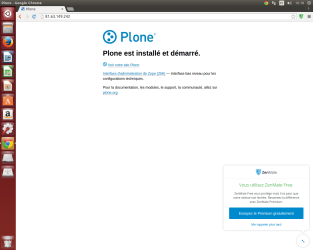
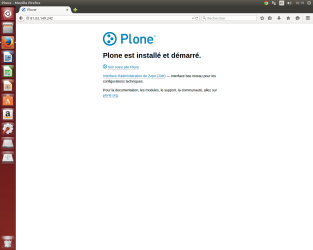
ZenMate with Firefox on Windows 7 will recognize my public IP address but it will be refused as a valid URL (please see attached screen shot in Word format). Under Ubuntu ZenMate only seems to work with Google Chrome, although I have no problem connecting to my site either with Firefox or Chrome (see the attached 'Ubuntu_Chrome.png' and 'Ubuntu_Firefox.png' screen shots).

Both the 'ifconfig' (Ubuntu) and 'ipconfig -all' (Windows) commands return my private IP address.
 

My Computer My Computer

Computer type
PC/Desktop
Computer Manufacturer/Model Number
ASUS
OS
Windows 7 Home 64-bit
CPU
Intel® Core™ i3-2100 CPU @ 3.10GHz × 4
Memory
7.8 Gio
Graphics Card(s)
Gallium 0.4 on NVCF
Hard Drives
C:\
Browser
Firefox

My Computer My Computer

Computer type
PC/Desktop
Computer Manufacturer/Model Number
Custom Build
OS
Windows 7 Ultimate x64 SP1
CPU
AMD Phenom 2 1090T
Motherboard
Gigabyte GA-890FXA-UD5
Memory
2x8GB Kingston HyperX Fury Black 1600Mhz Unganged
Graphics Card(s)
MSI GTX 970 Gaming 4G
Sound Card
Realtek On-Board HD 7.1 Audio / Logitech G35
Monitor(s) Displays
3xAcer GD245HQ
Screen Resolution
1920x1080
Hard Drives
Samsung 850 Pro 512GB SSD - OS /
WD Caviar Black SATA 3 - 1 TBx2 - Dynamic RAID 0 /
WD Caviar Green SATA 2 - 640GBx2 - Dynamic RAID 0 /
WD Caviar Green SATA 2 - 640GB - Internal Backup /
Seagate Barracude SATA 3 - 3TB - External Backup/ Sync
PSU
HighPower 1000W
Case
Cooler Master HAF 932
Cooling
Noctua NH-D14
Keyboard
Logitech G19
Mouse
Logitech G500
Internet Speed
100/4 Mbit Cable (100GB quota)
Antivirus
ZoneAlarm Extreme Security / MBAM Pro / MBAE Free / SAS Free
Browser
IE 11 - Firefox - Chrome
Other Info
Logitech F710/ G27/ G940/ Z5500 // TrackIR 5 // Nvidia 3D Surround Vision
My apologies for having missed sending the attached files and thank you for the link to the tutorial on uploading files. I hope you will get them this time. Otherwise, please let me know.

- Telnet cannot open connection to my private IP address (The response (in French, my working language) is: 'Impossible d'ouvrir la connection avec l'hôte on port 23: Echec de la connexion' (i. e. 'Impossible to open connection to host on port 23: Connection failed').

- Yes, Nginx is on the same computer as my web site. It runs with the Plone Content Management System (CMS), as the two screen shots taken from Ubuntu show.Ubuntu_Chrome.png

Ubuntu_Firefox.png

View attachment Screen shot of Firefox with Zen Mate on Windows 7.pdf
 

My Computer My Computer

Computer type
PC/Desktop
Computer Manufacturer/Model Number
ASUS
OS
Windows 7 Home 64-bit
CPU
Intel® Core™ i3-2100 CPU @ 3.10GHz × 4
Memory
7.8 Gio
Graphics Card(s)
Gallium 0.4 on NVCF
Hard Drives
C:\
Browser
Firefox
I can see them now, thanks.

Ok, you need to specify port like this:
Code:
telnet <IP address> 80
or
Code:
telnet <IP address> 8080

Is your website running now? Is it private by the way? I tried the IP from here, and no connection either.
 

My Computer My Computer

Computer type
PC/Desktop
Computer Manufacturer/Model Number
Custom Build
OS
Windows 7 Ultimate x64 SP1
CPU
AMD Phenom 2 1090T
Motherboard
Gigabyte GA-890FXA-UD5
Memory
2x8GB Kingston HyperX Fury Black 1600Mhz Unganged
Graphics Card(s)
MSI GTX 970 Gaming 4G
Sound Card
Realtek On-Board HD 7.1 Audio / Logitech G35
Monitor(s) Displays
3xAcer GD245HQ
Screen Resolution
1920x1080
Hard Drives
Samsung 850 Pro 512GB SSD - OS /
WD Caviar Black SATA 3 - 1 TBx2 - Dynamic RAID 0 /
WD Caviar Green SATA 2 - 640GBx2 - Dynamic RAID 0 /
WD Caviar Green SATA 2 - 640GB - Internal Backup /
Seagate Barracude SATA 3 - 3TB - External Backup/ Sync
PSU
HighPower 1000W
Case
Cooler Master HAF 932
Cooling
Noctua NH-D14
Keyboard
Logitech G19
Mouse
Logitech G500
Internet Speed
100/4 Mbit Cable (100GB quota)
Antivirus
ZoneAlarm Extreme Security / MBAM Pro / MBAE Free / SAS Free
Browser
IE 11 - Firefox - Chrome
Other Info
Logitech F710/ G27/ G940/ Z5500 // TrackIR 5 // Nvidia 3D Surround Vision
I still have no telnet connection with either port on my private and public IPs.

> Is your website running now? Is it private by the way? I tried the IP from here, and no connection either.

Yes, it is running at this time. And, yes, it still is a private site. The site's domain name is 'archeonavis.net'.
 

My Computer My Computer

Computer type
PC/Desktop
Computer Manufacturer/Model Number
ASUS
OS
Windows 7 Home 64-bit
CPU
Intel® Core™ i3-2100 CPU @ 3.10GHz × 4
Memory
7.8 Gio
Graphics Card(s)
Gallium 0.4 on NVCF
Hard Drives
C:\
Browser
Firefox
I wonder is this something I could try at home? Do these services have a trial of sorts? Would the software run on Mint MATE (should be Ubuntu based).
 

My Computer My Computer

Computer type
PC/Desktop
Computer Manufacturer/Model Number
Custom Build
OS
Windows 7 Ultimate x64 SP1
CPU
AMD Phenom 2 1090T
Motherboard
Gigabyte GA-890FXA-UD5
Memory
2x8GB Kingston HyperX Fury Black 1600Mhz Unganged
Graphics Card(s)
MSI GTX 970 Gaming 4G
Sound Card
Realtek On-Board HD 7.1 Audio / Logitech G35
Monitor(s) Displays
3xAcer GD245HQ
Screen Resolution
1920x1080
Hard Drives
Samsung 850 Pro 512GB SSD - OS /
WD Caviar Black SATA 3 - 1 TBx2 - Dynamic RAID 0 /
WD Caviar Green SATA 2 - 640GBx2 - Dynamic RAID 0 /
WD Caviar Green SATA 2 - 640GB - Internal Backup /
Seagate Barracude SATA 3 - 3TB - External Backup/ Sync
PSU
HighPower 1000W
Case
Cooler Master HAF 932
Cooling
Noctua NH-D14
Keyboard
Logitech G19
Mouse
Logitech G500
Internet Speed
100/4 Mbit Cable (100GB quota)
Antivirus
ZoneAlarm Extreme Security / MBAM Pro / MBAE Free / SAS Free
Browser
IE 11 - Firefox - Chrome
Other Info
Logitech F710/ G27/ G940/ Z5500 // TrackIR 5 // Nvidia 3D Surround Vision
Sorry for my late reply. As I am building my site on the Plone CMS and with Nginx as the server, both being in the public domain and with an Ubuntu version, I should think this software will run on a MATE version of Linux Mint without any problem. However, I installed Ubuntu-MATE for a test but noticed it doesn't provide the Swiss-French keyboard, which I normally use, as an option. So, until I have solved that, unfortunately I can't confirm whether connecting to my site will work on a MATE flavor of Linux/Ubuntu. But both Ubuntu-MATE (15.04) and Ubuntu 14.04 being so closely related, I shouldn't see a priori why this wouldn't work.

I am not quite sure what you mean by the words services and software. If Ubuntu, Nginx and the Plone CMS, which I use to build my site, are to be considered as services, then I should expect that they would run without any problem on a MATE version of Linux Mint, MATE being, as you mentioned, based on Ubuntu.

Did I answer your questions?
 

My Computer My Computer

Computer type
PC/Desktop
Computer Manufacturer/Model Number
ASUS
OS
Windows 7 Home 64-bit
CPU
Intel® Core™ i3-2100 CPU @ 3.10GHz × 4
Memory
7.8 Gio
Graphics Card(s)
Gallium 0.4 on NVCF
Hard Drives
C:\
Browser
Firefox
Hello, GokAy,

If this can be of any help (I should have added it to my last posting), I also can run my site with apache2 on Ubuntu 14.04, in case you prefer to work with that server rather than wiith nginx. Both servers can be easily and quickly installed with the Plone CMS on Ubuntu.

I didn't try to install the Windows version of Plone with apache2 on Windows 7 yet, as I am not quite sure it can work. However, if you have any hindsight on this issue, I'd very grateful if you could let me know.
 

My Computer My Computer

Computer type
PC/Desktop
Computer Manufacturer/Model Number
ASUS
OS
Windows 7 Home 64-bit
CPU
Intel® Core™ i3-2100 CPU @ 3.10GHz × 4
Memory
7.8 Gio
Graphics Card(s)
Gallium 0.4 on NVCF
Hard Drives
C:\
Browser
Firefox
Back
Top