Solved No context menu when installing programs

I'm confussed Muyfa666.
Are you having problems with your work computer or your personnel computer?
I highly recommend that anything you do with your work computer be done with the knowledge and help of the work I.T. Department.
 

My Computer

Computer type
PC/Desktop
Computer Manufacturer/Model Number
Home made Desktop
OS
Windows 10 Pro. 64/ version 1709 Windows 7 Pro/64
CPU
Intel i7-6800K @ 4.3
Motherboard
ASUS X-99 Deluxe II
Memory
Corsair Platinum 16 gig @2400
Graphics Card(s)
EVGA GTX 1070 OC
Monitor(s) Displays
Asus 27" LED LCD/VE278Q
Screen Resolution
1920-1080 or 1280-720 HDMI
Hard Drives
INTEL SSD 730-240 Gb Sata 3.0/
PSU
EVGA Platium 1200W
Case
Phanteks Luxe Tempered Glass 8 fans/ one radiator
Cooling
XSPC/ Water Cooled CPU
Keyboard
Das 4 Professional
Mouse
Logitech M705/MX Anywhere 2-S
Internet Speed
100 mbits
Antivirus
Microsoft Security Essentials/ Malwarebytes Premium 3.0/ SAS
Browser
I.E. 11 default/Firefox/ ISP Time Warner Cable/Spectrum
Other Info
LG BluRay Burner/
Sound system-KLipsch-THX/
Icy Dock ssd Hot Swap bays.
I'm probably expressing myself a bit unclear. The problem is with my personal computer, but I also tried to install the troublesome program on my work computer to see if it made a difference. I'm guessing it could be a Windows update causing this, hence all computers with automatic updates are affected. I'm gonna try to remove the latest updates and see if it fixes the issue.

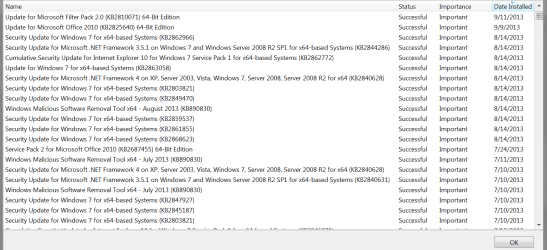
I'm hoping to be able to try to remove some updates this weekend. DavidW7ncus, could you post a windows update log screenshot that dates back one more step?

If nothing else works, I found a very good workaround; I'm a Total Commander user since WAY back. All my file operations are done from within this program. As it happens, TC actually have a good CRC/MD5 creator/checker integrated. The creator is very good and can be set to hotkeys. The checker is also ok, but quite basic. By having hkSFV installed and associated with .SFV files I can check them with hkSFV (no contect needed, just run the .SFV file) and then I can create .SFV by just highlighting and hitting Ctrl+S.

This I can live with, but I rather not abandon a problem. I'd like to know the cause for the original problem.
 
Last edited:

My Computer

Computer type
PC/Desktop
OS
Windows 7 Ultimate x64
CPU
Inte Core i5 3570K
Motherboard
Asus P8Z77-M
Memory
Corsair Vengeance 4x4GB
Graphics Card(s)
EVGA Geforce GTX 670 FTW
Hard Drives
Samsung 830 SSD 128GB
Samsung 1GB HDD
Antivirus
ESET Nod32
Browser
Opera
Here is a screenshot of the next update log entries:

WUPSP03.PNG
 

My Computer

Computer type
PC/Desktop
Computer Manufacturer/Model Number
home built
OS
Multi-Boot W7_Pro_x64 W8.1_Pro_x64 W10_Pro_x64 +Linux_VMs +Chromium_VM
CPU
AMD Athlon II x4 620
Motherboard
Gigabyte GA-MA785G-UD3H
Memory
6GB GSkill DDR2 800
Graphics Card(s)
AMD 4670 GPU + AMD 4200 IGP
Sound Card
on board Realtek ALC889A
Monitor(s) Displays
RCA 40" LCD TV, Insignia 32" LCD TV, HP 15" LCD monitor
Screen Resolution
1680 x 1050
Hard Drives
OCZ Vertex 3 120GB,
Samsung F3 1TB (3),
Several others - WD, Seagate, Hitachi, ...
PSU
Corsair 500 W
Case
Rosewill mid tower
Cooling
CM 90mm rifle
Keyboard
Gyration wireless, Logitech wireless, Dell USB wired
Mouse
Gyration wireless, Logitech wireless, V7 USB wired
Internet Speed
Spectrum - 100Mbps D / 10Mbps U
Antivirus
Avast, MBAM3, EMET, WinPatrol
Browser
Pale Moon, Firefox, IE
Other Info
2 multi-boot PC's
Mainly HTPC/Office/Gen purpose (no gaming).
Trendnet USB KVM.
LG DVD burner/Blue Ray Player.
Tray system for removable SATA backup drives.

Not currently OCd, under-volted.
I use Hybrid sleep, rarely re-boot or shutdown.

Hauppauge HD-PVR, Avermedia PCIe TV Tuner, Hauppauge PCI TV Tuner.
@Muyfa if Total Commander is 32 bit, try right clicking on a file and see if the program's context menu items show up. I do the same thing with FreeCommander. It's 32 bit so 32 bit context menu items show on my 64 bit Vista.
 

My Computer

Computer Manufacturer/Model Number
HP Media Center
OS
Windows 7 32 bit
CPU
AMD 5200+ dual core
Memory
2 GB
Graphics Card(s)
NVidia GeForce 6150SE 128 MB
Monitor(s) Displays
CRT
Screen Resolution
1280x1024
Hard Drives
500 GB Sata internal :

SIIG USB 3.0 docking stations w/WD Caviar Black 6 Gb/s drives
Keyboard
PS/2
Mouse
PS/2 Wheel Mouse
Other Info
SIIG USB 3.0 PCIexpress card.
@Muyfa if Total Commander is 32 bit, try right clicking on a file and see if the program's context menu items show up. I do the same thing with FreeCommander. It's 32 bit so 32 bit context menu items show on my 64 bit Vista.

This was it. :-D

I never considered that I changed to TC x64 beta. Now when I changed back to x86 the context menu popped right up!

Hahaha! So wonderful to find out. I never used hkSFV with explorer, so I never considered that to be the issue.

Thanks everyone else who tried to help. Beer's on me if you ever visit Sweden!
 

My Computer

Computer type
PC/Desktop
OS
Windows 7 Ultimate x64
CPU
Inte Core i5 3570K
Motherboard
Asus P8Z77-M
Memory
Corsair Vengeance 4x4GB
Graphics Card(s)
EVGA Geforce GTX 670 FTW
Hard Drives
Samsung 830 SSD 128GB
Samsung 1GB HDD
Antivirus
ESET Nod32
Browser
Opera
Glad it worked out for you. :)
 

My Computer

Computer Manufacturer/Model Number
HP Media Center
OS
Windows 7 32 bit
CPU
AMD 5200+ dual core
Memory
2 GB
Graphics Card(s)
NVidia GeForce 6150SE 128 MB
Monitor(s) Displays
CRT
Screen Resolution
1280x1024
Hard Drives
500 GB Sata internal :

SIIG USB 3.0 docking stations w/WD Caviar Black 6 Gb/s drives
Keyboard
PS/2
Mouse
PS/2 Wheel Mouse
Other Info
SIIG USB 3.0 PCIexpress card.
@Muyfa if Total Commander is 32 bit, try right clicking on a file and see if the program's context menu items show up. I do the same thing with FreeCommander. It's 32 bit so 32 bit context menu items show on my 64 bit Vista.

This was it. :-D

I never considered that I changed to TC x64 beta. Now when I changed back to x86 the context menu popped right up!

Hahaha! So wonderful to find out. I never used hkSFV with explorer, so I never considered that to be the issue.

Thanks everyone else who tried to help. Beer's on me if you ever visit Sweden!

Glad your issue is resolved.

Regarding the beer, why don't you ship it to all of us. ;)
 

My Computer

Computer type
PC/Desktop
Computer Manufacturer/Model Number
Custom Bulid/Self made
OS
Windows 11 x64
CPU
i5 2500K @ 3.3 GHz
Motherboard
ASUS P8 Z77 V pro
Memory
16 GB DDR 3 @ 1600Mhz
Graphics Card(s)
MSI 1050TI 4GB OC version
Sound Card
On Board (Realtek HD audio)
Monitor(s) Displays
Samsung 22" LCD
Screen Resolution
1920*1080
Hard Drives
Seagate 1 TB, WD 1TB, Seagate 2 TB ( I use a lot of space)
PSU
coolermaster 750 W
Case
Coolermaster HAF912
Cooling
Coolermaster hyper 212 EVO
Keyboard
Samsung
Mouse
Dell Wireless
Internet Speed
Wireless 50 Mbps
Antivirus
AVG 2016 Internet Security
Browser
Google Chrome
So expensive with international shipping... ;-)
 

My Computer

Computer type
PC/Desktop
OS
Windows 7 Ultimate x64
CPU
Inte Core i5 3570K
Motherboard
Asus P8Z77-M
Memory
Corsair Vengeance 4x4GB
Graphics Card(s)
EVGA Geforce GTX 670 FTW
Hard Drives
Samsung 830 SSD 128GB
Samsung 1GB HDD
Antivirus
ESET Nod32
Browser
Opera
No worries, We all will enjoy on your behalf.

Cheers! (d)
 

My Computer

Computer type
PC/Desktop
Computer Manufacturer/Model Number
Custom Bulid/Self made
OS
Windows 11 x64
CPU
i5 2500K @ 3.3 GHz
Motherboard
ASUS P8 Z77 V pro
Memory
16 GB DDR 3 @ 1600Mhz
Graphics Card(s)
MSI 1050TI 4GB OC version
Sound Card
On Board (Realtek HD audio)
Monitor(s) Displays
Samsung 22" LCD
Screen Resolution
1920*1080
Hard Drives
Seagate 1 TB, WD 1TB, Seagate 2 TB ( I use a lot of space)
PSU
coolermaster 750 W
Case
Coolermaster HAF912
Cooling
Coolermaster hyper 212 EVO
Keyboard
Samsung
Mouse
Dell Wireless
Internet Speed
Wireless 50 Mbps
Antivirus
AVG 2016 Internet Security
Browser
Google Chrome
Back
Top