No device drivers were found while installing Windows 7

pommesorbet

New member
Local time
9:32 PM
Messages
3
Hello all, I am trying to install Windows 7 on the following desktop PC:

Intel Core i3 Processor i3-530
2048MB DDR3
500GB 3G Hard Drive
ATI Radeon HD 4350 Graphics
Supermulti Drive with LightScribe Technology


First, I will start by saying that when I turn on my PC, I receive this message on a black screen "Reboot and Select proper Boot device or Insert Boot Media in selected Boot device and press a key". When I press a key, nothing changes, i.e. still stuck on the same screen.

So, I decided to install Windows 7.

When I tried installing Windows 7, it would begin the installation process... I clicked "Install Now", then when given the options between "Upgrade" or 'Custom (Advanced)', I selected the Custom Advanced.

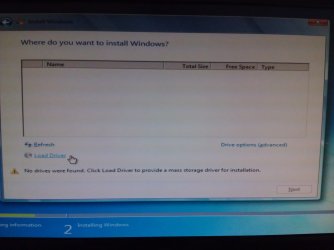
When asked 'Where you would like to install Windows?' (see screenshot #1.jpg), there was nothing shown in the box, i.e. there is no hard drive or partition for me to select where I can install Windows. So just to try, I clicked "Load Driver".

It prompted me to install a device driver. I clicked Browse and browsed through the existing drives. (see Screenshot #2.jpg)

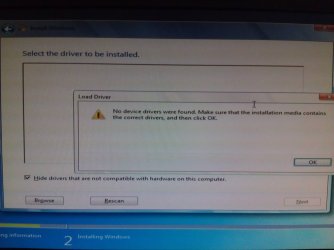
Next, it showed me that 'No device drivers were found..." (see Screenshot #3.jpg)

I tried to google on how to find the drivers to install but to no avail.

Any ideas on how I should proceed from here? i.e. How to install the device drivers needed to continue the installation process etc.

Thanks!
 

Attachments
  • Screenshot #1.jpg
    Screenshot #1.jpg
    367.9 KB · Views: 242
  • Screenshot #2.jpg
    Screenshot #2.jpg
    383.9 KB · Views: 579
  • Screenshot #3.jpg
    Screenshot #3.jpg
    565.7 KB · Views: 347

My Computer

OS
Windows 7 Home Premium 32bit
Hello all, I am trying to install Windows 7 on the following desktop PC:

Intel Core i3 Processor i3-530
2048MB DDR3
500GB 3G Hard Drive
ATI Radeon HD 4350 Graphics
Supermulti Drive with LightScribe Technology


First, I will start by saying that when I turn on my PC, I receive this message on a black screen "Reboot and Select proper Boot device or Insert Boot Media in selected Boot device and press a key". When I press a key, nothing changes, i.e. still stuck on the same screen.

So, I decided to install Windows 7.

When I tried installing Windows 7, it would begin the installation process... I clicked "Install Now", then when given the options between "Upgrade" or 'Custom (Advanced)', I selected the Custom Advanced.

When asked 'Where you would like to install Windows?' (see screenshot #1.jpg), there was nothing shown in the box, i.e. there is no hard drive or partition for me to select where I can install Windows. So just to try, I clicked "Load Driver".

It prompted me to install a device driver. I clicked Browse and browsed through the existing drives. (see Screenshot #2.jpg)

Next, it showed me that 'No device drivers were found..." (see Screenshot #3.jpg)

I tried to google on how to find the drivers to install but to no avail.

Any ideas on how I should proceed from here? i.e. How to install the device drivers needed to continue the installation process etc.

Thanks!

Are you trying to install it with USB or a DVD ?
 

My Computer

Computer Manufacturer/Model Number
Homebuilt
OS
Windows 7 Home Premium x64
CPU
Core i7 2600K
Motherboard
Asus P8Z77-V LX
Memory
4GB DDR3 Kingston HyperX
Graphics Card(s)
Gigabyte GTX 670
Sound Card
Realtek HD Audio
Monitor(s) Displays
Delium Monitor
Screen Resolution
1360 x 768
Hard Drives
C: (500GB)
PSU
Corsair 620W
Case
Antec
Cooling
Cooling Master
Keyboard
Logitech
Mouse
Logitech wireless mouse M 505
Internet Speed
60MBPS

My Computer

Computer Manufacturer/Model Number
Homebuilt
OS
Windows 7 Home Premium x64
CPU
Core i7 2600K
Motherboard
Asus P8Z77-V LX
Memory
4GB DDR3 Kingston HyperX
Graphics Card(s)
Gigabyte GTX 670
Sound Card
Realtek HD Audio
Monitor(s) Displays
Delium Monitor
Screen Resolution
1360 x 768
Hard Drives
C: (500GB)
PSU
Corsair 620W
Case
Antec
Cooling
Cooling Master
Keyboard
Logitech
Mouse
Logitech wireless mouse M 505
Internet Speed
60MBPS
No, it is not an ISO image.
Inside the DVD, there are the files needed for the installation, i.e. when I view the DVD contents, I can see the individual files and folders inside.
 

My Computer

OS
Windows 7 Home Premium 32bit
Where did you get Win7? Did you burn it yourself using an image burner like ImgBurn at 4x speed? If not burn another DVD after confirming the ISO integrity or downloading another.
 
GR is correct - you only see that error message when the source you're using to install from is corrupt or damaged. If you downloaded the ISO and burned it, make sure the MD5 and CRC checksums of the ISO match the original source, and if you're going to install from DVD rather than USB (and USB is preferable, if you can do it), then you need to make sure you burn at the slowest possible speed before using the media.
 

My Computer

Computer type
PC/Desktop
Computer Manufacturer/Model Number
Custom
OS
Windows 10 Pro x64
CPU
Intel Core i7 4790K @ 4.5GHz
Motherboard
Asus Maximus Hero VII
Memory
32GB DDR3
Graphics Card(s)
Nvidia GeForce GTX970
Sound Card
Realtek HD Audio
Screen Resolution
1920x1200
Hard Drives
1x Samsung 250GB SSD
4x WD RE 2TB (RAIDZ)
PSU
Corsair AX760i
Case
Fractal Design Define R4
Cooling
Noctua NH-D15
Normally most of the drivers are there in the Installation DVD but the problem that you are facing occurs when installing Windows 7 on old machines. I too faced the same problem on my old Desktop because the installation DVD did not install the ethernet, audio and video drivers.

I then searched the Net for the Drivers on my Laptop. I found the driver for ethernet on the Net, the driver for audio at the Microsoft Update site and no driver for the video adapter. For the video adapter I had to use the old XP driver in the "XP with SP3 compatible mode" and luckily it worked. In this way my old Desktop Computer was up and running with Windows 7 Pro.

You might perhaps try the same.
 

My Computer

Computer Manufacturer/Model Number
Custom Built
OS
Windows 7 Pro with SP1 32bit
Motherboard
Intel D845GVS1 X86-based PC
Memory
2 gigs of RAM
Graphics Card(s)
Intel(R) 82845G/GL/GE/PE/GV Graphics Controller
Sound Card
Realtek AC'97 Audio
Monitor(s) Displays
Samsung SyncMaster 931BF Black 19" LCD Monitor
Screen Resolution
1280X960
Hard Drives
1. SAMSUNG SP0822N ATA Device ~ 80 GigaBytes

2. Seagate FreeAgent Go USB Device ~ 500 GigaBytes
Keyboard
COMPAQ Standard PS/2 Keyboard
Mouse
iBall Laser Precise Speedster
Internet Speed
4 mb/sec
The error is almost always a bad installer. Confirm ISO or download another, burn a new DVD using ImgBurn at 4x speed.

If this fails, try writing ISO to flash stick using Universal USB Installer with Win7 in dropdown menu. Boot under USB, Removable or HD's.

Where did you get Win7?
 
With my laptop Dell Vostro 3560. When I install windows 7 using USB. I go to BIOS and set USB debug to Enable. It's work like a charm !
 

My Computer

Computer type
PC/Desktop
OS
Windows 7 Ultimate x64
Back
Top