
No digital sound out of external sound system

TanyaC

New member
Guru
Local time
9:24 AM
Messages
782
Location
Melbourne, Australia
I have a GA-EX58-UD3R Rev 1.6 mobo in a PC connected to a Samsung PS63C7000 3D TV via HDMI and by Stereo Analogue, Coax and Optical to a Yamaha RX-V567 receiver/amplifier.

The mobo runs the Realtek audio system supplied with the mobo, which has 5.1 Analogue outputs, coax and Optical out.

On the receiver I match the HDMI input to one of three Audio inputs; Analogue (AV5), Optical (AV4) or Coax (AV3). Sound only comes out of the Analogue connection, which is stereo only.

When I look at the sound on the PC it appears that a signal is being sent to the receiver. (through a spectrum analyser)

I tried reinstalling the sound drivers for the mobo, with no luck. I don't have a spare sound card with Optical. I tried replacing both the optical and coax cables.

When I plug the PC into a set of PC speakers it works fine.

I saw this post .. http://www.sevenforums.com/sound-audio/22269-digital-sound-issue.html, but I had already made sure only one sound option was connected at any one time.

oh, I am running Win7 x64 Ult.

Any ideas?
 

My Computer My Computer

At a glance

Linux Mint 17 Cinnamon | Win 7 Ult x64Intel I7-3770K @ 4.2ghz32GB G-Skill C10QEVGA GTX 670 2GB SC
Computer type
PC/Desktop
Computer Manufacturer/Model Number
Home Made
OS
Linux Mint 17 Cinnamon | Win 7 Ult x64
CPU
Intel I7-3770K @ 4.2ghz
Motherboard
ASRock Extreme 4
Memory
32GB G-Skill C10Q
Graphics Card(s)
EVGA GTX 670 2GB SC
Sound Card
Creative Fatality ExtremeGamer
Monitor(s) Displays
LG E2742V x 2
Screen Resolution
1920x1080
Hard Drives
256GB Vertex 4 SSD
2TB Seagate ST2000DM001
1TB Seagate ST1000DM003
PSU
Corsair HX 650
Case
HAF 932 advanced
Cooling
Corsair H100i liquid cooler
Keyboard
Logitech Wireless
Mouse
Logitech Wireless
Internet Speed
OptusNet NBN 100/40
Antivirus
Malwarebytes
Browser
Firefox 30
Other Info
Router: Sagemcom F@st 3846 Crippled by Optus.
There can be issues with sound output when you are using HDMI sound. In MOST cases when you use the HDMI sound it is set as the default playback device and thus the PC's sound card (or integrated audio) output is muted. Normally you can't have both, one or the other.

If you disconnect the cable for HDMI, at the PC, and select whatever you want for default playback device in the Sound Panel, do you get the S/PDIF or whatever other sound you want?
 

My Computer My Computer

At a glance

Windows 10 64 bitIntel i7 6700K16GB Corsair DominatorIntel CPU Graphics
Computer type
PC/Desktop
Computer Manufacturer/Model Number
My Own Build
OS
Windows 10 64 bit
CPU
Intel i7 6700K
Motherboard
ASUS ROG Maximus VIII Hero
Memory
16GB Corsair Dominator
Graphics Card(s)
Intel CPU Graphics
Sound Card
RealTek
Monitor(s) Displays
27" Dell S2719dgf
Screen Resolution
2560X1440
Hard Drives
1 TB Samsung 850 EVO SSD for Win 10 Pro
500GB Samsung 850 EVO SSD for Win 10 Insider
2 TB drive for backup
PSU
EVGA Supernova 750G2
Case
BeQuiet Silent Base 600
Cooling
Deepcool Captain 120EX
Keyboard
Microsoft Wireless 2000
Mouse
Microsoft wireless
Internet Speed
100 MB/sec (Cable)
Antivirus
Microsoft Defender and Malwarebytes
Browser
Edge/Firefox
Other Info
Cakewalk (Sonar) by BandLab and Studio One 4.1 Pro recording studio software. MOTU 896Mk3 Hybrid recording interface, Frontier Tranzport wireless control unit, Behringer X-Touch Control Surface.
Five USB connected optical drives for CD Audio production using Nero BurningROM
There can be issues with sound output when you are using HDMI sound. In MOST cases when you use the HDMI sound it is set as the default playback device and thus the PC's sound card (or integrated audio) output is muted. Normally you can't have both, one or the other.

If you disconnect the cable for HDMI, at the PC, and select whatever you want for default playback device in the Sound Panel, do you get the S/PDIF or whatever other sound you want?

Errr... If I disconnect the HDMI cable, I have no video so I cannot see what I am doing on the TV to select a different sound source.

However, there are three sound devices on the PC now. I have tried setting each as the default, Then I tried it with the Analogue, Coax and Optical settings on the TV

I'll see if I have a DVI cable and spare monitor sitting around, and leave the sound connected to the receiver as is and will get back to you later today.
 

My Computer My Computer

At a glance

Linux Mint 17 Cinnamon | Win 7 Ult x64Intel I7-3770K @ 4.2ghz32GB G-Skill C10QEVGA GTX 670 2GB SC
Computer type
PC/Desktop
Computer Manufacturer/Model Number
Home Made
OS
Linux Mint 17 Cinnamon | Win 7 Ult x64
CPU
Intel I7-3770K @ 4.2ghz
Motherboard
ASRock Extreme 4
Memory
32GB G-Skill C10Q
Graphics Card(s)
EVGA GTX 670 2GB SC
Sound Card
Creative Fatality ExtremeGamer
Monitor(s) Displays
LG E2742V x 2
Screen Resolution
1920x1080
Hard Drives
256GB Vertex 4 SSD
2TB Seagate ST2000DM001
1TB Seagate ST1000DM003
PSU
Corsair HX 650
Case
HAF 932 advanced
Cooling
Corsair H100i liquid cooler
Keyboard
Logitech Wireless
Mouse
Logitech Wireless
Internet Speed
OptusNet NBN 100/40
Antivirus
Malwarebytes
Browser
Firefox 30
Other Info
Router: Sagemcom F@st 3846 Crippled by Optus.
However, there are three sound devices on the PC now. I have tried setting each as the default, Then I tried it with the Analogue, Coax and Optical settings on the TV

I'll see if I have a DVI cable and spare monitor sitting around, and leave the sound connected to the receiver as is and will get back to you later today.

I removed the HDMI cable, and connected a monitor via d-Sub cable. Then tried each of the audio options, Analogue, coax and optical. I tried each of these connections as the default, and matched the receiver to each.

Still no sound except through the analogue cable.

The video card has an SPDIF cable connected to the motherboard. I assume this is so that the audio signal can be sent over HDMI. Since the cable is v1.4, and both the receiver and TV support audio return channel, shouldn't that have worked?

There are no BIOS parameters I can see that affects this, and the nVidia Control panel opens up the same config panels as the Control Panels sound function.
 

My Computer My Computer

At a glance

Linux Mint 17 Cinnamon | Win 7 Ult x64Intel I7-3770K @ 4.2ghz32GB G-Skill C10QEVGA GTX 670 2GB SC
Computer type
PC/Desktop
Computer Manufacturer/Model Number
Home Made
OS
Linux Mint 17 Cinnamon | Win 7 Ult x64
CPU
Intel I7-3770K @ 4.2ghz
Motherboard
ASRock Extreme 4
Memory
32GB G-Skill C10Q
Graphics Card(s)
EVGA GTX 670 2GB SC
Sound Card
Creative Fatality ExtremeGamer
Monitor(s) Displays
LG E2742V x 2
Screen Resolution
1920x1080
Hard Drives
256GB Vertex 4 SSD
2TB Seagate ST2000DM001
1TB Seagate ST1000DM003
PSU
Corsair HX 650
Case
HAF 932 advanced
Cooling
Corsair H100i liquid cooler
Keyboard
Logitech Wireless
Mouse
Logitech Wireless
Internet Speed
OptusNet NBN 100/40
Antivirus
Malwarebytes
Browser
Firefox 30
Other Info
Router: Sagemcom F@st 3846 Crippled by Optus.
Had similar issue and found a solution

I am not sure if this will alter your capability for surround, but it seemed to work for me. I am running HDMI from my PC to LG TV. I am using the optical line out from the TV and going to my Yamaha Stereo and it seems to work fine. Maybe this is how you are already connecting your system (if so , my apologies). I would agree with the other post, be sure to only have 1 audio line going to your receiver from or for a particular device (and optical out from TV should work - making sure your HDMI is set as default device in Control Panel/Sound on your computer, and the TV is set for optical out for sound).

I had problems getting an audio signal through HDMI to my TV (and thus to my stereo), but updating my audio drivers fixed the problem (my PC is only 6 months old, but still needed the update). If your your computer is not recognizing the HDMI connection in Control Panel/Sound, this might be the problem (worked for me and others). Let me know if you need the steps for the audio update (can be found through a google search as well - update audio driver Windows 7).

Good Luck
 

My Computer My Computer

At a glance

Windows 7 64bit
OS
Windows 7 64bit
I am not sure if this will alter your capability for surround, but it seemed to work for me. I am running HDMI from my PC to LG TV. I am using the optical line out from the TV and going to my Yamaha Stereo and it seems to work fine. Maybe this is how you are already connecting your system (if so , my apologies). I would agree with the other post, be sure to only have 1 audio line going to your receiver from or for a particular device (and optical out from TV should work - making sure your HDMI is set as default device in Control Panel/Sound on your computer, and the TV is set for optical out for sound).

I had problems getting an audio signal through HDMI to my TV (and thus to my stereo), but updating my audio drivers fixed the problem (my PC is only 6 months old, but still needed the update). If your your computer is not recognizing the HDMI connection in Control Panel/Sound, this might be the problem (worked for me and others). Let me know if you need the steps for the audio update (can be found through a google search as well - update audio driver Windows 7).

Good Luck

Thanks for the assistance Rodney.

My HDMI connections for all three devices (BDP, DVD, PC) all go to the receiver. A HDMI then goes to the TV. Since the TV, Receiver and HDMI all support ARC, there is no other cables. Not even a cable from TV to receiver, since TV audio is passed back to the receiver over HDMI.

I know this works, because I can hear my TV our of the sound system.

Gigabyte's curent version of the drivers is 2.52. The latest on the realtek site is 2.55. Realtek advise not to install their drivers if the mobo manufacturer supplies the drivers. I installed it anyway and it seemed to install the drivers, but I lost the configuration console.

It would be pointless running a cable from optical out on TV to receiver, because the audio signal for the PC is delivered directly to the receiver, not the TV;

So your suggestion is run the PC HDMI to the TV, then an optical out from the TV to the receiver. I would then had two audio going from TV. Optical does not support DTS HD Master, so if it takes precedence I lose the audio quality I purchased the equipment to provide. If HDMI takes precendence, then the suggestion won't work.

I also found the there were some issues with early GTX260's and SPDIF. So I've also purchased a GTX460 and will replace the existing card and update to latest drivers for that too. Have to do this anyway because I want 3D out of my PC and the GTX260 doesn't support 3D.

Thinking about it, I would only lose DTS Master and HD audio formats for TV and PC. Not for BDP. I guess I could live with that. No TV stations are broadcasting in HD Master etc anyway....

Either way, I will try it and get back to you.
 
Last edited:

My Computer My Computer

At a glance

Linux Mint 17 Cinnamon | Win 7 Ult x64Intel I7-3770K @ 4.2ghz32GB G-Skill C10QEVGA GTX 670 2GB SC
Computer type
PC/Desktop
Computer Manufacturer/Model Number
Home Made
OS
Linux Mint 17 Cinnamon | Win 7 Ult x64
CPU
Intel I7-3770K @ 4.2ghz
Motherboard
ASRock Extreme 4
Memory
32GB G-Skill C10Q
Graphics Card(s)
EVGA GTX 670 2GB SC
Sound Card
Creative Fatality ExtremeGamer
Monitor(s) Displays
LG E2742V x 2
Screen Resolution
1920x1080
Hard Drives
256GB Vertex 4 SSD
2TB Seagate ST2000DM001
1TB Seagate ST1000DM003
PSU
Corsair HX 650
Case
HAF 932 advanced
Cooling
Corsair H100i liquid cooler
Keyboard
Logitech Wireless
Mouse
Logitech Wireless
Internet Speed
OptusNet NBN 100/40
Antivirus
Malwarebytes
Browser
Firefox 30
Other Info
Router: Sagemcom F@st 3846 Crippled by Optus.
Your system sounds complicated but cool

It would be a shame to lose sound quality. You are correct in the way I connected my system. If you try it, be certain the default device in Control Panel/Sound is set to HDMI on your PC (as you probably know), and that your TV-out is set to optical.

Since I am not a real tech type, I am not sure what drivers you are referring to. When I went into device manager for my pc - located audio driver - and allowed the computer to locate the needed update, it fixed my lack of audio signal.

Good luck
 

My Computer My Computer

At a glance

Windows 7 64bit
OS
Windows 7 64bit
It would be a shame to lose sound quality. You are correct in the way I connected my system. If you try it, be certain the default device in Control Panel/Sound is set to HDMI on your PC (as you probably know), and that your TV-out is set to optical.

Since I am not a real tech type, I am not sure what drivers you are referring to. When I went into device manager for my pc - located audio driver - and allowed the computer to locate the needed update, it fixed my lack of audio signal.

Good luck

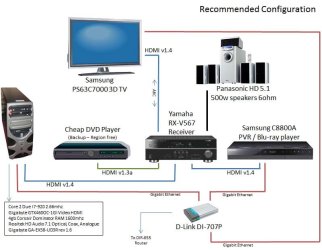
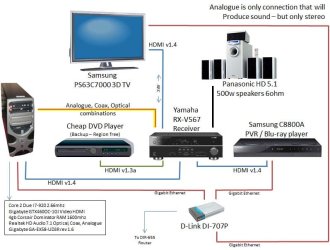
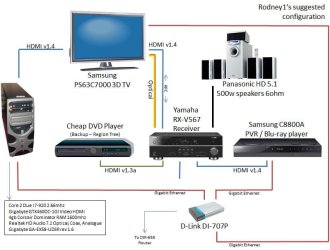
I've documented my set up so it's easier to understand what is going on.

The first image is how it should be. THe second is the only one that I can get working, via analogue cable, and the last is your suggestion - Run HDMI from PC to TV.

Since the HDMI cable on the TV to receiver supports ARC theoretically, I shouldn't have to run optical to the receiver.
 

Attachments

  • HE_config1.jpg
    HE_config1.jpg
    70.9 KB · Views: 53
  • he_config2.jpg
    he_config2.jpg
    76 KB · Views: 34
  • he_config3.jpg
    he_config3.jpg
    71.8 KB · Views: 33

My Computer My Computer

At a glance

Linux Mint 17 Cinnamon | Win 7 Ult x64Intel I7-3770K @ 4.2ghz32GB G-Skill C10QEVGA GTX 670 2GB SC
Computer type
PC/Desktop
Computer Manufacturer/Model Number
Home Made
OS
Linux Mint 17 Cinnamon | Win 7 Ult x64
CPU
Intel I7-3770K @ 4.2ghz
Motherboard
ASRock Extreme 4
Memory
32GB G-Skill C10Q
Graphics Card(s)
EVGA GTX 670 2GB SC
Sound Card
Creative Fatality ExtremeGamer
Monitor(s) Displays
LG E2742V x 2
Screen Resolution
1920x1080
Hard Drives
256GB Vertex 4 SSD
2TB Seagate ST2000DM001
1TB Seagate ST1000DM003
PSU
Corsair HX 650
Case
HAF 932 advanced
Cooling
Corsair H100i liquid cooler
Keyboard
Logitech Wireless
Mouse
Logitech Wireless
Internet Speed
OptusNet NBN 100/40
Antivirus
Malwarebytes
Browser
Firefox 30
Other Info
Router: Sagemcom F@st 3846 Crippled by Optus.
Running the PC via the TV did not work. Of course, the result was no sound at all, even through the speakers. There was no way that I could find to match the receiver to the HDMI port being used, given that the TV HDMI was now different to the receiver HDMI.

So, I've put it all back they way it is supposed to be. I have stereo sound, but if anyone has any other ideas (other than surround virtualization), I'd really appreceiate some help to get this working properly.

thanks
Tanya
 

My Computer My Computer

At a glance

Linux Mint 17 Cinnamon | Win 7 Ult x64Intel I7-3770K @ 4.2ghz32GB G-Skill C10QEVGA GTX 670 2GB SC
Computer type
PC/Desktop
Computer Manufacturer/Model Number
Home Made
OS
Linux Mint 17 Cinnamon | Win 7 Ult x64
CPU
Intel I7-3770K @ 4.2ghz
Motherboard
ASRock Extreme 4
Memory
32GB G-Skill C10Q
Graphics Card(s)
EVGA GTX 670 2GB SC
Sound Card
Creative Fatality ExtremeGamer
Monitor(s) Displays
LG E2742V x 2
Screen Resolution
1920x1080
Hard Drives
256GB Vertex 4 SSD
2TB Seagate ST2000DM001
1TB Seagate ST1000DM003
PSU
Corsair HX 650
Case
HAF 932 advanced
Cooling
Corsair H100i liquid cooler
Keyboard
Logitech Wireless
Mouse
Logitech Wireless
Internet Speed
OptusNet NBN 100/40
Antivirus
Malwarebytes
Browser
Firefox 30
Other Info
Router: Sagemcom F@st 3846 Crippled by Optus.
Solved - No digital sound out of sound system

Running the PC via the TV did not work. Of course, the result was no sound at all, even through the speakers. There was no way that I could find to match the receiver to the HDMI port being used, given that the TV HDMI was now different to the receiver HDMI.

So, I've put it all back they way it is supposed to be. I have stereo sound, but if anyone has any other ideas (other than surround virtualization), I'd really appreceiate some help to get this working properly.

thanks
Tanya

Two faulty optical cables in a row. What are the chances.

The Receiver doesn't need to be matched to the HDMI port, except for devices plugged into the receiver. Since the GTX 460 can't get EDID information from the receiver the PC has to be plugged into the TV. It means a few more clicks on the remotes, but at least it now works.
 

My Computer My Computer

At a glance

Linux Mint 17 Cinnamon | Win 7 Ult x64Intel I7-3770K @ 4.2ghz32GB G-Skill C10QEVGA GTX 670 2GB SC
Computer type
PC/Desktop
Computer Manufacturer/Model Number
Home Made
OS
Linux Mint 17 Cinnamon | Win 7 Ult x64
CPU
Intel I7-3770K @ 4.2ghz
Motherboard
ASRock Extreme 4
Memory
32GB G-Skill C10Q
Graphics Card(s)
EVGA GTX 670 2GB SC
Sound Card
Creative Fatality ExtremeGamer
Monitor(s) Displays
LG E2742V x 2
Screen Resolution
1920x1080
Hard Drives
256GB Vertex 4 SSD
2TB Seagate ST2000DM001
1TB Seagate ST1000DM003
PSU
Corsair HX 650
Case
HAF 932 advanced
Cooling
Corsair H100i liquid cooler
Keyboard
Logitech Wireless
Mouse
Logitech Wireless
Internet Speed
OptusNet NBN 100/40
Antivirus
Malwarebytes
Browser
Firefox 30
Other Info
Router: Sagemcom F@st 3846 Crippled by Optus.
Back
Top