Solved No Display ! Please Help .

Arc

New member
SF Team
Local time
1:52 AM
Messages
35,002
I am trying to fix my friend's computer. The problem is it is not displaying anything ... even the motherboard screen, too !

As far as I know, the specs are ....

Motherboard - Asus (dont know more specifications)
Processor - AMD Athlon 64 bit
RAM - Kingston 4 GB
OS - Windows 7 Home Premium 32 bit
The age of the system is more or less 2 years.

My best guess is the motherboard is damaged . But how to be sure about it? And if not, how to get display back ?

Please help us . Thanks a lot in advance . :)
 

My Computer

Computer type
PC/Desktop
Computer Manufacturer/Model Number
Self Assembled
OS
Microsoft Windows 10 Pro Insider Preview 64-bit
CPU
Intel(R) Core(TM) i3-4130 CPU @ 3.40GHz
Motherboard
Gigabyte Technology Co., Ltd. B85M-D3H
Memory
Corsair Vengence 4GB x2 (8.00GB Dual-Channel DDR3 @ 798MHz)
Graphics Card(s)
2047MB GeForce GTS 450 (ZOTAC International)
Sound Card
Onboard (Realtek High Definition Audio)
Monitor(s) Displays
LG Flatron E2040T
Screen Resolution
1600x900
Hard Drives
Western Digital 1 TB
Seagate 500 GB
PSU
Corsair VS550
Case
Cooler Master K380
Cooling
Cooler Master Seidon 120V Plus
Keyboard
Logitech MK260r
Mouse
Logitech MK260r
Internet Speed
PMPL Broadband
Antivirus
Windows Defender + MBAM
Browser
Firefox
Other Info
Dell Studio 15" Laptop
presumably the monitor is powered on , also check all the cables are in correctly and haven't come loose. :D
 

My Computer

Computer Manufacturer/Model Number
Hewlett packard/p6512uk
OS
Microsoft Windows 7 Home Premium 64-bit 7600
CPU
IIx4 amd athelon 635 processor
Motherboard
FOXCONN 2AA9
Memory
2x2gb
Graphics Card(s)
ati radeon HD 5450
Sound Card
(1) Realtek High Definition Audio (2) AMD High Definition
Monitor(s) Displays
samsung lcd tv 32"
Screen Resolution
1360x 768
Hard Drives
(1) WDC WD10 01FAES-60Z2A0 SATA Disk Device (2) Maxtor OneTouch USB Device (3) ST310003 33AS USB Device (4) WD My Book 1111 USB Device
PSU
?
Cooling
air!
Keyboard
wireless hp
Mouse
wireless Hp,optical
Internet Speed
1.10mb/s
Antivirus
MSE
Browser
Firefox
  • Like
Reactions: Arc
Archie

Is it a desktop or laptop?

Are there any lights on the box (ie power, hd, etc)?

Have you tried reseting the BIOS by removing the power and holding the power button down for 1 minute?
 

My Computer

Computer Manufacturer/Model Number
HP Pavillion dv-7 1005 Tx
OS
Win 8 Release candidate 8400
CPU
[email protected]
Memory
4 gigs
Graphics Card(s)
Nvidia 9600M
Sound Card
HD built-in
Monitor(s) Displays
17" Wxga
Screen Resolution
1440x900
Cooling
none
Internet Speed
45Mb down 5Mb up
presumably the monitor is powered on , also check all the cables are in correctly and haven't come loose. :D
Julian, The monitor is powered on , the indicator is blinking . And all the cables are connected properly . It was the same situation at my friend's home .
Archie

Is it a desktop or laptop?

Are there any lights on the box (ie power, hd, etc)?

Have you tried reseting the BIOS by removing the power and holding the power button down for 1 minute?
Ken, it is a desktop. Lights ... in front of the case, there are two lights, one green and one red, and both are on. On the motherboard (asus M2N MX SE Plus, the same board I had previously) there is one green light, also powered on .

There is a reset button, I have tried it several times, but no result .

Is the red light to be on always ?
 

My Computer

Computer type
PC/Desktop
Computer Manufacturer/Model Number
Self Assembled
OS
Microsoft Windows 10 Pro Insider Preview 64-bit
CPU
Intel(R) Core(TM) i3-4130 CPU @ 3.40GHz
Motherboard
Gigabyte Technology Co., Ltd. B85M-D3H
Memory
Corsair Vengence 4GB x2 (8.00GB Dual-Channel DDR3 @ 798MHz)
Graphics Card(s)
2047MB GeForce GTS 450 (ZOTAC International)
Sound Card
Onboard (Realtek High Definition Audio)
Monitor(s) Displays
LG Flatron E2040T
Screen Resolution
1600x900
Hard Drives
Western Digital 1 TB
Seagate 500 GB
PSU
Corsair VS550
Case
Cooler Master K380
Cooling
Cooler Master Seidon 120V Plus
Keyboard
Logitech MK260r
Mouse
Logitech MK260r
Internet Speed
PMPL Broadband
Antivirus
Windows Defender + MBAM
Browser
Firefox
Other Info
Dell Studio 15" Laptop
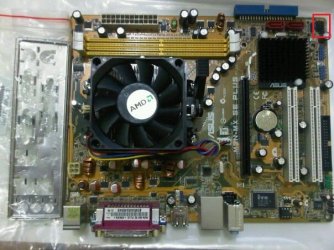
Here is a downloaded image of the board ... I have pointed the source of the red light
248284_2014209110795_1110829356_2387008_1967138_n.jpg
It is plunged at the bottom most pin, and the on the cable it is written H.D.D LED .

Is it an important info to the issue ?
 

My Computer

Computer type
PC/Desktop
Computer Manufacturer/Model Number
Self Assembled
OS
Microsoft Windows 10 Pro Insider Preview 64-bit
CPU
Intel(R) Core(TM) i3-4130 CPU @ 3.40GHz
Motherboard
Gigabyte Technology Co., Ltd. B85M-D3H
Memory
Corsair Vengence 4GB x2 (8.00GB Dual-Channel DDR3 @ 798MHz)
Graphics Card(s)
2047MB GeForce GTS 450 (ZOTAC International)
Sound Card
Onboard (Realtek High Definition Audio)
Monitor(s) Displays
LG Flatron E2040T
Screen Resolution
1600x900
Hard Drives
Western Digital 1 TB
Seagate 500 GB
PSU
Corsair VS550
Case
Cooler Master K380
Cooling
Cooler Master Seidon 120V Plus
Keyboard
Logitech MK260r
Mouse
Logitech MK260r
Internet Speed
PMPL Broadband
Antivirus
Windows Defender + MBAM
Browser
Firefox
Other Info
Dell Studio 15" Laptop
Archan, is there a spare monitor available? You could hookup the unit to that, if the problem persists you'll know it isn't the monitor. Second, swap the memory sticks around. Third run mem diags and hd diags. Fourth, can you get into the bios? If yes, try resetting to defaults. Finally, try booting from a win7 install dvd (dont worry about activation etc. right now).
 

My Computer

Computer Manufacturer/Model Number
Too many to describe...
OS
Windows 7 x64 pro/ Windows 7 x86 Pro/ XP SP3 x86
Bill, I have tried the system on three different monitors ... on of my friends own, one is my old unused one, and on my working monitor .... it is the same all black everywhere :(

I removed both the ram sticks, cleaned those up and applied again, no result at all .

Unfortunately I cannot go for the last three advises you suggested, coz it is not displaying the motherboard screen, too !

I have applied the hard disk on my computer, it works very nice .

Should the board me replaced ?
 

My Computer

Computer type
PC/Desktop
Computer Manufacturer/Model Number
Self Assembled
OS
Microsoft Windows 10 Pro Insider Preview 64-bit
CPU
Intel(R) Core(TM) i3-4130 CPU @ 3.40GHz
Motherboard
Gigabyte Technology Co., Ltd. B85M-D3H
Memory
Corsair Vengence 4GB x2 (8.00GB Dual-Channel DDR3 @ 798MHz)
Graphics Card(s)
2047MB GeForce GTS 450 (ZOTAC International)
Sound Card
Onboard (Realtek High Definition Audio)
Monitor(s) Displays
LG Flatron E2040T
Screen Resolution
1600x900
Hard Drives
Western Digital 1 TB
Seagate 500 GB
PSU
Corsair VS550
Case
Cooler Master K380
Cooling
Cooler Master Seidon 120V Plus
Keyboard
Logitech MK260r
Mouse
Logitech MK260r
Internet Speed
PMPL Broadband
Antivirus
Windows Defender + MBAM
Browser
Firefox
Other Info
Dell Studio 15" Laptop
Can you get to the video card? If yes, take it out. If that gives you a beep or some beeps, the video card could be the problem. If it doesnt, and you've ruled out the monitor, memory, hard disk, then yes time to look at the cpu and mobo. Are you sure the friend hasn't fiddled with CAS latency or something?
 

My Computer

Computer Manufacturer/Model Number
Too many to describe...
OS
Windows 7 x64 pro/ Windows 7 x86 Pro/ XP SP3 x86
Bill, there is no video card, just onboard graphics .

My friend is not a geek at all. She uses MS Word , Vlc, etc programs only . I am sure that she cannot make any major change in anything .

How should I check the CPU and motherboard ? And may I apply a graphics card to see if it changes anything ?
 

My Computer

Computer type
PC/Desktop
Computer Manufacturer/Model Number
Self Assembled
OS
Microsoft Windows 10 Pro Insider Preview 64-bit
CPU
Intel(R) Core(TM) i3-4130 CPU @ 3.40GHz
Motherboard
Gigabyte Technology Co., Ltd. B85M-D3H
Memory
Corsair Vengence 4GB x2 (8.00GB Dual-Channel DDR3 @ 798MHz)
Graphics Card(s)
2047MB GeForce GTS 450 (ZOTAC International)
Sound Card
Onboard (Realtek High Definition Audio)
Monitor(s) Displays
LG Flatron E2040T
Screen Resolution
1600x900
Hard Drives
Western Digital 1 TB
Seagate 500 GB
PSU
Corsair VS550
Case
Cooler Master K380
Cooling
Cooler Master Seidon 120V Plus
Keyboard
Logitech MK260r
Mouse
Logitech MK260r
Internet Speed
PMPL Broadband
Antivirus
Windows Defender + MBAM
Browser
Firefox
Other Info
Dell Studio 15" Laptop
If theres a way to test the video card, good. Have you checked the PSU yet?

The CPU can only be tested on another PC, so you'll need to take it to a shop I think. But mobos break faster than CPUs so it could be something say a wireless card shorted on the mobo.
 

My Computer

Computer Manufacturer/Model Number
Too many to describe...
OS
Windows 7 x64 pro/ Windows 7 x86 Pro/ XP SP3 x86
I was testing all the parts once again .... everything other than the motherboard works well . So I would suggest her to replace the board . Is there an alternative of this Asus M2N MX SE Plus available, which one will run with AMD Athlon 64 bit processor properly ?

It would be a pressure on her to change all the MOBO, CPU and RAM at once .... :(
 

My Computer

Computer type
PC/Desktop
Computer Manufacturer/Model Number
Self Assembled
OS
Microsoft Windows 10 Pro Insider Preview 64-bit
CPU
Intel(R) Core(TM) i3-4130 CPU @ 3.40GHz
Motherboard
Gigabyte Technology Co., Ltd. B85M-D3H
Memory
Corsair Vengence 4GB x2 (8.00GB Dual-Channel DDR3 @ 798MHz)
Graphics Card(s)
2047MB GeForce GTS 450 (ZOTAC International)
Sound Card
Onboard (Realtek High Definition Audio)
Monitor(s) Displays
LG Flatron E2040T
Screen Resolution
1600x900
Hard Drives
Western Digital 1 TB
Seagate 500 GB
PSU
Corsair VS550
Case
Cooler Master K380
Cooling
Cooler Master Seidon 120V Plus
Keyboard
Logitech MK260r
Mouse
Logitech MK260r
Internet Speed
PMPL Broadband
Antivirus
Windows Defender + MBAM
Browser
Firefox
Other Info
Dell Studio 15" Laptop
You could try a different video cable, if you haven't done so already while testing the other monitors.

But if the onboard chip has failed there is little to do but replace the board. If there is a video card slot you could test a graphics card.

One thing you should test before giving up on the MB: reset the BIOS by performing a Clear CMOS or CLRTC:

  • Shut down the computer > remove the power cord.
  • Remove the 3.3v battery.
  • Move the CLRTC jumper from pins 1-2 to 2-3.
  • Touch a metal part of the case and Press and Hold the reset button for approx. 30 seconds to discharge all power from the board.
  • Put the CLRTC jumper back on pins 1-2.
  • Replace the 3.3v battery > replace the power cord > boot.
  • Immediately go back into BIOS and reset all your preferred settings. If the CLRTC worked you will need to reset the date and time.
That last step is only possible if this works, and the graphics chip was disabnled by some BIOS corruption. A corruption is possible if the 3.3v battery is going dead.
 

My Computer

Computer type
PC/Desktop
Computer Manufacturer/Model Number
Home Built - Jan 2013
OS
Windows 7 64 Bit Home Premium SP1
CPU
i7-3820
Motherboard
Asus P9X79-PRO - Bios 4608
Memory
GSkill F3-14900CL9Q - 16GB
Graphics Card(s)
EVGA GeForce GTX660 - Driver 352.86
Sound Card
On board Realtek ALC898
Monitor(s) Displays
Acer S271HL
Screen Resolution
1920 x 1080
Hard Drives
#1- Samsung 840 Pro Series
#2- Western Digital WD1002FAEX Sata3 Black
#3- Western Digital WD1002FAEX Sata3 Black
PSU
Corsair CMPSU-850TX-V2 - 850 watt (by Seasonic)
Case
Corsair Obsidian 550D
Cooling
Standard 3 120mm case fans, Cooler Master Hyper 212 EVO
Keyboard
MS KC-0405
Mouse
Intellimouse 5-button
Internet Speed
56 Mbits/Sec (on a good day)
Antivirus
Avast & Malwarebytes
Browser
Firefox
Other Info
Asus DVD - DRW-24B1ST 24X
Finally the board is replaced ... with a gigabyte one . The shop near my home says that Asus is failing frequently ..... and as I am a regular customer, they dont want to sell me that thing . It costs near about Rs 2,500 (Indian Rupees, including VAT) , not that a big amount (which was my biggest concern).

So my friend is happy now, and I have learned a lot due to this issue, and so I am also happy . Thank you everybody, my friends :D
 

My Computer

Computer type
PC/Desktop
Computer Manufacturer/Model Number
Self Assembled
OS
Microsoft Windows 10 Pro Insider Preview 64-bit
CPU
Intel(R) Core(TM) i3-4130 CPU @ 3.40GHz
Motherboard
Gigabyte Technology Co., Ltd. B85M-D3H
Memory
Corsair Vengence 4GB x2 (8.00GB Dual-Channel DDR3 @ 798MHz)
Graphics Card(s)
2047MB GeForce GTS 450 (ZOTAC International)
Sound Card
Onboard (Realtek High Definition Audio)
Monitor(s) Displays
LG Flatron E2040T
Screen Resolution
1600x900
Hard Drives
Western Digital 1 TB
Seagate 500 GB
PSU
Corsair VS550
Case
Cooler Master K380
Cooling
Cooler Master Seidon 120V Plus
Keyboard
Logitech MK260r
Mouse
Logitech MK260r
Internet Speed
PMPL Broadband
Antivirus
Windows Defender + MBAM
Browser
Firefox
Other Info
Dell Studio 15" Laptop
Back
Top