No Driver for Network Adapter?

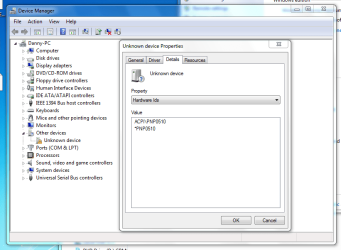
There's the screen shot of the unknown device. I should have mentioned that earlier.

Should I be installing both of those or just the one from the edit?
 

Attachments

  • Unknows Device.PNG
    Unknows Device.PNG
    34.6 KB · Views: 35

My Computer My Computer

Computer Manufacturer/Model Number
AlienWare Aurora 3500-R4
OS
Windows 7 Home Premium x64
CPU
AMD Athlon(tm) 64 X2 Duel Core Processor 5000+ (2 CPUs)
Memory
2048 MB RAM
Graphics Card(s)
ATI Radeon HD 2600 Pro
Sound Card
Digital Audio (S/PDIF)
Monitor(s) Displays
Generic PnP Monitor 17" AOpen
Hard Drives
ST325082 4AS SCSI Disk Device
Hi exemer, have you tried the Atheros drivers , you should have a wireless mini lan card in your lappy download and install the atheros driver in compatibility mode for Vista , will load up my lappy now and give you the exact driver in about 10 mins ;)
 

My Computer My Computer

Computer type
PC/Desktop
Computer Manufacturer/Model Number
self build
OS
win 7 ultimate32bit, Win8.1pro wmc 32bit
CPU
amd phenom x4 9600
Motherboard
asus m2n32-sli deluxe
Memory
corsair twinxs 2x2gb
Graphics Card(s)
2x nvidia 1gb 8500gt
Sound Card
onboard
Monitor(s) Displays
23" PB Viseo 233d
Screen Resolution
1920x1080
Hard Drives
maxtor sata 500gb
maxtor sata 320gb
fujitsu sata200gb
PSU
oryxx tornado 750w
Case
thermaltake xaser lll
Cooling
artic freezer64 pro + 7 case fans
If this is an upgrade install you will sometimes need to reset Winsock to get the network up and running.

1. Click start, type cmd in the Start Search box, right-click cmd.exe, click Run as administrator, and then press Continue.


2. Type netsh winsock reset at the command prompt, and then press ENTER.

Note If the command is typed incorrectly, you will receive an error message. Type the command again. When the command is completed successfully, a confirmation appears, followed by a new command prompt. Then, go to step 3.


3. Type exit, and then press ENTER. You should be prompted to reboot, if not you should reboot and test.

If the problem persists then sometimes a clean installation from the upgrade CD works better.

http://www.sevenforums.com/tutorials/1649-clean-install-windows-7-a.html

http://www.sevenforums.com/tutorials/1649-clean-install-windows-7-a.html
 

My Computer My Computer

Computer type
PC/Desktop
Computer Manufacturer/Model Number
Home built
OS
Windows 7 Ult, Windows 8.1 Pro,
CPU
Q9650-4.275GHz, E8600 4.5GHz, E6750-3.8GHz
Motherboard
Evga 780i FTW
Memory
G.Skill PC2 9600 1200Mhz 5 5 5 15 2T
Graphics Card(s)
GTX480
Sound Card
Asus Xonar D2
Monitor(s) Displays
HannsG
Screen Resolution
1680X1050
Hard Drives
GSkill Phoenix Pro 120GB SSD
PSU
ThermalTake Toughpower 1000Watt modular
Case
ThermalTake XaserV
Cooling
Xigmatek S1283
Keyboard
Logitech G15
Mouse
Logitech G9
Internet Speed
T1

My Computer My Computer

Computer type
PC/Desktop
Computer Manufacturer/Model Number
self build
OS
win 7 ultimate32bit, Win8.1pro wmc 32bit
CPU
amd phenom x4 9600
Motherboard
asus m2n32-sli deluxe
Memory
corsair twinxs 2x2gb
Graphics Card(s)
2x nvidia 1gb 8500gt
Sound Card
onboard
Monitor(s) Displays
23" PB Viseo 233d
Screen Resolution
1920x1080
Hard Drives
maxtor sata 500gb
maxtor sata 320gb
fujitsu sata200gb
PSU
oryxx tornado 750w
Case
thermaltake xaser lll
Cooling
artic freezer64 pro + 7 case fans
pebbly, it's a desktop. The fun part is determining what it has for its onboard NIC. One possibility assuming Alienware didn't have the NIC changed from what is on the reference Foxconn board is that it may have come with the Killer NIC in it (Killer had to sell those things somehow).

Exemer quick question; is the ethernet cable plugged into the general area of #1 or #2,
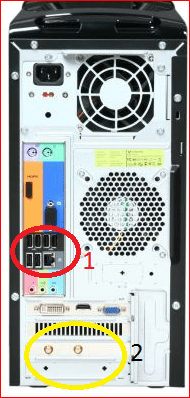
backpanel1.PNG

If it is #1 then it is the onboard NIC. If it is #2 (or even if #1 and there is an ethernet port anywhere near #2), then it also has a separate NIC card. If it is #2 and that is what you are using, then the easiest way to find out what it is is to pull the card and make note of the make and model number of it, then search for the drivers.

As far as that screen shot you posted with the hardware ID showing as PNP0510, from what I can find that is for an IrDA port,

Infrared Data Association - Wikipedia, the free encyclopedia

This is one of those things that if you're not using it, and assuming they didn't hide the option in the bios you can disable. Unfortunately this is one of those things that you know is actually being used, short of disabling it and seeing what doesn't work, the only way I can think of to see if it is connected to anything is to open the computer and see if there is something connected to the IrDA port on the motherboard. If you want to check inside and see it should be located here based on the reference Foxconn board green circle),
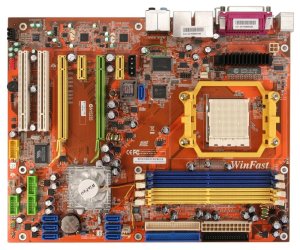
winfast-n570sm2aa.jpg

If there is nothing attached to it then you should be able to disable it in the bios here,
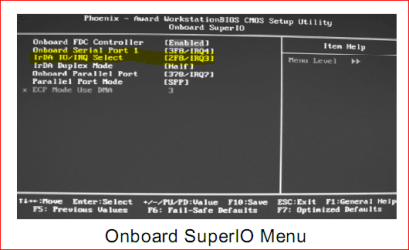
irda.PNG

Highlight the option and hit Enter, then set it to disabled (you can also do the same with the serial and parallel ports if you're not using them).

 

My Computer My Computer

Computer type
PC/Desktop
Computer Manufacturer/Model Number
Me
OS
Win 7 Ultimate x64
CPU
FX-8350 @ 4.6 GHz so far
Motherboard
Asus M5A97 EVO
Memory
ADATA XPG V1 Series Black 8GB DDR3 1600
Graphics Card(s)
Sapphire R9 270x Dual-X
Sound Card
Xonar DGX w/ Corsair Vengence 1300
Monitor(s) Displays
Acer S232HL Abid
Screen Resolution
1920x1080
Hard Drives
120 GB OCZ Vertex 3
500 GB Seagate 7200.12
PSU
Antec Earthwatts 650W Green
Case
Antec Three Hundred
Cooling
Cooler Master 212 EVO
Keyboard
Logitech G510
Mouse
Logitech G500s
Internet Speed
35000/3000
Thanks for at last trying to help pebbly.

Chev65, I tried resetting Winsock like you said and it doesn't seem to have done anything.

It is located in the #1 area, Stormy13. There are two ports if that means anything.
 

My Computer My Computer

Computer Manufacturer/Model Number
AlienWare Aurora 3500-R4
OS
Windows 7 Home Premium x64
CPU
AMD Athlon(tm) 64 X2 Duel Core Processor 5000+ (2 CPUs)
Memory
2048 MB RAM
Graphics Card(s)
ATI Radeon HD 2600 Pro
Sound Card
Digital Audio (S/PDIF)
Monitor(s) Displays
Generic PnP Monitor 17" AOpen
Hard Drives
ST325082 4AS SCSI Disk Device

My Computer My Computer

Computer Manufacturer/Model Number
AlienWare Aurora 3500-R4
OS
Windows 7 Home Premium x64
CPU
AMD Athlon(tm) 64 X2 Duel Core Processor 5000+ (2 CPUs)
Memory
2048 MB RAM
Graphics Card(s)
ATI Radeon HD 2600 Pro
Sound Card
Digital Audio (S/PDIF)
Monitor(s) Displays
Generic PnP Monitor 17" AOpen
Hard Drives
ST325082 4AS SCSI Disk Device
And that one doesn't shown it either. It does at least show that it has the Realtek ALC882 of which you can find the latest driver for here,

http://www.sevenforums.com/sound-audio/3756-latest-realtek-hd-audio-driver-version.html

Edit: Just had a better look at that log and it lists the motherboard as the Foxconn N570SM2AA. Now Foxconn does have a retail version of that board,

Foxconn - Products: Motherboard

Should I have tried to install either of these?
exemer, you have nothing to lose by trying them, the drivers are for Vista
so you may have to install them in compatibility mode, also have you got the foxxcon live update installed? :)
 

My Computer My Computer

Computer type
PC/Desktop
Computer Manufacturer/Model Number
self build
OS
win 7 ultimate32bit, Win8.1pro wmc 32bit
CPU
amd phenom x4 9600
Motherboard
asus m2n32-sli deluxe
Memory
corsair twinxs 2x2gb
Graphics Card(s)
2x nvidia 1gb 8500gt
Sound Card
onboard
Monitor(s) Displays
23" PB Viseo 233d
Screen Resolution
1920x1080
Hard Drives
maxtor sata 500gb
maxtor sata 320gb
fujitsu sata200gb
PSU
oryxx tornado 750w
Case
thermaltake xaser lll
Cooling
artic freezer64 pro + 7 case fans
Thanks for at last trying to help pebbly.

Chev65, I tried resetting Winsock like you said and it doesn't seem to have done anything.

It is located in the #1 area, Stormy13. There are two ports if that means anything.

Have you tried using the "other" eithernet port on the back of the machine? Have you attempted to clear the cmos yet?
 

My Computer My Computer

Computer type
PC/Desktop
Computer Manufacturer/Model Number
Home built
OS
Windows 7 Ult, Windows 8.1 Pro,
CPU
Q9650-4.275GHz, E8600 4.5GHz, E6750-3.8GHz
Motherboard
Evga 780i FTW
Memory
G.Skill PC2 9600 1200Mhz 5 5 5 15 2T
Graphics Card(s)
GTX480
Sound Card
Asus Xonar D2
Monitor(s) Displays
HannsG
Screen Resolution
1680X1050
Hard Drives
GSkill Phoenix Pro 120GB SSD
PSU
ThermalTake Toughpower 1000Watt modular
Case
ThermalTake XaserV
Cooling
Xigmatek S1283
Keyboard
Logitech G15
Mouse
Logitech G9
Internet Speed
T1
exemer, listed here are 5 nic cards Alienware : The Ultimate Gaming Machine= 1of these cards must be what you have installed on your desktop , if by any chance you are using a seperate nic have you disabled the onboard nic ?
 

My Computer My Computer

Computer type
PC/Desktop
Computer Manufacturer/Model Number
self build
OS
win 7 ultimate32bit, Win8.1pro wmc 32bit
CPU
amd phenom x4 9600
Motherboard
asus m2n32-sli deluxe
Memory
corsair twinxs 2x2gb
Graphics Card(s)
2x nvidia 1gb 8500gt
Sound Card
onboard
Monitor(s) Displays
23" PB Viseo 233d
Screen Resolution
1920x1080
Hard Drives
maxtor sata 500gb
maxtor sata 320gb
fujitsu sata200gb
PSU
oryxx tornado 750w
Case
thermaltake xaser lll
Cooling
artic freezer64 pro + 7 case fans
Thanks for at last trying to help pebbly.

Chev65, I tried resetting Winsock like you said and it doesn't seem to have done anything.

It is located in the #1 area, Stormy13. There are two ports if that means anything.

Have you tried using the "other" eithernet port on the back of the machine? Have you attempted to clear the cmos yet?

Yeah, that was the problem before I upgraded to 7. For some reason the internet would only work one of the two ports. I did try both and neither of them are working. Also, I'm not sure what cmos is.
 

My Computer My Computer

Computer Manufacturer/Model Number
AlienWare Aurora 3500-R4
OS
Windows 7 Home Premium x64
CPU
AMD Athlon(tm) 64 X2 Duel Core Processor 5000+ (2 CPUs)
Memory
2048 MB RAM
Graphics Card(s)
ATI Radeon HD 2600 Pro
Sound Card
Digital Audio (S/PDIF)
Monitor(s) Displays
Generic PnP Monitor 17" AOpen
Hard Drives
ST325082 4AS SCSI Disk Device
I will try those driver when I get off of work tomorrow afternoon if I can.
And I don't think I can update Foxxcon via my laptop can I? Since the whole issue is no internet on my desktop. ;)
 

My Computer My Computer

Computer Manufacturer/Model Number
AlienWare Aurora 3500-R4
OS
Windows 7 Home Premium x64
CPU
AMD Athlon(tm) 64 X2 Duel Core Processor 5000+ (2 CPUs)
Memory
2048 MB RAM
Graphics Card(s)
ATI Radeon HD 2600 Pro
Sound Card
Digital Audio (S/PDIF)
Monitor(s) Displays
Generic PnP Monitor 17" AOpen
Hard Drives
ST325082 4AS SCSI Disk Device
Well i got the audio working. The reason it showed that I didn't have any drivers at the time was because I didn't have any Audio Devices plugged in at the time. I'm using a cheap headset and never got around to plugging it in before I realized I couldn't get my internet to work.

Now I just need a Network Adapter Driver and I'll be all set.
 

My Computer My Computer

Computer Manufacturer/Model Number
AlienWare Aurora 3500-R4
OS
Windows 7 Home Premium x64
CPU
AMD Athlon(tm) 64 X2 Duel Core Processor 5000+ (2 CPUs)
Memory
2048 MB RAM
Graphics Card(s)
ATI Radeon HD 2600 Pro
Sound Card
Digital Audio (S/PDIF)
Monitor(s) Displays
Generic PnP Monitor 17" AOpen
Hard Drives
ST325082 4AS SCSI Disk Device
Can we get a confirmation on the model number of your computer please, as about the only thing of any relevance to what you have listed is this,

Alienware Aurora 3500 (Athlon 64 Review (3800) - Desktops - CNET Reviews

and the specs listed on page 2 there don't match up to what Siw and others are showing. Also nothing shows up when searching Alienware's support site using 3500.

Might even be worth signing up here (if you haven't already),

http://support.alienware.com/Profil...l=/Support_Pages/Restricted_Pages/myhive.aspx

and see if they can tell you exactly what is inside the computer.
 

My Computer My Computer

Computer type
PC/Desktop
Computer Manufacturer/Model Number
Me
OS
Win 7 Ultimate x64
CPU
FX-8350 @ 4.6 GHz so far
Motherboard
Asus M5A97 EVO
Memory
ADATA XPG V1 Series Black 8GB DDR3 1600
Graphics Card(s)
Sapphire R9 270x Dual-X
Sound Card
Xonar DGX w/ Corsair Vengence 1300
Monitor(s) Displays
Acer S232HL Abid
Screen Resolution
1920x1080
Hard Drives
120 GB OCZ Vertex 3
500 GB Seagate 7200.12
PSU
Antec Earthwatts 650W Green
Case
Antec Three Hundred
Cooling
Cooler Master 212 EVO
Keyboard
Logitech G510
Mouse
Logitech G500s
Internet Speed
35000/3000
The only other set of numbers I can find on the back of the computer is:

Account#AW: PC-435633A

***Edit***

I have upgraded it some more since i bought it from them so they wont know what I put inside it.
 

My Computer My Computer

Computer Manufacturer/Model Number
AlienWare Aurora 3500-R4
OS
Windows 7 Home Premium x64
CPU
AMD Athlon(tm) 64 X2 Duel Core Processor 5000+ (2 CPUs)
Memory
2048 MB RAM
Graphics Card(s)
ATI Radeon HD 2600 Pro
Sound Card
Digital Audio (S/PDIF)
Monitor(s) Displays
Generic PnP Monitor 17" AOpen
Hard Drives
ST325082 4AS SCSI Disk Device
The only other set of numbers I can find on the back of the computer is:

Account#AW: PC-435633A

***Edit***

I have upgraded it some more since i bought it from them so they wont know what I put inside it.

exemer, did you upgrade the network card when you upgraded ? Drivers & Downloads
this is the original hardware drivers supplied when the PC was new , as you can see there were 6 variations of network adaptor available at that time , could you please help us and download a little proggy called speccy
Speccy - System Information - Free Download and post us a screen shot so we can actually see what hardware you have in the pc ;)
 

My Computer My Computer

Computer type
PC/Desktop
Computer Manufacturer/Model Number
self build
OS
win 7 ultimate32bit, Win8.1pro wmc 32bit
CPU
amd phenom x4 9600
Motherboard
asus m2n32-sli deluxe
Memory
corsair twinxs 2x2gb
Graphics Card(s)
2x nvidia 1gb 8500gt
Sound Card
onboard
Monitor(s) Displays
23" PB Viseo 233d
Screen Resolution
1920x1080
Hard Drives
maxtor sata 500gb
maxtor sata 320gb
fujitsu sata200gb
PSU
oryxx tornado 750w
Case
thermaltake xaser lll
Cooling
artic freezer64 pro + 7 case fans
Alien Ware is Alien

Here is what I found at Alien ware.

This drivers and downloads site is intended for customers who purchased an Alienware system prior to September 2009 and do not have a service tag included on the system.
For systems that were purchased after September of 2009, please visit www.support.dell.com for the latest drivers and updates. In addition, if your system has a service tag on the bottom of the system (Notebooks) or in the front of the system (Desktops) then you will also need to visit www.support.dell.com for the latest drivers and updates.
 

My Computer My Computer

Computer Manufacturer/Model Number
BGC (Bob's Garage Crew)
OS
win 7 X64 Ultimate SP1
CPU
I3770K
Motherboard
Asus P8Z77-V Deluxe
Memory
G Skill F3-14900CL9-4GBXL x 4
Graphics Card(s)
NVIDIA GeForce GTX670 + Intel 4000
Sound Card
Realtek HD 5.1 (MOB)
Monitor(s) Displays
Asus VW224T (1)
Screen Resolution
1920 x 1080
Hard Drives
SATA Corsair Force GT 2.5" 180GB (System) Sata 3
OCZ Vertex3 120GB
OCZ Vertex 2 120GB 2.5" SATA II
ST31000524AS 1000.2GB
WD15EARS (External)
PSU
CoolerMaster 1000 Watt
Case
CoolerMaster HAF X
Cooling
CPU -- CoolerMaster 520N
Keyboard
MS Wireless 3000 V2
Mouse
MS Wireless 3000 V2
Internet Speed
Cable
Antivirus
Norton Internet Security
Browser
IE9
Other Info
AMI Bios 1805
OC'd 3%
Here is what I found at Alien ware.

This drivers and downloads site is intended for customers who purchased an Alienware system prior to September 2009 and do not have a service tag included on the system.
For systems that were purchased after September of 2009, please visit www.support.dell.com for the latest drivers and updates. In addition, if your system has a service tag on the bottom of the system (Notebooks) or in the front of the system (Desktops) then you will also need to visit www.support.dell.com for the latest drivers and updates.

thank you for the added info HammerHead , It is from the Dell site that we are supplying the drivers for the OP :)
 

My Computer My Computer

Computer type
PC/Desktop
Computer Manufacturer/Model Number
self build
OS
win 7 ultimate32bit, Win8.1pro wmc 32bit
CPU
amd phenom x4 9600
Motherboard
asus m2n32-sli deluxe
Memory
corsair twinxs 2x2gb
Graphics Card(s)
2x nvidia 1gb 8500gt
Sound Card
onboard
Monitor(s) Displays
23" PB Viseo 233d
Screen Resolution
1920x1080
Hard Drives
maxtor sata 500gb
maxtor sata 320gb
fujitsu sata200gb
PSU
oryxx tornado 750w
Case
thermaltake xaser lll
Cooling
artic freezer64 pro + 7 case fans
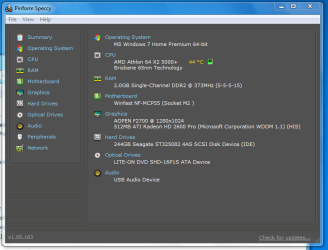
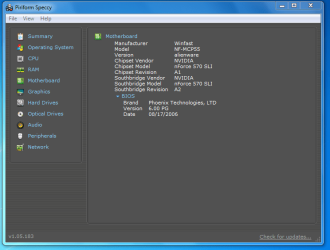
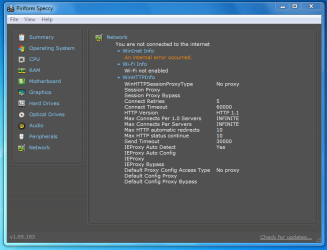
Here's the screen shots.

I don't think that I upgraded the Network Card when I upgraded it. Mainly the Video Card and Power Supply. I will try those drivers and see if any of them work.
 

Attachments

  • 001.PNG
    001.PNG
    26.1 KB · Views: 8
  • 002.PNG
    002.PNG
    24.6 KB · Views: 5
  • 003.PNG
    003.PNG
    25.8 KB · Views: 7

My Computer My Computer

Computer Manufacturer/Model Number
AlienWare Aurora 3500-R4
OS
Windows 7 Home Premium x64
CPU
AMD Athlon(tm) 64 X2 Duel Core Processor 5000+ (2 CPUs)
Memory
2048 MB RAM
Graphics Card(s)
ATI Radeon HD 2600 Pro
Sound Card
Digital Audio (S/PDIF)
Monitor(s) Displays
Generic PnP Monitor 17" AOpen
Hard Drives
ST325082 4AS SCSI Disk Device
exemer, did you upgrade the network card when you upgraded ? Drivers & Downloads
this is the original hardware drivers supplied when the PC was new , as you can see there were 6 variations of network adaptor available at that time

I tried a few of those drivers. One froze when it started installing the drivers. The other managed to fully install but it says there's still no driver.
 

My Computer My Computer

Computer Manufacturer/Model Number
AlienWare Aurora 3500-R4
OS
Windows 7 Home Premium x64
CPU
AMD Athlon(tm) 64 X2 Duel Core Processor 5000+ (2 CPUs)
Memory
2048 MB RAM
Graphics Card(s)
ATI Radeon HD 2600 Pro
Sound Card
Digital Audio (S/PDIF)
Monitor(s) Displays
Generic PnP Monitor 17" AOpen
Hard Drives
ST325082 4AS SCSI Disk Device
Back
Top