No Drives Displayed in "Computer"

vidurm

New member
Local time
3:22 AM
Messages
21
Hi all!

Just upgraded to Windows 7 today and have been totally loving it! Its so much faster than Vista.

I just have one major problem that has been bothering me. I dont know whether its a bug or just a noob mistake on my part but I am unable to see any drives whatsoever in the "computer" folder. I have tried disabling/enabling the "Show empty drives" thing but to no avail.

It would be great if someone could help me out with this issue.

ThankS!!!
 

My Computer

Computer Manufacturer/Model Number
Dell XPS Studio 16
OS
Windows 7 RC1 64bit
CPU
Intel Core2Duo [email protected]
Memory
3GB
Graphics Card(s)
ATI Radeon 3670 512MB
Screen Resolution
720p
Hard Drives
320GB 7200rpm
Internet Speed
2mbps
Other Info
Backlit Keyboard FTW!
Right click on Computer, then Manage, then Disk Management, then rightclick on a partition and you will find something like this: Add or Change drive letter. Use that for each partition you want to see in the computer folder.
 

My Computer

Computer Manufacturer/Model Number
home made
OS
Windows 7 RTM x64
CPU
AMD X2 5000+
Motherboard
Asrock
Memory
4GB
Graphics Card(s)
Nvidia 9400GT
Sound Card
onboard 6Ch
Monitor(s) Displays
Medion 22" + HannSpree 22"
Screen Resolution
1680X1050 + 1920X1080
Hard Drives
Intel SSD 80GB
WD 1.5 TB
WD 1 TB
Samsung 1TB X 3
PSU
noname
Case
noname
Cooling
Zalman
Keyboard
DeLUX multimedia keyboard
Mouse
Microsoft
Internet Speed
25MB/s
I never had to do that Robert - let's ascertain that the view isn't simply set to something else first....

Vidurn - can you post a screen shot of what your explorer window looks like in My Computer?
 

My Computers

System One System Two

  • Computer type
    PC/Desktop
    Computer Manufacturer/Model Number
    The Beast Model A (homebrew)
    OS
    Windows 11 21H2 Current build
    CPU
    AMD Ryzen 9 3950X
    Motherboard
    MSI MEG X570 GODLIKE
    Memory
    4 * 32 GB - Corsair Vengeance 3600 MHz
    Graphics Card(s)
    EVGA GeForce RTX 3080 Ti XC3 ULTRA GAMING (12G-P5-3955-KR)
    Sound Card
    Realtek® ALC1220 Codec
    Monitor(s) Displays
    2x Eve Spectrum ES07D03 4K Gaming Monitor (Matte) | Eve Spec
    Screen Resolution
    3x 3840 x 2160
    Hard Drives
    3x Samsung 980 Pro NVMe PCIe 4 M.2 2 TB SSD (MZ-V8P2T0B/AM) } 3x Sabrent Rocket NVMe 4.0 1 TB SSD
    PSU
    PC Power & Cooling’s Silencer Series 1050 Watt, 80 Plus Plat
    Case
    Fractal Design Define 7 XL Dark ATX Full Tower Case
    Cooling
    SteelSeries Apex Pro Wired Gaming Keyboard
    Keyboard
    SteelSeries Apex Pro
    Mouse
    Logitech MX Master 3S | MX Master 3 for business
    Internet Speed
    AT&T LightSpeed Gigabit Duplex Ftth
    Antivirus
    Windows Defender + MB 3
    Browser
    Nightly (default) + Firefox (stable),Chrome, Edge
  • Computer type
    PC/Desktop
    System Manufacturer/Model Number
    Dell Latitude E5470
    OS
    ChromeOS Flex Dev Channel (current)
    CPU
    Intel(R) Core(TM) i5-6300U CPU @ 2.40GHz, 2501 Mhz, 2 Core(s), 4 Logical Processor(s)
    Motherboard
    Dell
    Memory
    16 GB
    Graphics Card(s)
    Intel(R) HD Graphics 520
    Sound Card
    Intel(R) HD Graphics 520 + RealTek Audio
    Monitor(s) Displays
    Dell laptop display 15"
    Screen Resolution
    1920 * 1080
    Hard Drives
    Toshiba 128GB M.2 22300 drive
    INTEL Cherryville 520 Series SSDSC2CW180A 180 GB SATA III SSD
    PSU
    Dell
    Case
    Dell
    Cooling
    Dell
    Keyboard
    Dell
    Mouse
    Logitech MX Master 3S (shared w. Sys 1) | Dell TouchPad
    Internet Speed
    AT&T LightSpeed Gigabit Duplex Ftth
Thanks!

Well, my partitions already have drive letters allocated to them.

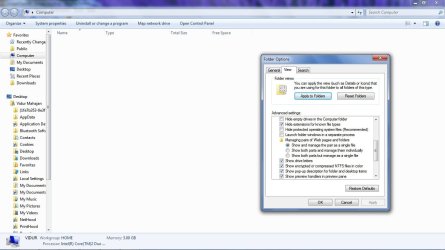
I am posting a screenie below:

Have included my folder settings as well in the screen shot.

Thanks alot!!


My Computer

Computer Manufacturer/Model Number
Dell XPS Studio 16
OS
Windows 7 RC1 64bit
CPU
Intel Core2Duo [email protected]
Memory
3GB
Graphics Card(s)
ATI Radeon 3670 512MB
Screen Resolution
720p
Hard Drives
320GB 7200rpm
Internet Speed
2mbps
Other Info
Backlit Keyboard FTW!
can you post the real image as opposed to the thumbnail? and try loading it here directly instead of using a third party hosting site....s
 

My Computers

System One System Two

  • Computer type
    PC/Desktop
    Computer Manufacturer/Model Number
    The Beast Model A (homebrew)
    OS
    Windows 11 21H2 Current build
    CPU
    AMD Ryzen 9 3950X
    Motherboard
    MSI MEG X570 GODLIKE
    Memory
    4 * 32 GB - Corsair Vengeance 3600 MHz
    Graphics Card(s)
    EVGA GeForce RTX 3080 Ti XC3 ULTRA GAMING (12G-P5-3955-KR)
    Sound Card
    Realtek® ALC1220 Codec
    Monitor(s) Displays
    2x Eve Spectrum ES07D03 4K Gaming Monitor (Matte) | Eve Spec
    Screen Resolution
    3x 3840 x 2160
    Hard Drives
    3x Samsung 980 Pro NVMe PCIe 4 M.2 2 TB SSD (MZ-V8P2T0B/AM) } 3x Sabrent Rocket NVMe 4.0 1 TB SSD
    PSU
    PC Power & Cooling’s Silencer Series 1050 Watt, 80 Plus Plat
    Case
    Fractal Design Define 7 XL Dark ATX Full Tower Case
    Cooling
    SteelSeries Apex Pro Wired Gaming Keyboard
    Keyboard
    SteelSeries Apex Pro
    Mouse
    Logitech MX Master 3S | MX Master 3 for business
    Internet Speed
    AT&T LightSpeed Gigabit Duplex Ftth
    Antivirus
    Windows Defender + MB 3
    Browser
    Nightly (default) + Firefox (stable),Chrome, Edge
  • Computer type
    PC/Desktop
    System Manufacturer/Model Number
    Dell Latitude E5470
    OS
    ChromeOS Flex Dev Channel (current)
    CPU
    Intel(R) Core(TM) i5-6300U CPU @ 2.40GHz, 2501 Mhz, 2 Core(s), 4 Logical Processor(s)
    Motherboard
    Dell
    Memory
    16 GB
    Graphics Card(s)
    Intel(R) HD Graphics 520
    Sound Card
    Intel(R) HD Graphics 520 + RealTek Audio
    Monitor(s) Displays
    Dell laptop display 15"
    Screen Resolution
    1920 * 1080
    Hard Drives
    Toshiba 128GB M.2 22300 drive
    INTEL Cherryville 520 Series SSDSC2CW180A 180 GB SATA III SSD
    PSU
    Dell
    Case
    Dell
    Cooling
    Dell
    Keyboard
    Dell
    Mouse
    Logitech MX Master 3S (shared w. Sys 1) | Dell TouchPad
    Internet Speed
    AT&T LightSpeed Gigabit Duplex Ftth
Is it your optical drives that are not showing. I remember there was a bug with iTunes that caused this. Have you got iTunes installed?
 

My Computer

Computer Manufacturer/Model Number
Custom Assembled
OS
Windows 7 Build 7600.16385 (Clean Install)
CPU
AMD Black Edition AMD Phenom X3 8750 / 2.4 GHz processor
Motherboard
Gigabyte GA-MA78GM-S2H 780G Socket AM2+ onboard VGA 8 channe
Memory
Kingston 4GB (4x1GB) DDR2 1066MHz/PC2-8500 Hyperx Memory
Graphics Card(s)
Intergrated ATI HD3200
Sound Card
Realtek High Definition Audio
Monitor(s) Displays
Acer 19"
Screen Resolution
1280 x 1024
Hard Drives
2 x Maxtor STM3250310AS 250GB SATAII 7200rpm 8MB Cache

3 x 500gb Seagate External HDD
PSU
CM eXtreme Power 460W PSU
Case
Coolermaster Elite 330 Black Case
Keyboard
Zippy Multimedia
Mouse
Logitech MX™518 Gaming-Grade Optical Mouse
Internet Speed
8Mbps down / 1Mbps up
Other Info
I haz floppyz
@John: Sure thing. This is what you mean right?

@Hedrush: Yes, as a matter of fact, I do have itunes installed. But its not just my optical drives that are not showing, none of my HDD partitions are visible. They are accessible when I directly enter c: etc into the address bar but nothing is seen in the "Computer" folder.

Thanks!
 

Attachments

  • Untitled.jpg
    Untitled.jpg
    90.9 KB · Views: 50

My Computer

Computer Manufacturer/Model Number
Dell XPS Studio 16
OS
Windows 7 RC1 64bit
CPU
Intel Core2Duo [email protected]
Memory
3GB
Graphics Card(s)
ATI Radeon 3670 512MB
Screen Resolution
720p
Hard Drives
320GB 7200rpm
Internet Speed
2mbps
Other Info
Backlit Keyboard FTW!
@John: Sure thing. This is what you mean right?

@Hedrush: Yes, as a matter of fact, I do have itunes installed. But its not just my optical drives that are not showing, none of my HDD partitions are visible. They are accessible when I directly enter c: etc into the address bar but nothing is seen in the "Computer" folder.

Thanks!

Make a reg backup first.

Try this open reg edit and goto ......

[HKEY_LOCAL_MACHINE\SYSTEM\CurrentControlSet\Contro l\Class\{4D36E965-E325-11CE-BFC1-08002BE10318}]
"UpperFilters"=-
"LowerFilters"=-

Delete upperfilters and lowerfilters. I didnt have lowerfilters on my machine, but deleting the upperfilters worked a treat. It brought back my optical drives anyway.
 

My Computer

Computer Manufacturer/Model Number
Custom Assembled
OS
Windows 7 Build 7600.16385 (Clean Install)
CPU
AMD Black Edition AMD Phenom X3 8750 / 2.4 GHz processor
Motherboard
Gigabyte GA-MA78GM-S2H 780G Socket AM2+ onboard VGA 8 channe
Memory
Kingston 4GB (4x1GB) DDR2 1066MHz/PC2-8500 Hyperx Memory
Graphics Card(s)
Intergrated ATI HD3200
Sound Card
Realtek High Definition Audio
Monitor(s) Displays
Acer 19"
Screen Resolution
1280 x 1024
Hard Drives
2 x Maxtor STM3250310AS 250GB SATAII 7200rpm 8MB Cache

3 x 500gb Seagate External HDD
PSU
CM eXtreme Power 460W PSU
Case
Coolermaster Elite 330 Black Case
Keyboard
Zippy Multimedia
Mouse
Logitech MX™518 Gaming-Grade Optical Mouse
Internet Speed
8Mbps down / 1Mbps up
Other Info
I haz floppyz
Weird. I have to reboot - bbiab.
 

My Computers

System One System Two

  • Computer type
    PC/Desktop
    Computer Manufacturer/Model Number
    The Beast Model A (homebrew)
    OS
    Windows 11 21H2 Current build
    CPU
    AMD Ryzen 9 3950X
    Motherboard
    MSI MEG X570 GODLIKE
    Memory
    4 * 32 GB - Corsair Vengeance 3600 MHz
    Graphics Card(s)
    EVGA GeForce RTX 3080 Ti XC3 ULTRA GAMING (12G-P5-3955-KR)
    Sound Card
    Realtek® ALC1220 Codec
    Monitor(s) Displays
    2x Eve Spectrum ES07D03 4K Gaming Monitor (Matte) | Eve Spec
    Screen Resolution
    3x 3840 x 2160
    Hard Drives
    3x Samsung 980 Pro NVMe PCIe 4 M.2 2 TB SSD (MZ-V8P2T0B/AM) } 3x Sabrent Rocket NVMe 4.0 1 TB SSD
    PSU
    PC Power & Cooling’s Silencer Series 1050 Watt, 80 Plus Plat
    Case
    Fractal Design Define 7 XL Dark ATX Full Tower Case
    Cooling
    SteelSeries Apex Pro Wired Gaming Keyboard
    Keyboard
    SteelSeries Apex Pro
    Mouse
    Logitech MX Master 3S | MX Master 3 for business
    Internet Speed
    AT&T LightSpeed Gigabit Duplex Ftth
    Antivirus
    Windows Defender + MB 3
    Browser
    Nightly (default) + Firefox (stable),Chrome, Edge
  • Computer type
    PC/Desktop
    System Manufacturer/Model Number
    Dell Latitude E5470
    OS
    ChromeOS Flex Dev Channel (current)
    CPU
    Intel(R) Core(TM) i5-6300U CPU @ 2.40GHz, 2501 Mhz, 2 Core(s), 4 Logical Processor(s)
    Motherboard
    Dell
    Memory
    16 GB
    Graphics Card(s)
    Intel(R) HD Graphics 520
    Sound Card
    Intel(R) HD Graphics 520 + RealTek Audio
    Monitor(s) Displays
    Dell laptop display 15"
    Screen Resolution
    1920 * 1080
    Hard Drives
    Toshiba 128GB M.2 22300 drive
    INTEL Cherryville 520 Series SSDSC2CW180A 180 GB SATA III SSD
    PSU
    Dell
    Case
    Dell
    Cooling
    Dell
    Keyboard
    Dell
    Mouse
    Logitech MX Master 3S (shared w. Sys 1) | Dell TouchPad
    Internet Speed
    AT&T LightSpeed Gigabit Duplex Ftth
OK, so you do not see any drives in the Computer view - and you say this was an upgrade - from what?

Also, have you checked permissions to make sure they were not messed up during the upgrade?

I did a quick check on my system and I cannot hide them completely - so a list of some apps (iTunes may in fact be causing this) would also help....
 

My Computers

System One System Two

  • Computer type
    PC/Desktop
    Computer Manufacturer/Model Number
    The Beast Model A (homebrew)
    OS
    Windows 11 21H2 Current build
    CPU
    AMD Ryzen 9 3950X
    Motherboard
    MSI MEG X570 GODLIKE
    Memory
    4 * 32 GB - Corsair Vengeance 3600 MHz
    Graphics Card(s)
    EVGA GeForce RTX 3080 Ti XC3 ULTRA GAMING (12G-P5-3955-KR)
    Sound Card
    Realtek® ALC1220 Codec
    Monitor(s) Displays
    2x Eve Spectrum ES07D03 4K Gaming Monitor (Matte) | Eve Spec
    Screen Resolution
    3x 3840 x 2160
    Hard Drives
    3x Samsung 980 Pro NVMe PCIe 4 M.2 2 TB SSD (MZ-V8P2T0B/AM) } 3x Sabrent Rocket NVMe 4.0 1 TB SSD
    PSU
    PC Power & Cooling’s Silencer Series 1050 Watt, 80 Plus Plat
    Case
    Fractal Design Define 7 XL Dark ATX Full Tower Case
    Cooling
    SteelSeries Apex Pro Wired Gaming Keyboard
    Keyboard
    SteelSeries Apex Pro
    Mouse
    Logitech MX Master 3S | MX Master 3 for business
    Internet Speed
    AT&T LightSpeed Gigabit Duplex Ftth
    Antivirus
    Windows Defender + MB 3
    Browser
    Nightly (default) + Firefox (stable),Chrome, Edge
  • Computer type
    PC/Desktop
    System Manufacturer/Model Number
    Dell Latitude E5470
    OS
    ChromeOS Flex Dev Channel (current)
    CPU
    Intel(R) Core(TM) i5-6300U CPU @ 2.40GHz, 2501 Mhz, 2 Core(s), 4 Logical Processor(s)
    Motherboard
    Dell
    Memory
    16 GB
    Graphics Card(s)
    Intel(R) HD Graphics 520
    Sound Card
    Intel(R) HD Graphics 520 + RealTek Audio
    Monitor(s) Displays
    Dell laptop display 15"
    Screen Resolution
    1920 * 1080
    Hard Drives
    Toshiba 128GB M.2 22300 drive
    INTEL Cherryville 520 Series SSDSC2CW180A 180 GB SATA III SSD
    PSU
    Dell
    Case
    Dell
    Cooling
    Dell
    Keyboard
    Dell
    Mouse
    Logitech MX Master 3S (shared w. Sys 1) | Dell TouchPad
    Internet Speed
    AT&T LightSpeed Gigabit Duplex Ftth
To clarify the iTunes thing a bit

iTunes installs a system level CD ROM driver, called GEARAspiWDM.sys. This driver is used by iTunes to burn CDs. The problem, however, is it causes your ROM drives to toss a driver signature problem in control panel. The fix is to search for the key in the registry. You're looking for a key called upperfilter ( info in my previous post ). When you find it, double click that key and delete that filename. Then, remove your ROM devices and let Windows redetect them.
 

My Computer

Computer Manufacturer/Model Number
Custom Assembled
OS
Windows 7 Build 7600.16385 (Clean Install)
CPU
AMD Black Edition AMD Phenom X3 8750 / 2.4 GHz processor
Motherboard
Gigabyte GA-MA78GM-S2H 780G Socket AM2+ onboard VGA 8 channe
Memory
Kingston 4GB (4x1GB) DDR2 1066MHz/PC2-8500 Hyperx Memory
Graphics Card(s)
Intergrated ATI HD3200
Sound Card
Realtek High Definition Audio
Monitor(s) Displays
Acer 19"
Screen Resolution
1280 x 1024
Hard Drives
2 x Maxtor STM3250310AS 250GB SATAII 7200rpm 8MB Cache

3 x 500gb Seagate External HDD
PSU
CM eXtreme Power 460W PSU
Case
Coolermaster Elite 330 Black Case
Keyboard
Zippy Multimedia
Mouse
Logitech MX™518 Gaming-Grade Optical Mouse
Internet Speed
8Mbps down / 1Mbps up
Other Info
I haz floppyz
Well, I upgraded from Vista Home Premium, I downloaded the RC1(32bit) from the microsoft site yesterday, so am assuming that its the latest.

How do I go about checking permissions?

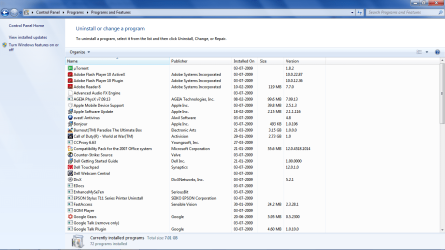
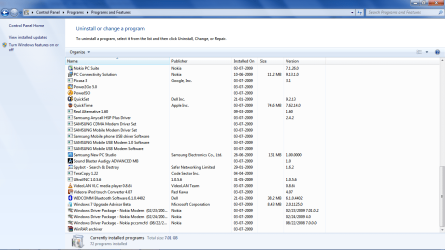
I have attached a list of the programs that are installed on my notebook.

I have also done what was advised by Hedrush, but to no avail.

Thanks so much.
 

Attachments

  • Untitled2.png
    Untitled2.png
    66.7 KB · Views: 25
  • Untitled4.png
    Untitled4.png
    63 KB · Views: 10
  • Untitled3.png
    Untitled3.png
    65.2 KB · Views: 7

My Computer

Computer Manufacturer/Model Number
Dell XPS Studio 16
OS
Windows 7 RC1 64bit
CPU
Intel Core2Duo [email protected]
Memory
3GB
Graphics Card(s)
ATI Radeon 3670 512MB
Screen Resolution
720p
Hard Drives
320GB 7200rpm
Internet Speed
2mbps
Other Info
Backlit Keyboard FTW!
You have Enhance my 7 installed - make sure you didn't change a setting in there to hide your drives in Explorer / Computer....
 

My Computers

System One System Two

  • Computer type
    PC/Desktop
    Computer Manufacturer/Model Number
    The Beast Model A (homebrew)
    OS
    Windows 11 21H2 Current build
    CPU
    AMD Ryzen 9 3950X
    Motherboard
    MSI MEG X570 GODLIKE
    Memory
    4 * 32 GB - Corsair Vengeance 3600 MHz
    Graphics Card(s)
    EVGA GeForce RTX 3080 Ti XC3 ULTRA GAMING (12G-P5-3955-KR)
    Sound Card
    Realtek® ALC1220 Codec
    Monitor(s) Displays
    2x Eve Spectrum ES07D03 4K Gaming Monitor (Matte) | Eve Spec
    Screen Resolution
    3x 3840 x 2160
    Hard Drives
    3x Samsung 980 Pro NVMe PCIe 4 M.2 2 TB SSD (MZ-V8P2T0B/AM) } 3x Sabrent Rocket NVMe 4.0 1 TB SSD
    PSU
    PC Power & Cooling’s Silencer Series 1050 Watt, 80 Plus Plat
    Case
    Fractal Design Define 7 XL Dark ATX Full Tower Case
    Cooling
    SteelSeries Apex Pro Wired Gaming Keyboard
    Keyboard
    SteelSeries Apex Pro
    Mouse
    Logitech MX Master 3S | MX Master 3 for business
    Internet Speed
    AT&T LightSpeed Gigabit Duplex Ftth
    Antivirus
    Windows Defender + MB 3
    Browser
    Nightly (default) + Firefox (stable),Chrome, Edge
  • Computer type
    PC/Desktop
    System Manufacturer/Model Number
    Dell Latitude E5470
    OS
    ChromeOS Flex Dev Channel (current)
    CPU
    Intel(R) Core(TM) i5-6300U CPU @ 2.40GHz, 2501 Mhz, 2 Core(s), 4 Logical Processor(s)
    Motherboard
    Dell
    Memory
    16 GB
    Graphics Card(s)
    Intel(R) HD Graphics 520
    Sound Card
    Intel(R) HD Graphics 520 + RealTek Audio
    Monitor(s) Displays
    Dell laptop display 15"
    Screen Resolution
    1920 * 1080
    Hard Drives
    Toshiba 128GB M.2 22300 drive
    INTEL Cherryville 520 Series SSDSC2CW180A 180 GB SATA III SSD
    PSU
    Dell
    Case
    Dell
    Cooling
    Dell
    Keyboard
    Dell
    Mouse
    Logitech MX Master 3S (shared w. Sys 1) | Dell TouchPad
    Internet Speed
    AT&T LightSpeed Gigabit Duplex Ftth
@Hedrush

Do you imply that I remove the CD drive from my laptop and then put it back?
 

My Computer

Computer Manufacturer/Model Number
Dell XPS Studio 16
OS
Windows 7 RC1 64bit
CPU
Intel Core2Duo [email protected]
Memory
3GB
Graphics Card(s)
ATI Radeon 3670 512MB
Screen Resolution
720p
Hard Drives
320GB 7200rpm
Internet Speed
2mbps
Other Info
Backlit Keyboard FTW!
@Hedrush

Do you imply that I remove the CD drive from my laptop and then put it back?

Try what john suggested first, but no I didnt mean physically remove them. I meant goto device manager, remove them from there and then let windows redetect them.
 

My Computer

Computer Manufacturer/Model Number
Custom Assembled
OS
Windows 7 Build 7600.16385 (Clean Install)
CPU
AMD Black Edition AMD Phenom X3 8750 / 2.4 GHz processor
Motherboard
Gigabyte GA-MA78GM-S2H 780G Socket AM2+ onboard VGA 8 channe
Memory
Kingston 4GB (4x1GB) DDR2 1066MHz/PC2-8500 Hyperx Memory
Graphics Card(s)
Intergrated ATI HD3200
Sound Card
Realtek High Definition Audio
Monitor(s) Displays
Acer 19"
Screen Resolution
1280 x 1024
Hard Drives
2 x Maxtor STM3250310AS 250GB SATAII 7200rpm 8MB Cache

3 x 500gb Seagate External HDD
PSU
CM eXtreme Power 460W PSU
Case
Coolermaster Elite 330 Black Case
Keyboard
Zippy Multimedia
Mouse
Logitech MX™518 Gaming-Grade Optical Mouse
Internet Speed
8Mbps down / 1Mbps up
Other Info
I haz floppyz
You have Enhance my 7 installed - make sure you didn't change a setting in there to hide your drives in Explorer / Computer....

I am sure it was there even before I installed it, but I gave it another look. Nothing. Weird.

Should I try uninstalling iTunes?
 

My Computer

Computer Manufacturer/Model Number
Dell XPS Studio 16
OS
Windows 7 RC1 64bit
CPU
Intel Core2Duo [email protected]
Memory
3GB
Graphics Card(s)
ATI Radeon 3670 512MB
Screen Resolution
720p
Hard Drives
320GB 7200rpm
Internet Speed
2mbps
Other Info
Backlit Keyboard FTW!

My Computer

Computer Manufacturer/Model Number
Custom Assembled
OS
Windows 7 Build 7600.16385 (Clean Install)
CPU
AMD Black Edition AMD Phenom X3 8750 / 2.4 GHz processor
Motherboard
Gigabyte GA-MA78GM-S2H 780G Socket AM2+ onboard VGA 8 channe
Memory
Kingston 4GB (4x1GB) DDR2 1066MHz/PC2-8500 Hyperx Memory
Graphics Card(s)
Intergrated ATI HD3200
Sound Card
Realtek High Definition Audio
Monitor(s) Displays
Acer 19"
Screen Resolution
1280 x 1024
Hard Drives
2 x Maxtor STM3250310AS 250GB SATAII 7200rpm 8MB Cache

3 x 500gb Seagate External HDD
PSU
CM eXtreme Power 460W PSU
Case
Coolermaster Elite 330 Black Case
Keyboard
Zippy Multimedia
Mouse
Logitech MX™518 Gaming-Grade Optical Mouse
Internet Speed
8Mbps down / 1Mbps up
Other Info
I haz floppyz
You can give that a try, if you wish. I don't use iTunes so I have not run into this particular problem - but I do know that iTunes has been *notorious for causing problems like this in all three recent Windows OSs
 

My Computers

System One System Two

  • Computer type
    PC/Desktop
    Computer Manufacturer/Model Number
    The Beast Model A (homebrew)
    OS
    Windows 11 21H2 Current build
    CPU
    AMD Ryzen 9 3950X
    Motherboard
    MSI MEG X570 GODLIKE
    Memory
    4 * 32 GB - Corsair Vengeance 3600 MHz
    Graphics Card(s)
    EVGA GeForce RTX 3080 Ti XC3 ULTRA GAMING (12G-P5-3955-KR)
    Sound Card
    Realtek® ALC1220 Codec
    Monitor(s) Displays
    2x Eve Spectrum ES07D03 4K Gaming Monitor (Matte) | Eve Spec
    Screen Resolution
    3x 3840 x 2160
    Hard Drives
    3x Samsung 980 Pro NVMe PCIe 4 M.2 2 TB SSD (MZ-V8P2T0B/AM) } 3x Sabrent Rocket NVMe 4.0 1 TB SSD
    PSU
    PC Power & Cooling’s Silencer Series 1050 Watt, 80 Plus Plat
    Case
    Fractal Design Define 7 XL Dark ATX Full Tower Case
    Cooling
    SteelSeries Apex Pro Wired Gaming Keyboard
    Keyboard
    SteelSeries Apex Pro
    Mouse
    Logitech MX Master 3S | MX Master 3 for business
    Internet Speed
    AT&T LightSpeed Gigabit Duplex Ftth
    Antivirus
    Windows Defender + MB 3
    Browser
    Nightly (default) + Firefox (stable),Chrome, Edge
  • Computer type
    PC/Desktop
    System Manufacturer/Model Number
    Dell Latitude E5470
    OS
    ChromeOS Flex Dev Channel (current)
    CPU
    Intel(R) Core(TM) i5-6300U CPU @ 2.40GHz, 2501 Mhz, 2 Core(s), 4 Logical Processor(s)
    Motherboard
    Dell
    Memory
    16 GB
    Graphics Card(s)
    Intel(R) HD Graphics 520
    Sound Card
    Intel(R) HD Graphics 520 + RealTek Audio
    Monitor(s) Displays
    Dell laptop display 15"
    Screen Resolution
    1920 * 1080
    Hard Drives
    Toshiba 128GB M.2 22300 drive
    INTEL Cherryville 520 Series SSDSC2CW180A 180 GB SATA III SSD
    PSU
    Dell
    Case
    Dell
    Cooling
    Dell
    Keyboard
    Dell
    Mouse
    Logitech MX Master 3S (shared w. Sys 1) | Dell TouchPad
    Internet Speed
    AT&T LightSpeed Gigabit Duplex Ftth
Tried it, but like I said, drive letters have been allocated by default.

Just removed iTunes, am gonna restart my comp now, just keeping my fingers crossed.
 

My Computer

Computer Manufacturer/Model Number
Dell XPS Studio 16
OS
Windows 7 RC1 64bit
CPU
Intel Core2Duo [email protected]
Memory
3GB
Graphics Card(s)
ATI Radeon 3670 512MB
Screen Resolution
720p
Hard Drives
320GB 7200rpm
Internet Speed
2mbps
Other Info
Backlit Keyboard FTW!
This is getting really weird. Nothing happened.

Even tried uninstalling and then letting windows detect the CD drive. Can it be because of the fact that I have disabled autorun?

What to do??
 

My Computer

Computer Manufacturer/Model Number
Dell XPS Studio 16
OS
Windows 7 RC1 64bit
CPU
Intel Core2Duo [email protected]
Memory
3GB
Graphics Card(s)
ATI Radeon 3670 512MB
Screen Resolution
720p
Hard Drives
320GB 7200rpm
Internet Speed
2mbps
Other Info
Backlit Keyboard FTW!
Back
Top