Solved No drives were found

jack12

New member
Local time
2:05 AM
Messages
19
I have just build a pc i5 2320 sandybridge, 4gb kingston ram, gigabyte Z68AP-D3 motherboard and 1 Generic Hard Disk Drive 500GB SATA II along side 1 seagate barracuda 7200.7 200gig hard drive i had lying about. When i boot the system posts however when asked were i want to install windows iam told that no drives were found the hard drive led says that a hard drive is present
 

My Computer

OS
Windows 7 pro x64
CPU
i5
im a bit of a noob and have no idea what you are talking about and the 500gb hard drive is brand new so doesnt need cleaning as nothing is installed on it
 

My Computer

OS
Windows 7 pro x64
CPU
i5
im a bit of a noob and have no idea what you are talking about and the 500gb hard drive is brand new so doesnt need cleaning as nothing is installed on it

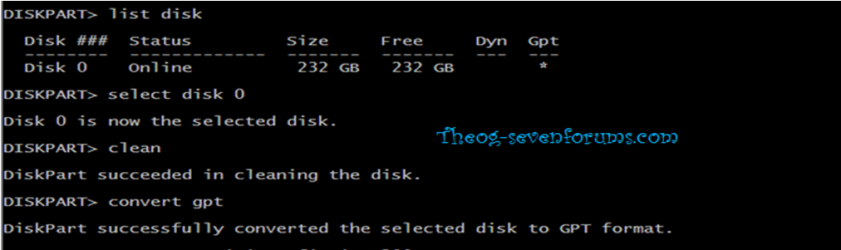
Just type> convent gpt

Windows 8 Downgrade-011 SB.PNG
 

My Computer

OS
ME/XP/Vista/Win7
i think i understand but iam a little confused do i need another pc to make the bootable usb as iam currently using a mac
 

My Computer

OS
Windows 7 pro x64
CPU
i5
iam trying to load windows 7 btw
 

My Computer

OS
Windows 7 pro x64
CPU
i5
iam not sure as i dont have a system with windows 7 running all i want is for the disk to recognise my hard drives
 

My Computer

OS
Windows 7 pro x64
CPU
i5
i need a quick and simple way to get the computer to work
 

My Computer

OS
Windows 7 pro x64
CPU
i5
I know that but are you trying to burn a DVD, write a flash stick installer? Do you want to keep trying install in UEFI mode or bypass EFI mode which requires a different method to write installer stick?

I gave you some options to consider in my last post. Did you read them over? One line responses aren't really very much to go on. Can you reply a little more fully exactly what you're thinking and how you prefer to proceed? Or ask all the questions needed to decide.
 
Last edited:
i just need the simplest way to get windows to recognise the hard drive
 

My Computer

OS
Windows 7 pro x64
CPU
i5
im so sorry that im wasting your time with this
 

My Computer

OS
Windows 7 pro x64
CPU
i5
Are you trying to install using a DVD or USB?
 

My Computer

Computer type
PC/Desktop
Computer Manufacturer/Model Number
Golden Mk. I.4
OS
Windows 10 Pro x64 ; Xubuntu x64
CPU
Intel i7 860 @ 2.80 GHz O/C'ed to 4.0GHz
Motherboard
Gigabyte P55A-UD3R Rev.1. Award BIOS F13
Memory
16GB Corsair Vengance DDR3 @ 661 MHz Dual Channel (9-9-9-24)
Graphics Card(s)
EVGA NVidia GTX 560 1024MB
Sound Card
Realtek Integrated
Monitor(s) Displays
Dual Samsung SyncMaster 2494HS
Screen Resolution
1920*1080 and 1920*1080
Hard Drives
1*Samsung 840 EVO 120GB SSD;
1*OCZ Vertex 2 60GB SSD;
2*Samsung F3 SpinPoint 1TB in RAID0;
1*Samsung F1 SpinPoint 1TB;
2*Western Digital 1TB External USB 3.0
1*Western Digital 500GB External USB 3.0
1*Seagate 500GB External USB 2.0
PSU
Thermaltake ToughPower QFan 750W
Case
Thermaltake Element S VK60001W2Z
Cooling
Corsair H60 Water Cooling, 2*230mm and 2*80mm case fans
Keyboard
Logitech G110
Mouse
Logitech MX518
you should first format your drives with ntfs format, then using a bootable DVD of the win7 or copy past all the component in the disk into the flash and boot your system with flash
 

My Computer

OS
Windows 7 Ultimate x64
CPU
core i7.
iam trying to install using DVD
 

My Computer

OS
Windows 7 pro x64
CPU
i5
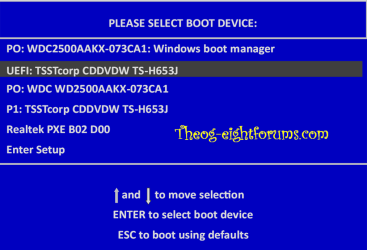
Jack, if you built your PC you should realize if you bought a new technology UEFI mobo that there is a whole new process for installing Win7 as detailed in UEFI (Unified Extensible Firmware Interface) - Install Windows 7 with - Windows 7 Forums.

Theog tried to guide you on this earlier today. There was no feedback from you or futher questions to ask how to get this done correctly.

I presented you with more information to read to understand more fully UEFI, so you can decide if you want to mess with it or even bypass it using the method I linked you. Theog specializes in installing to UEFI while I have had better luck helping users bypass it to install normally to an MBR HD. So you need to decide which you want to do, or try UEFI first and then if it doesn't work for you I'll help you bypass it.
 
then use your dvd to install the os. but first change the drive format to ntfs
 

My Computer

OS
Windows 7 Ultimate x64
CPU
core i7.
Back
Top