No explorer History drop down?

foobartwo

New member
Local time
2:16 AM
Messages
1
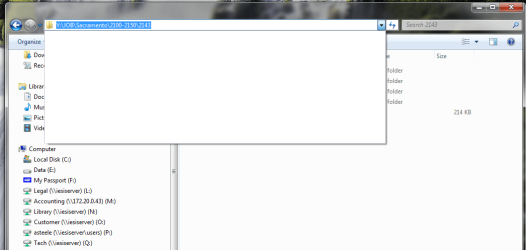
Everything seems to be working well however i have notice i dont have a history drop down in explorer.. is there a place to enable this? or is this a known bug..

See attached

Any Idea?
 

Attachments

  • image001.png
    image001.png
    34.2 KB · Views: 180

My Computer

OS
osx
Hello Foobartwo,

Welcome to Seven Forums.

Take a look in internet options. On the general tab click on browsing history settings and make sure you have some number of days for IE to remember last visted sites (at the bottom). Also if you have delete browsing history on exit checked click on the delete button (it won't delete anything yet) and make sure history is unchecked.

Hope this helps. Please keep us posted.

Gary
 

My Computer

Computer Manufacturer/Model Number
Dell XPS420
OS
Vista Ult 64 bit Seven Ult RTM x64
CPU
Intel Core2 Quad Q6600 2.40 gigahertz
Memory
Crucial Ballistix 4x2GB PC2 6400
Graphics Card(s)
NVIDIA GeForce 8600 GTS 256 MB
Sound Card
Creative SB X-Fi audio
Monitor(s) Displays
HP w2207 + HPvs15
Screen Resolution
1680x1050 + 1024x768
Hard Drives
2-WD5000AAKS-500 GB
WD5000AAV-500 GB external
Keyboard
Microsoft Comfort Curve
Mouse
MX Revolution
Other Info
Wacom Intuos 2 Graphics Tablet
Experience Index=5.5
Have you set History in IE to clean every time you close it?

Hiya' Gary ... didn't see you there :p
 

My Computer

Computer type
PC/Desktop
Computer Manufacturer/Model Number
Bruce ... somewhere in his 40's
OS
Windows 7 Ultimate 32bit SP1
CPU
Intel(R) Core(TM)2 Quad CPU @ 2.40GHz, 2400 MHz
Motherboard
INTEL/D975XBX2
Memory
4 GB
Graphics Card(s)
ATI Radeon HD 2600 Pro
Monitor(s) Displays
Samsung SyncMaster 914v
Screen Resolution
1280 x 1024
Hard Drives
2/500GB each ... ST3500630AS ATA Device.
One is not connected
PSU
Rocketfish 700 W
Case
G.Skill Gigabyte Chassis
Keyboard
Standard PS/2 Keyboard
Mouse
Microsoft PS/2 Mouse
Internet Speed
DSL
Antivirus
Avira Internet Security
Browser
IE 11
Other Info
ATI HDMI Audio
Hi Jacee,

No problem. :D

Gary
 

My Computer

Computer Manufacturer/Model Number
Dell XPS420
OS
Vista Ult 64 bit Seven Ult RTM x64
CPU
Intel Core2 Quad Q6600 2.40 gigahertz
Memory
Crucial Ballistix 4x2GB PC2 6400
Graphics Card(s)
NVIDIA GeForce 8600 GTS 256 MB
Sound Card
Creative SB X-Fi audio
Monitor(s) Displays
HP w2207 + HPvs15
Screen Resolution
1680x1050 + 1024x768
Hard Drives
2-WD5000AAKS-500 GB
WD5000AAV-500 GB external
Keyboard
Microsoft Comfort Curve
Mouse
MX Revolution
Other Info
Wacom Intuos 2 Graphics Tablet
Experience Index=5.5
Hi,

My IE is disabled in Windows 7 and I use Google Chrome. The auto fill / auto complete is enabled in Chrome. Yet I do not see the history in Windows Explorer. Plz help.

Thx
 

My Computer

OS
Windows 7
From the attached screenshot, I don't think the OP is actually talking about Internet Explorer but the files and folders dropdown menu.

I have had a look at the folder options and can't seem to find what will enable that for you :(

Maybe another member can offer a solution if you can clarify you are NOT talking about internet explorer?
 

My Computer

Computer Manufacturer/Model Number
Chosen by me - Built by someone else ;)
OS
Windows 7 x 32 bit
CPU
AMD Phenom II 810 Quad Core
Motherboard
Gigabyte GA-MA770T
Memory
Corsair 4GB (2x2GB)
Graphics Card(s)
ASUS GTS250 1GB DDR3
Sound Card
Realtek Audio
Monitor(s) Displays
BenQ
Screen Resolution
1220 x 900
Hard Drives
Western Digital 1TB, Caviar Green
PSU
650w
Case
Antec Sonata Elite Black/Silver
Keyboard
Logitech New Touch
Mouse
Belkin

My Computer

Computer Manufacturer/Model Number
Chosen by me - Built by someone else ;)
OS
Windows 7 x 32 bit
CPU
AMD Phenom II 810 Quad Core
Motherboard
Gigabyte GA-MA770T
Memory
Corsair 4GB (2x2GB)
Graphics Card(s)
ASUS GTS250 1GB DDR3
Sound Card
Realtek Audio
Monitor(s) Displays
BenQ
Screen Resolution
1220 x 900
Hard Drives
Western Digital 1TB, Caviar Green
PSU
650w
Case
Antec Sonata Elite Black/Silver
Keyboard
Logitech New Touch
Mouse
Belkin
Yes.. I was referring to Windows Explorer history and not Internet Explorer history. I'll check out the option of restoring folder options to default settings.
 

My Computer

OS
Windows 7
Have you ever typed a path in the address bar? If not you have no history to display.
 

My Computer

Computer type
PC/Desktop
Computer Manufacturer/Model Number
Alienware Aurora ALX R4
OS
Windows 10 Pro (x64)
CPU
Intel Core i7-3930K (3.2GHz - 4.5GHz)
Motherboard
Alienware Aurora-R4 x79
Memory
4x Samsung 4GB PC3-12800 DDR3 (16GB 1600MHz)
Graphics Card(s)
Nvidia Geforce GTX 690
Sound Card
SteelSeries Siberia Elite
Monitor(s) Displays
Dell UltraSharp U3011
Screen Resolution
2560x1600
Hard Drives
Samsung 850 Pro 256 GB, Seagate 1TB Desktop Hybrid HDD, 2x Western Digital 4TB Green HDD
PSU
875W Some Dell PSU <.<
Case
Alienware Aurora ALX
Cooling
Custom Liquid Cooling (EK CPU & GPU blocks) dual EK 480RAD
Keyboard
Logitech G710+ Mechanical
Mouse
Logitech G700s
Internet Speed
Verizon Fios (50 mbps average)
Other Info
Server: Intel NUC D54250WYK: i5-4250U, 16GB, 256 GB mSATA, Windows Server 2012 R2
Bingo Logicearth! I too have an empty Explorer history pull down and was wondering about this. So my thanks to Foobartwo for posting his inquiry. I thought just selecting them with my mouse on the left created history. As soon as I typed a few paths into the address bar, I can "see" some history! Thanks.
 

My Computer

Computer Manufacturer/Model Number
HP Pavillion p62120t desktop
OS
Windows 7x64 Home Prem Svce Pack 1, Build 7601.win7sp1Ver 3.0install)
CPU
Intel Premium Dual Core, 2.7GHz
Motherboard
Pegatron 2AC2 2.0
Memory
8 GB DDR3-1333 Mhz SSDRAM (2DIMMS)
Graphics Card(s)
Intel Graphics Media Accelerator HD 1000 (GT1)
Sound Card
Integrated Realtek HD Audio - PCIe GBE Family Controller
Monitor(s) Displays
HP 2311 Series Wide 23" LED
Hard Drives
500 GB Seagate SATA HDD
Keyboard
USB HP Multimedia keyboard
Mouse
USB HP Optical Mouse
Other Info
Canon MX 360 AIO printe; FX 13.0.1; AdBlock+ ; serial interface HP DVD-RAM GH80N; firmware version RF03
I tried to change the folder options as listed in "Issue with explorer and office" and it didn't make any difference.

If I manually type the paths into the windows explorer address bar, then only those directories are available in the drop down history. But I know for sure that this feature was working when initially installed Windows 7 and all I was doing at that time was browsing the directories through mouse clicks. No manual typing.

I notice several messages posted on the internet that Windows Explorer history is related to IE history. I wonder if my using Firefox / Chrome is related to this issue. Could others who have this issue let us know the browser they are using?
 

My Computer

OS
Windows 7
Does or did anyone use a cleaning program like CCleaner? That will clear the history.

In Windows Explorer: I did some testing....mine works....but not like I think it should....hummm
 

My Computer

Computer type
PC/Desktop
Computer Manufacturer/Model Number
Dell OP7010
OS
Windows 7 Enterprise (x64); Windows Server 2008 R2 (x64)
Memory
16GB
Monitor(s) Displays
4 Dell 24" LCD
Screen Resolution
1280x1024
Keyboard
Dell
Mouse
Dell Optical
Internet Speed
40meg
Had the same problem, found this solution:

  1. Open Windows Explorer.
  2. Type or copy and paste the following into the address bar: %AppData%\Microsoft\Windows\Recent\AutomaticDestinations
  3. Identify files that are comparatively larger in size than the rest of the file, such as files that have file size of 1 MB or more. Delete the abnormal file.
    Tip: If you does not want to retain the Jump Lists’ recent items history on all applications, just delete all the automaticDestinations-ms files in the folder.
  4. The recent items functionality on Jump Lists will be restored. The recent items on the Jump Lists will be re-added as the program is been used. However, do note that the solution does not restore the previously pinned items. So user will have to pin new items again.
Now my explorer history works just as it should(I've deleted all files in the AutomaticDestinations folder) , more info here:
Fix Windows 7 Jump Lists Missing or Does Not Display Recent Items or Pinned Files » My Digital Life
 

My Computer

Computer Manufacturer/Model Number
Dell
OS
Windows 7 Ultimate x64
CPU
Core 2 Duo 2.4Ghz
Motherboard
XPS M1730
Memory
4GB DDR2
Graphics Card(s)
SLI 8700GT
Hard Drives
200GB SATA2
Back
Top
