
You are using an out of date browser. It may not display this or other websites correctly.
You should upgrade or use an alternative browser.
You should upgrade or use an alternative browser.
no format option during the installation
- Thread starter 3night
- Start date

- Local time
- 9:40 AM
- Messages
- 1,557
how many partitions do you have?
are you booting your computer from the DVD?
are you booting your computer from the DVD?
My Computer
- Computer Manufacturer/Model Number
- Too many to list.
- OS
- XP, Seven, 2008R2
- CPU
- AMD, Intel, VIA
- Motherboard
- Various
- Memory
- Corsair, Kingston, etc.
- Graphics Card(s)
- ATI, NVIDIA
- Monitor(s) Displays
- Samsung
- Hard Drives
- Maxtor, Western Digital
- Keyboard
- qwerty
- Internet Speed
- 22 Mb/s @ home, 1 Gb/s @ server
- Other Info
- All of my systems still run fastest on XP 32-bit for the most part. Win7 is fun to play with, but I still prefer XP for raw speed, security, and functionality.
- Local time
- 9:40 AM
- Messages
- 1,557
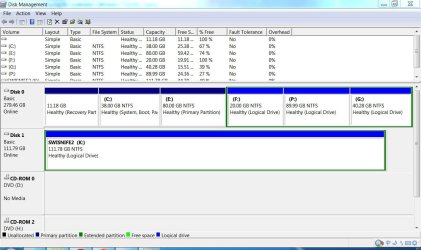
Could you attach a screenshot of Disk Management?
You should try write the ISO to a DVD and boot from it.
You should try write the ISO to a DVD and boot from it.
My Computer
- Computer Manufacturer/Model Number
- Too many to list.
- OS
- XP, Seven, 2008R2
- CPU
- AMD, Intel, VIA
- Motherboard
- Various
- Memory
- Corsair, Kingston, etc.
- Graphics Card(s)
- ATI, NVIDIA
- Monitor(s) Displays
- Samsung
- Hard Drives
- Maxtor, Western Digital
- Keyboard
- qwerty
- Internet Speed
- 22 Mb/s @ home, 1 Gb/s @ server
- Other Info
- All of my systems still run fastest on XP 32-bit for the most part. Win7 is fun to play with, but I still prefer XP for raw speed, security, and functionality.
- Local time
- 9:40 AM
- Messages
- 1,557
it looks fine to me. Shouldn't be any problems.
What partition are you trying to format?
What partition are you trying to format?
My Computer
- Computer Manufacturer/Model Number
- Too many to list.
- OS
- XP, Seven, 2008R2
- CPU
- AMD, Intel, VIA
- Motherboard
- Various
- Memory
- Corsair, Kingston, etc.
- Graphics Card(s)
- ATI, NVIDIA
- Monitor(s) Displays
- Samsung
- Hard Drives
- Maxtor, Western Digital
- Keyboard
- qwerty
- Internet Speed
- 22 Mb/s @ home, 1 Gb/s @ server
- Other Info
- All of my systems still run fastest on XP 32-bit for the most part. Win7 is fun to play with, but I still prefer XP for raw speed, security, and functionality.

- Local time
- 9:40 AM
- Messages
- 1,557
what partition are you trying to format? did you click on it, then click advanced?
My Computer
- Computer Manufacturer/Model Number
- Too many to list.
- OS
- XP, Seven, 2008R2
- CPU
- AMD, Intel, VIA
- Motherboard
- Various
- Memory
- Corsair, Kingston, etc.
- Graphics Card(s)
- ATI, NVIDIA
- Monitor(s) Displays
- Samsung
- Hard Drives
- Maxtor, Western Digital
- Keyboard
- qwerty
- Internet Speed
- 22 Mb/s @ home, 1 Gb/s @ server
- Other Info
- All of my systems still run fastest on XP 32-bit for the most part. Win7 is fun to play with, but I still prefer XP for raw speed, security, and functionality.
what partition are you trying to format? did you click on it, then click advanced?
C drive -i wanted to format. but even i tried other partitions , there was not any advanced to be seen?

My Computer
- OS
- windows 7
- Local time
- 9:40 AM
- Messages
- 1,557
you can't format the C: drive unless you boot from the DVD.
it means put the DVD in your drive, restart your computer, and select DVD-ROM as first boot device. Press any key to boot from DVD...
it means put the DVD in your drive, restart your computer, and select DVD-ROM as first boot device. Press any key to boot from DVD...
My Computer
- Computer Manufacturer/Model Number
- Too many to list.
- OS
- XP, Seven, 2008R2
- CPU
- AMD, Intel, VIA
- Motherboard
- Various
- Memory
- Corsair, Kingston, etc.
- Graphics Card(s)
- ATI, NVIDIA
- Monitor(s) Displays
- Samsung
- Hard Drives
- Maxtor, Western Digital
- Keyboard
- qwerty
- Internet Speed
- 22 Mb/s @ home, 1 Gb/s @ server
- Other Info
- All of my systems still run fastest on XP 32-bit for the most part. Win7 is fun to play with, but I still prefer XP for raw speed, security, and functionality.