no hard drive space left after clean install of windows 7

razman99

New member
Local time
3:09 PM
Messages
6
Hello I have a 250gb hard drive on my computer...I had windows vista and just did a clean install of windows 7 professional...after completing the installation it shows that i only have 80 gb of space left on my hard drive??..I thought i would have well over 200gb left...I did a backup to an external hard drive...any possible answers would be appreciated...thanks in advance
 

My Computer My Computer

At a glance

windows 7 professional 32 bit
OS
windows 7 professional 32 bit
Look for a folder named Windows.old (Desktop? C: Drive?)

In it you'll find most of the files that were on the drive before you upgraded... Delete everything in it that you don't need.
 

My Computer My Computer

At a glance

Windows 7 Professional 64 bit8 GBnVidia
Computer type
PC/Desktop
Computer Manufacturer/Model Number
Dell Inspiron 530
OS
Windows 7 Professional 64 bit
Memory
8 GB
Graphics Card(s)
nVidia
Monitor(s) Displays
2
I did look for that file in the search option in the start menu and nothing came up.
 

My Computer My Computer

At a glance

windows 7 professional 32 bit
OS
windows 7 professional 32 bit
I did look for that file in the search option in the start menu and nothing came up.

Sorry for the misinformation then... It does that when I reinstall Win7 so I guessed it would do it for Vista too... I would open explorer and start checking the folder sizes until I see what is using up all the space...
 

My Computer My Computer

At a glance

Windows 7 Professional 64 bit8 GBnVidia
Computer type
PC/Desktop
Computer Manufacturer/Model Number
Dell Inspiron 530
OS
Windows 7 Professional 64 bit
Memory
8 GB
Graphics Card(s)
nVidia
Monitor(s) Displays
2
Ok thanks....I will give that a try...thanks again for your help.
 

My Computer My Computer

At a glance

windows 7 professional 32 bit
OS
windows 7 professional 32 bit
Boot the Win7 installer, select Custom Install, then Drive Options, delete all partitions, create new ones as you wish, then format before installing Win7 to first partition.

Or you can use the Drive Options to delete all partitions and just click Next and the installer will auto-create and format one large partition and begin install.

Illustrated steps here: Clean Install Windows 7
 
Thank you for the response but I was hoping to avoid re-installing windows 7 again seeing that I just got everything back up and running on my computer...I am limited on time to work on this plus my wife needs the network up and running in my house for her job...If nothing else works then I will eventually do what you suggested...thanks again
 

My Computer My Computer

At a glance

windows 7 professional 32 bit
OS
windows 7 professional 32 bit

My Computer My Computer

At a glance

Microsoft Windows 10 Pro Insider Preview 64-bitIntel(R) Core(TM) i3-4130 CPU @ 3.40GHzCorsair Vengence 4GB x2 (8.00GB Dual-Channel ...2047MB GeForce GTS 450 (ZOTAC International)
Computer type
PC/Desktop
Computer Manufacturer/Model Number
Self Assembled
OS
Microsoft Windows 10 Pro Insider Preview 64-bit
CPU
Intel(R) Core(TM) i3-4130 CPU @ 3.40GHz
Motherboard
Gigabyte Technology Co., Ltd. B85M-D3H
Memory
Corsair Vengence 4GB x2 (8.00GB Dual-Channel DDR3 @ 798MHz)
Graphics Card(s)
2047MB GeForce GTS 450 (ZOTAC International)
Sound Card
Onboard (Realtek High Definition Audio)
Monitor(s) Displays
LG Flatron E2040T
Screen Resolution
1600x900
Hard Drives
Western Digital 1 TB
Seagate 500 GB
PSU
Corsair VS550
Case
Cooler Master K380
Cooling
Cooler Master Seidon 120V Plus
Keyboard
Logitech MK260r
Mouse
Logitech MK260r
Internet Speed
PMPL Broadband
Antivirus
Windows Defender + MBAM
Browser
Firefox
Other Info
Dell Studio 15" Laptop
Please post back a screenshot of your maximized Disk management drive map, using the Snipping Tool in Start Menu: Screen Shots
 
Hey guys thank you for your help...I searched for the windows.old files again and found them this time...not sure why they weren't there the first time...103gb in there...wow...also deleted the old system restore files and got another 30gb there...everything is good to go now...just want to thank you and let you know this a great site and you guys were a big help.
 

My Computer My Computer

At a glance

windows 7 professional 32 bit
OS
windows 7 professional 32 bit
Do not turn off System Restore, or throw the spare tire out of your car.
 
Here's a new one for you...

To avoid any risk of deleting any files, I decided to install my new Windows 7 OS on a new hard drive. I unplugged my old hard drive. Unplugged both power and SATA cable.

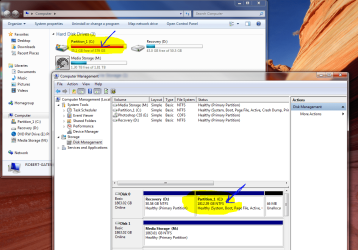
I installed it on the new drive, and everything seemed to be going well, but I had a look at my computer's properties showing that I had 35.1 GB free of 579 GB on the drive. The drive is a 2TB drive. The 579GB is referencing the OLD hard drive size, which is STILL UNPLUGGED.

A. How would the new OS know of the old OS drive size?
B. Is there a drive size limitation? (however archaic it would seem given the size of new hard drives and current state of the 64bit Windows 7 OS)
C. Why would it report, on the same OS, at the same time, in "computer" and "computer management"... TWO DIFFERENT SIZES OF THE SAME PARTITION?
D. Why would the drive be full after ONE DAY worth of installation of Win7 and Photoshop. There are no movies, photos or other large space consumers on the drive, just the installation. It took nearly two years to fill it that full on Vista with videos, photos, etc...
E. Sorry for the cross-posting. Delete or move where necessary.

 

Attachments

  • WTF.PNG
    WTF.PNG
    132.1 KB · Views: 19

My Computer My Computer

At a glance

Windows 7 Home Premium 64 bitAMD Phenom(tm) 9100e Quad-Core Processor4.00 GBNVIDIA GeForce 9500 GT (Microsoft Corporation...
Computer Manufacturer/Model Number
Gateway 5694
OS
Windows 7 Home Premium 64 bit
CPU
AMD Phenom(tm) 9100e Quad-Core Processor
Motherboard
Gateway RS780
Memory
4.00 GB
Graphics Card(s)
NVIDIA GeForce 9500 GT (Microsoft Corporation - WDDM v1.1)
Sound Card
High Definition Audio Device
Hard Drives
(1) ST2000DL003-9VT166 ATA Device (2) EPSON Stylus Storage USB Device (3) IOI-CFC USB Device (4) IOI-MMC USB Device (5) IOI-MSC USB Device (6) IOI-SMC USB Device
Other Info
American Megatrends Inc.
Default System BIOS
Ver. 7B3P081G
Released 5/5/2008
Back
Top