Yesterday my antivirus found two trojans (trojan.downloader.win32.genome.itdk) while installing a software. I panicked and in a hurry killed csrss.exe. The system froze for a few seconds and then got shut down instantly (as if someone removed the battery). On restarting i found that my internet stopped working. It could connect to a wireless network but always shows 'no internet access' status. Moreover some of the applications were crashing on startup. One of them gave an error that "this program does not supports multiple user sessions. Close the program in other session and then try again." Then i checked the reports of my anti virus software which said that one virus was deleted but the other one was not found. So i downloaded malware bytes and ran a threat scan in safe mode. But it didnt find anything except for some pup.optional.outbrowse registry keys.
But something is wrong with my system. Sometimes a black screen appears with just a mouse pointer after windows login for 10-20 seconds. I dont know if its the malware or the fact that i terminated csrss.exe improperly.
Download the softwarefrom here http://support.kaspersky.com/4162 and make abootable disk or USB stick. Set the BIOS to boot from either the optical driveor the USB stick whichever you prefer I like the disk myself but the choice isyours.
Insert the disk andthen reboot and let the program run it will scan from the very start of poweron for malware that may be otherwise too well hidden. It also does not involve Windows as it runsalone - bootable. If this gets things going run these
One other Desktop (tester) and spare Toshba laptop both with SSD's
Running Kaspersky 2016 ISS on all machines config'd identically
Logitec audio stereo systems on each machine (x3)
Canon MG5250MFC
Router/modem TP-Link running WPA2SK
But it says that the kaspersky rescue disk should be used when it is impossible to boot windows. But in my case windows is booting, its just the applications which are crashing. Should i still go for it?
And i have already tried chkdsk and system scan. They didnt find any error in the system files.
Thanks
One other Desktop (tester) and spare Toshba laptop both with SSD's
Running Kaspersky 2016 ISS on all machines config'd identically
Logitec audio stereo systems on each machine (x3)
Canon MG5250MFC
Router/modem TP-Link running WPA2SK
Malware bytes anti malware didnt find anything except for some pup.optional registry keys. Super anti spyware and TDSS also didnt find anything.
I am thinking of doing a factory reset of windows because otherwise il never be 100% sure if the malware is still there or not. I'l reset the windows to factory settings and then perform a repair install with the latest available windows 7 dvd to add the sp1 along with updates.
So is there any chance of malware surviving this process (if there is any)?
Ok mate now an option for you would be this http://www.sevenforums.com/tutorials/219487-clean-reinstall-factory-oem-windows-7-a.html#post1839164 it will be the very latest version "freshest" some call it of Windows 7 including the SP1 and it will not load all the factory bloatware therefore giving you more space and less annoying factory rubbish they put on store made machine shese days.
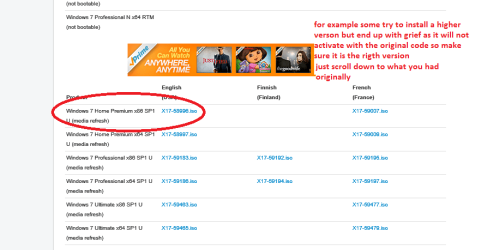
Just make sure you pick only the version of Windows that was originally installed and not a higher version - some do and end up with buckets of grief. All you need for this is the activation code on the sticker on your machine. Your data you can add later if you have backed it up and it is a good idea to do this http://www.sevenforums.com/tutorials/73828-imaging-free-macrium.html I do it on a weekly basis and one last thing I always do a backup of the registry after a clean install or before I go changing the registry as one can do if you use the Optimise tutorial - it is very safe anyway but just in case you hit a wrong key you can always get back the original registry listing.
To do that see this http://www.sevenforums.com/tutorials/4230-registry-backup-restore.html takes very little time to do and to optimize see this I do nearly everything on this tutorial and you will be amazed at the difference in performance http://www.sevenforums.com/tutorials/11728-optimize-windows-7-a.html
Post back on how you get on as I am interested as we have doe a bit together now and sorry I couldn't give you the answers
Attachments
ISO.PNG
22.9 KB
· Views: 0
My Computer
At a glance
Desk1 7 Home Prem / Desk2 10 Pro / Main lap A...Desk1 i5 3750K / Laptop i7 GTX 860M / Desk2 i...Desk1 8GB (1866) / Desk2 16GB (1333) / Laptop...Desk 1& 2NVidia GTX 650 & Laptops on board Intel
Computer type
PC/Desktop
Computer Manufacturer/Model Number
Own build (new) Desk1 / Asus ROG Win 7 / Desk2 1st build
OS
Desk1 7 Home Prem / Desk2 10 Pro / Main lap Asus ROG 10 Pro 2 laptop Toshiba 7 Pro Asus P2520 7 & 10
One other Desktop (tester) and spare Toshba laptop both with SSD's
Running Kaspersky 2016 ISS on all machines config'd identically
Logitec audio stereo systems on each machine (x3)
Canon MG5250MFC
Router/modem TP-Link running WPA2SK
Actually i want to keep some of those bloatwares. So will it be same if i reset windows and then upgrade to sp1 using the windows disc? Or should i go for a clean reinstall if i want to be 100% sure that the malware is gone.
That's ok Prakhar if you like to keep the stuff - I don't personally as if it does not do anything really vital to the operation of the machine I like to get rid of it.
As a matter of fact my Toshibas have both been clean installed onto SSD's with an OEM and there is still some Toshiba rubbish that downloads with updates - how don't ask I haven't got a clue.
I am just wondering what the Lenovo features are that you like in case there may be an alternative that will not pester like some of the factory stuff does. By the way do you know the factory default key?? If not just Google the machine you have by typing
"factory restore button for a Lenovo *******" you should end up with replies as that that is and it is usually one of the "F" keys or a combo of one of those and DEL or others. For example my Toshiba factory restore key is the 0 (zero) number key on the top of the keyboard and not the NUM pad zero. Anyway the Google will tell you what it is.
Actually I did just that and you should get this How do I recover my factory installed programs and files? - Desktops and Workstations - Lenovo Support (US)
Now this process if you don't know invokes a complete clearance of everything on that drive except the partition that holds the install stuff and I would guess if the machine is not very old the SP 1 should be on that partition because it is a pain in the neck having to download and install that SP1.
Good luck and sorry I could be more helpful - let us know how you go because if the problem persists then you may have to do the tutorial method if that restore partition has been infected - anything is possible
My Computer
At a glance
Desk1 7 Home Prem / Desk2 10 Pro / Main lap A...Desk1 i5 3750K / Laptop i7 GTX 860M / Desk2 i...Desk1 8GB (1866) / Desk2 16GB (1333) / Laptop...Desk 1& 2NVidia GTX 650 & Laptops on board Intel
Computer type
PC/Desktop
Computer Manufacturer/Model Number
Own build (new) Desk1 / Asus ROG Win 7 / Desk2 1st build
OS
Desk1 7 Home Prem / Desk2 10 Pro / Main lap Asus ROG 10 Pro 2 laptop Toshiba 7 Pro Asus P2520 7 & 10
One other Desktop (tester) and spare Toshba laptop both with SSD's
Running Kaspersky 2016 ISS on all machines config'd identically
Logitec audio stereo systems on each machine (x3)
Canon MG5250MFC
Router/modem TP-Link running WPA2SK
Hehe... Lenovo has this veriface feature for locking your files or windows with face recognition and i use it a lot. Lets say ive got used to it. There are few more.
But anyways, thanks a lot for your help. Even though we couldnt find the malware but im glad that im reinstalling windows. I will be out of town for a couple of days so wont be able to reinstall it very soon. But will let you know the outcome once i do it.
Thanks!
And one last question. Does reseting windows to factory defaults formats the MBR?! Because that is one of the few reasons why i want to reset windows. (Just in case if the virus has manifested itself in the boot sector)
I cannot say praktar I only know for certain that factory restores typically tell one that the machine will essentially be the same as when it came out of the box. having said that you are right the MBR may have become infected and I am wondering if that will have been sorted by doing this.
There is this but like so many others I am assuming you were not supplied with any rescue media unless you made one yourself. http://support.microsoft.com/kb/927392
The other option is I am really doing some wishful thinking here is that if you do a clean install as per that link you may be able to download the Lenovo stuff you like - it would be a first I guess but worth asking Lenovo first or Googling for it.
My own personal thoughts on it mate is that is it worth it to have that face recognition stuff because lets face it (no pun) anything can be hacked if they want to badly enough. and I think if you used all the user account security stuff it would be suffice.
PS I messaged you look for it at the top of the page.
My Computer
At a glance
Desk1 7 Home Prem / Desk2 10 Pro / Main lap A...Desk1 i5 3750K / Laptop i7 GTX 860M / Desk2 i...Desk1 8GB (1866) / Desk2 16GB (1333) / Laptop...Desk 1& 2NVidia GTX 650 & Laptops on board Intel
Computer type
PC/Desktop
Computer Manufacturer/Model Number
Own build (new) Desk1 / Asus ROG Win 7 / Desk2 1st build
OS
Desk1 7 Home Prem / Desk2 10 Pro / Main lap Asus ROG 10 Pro 2 laptop Toshiba 7 Pro Asus P2520 7 & 10
One other Desktop (tester) and spare Toshba laptop both with SSD's
Running Kaspersky 2016 ISS on all machines config'd identically
Logitec audio stereo systems on each machine (x3)
Canon MG5250MFC
Router/modem TP-Link running WPA2SK
since you paid for kapersky, call their support number. They will help you clean the threats on your system and get you back up and running. The whole point of paying for antivirus is to have that kind of support number that you can call for assistance.
My Computer
At a glance
Windows 10 ProAMD Ryzen 5 2400G Processor with Radeon RX Ve...G.SKILL Ripjaws V Series 16GB (2 x 8GB) 288-P...2047MB NVIDIA GeForce GTX 1060 6GB (EVGA)
Yep that's ok Andrew but if like me ( I have used KISS for the last five years on five machines) the support is anything like out here then good luck with that one. The forum either local or international is also very very slow at answering and I sometimes wonder re the local blokes whether they really are on the ball as they make out.
But I suppose Prakhar might get lucky as I cannot remember without going all the way back if he has paid for KISS - the rescue disk is free as is a lot of their varied free scanners.
My Computer
At a glance
Desk1 7 Home Prem / Desk2 10 Pro / Main lap A...Desk1 i5 3750K / Laptop i7 GTX 860M / Desk2 i...Desk1 8GB (1866) / Desk2 16GB (1333) / Laptop...Desk 1& 2NVidia GTX 650 & Laptops on board Intel
Computer type
PC/Desktop
Computer Manufacturer/Model Number
Own build (new) Desk1 / Asus ROG Win 7 / Desk2 1st build
OS
Desk1 7 Home Prem / Desk2 10 Pro / Main lap Asus ROG 10 Pro 2 laptop Toshiba 7 Pro Asus P2520 7 & 10
One other Desktop (tester) and spare Toshba laptop both with SSD's
Running Kaspersky 2016 ISS on all machines config'd identically
Logitec audio stereo systems on each machine (x3)
Canon MG5250MFC
Router/modem TP-Link running WPA2SK
Hi! I have just now started reinstalling windows (fresh install from the dvd and not factory reset). While installing i came across a partition manager or something with following partition details:-
Disk 0 partition 0 100mb system
Disk 0 partition 1 421gb primary
So i formated the primary partition and am currently installing windows on the same. I chose to leave the system partition as it is. Is that OK? I mean that partition does not have anything to do with the malware infection right?
One other Desktop (tester) and spare Toshba laptop both with SSD's
Running Kaspersky 2016 ISS on all machines config'd identically
Logitec audio stereo systems on each machine (x3)
Canon MG5250MFC
Router/modem TP-Link running WPA2SK