No internet access appears often on Realtech wifi pci card.

IamLEGEND

New member
Member
VIP
Local time
12:19 AM
Messages
138
Hi all.
I m using wifi pci card on acer pc first time. its model is Realtek RTL8190 802.11n Wireless LAN (Mini-)PCI NIC.
after installing its dirver (which is located here REALTEK - Download driver for RTL8190 and Windows 7 64bit)
internet successfully connected. but I noticed most of the time in wifi signal bars a yellow cation mark appears. its says no internet access. although my broadband router (provided by isp) is continuously connected with internet (I checked this by connect internet on cell while No internet access appears on pc).
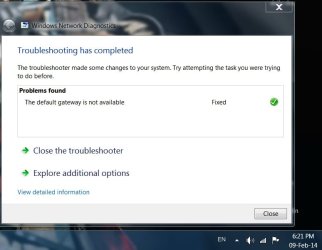
and then I right click on signal bars and troubleshoot problem. after some loading internet connected and problem fixed. why is that happening,? please help me.

Untitled.jpg

Untitled2.jpg
 

My Computer My Computer

At a glance

Windows 7 SP1 Ultimate x64Intel(R) Core(TM) 2 Due cpu E8400 @ 3.0ghz3x2gb DDR3 PC3-10600NVIDIA GeForce 9800 GT
Computer type
PC/Desktop
Computer Manufacturer/Model Number
Acer Veriton S670/G M670/G
OS
Windows 7 SP1 Ultimate x64
CPU
Intel(R) Core(TM) 2 Due cpu E8400 @ 3.0ghz
Motherboard
Acer EQ45M
Memory
3x2gb DDR3 PC3-10600
Graphics Card(s)
NVIDIA GeForce 9800 GT
Sound Card
Digital Audio (S/PDIF) (High Definition Audio Device)
Monitor(s) Displays
Asus VK222H 22" lcd HDMI wide.
Screen Resolution
1680x1050 @ 60 Hz
Hard Drives
2x1TB WD 10EAR
Internet Speed
4mbps
Browser
FireFox v27.01

My Computer My Computer

At a glance

Windows 7 Ult, Windows 8.1 Pro,Q9650-4.275GHz, E8600 4.5GHz, E6750-3.8GHzG.Skill PC2 9600 1200Mhz 5 5 5 15 2TGTX480
Computer type
PC/Desktop
Computer Manufacturer/Model Number
Home built
OS
Windows 7 Ult, Windows 8.1 Pro,
CPU
Q9650-4.275GHz, E8600 4.5GHz, E6750-3.8GHz
Motherboard
Evga 780i FTW
Memory
G.Skill PC2 9600 1200Mhz 5 5 5 15 2T
Graphics Card(s)
GTX480
Sound Card
Asus Xonar D2
Monitor(s) Displays
HannsG
Screen Resolution
1680X1050
Hard Drives
GSkill Phoenix Pro 120GB SSD
PSU
ThermalTake Toughpower 1000Watt modular
Case
ThermalTake XaserV
Cooling
Xigmatek S1283
Keyboard
Logitech G15
Mouse
Logitech G9
Internet Speed
T1
That driver version is a bit outdated, try using the newer driver from the link below dated June 18 2012. If this driver doesn't work then consider updated the routers firmware to the latest version.

Download Realtek RTL8190 WLAN Adapter Driver 2000.4.201.2010 for Windows 7 64 bit, Windows 8 64 bit

Or maybe try different driver versions directly from Realtek :)

Realtek

previous version install year is 2009, and your link is 2010 dated. its update successfully, lets see problem happened or not.
thanks alot.
 

My Computer My Computer

At a glance

Windows 7 SP1 Ultimate x64Intel(R) Core(TM) 2 Due cpu E8400 @ 3.0ghz3x2gb DDR3 PC3-10600NVIDIA GeForce 9800 GT
Computer type
PC/Desktop
Computer Manufacturer/Model Number
Acer Veriton S670/G M670/G
OS
Windows 7 SP1 Ultimate x64
CPU
Intel(R) Core(TM) 2 Due cpu E8400 @ 3.0ghz
Motherboard
Acer EQ45M
Memory
3x2gb DDR3 PC3-10600
Graphics Card(s)
NVIDIA GeForce 9800 GT
Sound Card
Digital Audio (S/PDIF) (High Definition Audio Device)
Monitor(s) Displays
Asus VK222H 22" lcd HDMI wide.
Screen Resolution
1680x1050 @ 60 Hz
Hard Drives
2x1TB WD 10EAR
Internet Speed
4mbps
Browser
FireFox v27.01
no brother, problem still exist. limited sign appears again and again. any other solution.?
in your other link for other version of driver, I can't decide which one to download,
 

My Computer My Computer

At a glance

Windows 7 SP1 Ultimate x64Intel(R) Core(TM) 2 Due cpu E8400 @ 3.0ghz3x2gb DDR3 PC3-10600NVIDIA GeForce 9800 GT
Computer type
PC/Desktop
Computer Manufacturer/Model Number
Acer Veriton S670/G M670/G
OS
Windows 7 SP1 Ultimate x64
CPU
Intel(R) Core(TM) 2 Due cpu E8400 @ 3.0ghz
Motherboard
Acer EQ45M
Memory
3x2gb DDR3 PC3-10600
Graphics Card(s)
NVIDIA GeForce 9800 GT
Sound Card
Digital Audio (S/PDIF) (High Definition Audio Device)
Monitor(s) Displays
Asus VK222H 22" lcd HDMI wide.
Screen Resolution
1680x1050 @ 60 Hz
Hard Drives
2x1TB WD 10EAR
Internet Speed
4mbps
Browser
FireFox v27.01
no brother, problem still exist. limited sign appears again and again. any other solution.?
in your other link for other version of driver, I can't decide which one to download,

If you trying different driver versions and none of them seem to be working then it's very likely that the problem is with the ISP issued modem/router's which can be very problematic. Might be better off using a standard modem plugged into a router but sometimes it's fixable.

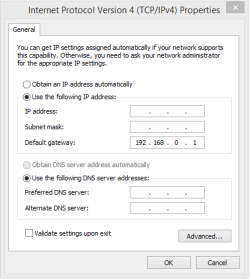
With default gateway problems it sometimes helps to type the gateway IP into the IPv4 properties, then just type the gateway IP into where it says 'default gateway. The one I'm using is just an example of a typical router gateway IP. If I can see ipconfig/all then you can find the gateway IP.
 

Attachments

  • gateway IP typed into IPv4 Properties.PNG
    gateway IP typed into IPv4 Properties.PNG
    8 KB · Views: 25
Last edited:

My Computer My Computer

At a glance

Windows 7 Ult, Windows 8.1 Pro,Q9650-4.275GHz, E8600 4.5GHz, E6750-3.8GHzG.Skill PC2 9600 1200Mhz 5 5 5 15 2TGTX480
Computer type
PC/Desktop
Computer Manufacturer/Model Number
Home built
OS
Windows 7 Ult, Windows 8.1 Pro,
CPU
Q9650-4.275GHz, E8600 4.5GHz, E6750-3.8GHz
Motherboard
Evga 780i FTW
Memory
G.Skill PC2 9600 1200Mhz 5 5 5 15 2T
Graphics Card(s)
GTX480
Sound Card
Asus Xonar D2
Monitor(s) Displays
HannsG
Screen Resolution
1680X1050
Hard Drives
GSkill Phoenix Pro 120GB SSD
PSU
ThermalTake Toughpower 1000Watt modular
Case
ThermalTake XaserV
Cooling
Xigmatek S1283
Keyboard
Logitech G15
Mouse
Logitech G9
Internet Speed
T1
Try reconnecting on your phone right when the problem happens on the pc. My router for some odd reason, there will be times that new connections cannot be made and i have to restart it.
 

My Computer My Computer

At a glance

Windows 7 Professional 32-bit/Windows 8 64-bi...Intel Core 2 Quad Q6600/Intel Core i7 4790/In...2GB/16GB/4GBIntel G33/G31 Express(Vostro)/NVIDIA GeForce ...
Computer type
PC/Desktop
Computer Manufacturer/Model Number
Dell Vostro 400/Dell XPS 8700(Slightly Customized for me by Dell)/Toshiba Satellite T135
OS
Windows 7 Professional 32-bit/Windows 8 64-bit/Win7 Pro64-bit
CPU
Intel Core 2 Quad Q6600/Intel Core i7 4790/Intel Pentium
Memory
2GB/16GB/4GB
Graphics Card(s)
Intel G33/G31 Express(Vostro)/NVIDIA GeForce GTX 745(XPS)
Monitor(s) Displays
HP 2009m(Vostro)/ViewSonic VX2250wm-LED(XPS)
Screen Resolution
1600x900(Vostro)/1920x1080(XPS)
Hard Drives
Seagate ST3160815AS(Vostro)/Western Digital Blue(Satellite)
External:
Western Digital My Passport 0748
Samsung HM121HC
Keyboard
Dell L100)(Vostro)/Dell KB2133p(XPS)
Mouse
Dell M-UAV-DEL8(XPS)
Internet Speed
100 Mbit/s(Only when IPTV is plugged out)
Antivirus
Avast, Malwarebytes PRO
Browser
Internet Explorer 11
Other Info
Note: Names with slashes between two different parts mean that the left is my old desktop and the right is my old laptop and the middle is my new desktop.(Unless specified)
Ping is horrible for servers overseas in US and Europe.
New laptop:LG Gram(Not available in US) Processor:Intel Core i3 4th Gen Ultra Low Power RAM:4GB Hard Drive:SK Hynix OEM MSATA or M.2 Graphics:Intel HD
That driver version is a bit outdated, try using the newer driver from the link below dated June 18 2012. If this driver doesn't work then consider updated the routers firmware to the latest version.

Download Realtek RTL8190 WLAN Adapter Driver 2000.4.201.2010 for Windows 7 64 bit, Windows 8 64 bit

Or maybe try different driver versions directly from Realtek :)

Realtek

your update works.
actually the update didn't require restart, so neither I do restart. and the next day when I start computer Limited or No internet Access problem don't appears.
thanks a lot chev.
(I think my last rep added to you, that's why no more rep allowed to you from me)
 

My Computer My Computer

At a glance

Windows 7 SP1 Ultimate x64Intel(R) Core(TM) 2 Due cpu E8400 @ 3.0ghz3x2gb DDR3 PC3-10600NVIDIA GeForce 9800 GT
Computer type
PC/Desktop
Computer Manufacturer/Model Number
Acer Veriton S670/G M670/G
OS
Windows 7 SP1 Ultimate x64
CPU
Intel(R) Core(TM) 2 Due cpu E8400 @ 3.0ghz
Motherboard
Acer EQ45M
Memory
3x2gb DDR3 PC3-10600
Graphics Card(s)
NVIDIA GeForce 9800 GT
Sound Card
Digital Audio (S/PDIF) (High Definition Audio Device)
Monitor(s) Displays
Asus VK222H 22" lcd HDMI wide.
Screen Resolution
1680x1050 @ 60 Hz
Hard Drives
2x1TB WD 10EAR
Internet Speed
4mbps
Browser
FireFox v27.01
That driver version is a bit outdated, try using the newer driver from the link below dated June 18 2012. If this driver doesn't work then consider updated the routers firmware to the latest version.

Download Realtek RTL8190 WLAN Adapter Driver 2000.4.201.2010 for Windows 7 64 bit, Windows 8 64 bit

Or maybe try different driver versions directly from Realtek :)

Realtek

your update works.
actually the update didn't require restart, so neither I do restart. and the next day when I start computer Limited or No internet Access problem don't appears.
thanks a lot chev.
(I think my last rep added to you, that's why no more rep allowed to you from me)

Well that's good, finally I fix something for you. :cool:

Adding the gateway IP statically is an old trick that works to fix compatibility issues between the adaptor and router or modem. I'm glad this trick worked for someone because it doesn't always work.
 

My Computer My Computer

At a glance

Windows 7 Ult, Windows 8.1 Pro,Q9650-4.275GHz, E8600 4.5GHz, E6750-3.8GHzG.Skill PC2 9600 1200Mhz 5 5 5 15 2TGTX480
Computer type
PC/Desktop
Computer Manufacturer/Model Number
Home built
OS
Windows 7 Ult, Windows 8.1 Pro,
CPU
Q9650-4.275GHz, E8600 4.5GHz, E6750-3.8GHz
Motherboard
Evga 780i FTW
Memory
G.Skill PC2 9600 1200Mhz 5 5 5 15 2T
Graphics Card(s)
GTX480
Sound Card
Asus Xonar D2
Monitor(s) Displays
HannsG
Screen Resolution
1680X1050
Hard Drives
GSkill Phoenix Pro 120GB SSD
PSU
ThermalTake Toughpower 1000Watt modular
Case
ThermalTake XaserV
Cooling
Xigmatek S1283
Keyboard
Logitech G15
Mouse
Logitech G9
Internet Speed
T1
thanks.
 

My Computer My Computer

At a glance

Windows 7 SP1 Ultimate x64Intel(R) Core(TM) 2 Due cpu E8400 @ 3.0ghz3x2gb DDR3 PC3-10600NVIDIA GeForce 9800 GT
Computer type
PC/Desktop
Computer Manufacturer/Model Number
Acer Veriton S670/G M670/G
OS
Windows 7 SP1 Ultimate x64
CPU
Intel(R) Core(TM) 2 Due cpu E8400 @ 3.0ghz
Motherboard
Acer EQ45M
Memory
3x2gb DDR3 PC3-10600
Graphics Card(s)
NVIDIA GeForce 9800 GT
Sound Card
Digital Audio (S/PDIF) (High Definition Audio Device)
Monitor(s) Displays
Asus VK222H 22" lcd HDMI wide.
Screen Resolution
1680x1050 @ 60 Hz
Hard Drives
2x1TB WD 10EAR
Internet Speed
4mbps
Browser
FireFox v27.01
That driver version is a bit outdated, try using the newer driver from the link below dated June 18 2012. If this driver doesn't work then consider updated the routers firmware to the latest version.

Download Realtek RTL8190 WLAN Adapter Driver 2000.4.201.2010 for Windows 7 64 bit, Windows 8 64 bit

Or maybe try different driver versions directly from Realtek :)

Realtek

your update works.
actually the update didn't require restart, so neither I do restart. and the next day when I start computer Limited or No internet Access problem don't appears.
thanks a lot chev.
(I think my last rep added to you, that's why no more rep allowed to you from me)

Well that's good, finally I fix something for you. :cool:

Adding the gateway IP statically is an old trick that works to fix compatibility issues between the adaptor and router or modem. I'm glad this trick worked for someone because it doesn't always work.
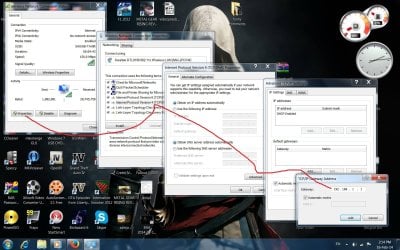
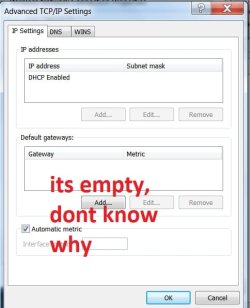
wtf is that. internet runs normally without problem just for 2 or 3 days. now its happening again. adding default gateway either didn't solve the problem, instead adding the gateway disconnect the internet. and sometime. when I add gateway, it did not actually add. and the gateway box is empty. if its add then internet gone. any other solution will highly appreciated. waiting.
gateway.jpg

gateway1.jpg
 

My Computer My Computer

At a glance

Windows 7 SP1 Ultimate x64Intel(R) Core(TM) 2 Due cpu E8400 @ 3.0ghz3x2gb DDR3 PC3-10600NVIDIA GeForce 9800 GT
Computer type
PC/Desktop
Computer Manufacturer/Model Number
Acer Veriton S670/G M670/G
OS
Windows 7 SP1 Ultimate x64
CPU
Intel(R) Core(TM) 2 Due cpu E8400 @ 3.0ghz
Motherboard
Acer EQ45M
Memory
3x2gb DDR3 PC3-10600
Graphics Card(s)
NVIDIA GeForce 9800 GT
Sound Card
Digital Audio (S/PDIF) (High Definition Audio Device)
Monitor(s) Displays
Asus VK222H 22" lcd HDMI wide.
Screen Resolution
1680x1050 @ 60 Hz
Hard Drives
2x1TB WD 10EAR
Internet Speed
4mbps
Browser
FireFox v27.01
In this case the ISP issued router/modem is the most likely problem.

I believe you should try to start up in safe mode with Networking to see if the problem persists when in safe mode.

It may also help to try connecting to a different router and see if the problem persists.

You could also try using a static IP which may help with the handshake problem you seem to be having.
- Click Start Button
- Type: ncpa.cpl
- Right click the Wireless Adapter and choose PROPERTIES
- Click and highlight the Internet Protocol TCP/IP Version 4 option
- Click the Properties button
- Choose “Use the following IP address”
- Enter the following for the IP address: 192.168.1.xxx- the xxx should be an address that is outside the range of DHCP on your router.

Enter the following for the Subnet Mask: 255.255.255.0
- Enter the following for the Default Gateway: 192.168.1.1
- Choose “Use the following DNS servers”
- Enter the following for the Primary DNS server: 192.168.1.1
- Enter the following for the Secondary DNS server: 8.8.8.8
- Click OK
- Click OK
- Reconnect to the wireless signal
 
Last edited:

My Computer My Computer

At a glance

Windows 7 Ult, Windows 8.1 Pro,Q9650-4.275GHz, E8600 4.5GHz, E6750-3.8GHzG.Skill PC2 9600 1200Mhz 5 5 5 15 2TGTX480
Computer type
PC/Desktop
Computer Manufacturer/Model Number
Home built
OS
Windows 7 Ult, Windows 8.1 Pro,
CPU
Q9650-4.275GHz, E8600 4.5GHz, E6750-3.8GHz
Motherboard
Evga 780i FTW
Memory
G.Skill PC2 9600 1200Mhz 5 5 5 15 2T
Graphics Card(s)
GTX480
Sound Card
Asus Xonar D2
Monitor(s) Displays
HannsG
Screen Resolution
1680X1050
Hard Drives
GSkill Phoenix Pro 120GB SSD
PSU
ThermalTake Toughpower 1000Watt modular
Case
ThermalTake XaserV
Cooling
Xigmatek S1283
Keyboard
Logitech G15
Mouse
Logitech G9
Internet Speed
T1
giving IP, dns and gateway manually also not working.
tired of solving this problem. and replace router back to my room, and run internet through LAN.
thanks all guys for stick to this.
 

My Computer My Computer

At a glance

Windows 7 SP1 Ultimate x64Intel(R) Core(TM) 2 Due cpu E8400 @ 3.0ghz3x2gb DDR3 PC3-10600NVIDIA GeForce 9800 GT
Computer type
PC/Desktop
Computer Manufacturer/Model Number
Acer Veriton S670/G M670/G
OS
Windows 7 SP1 Ultimate x64
CPU
Intel(R) Core(TM) 2 Due cpu E8400 @ 3.0ghz
Motherboard
Acer EQ45M
Memory
3x2gb DDR3 PC3-10600
Graphics Card(s)
NVIDIA GeForce 9800 GT
Sound Card
Digital Audio (S/PDIF) (High Definition Audio Device)
Monitor(s) Displays
Asus VK222H 22" lcd HDMI wide.
Screen Resolution
1680x1050 @ 60 Hz
Hard Drives
2x1TB WD 10EAR
Internet Speed
4mbps
Browser
FireFox v27.01

My Computer My Computer

At a glance

Windows 7 Ultimate x64
Computer type
PC/Desktop
OS
Windows 7 Ultimate x64
Back
Top