No internet access- LAN connection - GeForce 6100/nForce 430

reds

New member
Local time
12:24 AM
Messages
5
Dear all,

recently I decided to re-install windows 7 professional 32 bit on my pc. However since I reinstalled it, I haven't been able to connect to the internet. The motherboard is ASUS M2N-VM DH and comes with an integrated GeForce 6100/nForce 430.

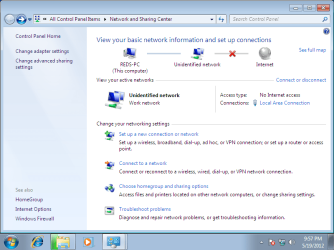
As seen on the 1st screenshot of my network and sharing center, it doesn't identify the network (I even change it's type from public to personal and didn't help).

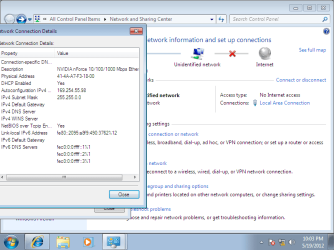
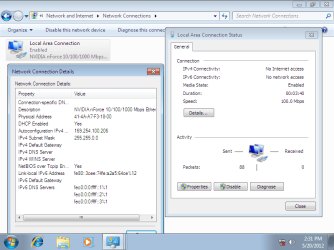
Next I check that the DHCP is enabled however wasn't retrieveing any useful IP adress (see attachment 2)

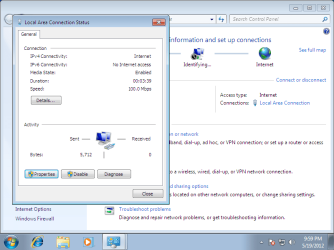
Therefore I decided to introduce manually the IP adress, however it also didn't help (see attachment 3 and 4)

Additionally I tried installing the latest drivers found at nvidia.com 15.49_nforce_winvista_win7_32bit_international_whql.exe

Does anybody may help. I have spent one whole day reading forums and still have no clue what may be the issue, everything was working before re-installing win7. :cry:
 

Attachments

  • Network and sharing center.png
    Network and sharing center.png
    37.9 KB · Views: 44
  • dhcp enabled.png
    dhcp enabled.png
    29.6 KB · Views: 43
  • inserted manually ip adress.png
    inserted manually ip adress.png
    28.1 KB · Views: 30
  • final result.png
    final result.png
    29.3 KB · Views: 30

My Computer My Computer

At a glance

Windows 7 Professional 32bit
OS
Windows 7 Professional 32bit
Dear all,

recently I decided to re-install windows 7 professional 32 bit on my pc. However since I reinstalled it, I haven't been able to connect to the internet. The motherboard is ASUS M2N-VM DH and comes with an integrated GeForce 6100/nForce 430.

As seen on the 1st screenshot of my network and sharing center, it doesn't identify the network (I even change it's type from public to personal and didn't help).

Next I check that the DHCP is enabled however wasn't retrieveing any useful IP adress (see attachment 2)

Therefore I decided to introduce manually the IP adress, however it also didn't help (see attachment 3 and 4)

Additionally I tried installing the latest drivers found at nvidia.com 15.49_nforce_winvista_win7_32bit_international_whql.exe

Does anybody may help. I have spent one whole day reading forums and still have no clue what may be the issue, everything was working before re-installing win7. :cry:
click hereWindows Unidentified network | xpresslearn.com follow instructions;for me worked
 

My Computer My Computer

At a glance

Windows 7 ultimate x64 SP1AMD Phenom II X4 955,3,2 GHzKINGSTON DDR3 1600 MHz 2X4GGainward nVidia GeForce GTX 580
OS
Windows 7 ultimate x64 SP1
CPU
AMD Phenom II X4 955,3,2 GHz
Motherboard
ASSUS M5A97,Socket AM3
Memory
KINGSTON DDR3 1600 MHz 2X4G
Graphics Card(s)
Gainward nVidia GeForce GTX 580
Sound Card
INCLUDED IN THE MOTHERBOARD(Realtek driver)
Monitor(s) Displays
BenQ LED 24" Wide Full HD
Screen Resolution
1920X1080
Hard Drives
HDD Seagate Barracuda Green 2TB
Case
NOX
Keyboard
USB OFFICE KEYBOARD
Mouse
Genius Xscroll Black USB
Internet Speed
LAN 100M
It didn't help :(
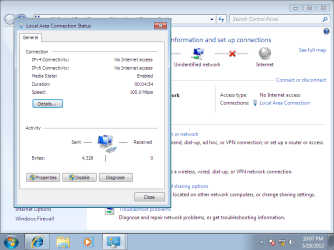
As seen on the screenshot, now the adapter status is enabled, however I still have no network access :(
 

Attachments

  • attempt 1.png
    attempt 1.png
    30.3 KB · Views: 25

My Computer My Computer

At a glance

Windows 7 Professional 32bit
OS
Windows 7 Professional 32bit
It didn't help :(
As seen on the screenshot, now the adapter status is enabled, however I still have no network access :(
1.open control panel(all items)-->device manager
2.in device manager look for network adapter
3.uninstall network driver
4.install new driver via "windows update"
P.S.:let me know for future problems
 

My Computer My Computer

At a glance

Windows 7 ultimate x64 SP1AMD Phenom II X4 955,3,2 GHzKINGSTON DDR3 1600 MHz 2X4GGainward nVidia GeForce GTX 580
OS
Windows 7 ultimate x64 SP1
CPU
AMD Phenom II X4 955,3,2 GHz
Motherboard
ASSUS M5A97,Socket AM3
Memory
KINGSTON DDR3 1600 MHz 2X4G
Graphics Card(s)
Gainward nVidia GeForce GTX 580
Sound Card
INCLUDED IN THE MOTHERBOARD(Realtek driver)
Monitor(s) Displays
BenQ LED 24" Wide Full HD
Screen Resolution
1920X1080
Hard Drives
HDD Seagate Barracuda Green 2TB
Case
NOX
Keyboard
USB OFFICE KEYBOARD
Mouse
Genius Xscroll Black USB
Internet Speed
LAN 100M
How I may install a new driver via "windows update"?
When I clicked "Check for updates" it gave me error:
Code 8024001F You need to connect to the Internet to check for updates.
 

My Computer My Computer

At a glance

Windows 7 Professional 32bit
OS
Windows 7 Professional 32bit
When you set the IP address manually what did you put in for the IP address, Subnet, gateway & DNS ?
 

My Computer My Computer

At a glance

Windows 7 Ultimate 64bitAMD Phenom Quad core 9950 black edition16Gb2x XFX Radeon 5850
Computer type
PC/Desktop
Computer Manufacturer/Model Number
Self Built
OS
Windows 7 Ultimate 64bit
CPU
AMD Phenom Quad core 9950 black edition
Motherboard
Gigabyte
Memory
16Gb
Graphics Card(s)
2x XFX Radeon 5850
Sound Card
PCI Express X-Fi Titanium / Logitech G35
Monitor(s) Displays
2x HP 2410i
Screen Resolution
1920x1080
Hard Drives
2x 500Gb Seagate
1x 300Gb Seagate
1x 1Tb Seagate
2x 1Tb Hitatchi
PSU
Jean Tech Storm 700W
Case
Cooler Master COSMOS S
Cooling
Akasa Evo Blue Pro
Keyboard
Logitech G15
Mouse
Mad Catz M.M.O. 7
Internet Speed
12mb
I used the one my laptop retrieves when I connect it to the same cable.
 
Last edited:

My Computer My Computer

At a glance

Windows 7 Professional 32bit
OS
Windows 7 Professional 32bit
I used the one my laptop retrieves when I connect it to the same cable. (see attachment)
1.first after you uninstall driver via device manager(see my above post) right click on the network adapter and choose "scan for hardware changes"---?widows choose the best driver for you
2.second if the above method not work right click on the network adapter in device manager and choose properties;look for advanced tab and here scroll down and choose last option"WOL&Shutdown link speed"'in the right side you have 3 options avaible and choose the last one "not speed down"
PS sorry my english is not good; write me here for future problems
 

My Computer My Computer

At a glance

Windows 7 ultimate x64 SP1AMD Phenom II X4 955,3,2 GHzKINGSTON DDR3 1600 MHz 2X4GGainward nVidia GeForce GTX 580
OS
Windows 7 ultimate x64 SP1
CPU
AMD Phenom II X4 955,3,2 GHz
Motherboard
ASSUS M5A97,Socket AM3
Memory
KINGSTON DDR3 1600 MHz 2X4G
Graphics Card(s)
Gainward nVidia GeForce GTX 580
Sound Card
INCLUDED IN THE MOTHERBOARD(Realtek driver)
Monitor(s) Displays
BenQ LED 24" Wide Full HD
Screen Resolution
1920X1080
Hard Drives
HDD Seagate Barracuda Green 2TB
Case
NOX
Keyboard
USB OFFICE KEYBOARD
Mouse
Genius Xscroll Black USB
Internet Speed
LAN 100M
Thanks for all your help. However it seems I will need to re-install windows again. It seems I erased some critical file, so now I am not able to enter Windows.

Just this time I will first install windows XP and then upgrade it to windows 7, as I did 3 years ago. Hopefully this will help me :)
 

My Computer My Computer

At a glance

Windows 7 Professional 32bit
OS
Windows 7 Professional 32bit
Back
Top