No internet access

VentiSC

New member
Local time
4:59 AM
Messages
2
Hi guys, I'm new here. I've searched forums for this problem but haven't been very successful.

So, I'm using HP Laptop, running Win7 Professional 32-bit and Wireless router TP-link tl-wr741nd . When i'm trying to connect to network i only get "No Internet access" . I have the same problem too when i'm connected with wire.

From ipconfig i get this:

Ethernet Adapter Local Area Connection:
Connection-specific DNS Suffix:
Autoconfiguration IPv4 Adress : 169.254.xxx.xxx
Subnet Mask: 255.255.0.0
Default Gateway :


When i tried to connect this laptop to other network it's ok, with no problems. Also on this other machine (PC, Win XP), there is no problem with Internet connections in this network where i have problems with laptop.
 

My Computer

OS
Windows7 professional 32-bit
Hello VentiSC and welcome to the forums!

It seems like your Laptop isn't receiving the correct DHCP information from the router....

1. Have you tried to type in ipconfig /release and ipconfig /renew at the command prompt?

2. Have you tried to input a static IP address for your ethernet adapter for this network?

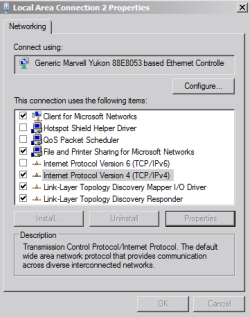
a. Go to Network and Sharing center in Control Panel, change adapter settings (which should be on the left hand side of the screen), right click on your Adapter and select properties.

b. In the Properties box, click on Internet Protocol Version 4, and properties

prop.PNG

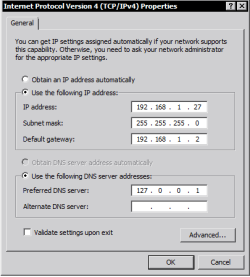
c. In the Internet Protocol Version 4 properties box, type in an IP address, this IP address should be similar to another device on the network that has internet connection. For example if your XP PC's IP address is 192.168.1.90 and your router's address is 192.168.1.1, you should type in 192.168.1.xxx where xxx is a number between 2 and 254 excluding the 90 of your other PC.

d. Enter the router's address for the default gateway and Preferred DNS Server

prop1.PNG

e. And hit ok at the end..

Try connecting to the internet after that.

Hope that helps!
 

My Computer

Computer Manufacturer/Model Number
DELL SXPS 1640
OS
Windows 7 x64 Professional SP1
CPU
Intel C2D T9550 2.66 GHz @ 2.793 GHz (Thanks ThrottleStop!!)
Motherboard
Intel PM45
Memory
8 GB DDR3
Graphics Card(s)
ATI MOBILITY RADEON 4670
Sound Card
CREATIVE XFI AUDIO NOTEBOOK
Monitor(s) Displays
16.1 WLED
Screen Resolution
1920x1080
Hard Drives
Seagate ST9500420AS 500GB (465GiBi) 7200 RPM Drive

External Drives:-
2 TB WD Essentials x 3
1 TB WD Mybook Gen 1
1 TB WD Mybook Gen 2
1 TB Seagate
1 TB Seagate
320 GB WD Scorpio Black (enclosed)
PSU
90W Dell Power Brick
Case
Dell Chassis
Cooling
Coolermaster Cooling Pad
Keyboard
Built-in backlighted Keyboard
Mouse
Logitech Wireless Mini Mouse
Internet Speed
4/0.5
Thanks solarmystic but I've tried this and didn't work out.

with ipconfig /renew i got "An error occurred while renewing interface Wireless Network Connection: unable to contact your DHCP server. Request has timed out."

And when I enter IP adress, things still doesn't change.
 

My Computer

OS
Windows7 professional 32-bit
Hmm.. i haven't thought of this before but have you tried updating the router's firmware to the latest version from TP-Link's website?

How about resetting the router to the default settings?

As far as i know the router should be Windows 7 compatible, but it never hurts to be sure....
 

My Computer

Computer Manufacturer/Model Number
DELL SXPS 1640
OS
Windows 7 x64 Professional SP1
CPU
Intel C2D T9550 2.66 GHz @ 2.793 GHz (Thanks ThrottleStop!!)
Motherboard
Intel PM45
Memory
8 GB DDR3
Graphics Card(s)
ATI MOBILITY RADEON 4670
Sound Card
CREATIVE XFI AUDIO NOTEBOOK
Monitor(s) Displays
16.1 WLED
Screen Resolution
1920x1080
Hard Drives
Seagate ST9500420AS 500GB (465GiBi) 7200 RPM Drive

External Drives:-
2 TB WD Essentials x 3
1 TB WD Mybook Gen 1
1 TB WD Mybook Gen 2
1 TB Seagate
1 TB Seagate
320 GB WD Scorpio Black (enclosed)
PSU
90W Dell Power Brick
Case
Dell Chassis
Cooling
Coolermaster Cooling Pad
Keyboard
Built-in backlighted Keyboard
Mouse
Logitech Wireless Mini Mouse
Internet Speed
4/0.5
Good idea by solarmystic on router firmware updating. There was a significant security flaw that was uncovered about a year ago the affects most brands of wireless routers manufactured within about the past 5 years. Manufacturers have either recommended settings changes and/or offered firmware updates as a stop-gap measure.

Until you get a chance to to update firmware, give this a shot:

Copy and paste these lines in Notepad:

@Echo on
pushd\windows\system32\drivers\etc
attrib -h -s -r hosts
echo 127.0.0.1 localhost>HOSTS
attrib +r +h +s hosts
popd
ipconfig /release
ipconfig /renew
ipconfig /flushdns
netsh winsock reset all
netsh int ip reset all
shutdown -r -t 1
del %0

Save as flush.bat to your desktop. Right click on the flush.bat file to run it as Administrator.

Your computer will reboot itself.

Retry after the restart.
 

My Computer

OS
Windows 7 Ultimate x64
Hi guys, I'm new here. I've searched forums for this problem but haven't been very successful.

So, I'm using HP Laptop, running Win7 Professional 32-bit and Wireless router TP-link tl-wr741nd . When i'm trying to connect to network i only get "No Internet access" . I have the same problem too when i'm connected with wire.

From ipconfig i get this:

Ethernet Adapter Local Area Connection:
Connection-specific DNS Suffix:
Autoconfiguration IPv4 Adress : 169.254.xxx.xxx
Subnet Mask: 255.255.0.0
Default Gateway :


When i tried to connect this laptop to other network it's ok, with no problems. Also on this other machine (PC, Win XP), there is no problem with Internet connections in this network where i have problems with laptop.

Dear OP,

These are excellent suggestions to help you in getting this resolve. I have provided you some links that will help you along these suggestions. You will find the FAQ's on both how to properly flash the firmware on our devices and also how to properly reset the device to factory defaults. If we at TP-LINK may be of any further help please do not hesitate to contact us directly.

Firmware flash: How to Upgrade TP-LINK Wireless G Router&AP - Welcome to TP-LINK
Resetting the device: How to reset TP-LINK products to factory defaults (Forgot/Lost Password) - Welcome to TP-LINK

[FONT=&quot]Best Regards![/FONT]
[FONT=&quot]TP-LINK Support Force[/FONT]
[FONT=&quot]Toll Free Tech Support: 866-225-8139[/FONT]
[FONT=&quot][email protected][/FONT][FONT=&quot][/FONT]
[FONT=&quot]http://www.facebook.com/TPLINK[/FONT]
 

My Computer

OS
Windows 7 32bit
Back
Top