Solved No Internet Icon but Internet is present

jimnycricket

New member
Member
VIP
Local time
10:04 AM
Messages
97
Location
Anaheim, CA
I have this notification and yet I have internet

nointerneticon.jpg
 

My Computer My Computer

At a glance

Windows 7 Professional 64bit2.20GHz24GB RAMIntel HD Graphics; NVIDIA Quador 1000M
OS
Windows 7 Professional 64bit
CPU
2.20GHz
Motherboard
Whatever came with Lenovo w520 in 2011
Memory
24GB RAM
Graphics Card(s)
Intel HD Graphics; NVIDIA Quador 1000M
Monitor(s) Displays
HP 24" at work and ASUS 32" at home
Screen Resolution
Depends but Laptop is 1600x900
Hard Drives
SAMSUNG SSD 830 Series: 256GB for C, 128 for D in HHD Slot
Mouse
Different mouse for different desks
Internet Speed
10+MB Down. 2MG Up.

My Computer My Computer

At a glance

Windows 8.1 64 bitWindows 8.1 64-bit4096 MB RAMMicrosoft Basic Display Adapter
Computer type
Laptop
Computer Manufacturer/Model Number
Acer Aspire M5100
OS
Windows 8.1 64 bit
CPU
Windows 8.1 64-bit
Motherboard
Toshiba L745D
Memory
4096 MB RAM
Graphics Card(s)
Microsoft Basic Display Adapter
Sound Card
High Definition Audio Device
Monitor(s) Displays
1366x768
Screen Resolution
1366x768
Keyboard
Logitech Keyboard K800
Antivirus
MalwareBytes
Browser
Google Chrome
Exactly. Odd, right? I can't trust that icon so I end up opening a browser to make sure that the internet is up and running.
 

My Computer My Computer

At a glance

Windows 7 Professional 64bit2.20GHz24GB RAMIntel HD Graphics; NVIDIA Quador 1000M
OS
Windows 7 Professional 64bit
CPU
2.20GHz
Motherboard
Whatever came with Lenovo w520 in 2011
Memory
24GB RAM
Graphics Card(s)
Intel HD Graphics; NVIDIA Quador 1000M
Monitor(s) Displays
HP 24" at work and ASUS 32" at home
Screen Resolution
Depends but Laptop is 1600x900
Hard Drives
SAMSUNG SSD 830 Series: 256GB for C, 128 for D in HHD Slot
Mouse
Different mouse for different desks
Internet Speed
10+MB Down. 2MG Up.
Exactly. Odd, right? I can't trust that icon so I end up opening a browser to make sure that the internet is up and running.

It's normal, don't worry about it . Will help you get it fixed :)
 

My Computer My Computer

At a glance

Windows 8.1 64 bitWindows 8.1 64-bit4096 MB RAMMicrosoft Basic Display Adapter
Computer type
Laptop
Computer Manufacturer/Model Number
Acer Aspire M5100
OS
Windows 8.1 64 bit
CPU
Windows 8.1 64-bit
Motherboard
Toshiba L745D
Memory
4096 MB RAM
Graphics Card(s)
Microsoft Basic Display Adapter
Sound Card
High Definition Audio Device
Monitor(s) Displays
1366x768
Screen Resolution
1366x768
Keyboard
Logitech Keyboard K800
Antivirus
MalwareBytes
Browser
Google Chrome
Exactly. Odd, right? I can't trust that icon so I end up opening a browser to make sure that the internet is up and running.

It's normal, don't worry about it . Will help you get it fixed :)

LOL... how is this inconsistency a normal occurance...? Thanks in advance in getting this thing fixed.
 

My Computer My Computer

At a glance

Windows 7 Professional 64bit2.20GHz24GB RAMIntel HD Graphics; NVIDIA Quador 1000M
OS
Windows 7 Professional 64bit
CPU
2.20GHz
Motherboard
Whatever came with Lenovo w520 in 2011
Memory
24GB RAM
Graphics Card(s)
Intel HD Graphics; NVIDIA Quador 1000M
Monitor(s) Displays
HP 24" at work and ASUS 32" at home
Screen Resolution
Depends but Laptop is 1600x900
Hard Drives
SAMSUNG SSD 830 Series: 256GB for C, 128 for D in HHD Slot
Mouse
Different mouse for different desks
Internet Speed
10+MB Down. 2MG Up.

My Computer My Computer

At a glance

Windows 8.1 64 bitWindows 8.1 64-bit4096 MB RAMMicrosoft Basic Display Adapter
Computer type
Laptop
Computer Manufacturer/Model Number
Acer Aspire M5100
OS
Windows 8.1 64 bit
CPU
Windows 8.1 64-bit
Motherboard
Toshiba L745D
Memory
4096 MB RAM
Graphics Card(s)
Microsoft Basic Display Adapter
Sound Card
High Definition Audio Device
Monitor(s) Displays
1366x768
Screen Resolution
1366x768
Keyboard
Logitech Keyboard K800
Antivirus
MalwareBytes
Browser
Google Chrome
That's not normal. Do you use a wireless connection? Or just Ethernet?

1.) Have you tried running windows updates and seeing if under optional updates there is a updated driver for networking/Ethernet?

2.) Have you tried right clicking the networking icon and running the troubleshooter?

3.) You could also try downloading ccleaner and selecting the "clear notifications icon cache" and clearing it. Then restart and see what happens.
 

My Computer My Computer

At a glance

Windows 10 ProAMD Ryzen 5 2400G Processor with Radeon RX Ve...G.SKILL Ripjaws V Series 16GB (2 x 8GB) 288-P...2047MB NVIDIA GeForce GTX 1060 6GB (EVGA)
Computer type
PC/Desktop
Computer Manufacturer/Model Number
Custom Built
OS
Windows 10 Pro
CPU
AMD Ryzen 5 2400G Processor with Radeon RX Vega 11 Graphics
Motherboard
ASRock X470 Master SLI/AC AM4 AMD Promontory X470 SATA 6Gb/s
Memory
G.SKILL Ripjaws V Series 16GB (2 x 8GB) 288-Pin DDR4 SDRAM D
Graphics Card(s)
2047MB NVIDIA GeForce GTX 1060 6GB (EVGA)
Sound Card
Motherboard Built in
Monitor(s) Displays
Acer R240HY bidx 23.8-Inch IPS HDMI DVI VGA (1920 x 1080) Wi
Screen Resolution
1920 x 1080
Hard Drives
1TB Sandisk SSD PLUS (Main drive)
500 GB Seagate 7200 RPM (Games)
500 GB Western Digital 7200 RPM (Virtual Machines)
PSU
CORSAIR TX Series TX650M 650W 80+ Gold Modular Power Supply
Case
CORSAIR CARBIDE SPEC-02 Mid-Tower Gaming Case, Red LED Fan
Cooling
220mm, two 120mm, and four 60mm fans
Keyboard
Wired Dell keyboard
Mouse
Wireless Logitech mouse
Internet Speed
250mb down, 30mb up
Antivirus
Panda Cloud Antivirus
Browser
Chrome-ish x64
Other Info
Your awesome for reading this.
I have done 1 and 2. I am not too keen on#3 option. Thanks.
 

My Computer My Computer

At a glance

Windows 7 Professional 64bit2.20GHz24GB RAMIntel HD Graphics; NVIDIA Quador 1000M
OS
Windows 7 Professional 64bit
CPU
2.20GHz
Motherboard
Whatever came with Lenovo w520 in 2011
Memory
24GB RAM
Graphics Card(s)
Intel HD Graphics; NVIDIA Quador 1000M
Monitor(s) Displays
HP 24" at work and ASUS 32" at home
Screen Resolution
Depends but Laptop is 1600x900
Hard Drives
SAMSUNG SSD 830 Series: 256GB for C, 128 for D in HHD Slot
Mouse
Different mouse for different desks
Internet Speed
10+MB Down. 2MG Up.
That's not normal. Do you use a wireless connection? Or just Ethernet?

1.) Have you tried running windows updates and seeing if under optional updates there is a updated driver for networking/Ethernet?

2.) Have you tried right clicking the networking icon and running the troubleshooter?

3.) You could also try downloading ccleaner and selecting the "clear notifications icon cache" and clearing it. Then restart and see what happens.


Andrew I typed that accidentally , and it isn't normal. Have you tried looking for the driver online?. Please give me your Model Number so I can find your driver. It can be a driver issue.
 

My Computer My Computer

At a glance

Windows 8.1 64 bitWindows 8.1 64-bit4096 MB RAMMicrosoft Basic Display Adapter
Computer type
Laptop
Computer Manufacturer/Model Number
Acer Aspire M5100
OS
Windows 8.1 64 bit
CPU
Windows 8.1 64-bit
Motherboard
Toshiba L745D
Memory
4096 MB RAM
Graphics Card(s)
Microsoft Basic Display Adapter
Sound Card
High Definition Audio Device
Monitor(s) Displays
1366x768
Screen Resolution
1366x768
Keyboard
Logitech Keyboard K800
Antivirus
MalwareBytes
Browser
Google Chrome
I have done 1 and 2. I am not too keen on#3 option. Thanks.

Hello Jimney,

No worries, resetting your notification area icons will not harm your PC. If you like, use the tutorial below to do so without having to install or use 3rd party software to do so.

http://www.sevenforums.com/tutorials/13102-notification-area-icons-reset.html

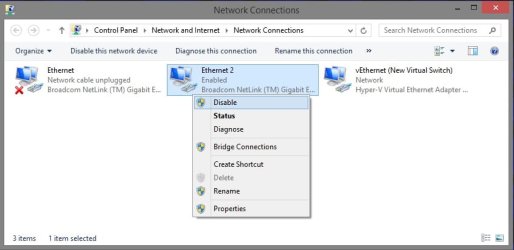
If that doesn't help, then disabling and enabling your network adapter will sometimes help to toggle the icon back to normal.

http://www.sevenforums.com/tutorials/24545-network-connections-create-shortcut.html

network.jpg
 

My Computer My Computer

At a glance

64-bit Windows 11 Pro for WorkstationsIntel i7-8700K OC'd to 5 GHz64 GB (4x16GB) G.SKILL TridentZ RGB DDR4 3600...ASUS ROG-STRIX-GTX1080TI-O11G-GAMING
Computer type
PC/Desktop
Computer Manufacturer/Model Number
Self built custom
OS
64-bit Windows 11 Pro for Workstations
CPU
Intel i7-8700K OC'd to 5 GHz
Motherboard
ASUS ROG Maximus XI Formula Z390
Memory
64 GB (4x16GB) G.SKILL TridentZ RGB DDR4 3600 MHz
Graphics Card(s)
ASUS ROG-STRIX-GTX1080TI-O11G-GAMING
Sound Card
Integrated
Monitor(s) Displays
2 x Samsung Odyssey G7 27"
Screen Resolution
2560x1440
Hard Drives
1TB Samsung 990 PRO M.2,
4TB Samsung 990 PRO PRO M.2,
TerraMaster F8 SSD Plus NAS
PSU
Seasonic Prime Titanium 850W
Case
Thermaltake Core P3
Cooling
Corsair Hydro H115i
Keyboard
Logitech wireless K800
Mouse
Logitech MX Master 4
Internet Speed
2 Gb/s Download and 100 Mb/s Upload
Antivirus
Malwarebyte Anti-Malware Premium
Browser
Google Chrome
Other Info
Logitech Z625 speaker system,
Logitech BRIO 4K Pro webcam,
HP Color LaserJet Pro MFP M477fdn,
APC SMART-UPS RT 1000 XL - SURT1000XLI,
Galaxy S23 Plus phone
Brink thank you. :) The second option is nice touch.

You and your tutorials! Is there anything you do not have a tutorial on? haha

One of these days I am going to dedicate a couple of hours and look at every tutorial you have on this site.
 

My Computer My Computer

At a glance

Windows 10 ProAMD Ryzen 5 2400G Processor with Radeon RX Ve...G.SKILL Ripjaws V Series 16GB (2 x 8GB) 288-P...2047MB NVIDIA GeForce GTX 1060 6GB (EVGA)
Computer type
PC/Desktop
Computer Manufacturer/Model Number
Custom Built
OS
Windows 10 Pro
CPU
AMD Ryzen 5 2400G Processor with Radeon RX Vega 11 Graphics
Motherboard
ASRock X470 Master SLI/AC AM4 AMD Promontory X470 SATA 6Gb/s
Memory
G.SKILL Ripjaws V Series 16GB (2 x 8GB) 288-Pin DDR4 SDRAM D
Graphics Card(s)
2047MB NVIDIA GeForce GTX 1060 6GB (EVGA)
Sound Card
Motherboard Built in
Monitor(s) Displays
Acer R240HY bidx 23.8-Inch IPS HDMI DVI VGA (1920 x 1080) Wi
Screen Resolution
1920 x 1080
Hard Drives
1TB Sandisk SSD PLUS (Main drive)
500 GB Seagate 7200 RPM (Games)
500 GB Western Digital 7200 RPM (Virtual Machines)
PSU
CORSAIR TX Series TX650M 650W 80+ Gold Modular Power Supply
Case
CORSAIR CARBIDE SPEC-02 Mid-Tower Gaming Case, Red LED Fan
Cooling
220mm, two 120mm, and four 60mm fans
Keyboard
Wired Dell keyboard
Mouse
Wireless Logitech mouse
Internet Speed
250mb down, 30mb up
Antivirus
Panda Cloud Antivirus
Browser
Chrome-ish x64
Other Info
Your awesome for reading this.
You're most welcome Andrew. Glad to have been of help. :)
 

My Computer My Computer

At a glance

64-bit Windows 11 Pro for WorkstationsIntel i7-8700K OC'd to 5 GHz64 GB (4x16GB) G.SKILL TridentZ RGB DDR4 3600...ASUS ROG-STRIX-GTX1080TI-O11G-GAMING
Computer type
PC/Desktop
Computer Manufacturer/Model Number
Self built custom
OS
64-bit Windows 11 Pro for Workstations
CPU
Intel i7-8700K OC'd to 5 GHz
Motherboard
ASUS ROG Maximus XI Formula Z390
Memory
64 GB (4x16GB) G.SKILL TridentZ RGB DDR4 3600 MHz
Graphics Card(s)
ASUS ROG-STRIX-GTX1080TI-O11G-GAMING
Sound Card
Integrated
Monitor(s) Displays
2 x Samsung Odyssey G7 27"
Screen Resolution
2560x1440
Hard Drives
1TB Samsung 990 PRO M.2,
4TB Samsung 990 PRO PRO M.2,
TerraMaster F8 SSD Plus NAS
PSU
Seasonic Prime Titanium 850W
Case
Thermaltake Core P3
Cooling
Corsair Hydro H115i
Keyboard
Logitech wireless K800
Mouse
Logitech MX Master 4
Internet Speed
2 Gb/s Download and 100 Mb/s Upload
Antivirus
Malwarebyte Anti-Malware Premium
Browser
Google Chrome
Other Info
Logitech Z625 speaker system,
Logitech BRIO 4K Pro webcam,
HP Color LaserJet Pro MFP M477fdn,
APC SMART-UPS RT 1000 XL - SURT1000XLI,
Galaxy S23 Plus phone
I will live with this since this is a workstation that acts as a file server and is seldom accessed (unless issues rise). Besides, some of these little things seem to fix on an update or reboot. Thanks for your inputs.
 

My Computer My Computer

At a glance

Windows 7 Professional 64bit2.20GHz24GB RAMIntel HD Graphics; NVIDIA Quador 1000M
OS
Windows 7 Professional 64bit
CPU
2.20GHz
Motherboard
Whatever came with Lenovo w520 in 2011
Memory
24GB RAM
Graphics Card(s)
Intel HD Graphics; NVIDIA Quador 1000M
Monitor(s) Displays
HP 24" at work and ASUS 32" at home
Screen Resolution
Depends but Laptop is 1600x900
Hard Drives
SAMSUNG SSD 830 Series: 256GB for C, 128 for D in HHD Slot
Mouse
Different mouse for different desks
Internet Speed
10+MB Down. 2MG Up.
Back
Top