No internet in XP Mode only?!

flatratetec

New member
My laptop will not connect to the internet at all in XP Mode. It works just fine in Windows 7 Pro. :confused: It seems like when its in XP mode it doesnt see the wireless adaptor. Is there anything else that I may need to do? I just downloaded the XP Mode app. Unfortunately I need XP to run an app for my job which also requires internet access. Any ideas or help that anyone can provide is greatly appreciated. Thanks!!
 

My Computer

Computer Manufacturer/Model Number
Sony Vaio sr520g/b
OS
Windows 7 Professional
CPU
Inten Core Duo 2.2G
Memory
4gb
Graphics Card(s)
4500MHD Mobile Intel
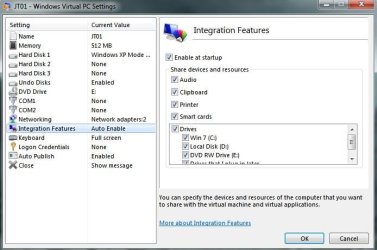
Did you enable integration features?
 

My Computer

Computer Manufacturer/Model Number
Cyberpower, Inc.
OS
Windows 7 Professional (x64)
CPU
AMD Phenom II X4 955 Black Edition
Motherboard
Gigabyte AMD MA770T-UD3P AM3 DDR3 1666+/1333/1066
Memory
6GB (3 x 2GB) Kingston DDR3 1333 SDRAM
Graphics Card(s)
NVIDIA GeForce GTX 260
Sound Card
Onboard 7.1 Sound
Monitor(s) Displays
Samsung 24" SyncMaster 2422
Screen Resolution
1920 x 1200
Hard Drives
500GB Sata II 3.0GB 16MB 7200RPM,
Western Digital 1TB USB 2.0 External Hard Drive
PSU
Kingwin 700 Watt Power Supply
Case
Silver X-Cruiser 2 Mid No Power
Cooling
Asetek 120MM Watercooler
Keyboard
HTK-1001
Mouse
Razer Viper
Internet Speed
Incoming: 2496 kbps, Outgoing: 512 kbps
How do I do that?
 

My Computer

Computer Manufacturer/Model Number
Sony Vaio sr520g/b
OS
Windows 7 Professional
CPU
Inten Core Duo 2.2G
Memory
4gb
Graphics Card(s)
4500MHD Mobile Intel
Just go to All Programs, find Windows Virtual PC, click it and find XP mode, right-click it, choose settings, find Integration Features, and check it off.
 

My Computer

Computer Manufacturer/Model Number
Cyberpower, Inc.
OS
Windows 7 Professional (x64)
CPU
AMD Phenom II X4 955 Black Edition
Motherboard
Gigabyte AMD MA770T-UD3P AM3 DDR3 1666+/1333/1066
Memory
6GB (3 x 2GB) Kingston DDR3 1333 SDRAM
Graphics Card(s)
NVIDIA GeForce GTX 260
Sound Card
Onboard 7.1 Sound
Monitor(s) Displays
Samsung 24" SyncMaster 2422
Screen Resolution
1920 x 1200
Hard Drives
500GB Sata II 3.0GB 16MB 7200RPM,
Western Digital 1TB USB 2.0 External Hard Drive
PSU
Kingwin 700 Watt Power Supply
Case
Silver X-Cruiser 2 Mid No Power
Cooling
Asetek 120MM Watercooler
Keyboard
HTK-1001
Mouse
Razer Viper
Internet Speed
Incoming: 2496 kbps, Outgoing: 512 kbps
My laptop will not connect to the internet at all in XP Mode. It works just fine in Windows 7 Pro. :confused: It seems like when its in XP mode it doesnt see the wireless adaptor. Is there anything else that I may need to do? I just downloaded the XP Mode app. Unfortunately I need XP to run an app for my job which also requires internet access. Any ideas or help that anyone can provide is greatly appreciated. Thanks!!

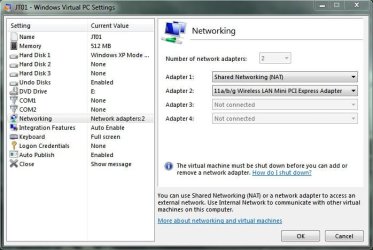
Check in VPC Settings that your "Network" include integration for your wireless adapter. See mine is set as Adapter 2.

Also, To se auto integrade just enable it in the "Integration Features" below "Networking"..in the Setting Window. OR from the Xp mode window, click ACTION > Enable Integration Features.
 

Attachments

  • Noname1.jpg
    Noname1.jpg
    61.9 KB · Views: 1,569
  • Noname.jpg
    Noname.jpg
    52.3 KB · Views: 1,282

My Computer

Computer Manufacturer/Model Number
Lenovo ThinkPad T60
OS
Windows 7 Ultimate 64Bit
CPU
GenuineIntel Intel(R) Core(TM) DuoCore T2400 @ 1.83GHz
Motherboard
Intel(R) 82801G (ICH7 Family)
Memory
2.00 GB
Graphics Card(s)
Mobile Intel(R) 945 Express Chipset
Sound Card
SoundMAX Integrated Digital HD Audio
Monitor(s) Displays
ThinkPad Display
Screen Resolution
1400x1050
Hard Drives
100Gb SATA
Keyboard
Standard Keyboard
Mouse
HID-compliant Mouse
Internet Speed
Cable Broadband - 54Mbps
Other Info
Intel(R) PRO/1000 PL Network Connection
11a/b/g Wireless LAN Mini PCI Express Adapter
Thanks guys! Adjusting the network adaptor settings in the virtual PC menu fixed the problem. Only the wired ethernet card was set up by default. Thanks again.
 

My Computer

Computer Manufacturer/Model Number
Sony Vaio sr520g/b
OS
Windows 7 Professional
CPU
Inten Core Duo 2.2G
Memory
4gb
Graphics Card(s)
4500MHD Mobile Intel
I was having the same issue, it had initially worked, then stopped when I added my ethernet to the settings network. In the settings network, I had my wireless 1st, my ethernet 2nd.

Looking at AEM's setup, I added Shared Networking (NAT) in the 1st slot and moved everything else down...

That was my silver bullet.

Thanks
 

My Computer

Computer Manufacturer/Model Number
Toshiba Qosmio X505-Q860
OS
Windows 7 64 bit with XP Mode
CPU
Intel® Core™ i5-430M processor
Memory
4GB DDR3 1066MHz memory
Graphics Card(s)
NVIDIA® GeForce® GTS 360M
Monitor(s) Displays
18.4" widescreen HD+ TruBrite® TFT LCD display
Hard Drives
500GB HDD (7200rpm)
Back
Top