Solved No Internet on desk top but all wifi devices work perfect.

You might want to check the Date/Time settings, it says they aren't set for some reason.

Pressing the Delete button should get you to where you can set the date/time, might have to look around a bit in bios, then load defaults and start up then post the ipconfig/all to see if anything has changed.

Do you have Zone Alarm installed on this system?

Let me look around for more solutions,:

If the yellow exclamation is still showing for Teredo tunneling then try the following.

1. Open command prompt with administrator credentials (Find CMD and right-click - Run as Administrator).
2. Enter netsh environment. Type "netsh" and ENTER.
3. "int teredo" and ENTER
4. "set state disabled" and ENTER.
5. Open Device Manager and uninstall "Teredo Tunneling Pseudo-Interface".
6. Open command prompt with administrator credentials once again.
7. netsh + ENTER.
8. "int ipv6" + ENTER
9. "set teredo client" + ENTER
10. Open Device Manager and Scan for new hardware.
11. Select "Show hidden devices" from the View menu. You will now see that it is present without errors with any luck.

Option#2
If the item is disabled.
In the start menu search bar type in REGEDIT to open the registry editor. Navigate through the following:

HKEY_LOCAL_MACHINE\SYSTEM\CURRENTCONTROLSET\SERVICES\TCPIP6\PARAMETERS.

In the right pane look for Disabled Components, right click Disabled Components and select edit. Set the DWord value to 0. (If you do have Disabled Components there, the value may for example be set to ff which is invalid.)

You must Restart your computer and the teredo tunneling adapter will now start.


Hi, I'm at the uninstall teredo part but can't find it in devices?

If teredo is already gone then go to the next step at the command prompt.
 

My Computer My Computer

At a glance

Windows 7 Ult, Windows 8.1 Pro,Q9650-4.275GHz, E8600 4.5GHz, E6750-3.8GHzG.Skill PC2 9600 1200Mhz 5 5 5 15 2TGTX480
Computer type
PC/Desktop
Computer Manufacturer/Model Number
Home built
OS
Windows 7 Ult, Windows 8.1 Pro,
CPU
Q9650-4.275GHz, E8600 4.5GHz, E6750-3.8GHz
Motherboard
Evga 780i FTW
Memory
G.Skill PC2 9600 1200Mhz 5 5 5 15 2T
Graphics Card(s)
GTX480
Sound Card
Asus Xonar D2
Monitor(s) Displays
HannsG
Screen Resolution
1680X1050
Hard Drives
GSkill Phoenix Pro 120GB SSD
PSU
ThermalTake Toughpower 1000Watt modular
Case
ThermalTake XaserV
Cooling
Xigmatek S1283
Keyboard
Logitech G15
Mouse
Logitech G9
Internet Speed
T1
You might want to check the Date/Time settings, it says they aren't set for some reason.

Pressing the Delete button should get you to where you can set the date/time, might have to look around a bit in bios, then load defaults and start up then post the ipconfig/all to see if anything has changed.

Do you have Zone Alarm installed on this system?

Let me look around for more solutions,:

If the yellow exclamation is still showing for Teredo tunneling then try the following.

1. Open command prompt with administrator credentials (Find CMD and right-click - Run as Administrator).
2. Enter netsh environment. Type "netsh" and ENTER.
3. "int teredo" and ENTER
4. "set state disabled" and ENTER.
5. Open Device Manager and uninstall "Teredo Tunneling Pseudo-Interface".
6. Open command prompt with administrator credentials once again.
7. netsh + ENTER.
8. "int ipv6" + ENTER
9. "set teredo client" + ENTER
10. Open Device Manager and Scan for new hardware.
11. Select "Show hidden devices" from the View menu. You will now see that it is present without errors with any luck.

Option#2
If the item is disabled.
In the start menu search bar type in REGEDIT to open the registry editor. Navigate through the following:

HKEY_LOCAL_MACHINE\SYSTEM\CURRENTCONTROLSET\SERVICES\TCPIP6\PARAMETERS.

In the right pane look for Disabled Components, right click Disabled Components and select edit. Set the DWord value to 0. (If you do have Disabled Components there, the value may for example be set to ff which is invalid.)

You must Restart your computer and the teredo tunneling adapter will now start.


Hi, I'm at the uninstall teredo part but can't find it in devices?

If teredo is already gone then go to the next step at the command prompt.

Hi chev65, in device manager I can see the realtek pci GBE network adaptor, does that require deleting?, I've never noticed teredo tunnelling adaptor.
 

My Computer My Computer

At a glance

Windows 7
Computer type
PC/Desktop
OS
Windows 7
Hi, I'm at the uninstall teredo part but can't find it in devices?

If teredo is already gone then go to the next step at the command prompt.

Hi chev65, in device manager I can see the realtek pci GBE network adaptor, does that require deleting?, I've never noticed teredo tunnelling adaptor.


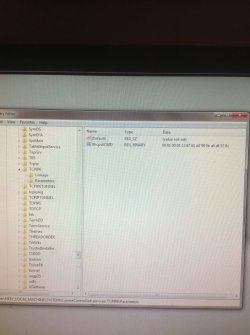
Option 1 no better!!!! I'm on option 2 now and stuck at this part.....I've opened upto tcpip6 parameters, what do I do from there?

Cheers.
 

Attachments

  • 88ebca6fe8a0aad3c8f5a30b4ea8acc7.jpg
    88ebca6fe8a0aad3c8f5a30b4ea8acc7.jpg
    84.4 KB · Views: 1

My Computer My Computer

At a glance

Windows 7
Computer type
PC/Desktop
OS
Windows 7
Let me check what the defaults are supposed to be for Windows 7, you aren't showing disabled anything so there may not be a problem here.

Yes you should uninstall the Realtek network adaptor in Device Manager then either reboot or right click and scan for changes, either way it will reinstall the driver.

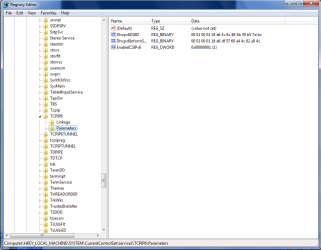
Update: the registry on your machine appears to be missing some registry values for IPv6 parameters.

After reinstalling the driver can you post a screen shot of the properties for the Realtek NIC just to make sure that IPv6 is present and enabled.

This is what the TCP/ipV6 registry values should be so you are missing two keys here.
 

Attachments

  • ipv6 default registry values.PNG
    ipv6 default registry values.PNG
    25.2 KB · Views: 3
Last edited:

My Computer My Computer

At a glance

Windows 7 Ult, Windows 8.1 Pro,Q9650-4.275GHz, E8600 4.5GHz, E6750-3.8GHzG.Skill PC2 9600 1200Mhz 5 5 5 15 2TGTX480
Computer type
PC/Desktop
Computer Manufacturer/Model Number
Home built
OS
Windows 7 Ult, Windows 8.1 Pro,
CPU
Q9650-4.275GHz, E8600 4.5GHz, E6750-3.8GHz
Motherboard
Evga 780i FTW
Memory
G.Skill PC2 9600 1200Mhz 5 5 5 15 2T
Graphics Card(s)
GTX480
Sound Card
Asus Xonar D2
Monitor(s) Displays
HannsG
Screen Resolution
1680X1050
Hard Drives
GSkill Phoenix Pro 120GB SSD
PSU
ThermalTake Toughpower 1000Watt modular
Case
ThermalTake XaserV
Cooling
Xigmatek S1283
Keyboard
Logitech G15
Mouse
Logitech G9
Internet Speed
T1
Let me check what the defaults are supposed to be for Windows 7, you aren't showing disabled anything so there may not be a problem here.

Yes you should uninstall the Realtek network adaptor in Device Manager then either reboot or right click and scan for changes, either way it will reinstall the driver.


Ok, I'll try that now, thx
 

My Computer My Computer

At a glance

Windows 7
Computer type
PC/Desktop
OS
Windows 7
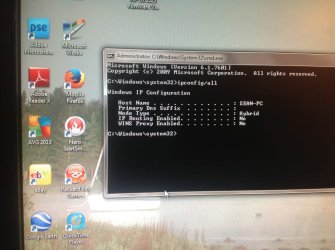
Hi chev65, I've tried all that, removed, reinstalled, no difference, done an ipconfig/all and attach findings,, seemsvless info than previous time.
 

Attachments

  • a14522ed8af3841aa80bda59f5980996.jpg
    a14522ed8af3841aa80bda59f5980996.jpg
    83.5 KB · Views: 1

My Computer My Computer

At a glance

Windows 7
Computer type
PC/Desktop
OS
Windows 7

My Computer My Computer

At a glance

Windows 7 Ult, Windows 8.1 Pro,Q9650-4.275GHz, E8600 4.5GHz, E6750-3.8GHzG.Skill PC2 9600 1200Mhz 5 5 5 15 2TGTX480
Computer type
PC/Desktop
Computer Manufacturer/Model Number
Home built
OS
Windows 7 Ult, Windows 8.1 Pro,
CPU
Q9650-4.275GHz, E8600 4.5GHz, E6750-3.8GHz
Motherboard
Evga 780i FTW
Memory
G.Skill PC2 9600 1200Mhz 5 5 5 15 2T
Graphics Card(s)
GTX480
Sound Card
Asus Xonar D2
Monitor(s) Displays
HannsG
Screen Resolution
1680X1050
Hard Drives
GSkill Phoenix Pro 120GB SSD
PSU
ThermalTake Toughpower 1000Watt modular
Case
ThermalTake XaserV
Cooling
Xigmatek S1283
Keyboard
Logitech G15
Mouse
Logitech G9
Internet Speed
T1
I have tried system resored but it keeps saying it was unable to complete it!!!
 

My Computer My Computer

At a glance

Windows 7
Computer type
PC/Desktop
OS
Windows 7
I have tried system resored but it keeps saying it was unable to complete it!!!

Yep that's what everyone says about using system restore which is why having a system image is the best way to back up your system.

This system will require a complete reinstall of the Op system unless you have a good back up of your registry from when it was working. This is way past a networking problem IMO. :sarc:
 

My Computer My Computer

At a glance

Windows 7 Ult, Windows 8.1 Pro,Q9650-4.275GHz, E8600 4.5GHz, E6750-3.8GHzG.Skill PC2 9600 1200Mhz 5 5 5 15 2TGTX480
Computer type
PC/Desktop
Computer Manufacturer/Model Number
Home built
OS
Windows 7 Ult, Windows 8.1 Pro,
CPU
Q9650-4.275GHz, E8600 4.5GHz, E6750-3.8GHz
Motherboard
Evga 780i FTW
Memory
G.Skill PC2 9600 1200Mhz 5 5 5 15 2T
Graphics Card(s)
GTX480
Sound Card
Asus Xonar D2
Monitor(s) Displays
HannsG
Screen Resolution
1680X1050
Hard Drives
GSkill Phoenix Pro 120GB SSD
PSU
ThermalTake Toughpower 1000Watt modular
Case
ThermalTake XaserV
Cooling
Xigmatek S1283
Keyboard
Logitech G15
Mouse
Logitech G9
Internet Speed
T1
I have tried system resored but it keeps saying it was unable to complete it!!!

Yep that's what everyone says about using system restore which is why having a system image is the best way to back up your system.

This system will require a complete reinstall of the Op system unless you have a good back up of your registry from when it was working. This is way past a networking problem IMO. :sarc:

Reinstall in progress!!! Using the option that backs up my files to the c drive with fingers crossed before I do a full on reinstall... Fingers crossed, I assume if these options fail the network adaptor has died?
 

My Computer My Computer

At a glance

Windows 7
Computer type
PC/Desktop
OS
Windows 7
I have tried system resored but it keeps saying it was unable to complete it!!!

Yep that's what everyone says about using system restore which is why having a system image is the best way to back up your system.

This system will require a complete reinstall of the Op system unless you have a good back up of your registry from when it was working. This is way past a networking problem IMO. :sarc:

Reinstall in progress!!! Using the option that backs up my files to the c drive with fingers crossed before I do a full on reinstall... Fingers crossed, I assume if these options fail the network adaptor has died?

The adaptor could be dead although with the missing registry keys and the missing network interface it's more likely that the registry is the problem and hopefully that is the only problem.
 

My Computer My Computer

At a glance

Windows 7 Ult, Windows 8.1 Pro,Q9650-4.275GHz, E8600 4.5GHz, E6750-3.8GHzG.Skill PC2 9600 1200Mhz 5 5 5 15 2TGTX480
Computer type
PC/Desktop
Computer Manufacturer/Model Number
Home built
OS
Windows 7 Ult, Windows 8.1 Pro,
CPU
Q9650-4.275GHz, E8600 4.5GHz, E6750-3.8GHz
Motherboard
Evga 780i FTW
Memory
G.Skill PC2 9600 1200Mhz 5 5 5 15 2T
Graphics Card(s)
GTX480
Sound Card
Asus Xonar D2
Monitor(s) Displays
HannsG
Screen Resolution
1680X1050
Hard Drives
GSkill Phoenix Pro 120GB SSD
PSU
ThermalTake Toughpower 1000Watt modular
Case
ThermalTake XaserV
Cooling
Xigmatek S1283
Keyboard
Logitech G15
Mouse
Logitech G9
Internet Speed
T1
Yep that's what everyone says about using system restore which is why having a system image is the best way to back up your system.

This system will require a complete reinstall of the Op system unless you have a good back up of your registry from when it was working. This is way past a networking problem IMO. :sarc:

Reinstall in progress!!! Using the option that backs up my files to the c drive with fingers crossed before I do a full on reinstall... Fingers crossed, I assume if these options fail the network adaptor has died?

The adaptor could be dead although with the missing registry keys and the missing network interface it's more likely that the registry is the problem and hopefully that is the only problem.


At last, I'm back on, just the hell of re installing all the software..... Many thanks to you chev65 for your patience,, how this happened ill never know I guess!
 

My Computer My Computer

At a glance

Windows 7
Computer type
PC/Desktop
OS
Windows 7
Reinstall in progress!!! Using the option that backs up my files to the c drive with fingers crossed before I do a full on reinstall... Fingers crossed, I assume if these options fail the network adaptor has died?

The adaptor could be dead although with the missing registry keys and the missing network interface it's more likely that the registry is the problem and hopefully that is the only problem.


At last, I'm back on, just the hell of re installing all the software..... Many thanks to you chev65 for your patience,, how this happened ill never know I guess!

Hey it happens to the best of us, somehow the registry was missing keys and this happens pretty often but no telling how.

At least I know when to throw in the towel and I was pretty sure it was just a registry problem since you passed the system file integrity test. Glad you are up and running again. :)
 

My Computer My Computer

At a glance

Windows 7 Ult, Windows 8.1 Pro,Q9650-4.275GHz, E8600 4.5GHz, E6750-3.8GHzG.Skill PC2 9600 1200Mhz 5 5 5 15 2TGTX480
Computer type
PC/Desktop
Computer Manufacturer/Model Number
Home built
OS
Windows 7 Ult, Windows 8.1 Pro,
CPU
Q9650-4.275GHz, E8600 4.5GHz, E6750-3.8GHz
Motherboard
Evga 780i FTW
Memory
G.Skill PC2 9600 1200Mhz 5 5 5 15 2T
Graphics Card(s)
GTX480
Sound Card
Asus Xonar D2
Monitor(s) Displays
HannsG
Screen Resolution
1680X1050
Hard Drives
GSkill Phoenix Pro 120GB SSD
PSU
ThermalTake Toughpower 1000Watt modular
Case
ThermalTake XaserV
Cooling
Xigmatek S1283
Keyboard
Logitech G15
Mouse
Logitech G9
Internet Speed
T1
The adaptor could be dead although with the missing registry keys and the missing network interface it's more likely that the registry is the problem and hopefully that is the only problem.


At last, I'm back on, just the hell of re installing all the software..... Many thanks to you chev65 for your patience,, how this happened ill never know I guess!

Hey it happens to the best of us, somehow the registry was missing keys and this happens pretty often but no telling how.

At least I know when to throw in the towel and I was pretty sure it was just a registry problem since you passed the system file integrity test. Glad you are up and running again. :)


It's very good of you chev65, us minions would be screwed without the help of your kind. Thanks again for your time and patience...
 

My Computer My Computer

At a glance

Windows 7
Computer type
PC/Desktop
OS
Windows 7
Back
Top