No internet on XP Pro (windows 7 is OK)?

myroshar

New member
Local time
8:02 AM
Messages
4
I dual booted my HP d4650y with XP Pro And Windows 7 on seperate drives, I have XP Pro on drive E: and Windows on drive C:, is that a problem? ... the only problem I have so far is that I can't get on the internet when I'm in XP Pro...I get this message when I click on my internet (can not connect to server). Is there anyway I can fix this... I have no internet icon connection in INTERNET CONNECTIONS FOLDER. I'm new at this so please excuse my dumbness. This is also the first time I did a dual boot... age 73 that could be the problem. thanks RON.
 

My Computer My Computer

At a glance

windows 7 /xp pro
OS
windows 7 /xp pro
age 73 that could be the problem. thanks RON.

:) Ron pal your never to old/young to learn. First things first let's have a look at what your settings are in Win 7 as this config is working. Click "start" "run" then type cmd this will bring up a window
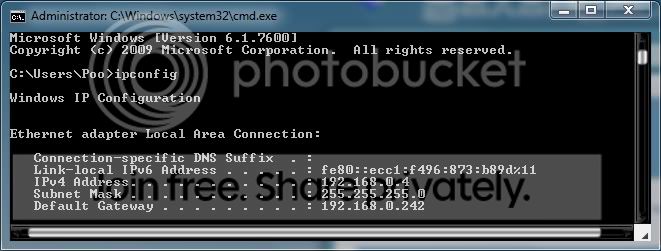
Next type in ipconfig

ipconfig.jpg


post back your results

ipv4 =
subnet mask =
default gateway =

After you've done this we will try to see what more we can do

PS. When your in Win XP have a look in device manager --- make sure you have no errors

To do this press the "windows key + pause/break key" together then click on the "hardware" tab then click "device manager"

XPDeviceManagerNetworkAdapter.jpg
 

My Computer My Computer

At a glance

Windows 7 Ultimate 64bitAMD Phenom Quad core 9950 black edition16Gb2x XFX Radeon 5850
Computer type
PC/Desktop
Computer Manufacturer/Model Number
Self Built
OS
Windows 7 Ultimate 64bit
CPU
AMD Phenom Quad core 9950 black edition
Motherboard
Gigabyte
Memory
16Gb
Graphics Card(s)
2x XFX Radeon 5850
Sound Card
PCI Express X-Fi Titanium / Logitech G35
Monitor(s) Displays
2x HP 2410i
Screen Resolution
1920x1080
Hard Drives
2x 500Gb Seagate
1x 300Gb Seagate
1x 1Tb Seagate
2x 1Tb Hitatchi
PSU
Jean Tech Storm 700W
Case
Cooler Master COSMOS S
Cooling
Akasa Evo Blue Pro
Keyboard
Logitech G15
Mouse
Mad Catz M.M.O. 7
Internet Speed
12mb
Ron, you might want to check to make sure your ethernet controller or wireless adapter has a driver for it in the device manager [Right-click My Computer > Manage > Device Manager [on left side]]. In Windows 7, it might have found it via Windows Update and installed it automatically, but XP doesn't have that awesome feature.

If you don't have either or both installed [depending on how your are connecting to your modem] that most likely is your problem, especially if you don't have ANY network connections listed.

Let me know what you discover.

EDIT: Looks like I was beaten to the punch.
 

My Computer My Computer

At a glance

Windows 7 Ultimate 64-bitAMD Phenom II X6 1090T 3.2GHZG.SKILL RipJaw 3x2GB DDR3-10662x HIS Radeon HD 6850 1 GB
OS
Windows 7 Ultimate 64-bit
CPU
AMD Phenom II X6 1090T 3.2GHZ
Motherboard
MSI 890FXA-GD70
Memory
G.SKILL RipJaw 3x2GB DDR3-1066
Graphics Card(s)
2x HIS Radeon HD 6850 1 GB
Sound Card
VIA 8-channel
Monitor(s) Displays
2x 20 inch Acer LCDs, 1x 32" Sony LCD TV
Screen Resolution
4480x900
Hard Drives
1x Crucial 64GB SSD
3x 1TB HDDs (WD, Seagate, Hitatchi)
1x 500GB Seagate External
PSU
Kingwin 1000W Modular
Case
Coolermaster HAF 932
Cooling
1x 120mm, 3x 200mm, CoolerMaster Hyper 212+
Keyboard
Microsoft Wireless Keyboard 1000
Mouse
Microsoft Wiresless Mouse 5000
Internet Speed
20mbps
Other Info
Samsung BD-ROM/DVD-RW
I don't know if this is what you want?
ipv4 =192.168.2.101
subnet mask = 255.255.255.0
default gateway =192.168.2.1
 

My Computer My Computer

At a glance

windows 7 /xp pro
OS
windows 7 /xp pro
Yep that's perfect. Ok next we need to check your settings in XP.

1. Goto "control panel"

control_panel.jpg


2. 2x click on "network conections"

network_protocols01.gif


3. Click "right mouse button" on "local area connection" then left click "properties"
4. Another window will open. Under the "General" tab click on "Internet Protocol" then click "properties" button.

xpnetwork.jpg


5. This will take you to the TCP/IP Properties window

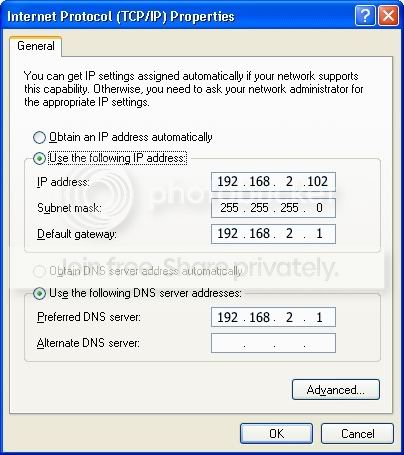
Conf_WmXP.jpg


6. Select "Use the following IP address" Key in the values shown in the pic (The DNS might be differenet) Sorry I forgot this step in the last post, but if you follow the steps in the win 7 part and type
ipconfig /all it will show you what DNS your using.

Click OK to everything then try the internet again

All of these steps require that the win XP drivers are installed correctly for your network card which is why you need to check that your hardware is installed correctly (see previous reply have a look in Device Manager)
 

My Computer My Computer

At a glance

Windows 7 Ultimate 64bitAMD Phenom Quad core 9950 black edition16Gb2x XFX Radeon 5850
Computer type
PC/Desktop
Computer Manufacturer/Model Number
Self Built
OS
Windows 7 Ultimate 64bit
CPU
AMD Phenom Quad core 9950 black edition
Motherboard
Gigabyte
Memory
16Gb
Graphics Card(s)
2x XFX Radeon 5850
Sound Card
PCI Express X-Fi Titanium / Logitech G35
Monitor(s) Displays
2x HP 2410i
Screen Resolution
1920x1080
Hard Drives
2x 500Gb Seagate
1x 300Gb Seagate
1x 1Tb Seagate
2x 1Tb Hitatchi
PSU
Jean Tech Storm 700W
Case
Cooler Master COSMOS S
Cooling
Akasa Evo Blue Pro
Keyboard
Logitech G15
Mouse
Mad Catz M.M.O. 7
Internet Speed
12mb
Thanks alot "poorman"

just as soon as I seen your reply and I checked my IP and then I looked further on your reply...I remembered that I had a simular problem when my computer crashed one time with my network adapters,checked and they all errored out got driver from HP and installed I'm on the internet with XP Pro.
Thank you very
Ron
 

My Computer My Computer

At a glance

windows 7 /xp pro
OS
windows 7 /xp pro
Cool pal ... glad you got it sorted ;)
 

My Computer My Computer

At a glance

Windows 7 Ultimate 64bitAMD Phenom Quad core 9950 black edition16Gb2x XFX Radeon 5850
Computer type
PC/Desktop
Computer Manufacturer/Model Number
Self Built
OS
Windows 7 Ultimate 64bit
CPU
AMD Phenom Quad core 9950 black edition
Motherboard
Gigabyte
Memory
16Gb
Graphics Card(s)
2x XFX Radeon 5850
Sound Card
PCI Express X-Fi Titanium / Logitech G35
Monitor(s) Displays
2x HP 2410i
Screen Resolution
1920x1080
Hard Drives
2x 500Gb Seagate
1x 300Gb Seagate
1x 1Tb Seagate
2x 1Tb Hitatchi
PSU
Jean Tech Storm 700W
Case
Cooler Master COSMOS S
Cooling
Akasa Evo Blue Pro
Keyboard
Logitech G15
Mouse
Mad Catz M.M.O. 7
Internet Speed
12mb
Sorry PooMan

That I misspelled your name...I have a spelling problem to..
Ron
 

My Computer My Computer

At a glance

windows 7 /xp pro
OS
windows 7 /xp pro
:D:D it's no problem mate ... Just as long as your Silver surfing :p thats the main thing ...
Have fun pal, any problems pop back in ;)
 

My Computer My Computer

At a glance

Windows 7 Ultimate 64bitAMD Phenom Quad core 9950 black edition16Gb2x XFX Radeon 5850
Computer type
PC/Desktop
Computer Manufacturer/Model Number
Self Built
OS
Windows 7 Ultimate 64bit
CPU
AMD Phenom Quad core 9950 black edition
Motherboard
Gigabyte
Memory
16Gb
Graphics Card(s)
2x XFX Radeon 5850
Sound Card
PCI Express X-Fi Titanium / Logitech G35
Monitor(s) Displays
2x HP 2410i
Screen Resolution
1920x1080
Hard Drives
2x 500Gb Seagate
1x 300Gb Seagate
1x 1Tb Seagate
2x 1Tb Hitatchi
PSU
Jean Tech Storm 700W
Case
Cooler Master COSMOS S
Cooling
Akasa Evo Blue Pro
Keyboard
Logitech G15
Mouse
Mad Catz M.M.O. 7
Internet Speed
12mb
Back
Top