
No IP Address when rebooting

KenY7744

New member
Local time
12:33 AM
Messages
26
Location
Glenside, PA
I just did a fresh install of Win7 Enterprise on a new 1Tb HD. I also have a 500Gb HD with my old XP system on it, and I use the F12 boot menu to choose which system to boot up while I'm "building" up the Win7 system.

Whenever I reboot into Win7 after having run WinXP, I am unable to connect to the internet. The Win7 troubleshooting always fixes the problem by renewing the IP address.

If I reboot the system from being in Win7 back to Win7, no connectivity problem.

Is there some setting that I can tweak so this doesn't happen? Or should I just live with it until I'm fully up and running on the new Win7 system, which will probably be within a week or so.

Thanks for any help.
Ken
 
Last edited:

My Computer

Computer Manufacturer/Model Number
Dell Vostro 200
OS
Windows 7 Enterprise Edition 32-bit
CPU
Pentium Dual Core 2.4 GHz
Memory
4Gb
Graphics Card(s)
ATI Radeon HD 3400
Sound Card
On board
Monitor(s) Displays
2 Dell flatscreen
Hard Drives
WD 160Gb Internal (Containing OS & Installed Programs)
Seagate 1Tb Internal (DATA, MUSIC, PHOTOS, VIDEOS, DOWNLOADS)
Various external HDs 500Gb & 1Tb for backups
Welcome!

Try setting a static IP address for both XP and 7. For example, set XP to use 192.168.1.50, and 7 to have 192.168.1.51.

Capture.PNG
 

My Computer

Computer Manufacturer/Model Number
Custom
OS
Windows 7 Professional x64
CPU
Intel i7 2600K OC'd @ 4620 MHz
Motherboard
Asus P8Z68-V Pro
Memory
16GB GSkill Sniper 2133 Mhz (4x4GB)
Graphics Card(s)
EVGA GeForce GTX 480 SuperClocked+
Sound Card
Realtek High Definition Audio
Monitor(s) Displays
2x Acer S273HLbmii 27"
Screen Resolution
2 x 1920x1080
Hard Drives
64GB Crucial M4 SSD

Storage: Hitachi 1TB 5400RPM, Samsung 1.5TB 5400RPM
PSU
Corsair HW Series 750w (modular)
Case
Cooler Master HAF 932 Advanced Blue Edition
Cooling
CM Hyper 212+ CPU cooler, 3x 230mm + 1x 140mm case fans
Keyboard
Logitech MK320 (wireless)
Mouse
Logitech MK320 (wireless)
Internet Speed
30 Mb/s : 2 Mb/s
Thanks

Thanks for your speedy response to my query, Jonathan.

I was able to apply your suggestions and they appear to have resolved the problem.

I tried to do the same in my XP system, but I was unable to connect to the internet when I applied the same information to the adapter properties. When I switched back to DHCP, I was again able to connect.

Thanks again.
Ken
 

My Computer

Computer Manufacturer/Model Number
Dell Vostro 200
OS
Windows 7 Enterprise Edition 32-bit
CPU
Pentium Dual Core 2.4 GHz
Memory
4Gb
Graphics Card(s)
ATI Radeon HD 3400
Sound Card
On board
Monitor(s) Displays
2 Dell flatscreen
Hard Drives
WD 160Gb Internal (Containing OS & Installed Programs)
Seagate 1Tb Internal (DATA, MUSIC, PHOTOS, VIDEOS, DOWNLOADS)
Various external HDs 500Gb & 1Tb for backups
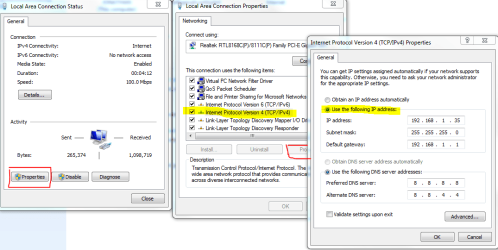
Great, thanks for reporting back.

One thing you can do is look in your router for the DHCP settings. I have mine set to assign IP addresses in the range 100-125.

If you tell XP to get an IP address automatically, but tell 7 to take an IP address outside that range (say 35), they will never conflict.
 

My Computer

Computer Manufacturer/Model Number
Custom
OS
Windows 7 Professional x64
CPU
Intel i7 2600K OC'd @ 4620 MHz
Motherboard
Asus P8Z68-V Pro
Memory
16GB GSkill Sniper 2133 Mhz (4x4GB)
Graphics Card(s)
EVGA GeForce GTX 480 SuperClocked+
Sound Card
Realtek High Definition Audio
Monitor(s) Displays
2x Acer S273HLbmii 27"
Screen Resolution
2 x 1920x1080
Hard Drives
64GB Crucial M4 SSD

Storage: Hitachi 1TB 5400RPM, Samsung 1.5TB 5400RPM
PSU
Corsair HW Series 750w (modular)
Case
Cooler Master HAF 932 Advanced Blue Edition
Cooling
CM Hyper 212+ CPU cooler, 3x 230mm + 1x 140mm case fans
Keyboard
Logitech MK320 (wireless)
Mouse
Logitech MK320 (wireless)
Internet Speed
30 Mb/s : 2 Mb/s
Back
Top