
Solved No IP address

lvr181

New member
Member
Local time
4:31 AM
Messages
33
Location
Gold Coast, Australia
My HP laptop running Win 7 Home edition has only limited connectivity due to no IP address :(

After downloading some updates from HP site this has happened and my system now does not allow me to restore to an earlier date.

What to do?
 
Last edited:

My Computer

Computer Manufacturer/Model Number
Homebuilt
OS
Windows7 Home Premium 64bit
CPU
2.70 gigahertz AMD Athlon 64 X2 Dual Core
Motherboard
Gigabyte GA-MA78GM-S2H
Memory
4GB DDR 800
Graphics Card(s)
ATI Radeon HD 3200 Graphics [Display adapter] on board
Sound Card
ATI HDMI Audio Realtek High Definition Audio (on board)
Monitor(s) Displays
BenQ G2420HD [Monitor] 24.0"
Screen Resolution
Full HD 1080p LCD monitor featuring 16:9 aspect ratio
Hard Drives
WDC WD5000AACS-00G8B0 [Hard drive] (500.10 GB)
WD Ext HDD 1021 USB Device [Hard drive] (1000.19 GB)
SAMSUNG HD502IJ [Hard drive] (500.11 GB)
My HP laptop running Win 7 Home edition has only limited connectivity due to no IP address :(

After downloading some updates from HP site this has happened and my system now does not allow me to restore to an earlier date.

What to do?

Limited connectivity has nothing to do with updates.
The problem is due to the connection & setting.

Below the task bar, look for the internet icon, either by signal (for wireless) or Monitor w/line (wired).
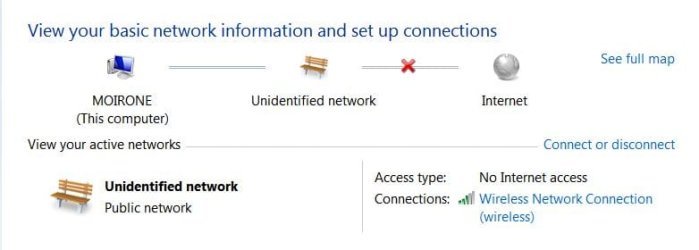
Click on "Open Network and Sharing Center"
If from the router to internet, is there a mark;
If from the computer to router, is there a mark;
Red X mark, connection broken, if between router to internet, ISP issue.
Yellow ! exclamation mark, limited access.

Next, go to the left panel, select "Change adapter setting"
Same type of icons.
If you are using either wired LAN cable or Wireless
Click on the icon that your connection is using. Then right-click and select Disable.
After doing this, then right-click and select Enable, as to force the computer to connect.

You can select an earlier restore point, not necessary the last restore point.
If nothing wrong with the system, leave it unless there is problem after you manually did updates.
The main problem is that you may not "Create a restore point", if any.
This can be found at Control Panel --> System & Security --> System Protection tab --> Create Restore Point.
When Windows doing updates automatically it create a restore point Before updating.
 

My Computer

Computer type
Laptop
Computer Manufacturer/Model Number
Toshiba L630 and L735
OS
Windows 7 x64
Hard Drives
240 GB SSD
Tried that

My HP laptop running Win 7 Home edition has only limited connectivity due to no IP address :(

After downloading some updates from HP site this has happened and my system now does not allow me to restore to an earlier date.

What to do?

Limited connectivity has nothing to do with updates.
The problem is due to the connection & setting.

Below the task bar, look for the internet icon, either by signal (for wireless) or Monitor w/line (wired).
Click on "Open Network and Sharing Center"
If from the router to internet, is there a mark;
If from the computer to router, is there a mark;
Red X mark, connection broken, if between router to internet, ISP issue.
Yellow ! exclamation mark, limited access.

Next, go to the left panel, select "Change adapter setting"
Same type of icons.
If you are using either wired LAN cable or Wireless
Click on the icon that your connection is using. Then right-click and select Disable.
After doing this, then right-click and select Enable, as to force the computer to connect.

You can select an earlier restore point, not necessary the last restore point.
If nothing wrong with the system, leave it unless there is problem after you manually did updates.
The main problem is that you may not "Create a restore point", if any.
This can be found at Control Panel --> System & Security --> System Protection tab --> Create Restore Point.
When Windows doing updates automatically it create a restore point Before updating.

Thanks Eric for your advice. But sadly no success.

I have attached some screen shots if they are of any use in helping to solve the problem.

Also I am using exactly the same wireless connection, at the same time on my desktop system without a problem.

Help again please? :confused:
 

Attachments

  • TaskBar.JPG
    TaskBar.JPG
    10.7 KB · Views: 14
  • OpenNetwork&Sharing Center.JPG
    OpenNetwork&Sharing Center.JPG
    28.8 KB · Views: 0
  • Disabledthenenabled.JPG
    Disabledthenenabled.JPG
    39 KB · Views: 2
  • ChangeAdapterSetting.JPG
    ChangeAdapterSetting.JPG
    34.3 KB · Views: 0

My Computer

Computer Manufacturer/Model Number
Homebuilt
OS
Windows7 Home Premium 64bit
CPU
2.70 gigahertz AMD Athlon 64 X2 Dual Core
Motherboard
Gigabyte GA-MA78GM-S2H
Memory
4GB DDR 800
Graphics Card(s)
ATI Radeon HD 3200 Graphics [Display adapter] on board
Sound Card
ATI HDMI Audio Realtek High Definition Audio (on board)
Monitor(s) Displays
BenQ G2420HD [Monitor] 24.0"
Screen Resolution
Full HD 1080p LCD monitor featuring 16:9 aspect ratio
Hard Drives
WDC WD5000AACS-00G8B0 [Hard drive] (500.10 GB)
WD Ext HDD 1021 USB Device [Hard drive] (1000.19 GB)
SAMSUNG HD502IJ [Hard drive] (500.11 GB)

My HP laptop running Win 7 Home edition has only limited connectivity due to no IP address :(

After downloading some updates from HP site this has happened and my system now does not allow me to restore to an earlier date.

What to do?

Limited connectivity has nothing to do with updates.
The problem is due to the connection & setting.

Below the task bar, look for the internet icon, either by signal (for wireless) or Monitor w/line (wired).
Click on "Open Network and Sharing Center"
If from the router to internet, is there a mark;
If from the computer to router, is there a mark;
Red X mark, connection broken, if between router to internet, ISP issue.
Yellow ! exclamation mark, limited access.

Next, go to the left panel, select "Change adapter setting"
Same type of icons.
If you are using either wired LAN cable or Wireless
Click on the icon that your connection is using. Then right-click and select Disable.
After doing this, then right-click and select Enable, as to force the computer to connect.

You can select an earlier restore point, not necessary the last restore point.
If nothing wrong with the system, leave it unless there is problem after you manually did updates.
The main problem is that you may not "Create a restore point", if any.
This can be found at Control Panel --> System & Security --> System Protection tab --> Create Restore Point.
When Windows doing updates automatically it create a restore point Before updating.

Thanks Eric for your advice. But sadly no success.

I have attached some screen shots if they are of any use in helping to solve the problem.

Also I am using exactly the same wireless connection, at the same time on my desktop system without a problem.

Help again please? :confused:

Problem solved! Disabling and enabling adaptors, finally managing to successfully achieve an earlier restore point (via Safe Mode) nothing changed - still same problem. And then I uninstalled Zone Alarm and now everything work okay again.

Thanks to everyone for your input :D
 

My Computer

Computer Manufacturer/Model Number
Homebuilt
OS
Windows7 Home Premium 64bit
CPU
2.70 gigahertz AMD Athlon 64 X2 Dual Core
Motherboard
Gigabyte GA-MA78GM-S2H
Memory
4GB DDR 800
Graphics Card(s)
ATI Radeon HD 3200 Graphics [Display adapter] on board
Sound Card
ATI HDMI Audio Realtek High Definition Audio (on board)
Monitor(s) Displays
BenQ G2420HD [Monitor] 24.0"
Screen Resolution
Full HD 1080p LCD monitor featuring 16:9 aspect ratio
Hard Drives
WDC WD5000AACS-00G8B0 [Hard drive] (500.10 GB)
WD Ext HDD 1021 USB Device [Hard drive] (1000.19 GB)
SAMSUNG HD502IJ [Hard drive] (500.11 GB)
Back
Top

