JavaScript is disabled. For a better experience, please enable JavaScript in your browser before proceeding.
You are using an out of date browser. It may not display this or other websites correctly.
You should upgrade or use an
alternative browser .
No JMV could be found on your system minecraft error
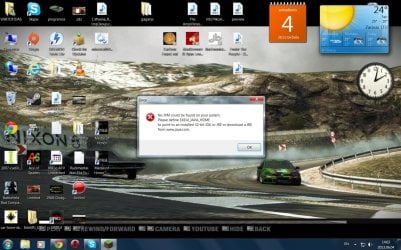
Hello everyone i recently upgraded my new computer and its now on 64bit and i cant play minecraft because its showing an error like this:No JVM could be found on your system. Please define EX4j_JAVA_HOME to point to installed 32-bit JDK or JRE or download a JRE from
java.com: Java + You
i did everything what the error write but when i intall 32bit java minecraft just freezing and i cant play like this so i installed the 64bit java like my computer is asking but it dont work just showing me this error please help me my system is 64 bit
Computer type PC/Desktop OS Windows Ultimate 64bit CPU Intel(R) Pentium(R) D CPU 2.80Ghz 2.79GHz Motherboard ASrock G41C-GS / G41C-S Graphics Card(s) Nvidia Geforce GTS 450 Antivirus Kasperski Anti security Browser Google Chrome
Hi Lazeris,
Computer type PC/Desktop Computer Manufacturer/Model Number Custom Build OS Windows 7 Home Premium 64Bit (Service Pack 1) CPU Intel i5 3570k @ 3.4Ghz - Cooler: Corsair H80i Motherboard Asus P8Z77-V Memory Crucial Ballistix Tactical 8gb 1866Mhz Graphics Card(s) XFX HD 7950 3Gb Sound Card On Board Monitor(s) Displays 2 X Acer G225HQVbd 21.5" Screen Resolution 1920 x 1080 Hard Drives 1 x 128Gb Corsair Force PSU Corsair AX860 Fully Modular Case CM Haf XB Cooling 2 x Corsair AF120 2 x BeQuiet Silent wings 80mm Keyboard Saitek Cyborg V5 Mouse Saitek Cyborg R.A.T 3 Internet Speed 50 mb/s Dl 15mb/s UL Antivirus MSE Browser Firefox Other Info Samsung 22xDVD RW
New member
Member
Thread Starter
error.jpg
237 KB
· Views: 3
Computer type PC/Desktop OS Windows Ultimate 64bit CPU Intel(R) Pentium(R) D CPU 2.80Ghz 2.79GHz Motherboard ASrock G41C-GS / G41C-S Graphics Card(s) Nvidia Geforce GTS 450 Antivirus Kasperski Anti security Browser Google Chrome
Dunno if this will help but you could try this:
Computer type PC/Desktop Computer Manufacturer/Model Number Custom Build OS Windows 7 Home Premium 64Bit (Service Pack 1) CPU Intel i5 3570k @ 3.4Ghz - Cooler: Corsair H80i Motherboard Asus P8Z77-V Memory Crucial Ballistix Tactical 8gb 1866Mhz Graphics Card(s) XFX HD 7950 3Gb Sound Card On Board Monitor(s) Displays 2 X Acer G225HQVbd 21.5" Screen Resolution 1920 x 1080 Hard Drives 1 x 128Gb Corsair Force PSU Corsair AX860 Fully Modular Case CM Haf XB Cooling 2 x Corsair AF120 2 x BeQuiet Silent wings 80mm Keyboard Saitek Cyborg V5 Mouse Saitek Cyborg R.A.T 3 Internet Speed 50 mb/s Dl 15mb/s UL Antivirus MSE Browser Firefox Other Info Samsung 22xDVD RW
New member
Member
Thread Starter
yeah i tried that not really working when i install 32 then 64 and playing game its showing me tht i have 32bit and it freezing how always maybe you know fix for the freezes and yea the freeze is when i playing minecraft everything seems normal when from nowhere just game stops working then i open my task manager click processes and found javaw and he using my memory like 500.000 K like normally he using 100.000 K or 150.000 K so that the freeze problem
Computer type PC/Desktop OS Windows Ultimate 64bit CPU Intel(R) Pentium(R) D CPU 2.80Ghz 2.79GHz Motherboard ASrock G41C-GS / G41C-S Graphics Card(s) Nvidia Geforce GTS 450 Antivirus Kasperski Anti security Browser Google Chrome
could possibly be the reason
Computer type PC/Desktop Computer Manufacturer/Model Number Custom Build OS Windows 7 Home Premium 64Bit (Service Pack 1) CPU Intel i5 3570k @ 3.4Ghz - Cooler: Corsair H80i Motherboard Asus P8Z77-V Memory Crucial Ballistix Tactical 8gb 1866Mhz Graphics Card(s) XFX HD 7950 3Gb Sound Card On Board Monitor(s) Displays 2 X Acer G225HQVbd 21.5" Screen Resolution 1920 x 1080 Hard Drives 1 x 128Gb Corsair Force PSU Corsair AX860 Fully Modular Case CM Haf XB Cooling 2 x Corsair AF120 2 x BeQuiet Silent wings 80mm Keyboard Saitek Cyborg V5 Mouse Saitek Cyborg R.A.T 3 Internet Speed 50 mb/s Dl 15mb/s UL Antivirus MSE Browser Firefox Other Info Samsung 22xDVD RW