No mail visible in outlook 2010!

Daz1966

New member
Member
Local time
5:15 PM
Messages
27
Location
Nottingham
Hello all, nice forum.

I hope i have not duplicated this thread.

I have office 2010 installed on my daughters christmas prezzie laptop (Toshiba with Windows 7 Home Premium 64 bit) but i am struggling downloading mail to the outlook inbox, or anywhere else for that matter.

Her original mailbox is on the family desktop in outlook express which works fine & as far as i can see i have mirrored the setting. I have also enabled leave a copy on the server on both machines.
Test account settings tells me test email sent & congratulations, but no visible mail, only on the desktop.


Any help would be greatly appreciated & i thank you in advance.

Regards

Darren

(pop3 ntlworld account) :D
 

My Computer My Computer

At a glance

Windows 7 Ultimate 32 bit
OS
Windows 7 Ultimate 32 bit
Well Darren, riddle me this.

When you try to sync her email to her new machine, what does outlook do? does it say there are messages downloading or does it give you an error?
 

My Computer My Computer

At a glance

Windows 7 Ultimate 64-bitAMD Phenom II X6 1090T 3.2GHZG.SKILL RipJaw 3x2GB DDR3-10662x HIS Radeon HD 6850 1 GB
OS
Windows 7 Ultimate 64-bit
CPU
AMD Phenom II X6 1090T 3.2GHZ
Motherboard
MSI 890FXA-GD70
Memory
G.SKILL RipJaw 3x2GB DDR3-1066
Graphics Card(s)
2x HIS Radeon HD 6850 1 GB
Sound Card
VIA 8-channel
Monitor(s) Displays
2x 20 inch Acer LCDs, 1x 32" Sony LCD TV
Screen Resolution
4480x900
Hard Drives
1x Crucial 64GB SSD
3x 1TB HDDs (WD, Seagate, Hitatchi)
1x 500GB Seagate External
PSU
Kingwin 1000W Modular
Case
Coolermaster HAF 932
Cooling
1x 120mm, 3x 200mm, CoolerMaster Hyper 212+
Keyboard
Microsoft Wireless Keyboard 1000
Mouse
Microsoft Wiresless Mouse 5000
Internet Speed
20mbps
Other Info
Samsung BD-ROM/DVD-RW
for POP/Imap accounts - server = .pst file(s)

I would copy/transfer the .pst files from the family desktop over to the new laptop then "import" that data to her new outlook profile on the laptop.
 

My Computer My Computer

At a glance

7 Pro
OS
7 Pro
Have you downloaded MS Outlook Connector yet?
 

My Computer My Computer

At a glance

Windows 7 Home Premium 64bitIntel(R)Core(TM)2 quad [email protected] 2.39GHz6GB DDR2 6400GeForce 8500/512MB
Computer Manufacturer/Model Number
HP M9077c
OS
Windows 7 Home Premium 64bit
CPU
Intel(R)Core(TM)2 quad [email protected] 2.39GHz
Motherboard
ASUSeK
Memory
6GB DDR2 6400
Graphics Card(s)
GeForce 8500/512MB
Sound Card
Realtek High Def Audio
Monitor(s) Displays
HP w2408 LCD 24" widescreen
Screen Resolution
1920x1200
Cooling
6 pack of Bud
Keyboard
MS wireless Inteli
Mouse
MS wireless Inteli
Thanks for the swift replies chaps, all three suggestions got me scratching my head but i will venture forth & let you know the outcome.

Regards

Darren
 

My Computer My Computer

At a glance

Windows 7 Ultimate 32 bit
OS
Windows 7 Ultimate 32 bit
Well guys, i drew a blank so i removed all accounts & started again with new profiles & also re-setting the account password, & what do you know?

All working fine now but the auto detect settings gave me imap not pop on the incoming, which gives me the sync facility as mentioned above.

Is this ok?

Thanks again chaps & this won't be a hit & run, i plan on picking your brains a whole lot more & hopefully offering something back if i can.

Darren
 

My Computer My Computer

At a glance

Windows 7 Ultimate 32 bit
OS
Windows 7 Ultimate 32 bit
POP is a "push emails from server to client" while IMAP is "sync both server and client". I like IMAP if I have two or more clients that need to have all the same emails and folders and Exchange is not available.
 

My Computer My Computer

At a glance

Windows 7 Ultimate 64-bitAMD Phenom II X6 1090T 3.2GHZG.SKILL RipJaw 3x2GB DDR3-10662x HIS Radeon HD 6850 1 GB
OS
Windows 7 Ultimate 64-bit
CPU
AMD Phenom II X6 1090T 3.2GHZ
Motherboard
MSI 890FXA-GD70
Memory
G.SKILL RipJaw 3x2GB DDR3-1066
Graphics Card(s)
2x HIS Radeon HD 6850 1 GB
Sound Card
VIA 8-channel
Monitor(s) Displays
2x 20 inch Acer LCDs, 1x 32" Sony LCD TV
Screen Resolution
4480x900
Hard Drives
1x Crucial 64GB SSD
3x 1TB HDDs (WD, Seagate, Hitatchi)
1x 500GB Seagate External
PSU
Kingwin 1000W Modular
Case
Coolermaster HAF 932
Cooling
1x 120mm, 3x 200mm, CoolerMaster Hyper 212+
Keyboard
Microsoft Wireless Keyboard 1000
Mouse
Microsoft Wiresless Mouse 5000
Internet Speed
20mbps
Other Info
Samsung BD-ROM/DVD-RW
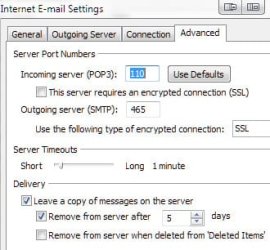
When using POP accounts with the same email on two different devices (this includes smart phones, notepads, and computers), it is important to go into "More Settings..." then to the "Advanced" tab and check the box to "Leave a copy of the message on the server". If one desires not to have them left on the server permanently, check the box "Remove from server after" and set the number of days (I have mine set to five but use 10 on some of my POP accounts depending on how often I access the account on different devices).

ScreenShot00343.jpg

ScreenShot00344.jpg

If the box is not checked for "Leave a copy of the message on the server", as soon as one device accesses the email, the other device will never see it.
 

My Computer My Computer

At a glance

Windows 7 Ultimate x64 SP1Core2 Duo4 GBGM965 on-board
Computer Manufacturer/Model Number
Toshiba L355D
OS
Windows 7 Ultimate x64 SP1
CPU
Core2 Duo
Motherboard
Intel
Memory
4 GB
Graphics Card(s)
GM965 on-board
Sound Card
RealTek on-board
Monitor(s) Displays
19"+17"(laptop)
Screen Resolution
1440x900 (x 2)
Hard Drives
500GB Ext. 200GB Internal
PSU
N/A
Case
N/A
Cooling
N/A
Nice one Mikedl, thanks for the info.
 

My Computer My Computer

At a glance

Windows 7 Ultimate 32 bit
OS
Windows 7 Ultimate 32 bit
You are quite welcome, Daz1966, and, also, welcome to the Seven Forums! :)

I first learned of this setting when I got my first smart phone years ago and set up email on it. Of course, at the time, I didn't have this setting checked in Outlook and Outlook was set to automatically send and receive every 5 minutes.

For some reason, I couldn't get emails on my phone so I called tech support - duh! :o

But wait, it gets funnier. After changing the setting on my computer, I got emails on my phone but would be missing emails on the computer. Another call ... turns out the phone had a similar setting that needed to be set or else once it accessed the email, before my computer accessed it, the computer would no longer see the email.

Live, learn, laugh! :D
 

My Computer My Computer

At a glance

Windows 7 Ultimate x64 SP1Core2 Duo4 GBGM965 on-board
Computer Manufacturer/Model Number
Toshiba L355D
OS
Windows 7 Ultimate x64 SP1
CPU
Core2 Duo
Motherboard
Intel
Memory
4 GB
Graphics Card(s)
GM965 on-board
Sound Card
RealTek on-board
Monitor(s) Displays
19"+17"(laptop)
Screen Resolution
1440x900 (x 2)
Hard Drives
500GB Ext. 200GB Internal
PSU
N/A
Case
N/A
Cooling
N/A
Back
Top