No MIDI Input

AJay

New member
Local time
10:52 PM
Messages
7
Midi in doesn't work here. I've read that people have been talking about midi out but what about midi in? None of them work. And I can't find how to change it via registry. Don't even know what that is.
Sorry to make another topic but I am a musician and need my keyboard to send information in so I can make music.

The midi mapper etc. is only for midi out.

Thanks all
 

My Computer

OS
Windows 7 Ultimate
CPU
Intel Quad Core Q6600 @ 2.40GHz
Motherboard
Gigabyte (don't remember the model)
Memory
8GB
Graphics Card(s)
NVIDIA GeForce 8800 GTX
Sound Card
Esi Maya 44 24-bit 96/192kHz 4-in / 4-out audio interface
Monitor(s) Displays
3 Ctx 17"
Screen Resolution
3840 x 1024
Hard Drives
Seagate Barracuda 149GB
Seagate Barracuda 232GB
Case
Cooler master
Cooling
Silent x
Keyboard
Logitech x-flat
Mouse
Microsoft internet explorer
Internet Speed
20mb/s
Other Info
The audio card has a midi add on extension card. Cubase 5, MIDI keyboard: KORG SP 200 stage piano with midi cables to the maya add on card.

My Computer

Computer Manufacturer/Model Number
Sony Vaio FZ21Z
OS
Windows 7 Ultimate x64 ®™
CPU
Intel Core 2 Duo (2.2 GHz)
Motherboard
Sony (Intel Chipset)
Memory
2x 2GB Corsair (667 MHz)
Graphics Card(s)
NVIDIA 8600M GS (256MB)
Sound Card
Sigmatel
Monitor(s) Displays
15.4" TFT X-Black
Screen Resolution
1280x800
Hard Drives
Western Digital 300GB Scorpio Black (7200rpm)
Mouse
Logitech Anywhere MX
Internet Speed
Sky 5MB
I didn't post it because it's irrelevant. It was working in Windows Xp and now it doesn't. The problem is windows 7, and I need help to fix it because I need to choose my MIDI keyboard from device setup...but devce setup for midi was completely removed from windows 7 so I need to know how to do it another way.

This is an issue about not being able at all to pick your midi source.

I was wondering if you could help me with that.
 

My Computer

OS
Windows 7 Ultimate
CPU
Intel Quad Core Q6600 @ 2.40GHz
Motherboard
Gigabyte (don't remember the model)
Memory
8GB
Graphics Card(s)
NVIDIA GeForce 8800 GTX
Sound Card
Esi Maya 44 24-bit 96/192kHz 4-in / 4-out audio interface
Monitor(s) Displays
3 Ctx 17"
Screen Resolution
3840 x 1024
Hard Drives
Seagate Barracuda 149GB
Seagate Barracuda 232GB
Case
Cooler master
Cooling
Silent x
Keyboard
Logitech x-flat
Mouse
Microsoft internet explorer
Internet Speed
20mb/s
Other Info
The audio card has a midi add on extension card. Cubase 5, MIDI keyboard: KORG SP 200 stage piano with midi cables to the maya add on card.
I didn't post it because it's irrelevant. It was working in Windows Xp and now it doesn't. The problem is windows 7, and I need help to fix it because I need to choose my MIDI keyboard from device setup...but devce setup for midi was completely removed from windows 7 so I need to know how to do it another way.

This is an issue about not being able at all to pick your midi source.

I was wondering if you could help me with that.

Don't know what kind of a MIDI connection... there are MIDI interfaces and also keyboards with built in USB MIDI interface. Are you using the keyboard with a music program? If so, which one.

We actually do need more info... It's possible that the MIDI ports are located in a different spot, Windows 7 is not XP.

List your keyboard make & model and exactly how you used it in XP.

And take a moment to fill out your system specs... it all helps!

Ap

p.s. Look at my specs.. I have a large MIDI setup
 

My Computer

Computer Manufacturer/Model Number
Assembled in my workshop
OS
Windows 7 Home Premium
CPU
Intel Core 2 Duo @ 3.00gHz
Motherboard
Gigabyte GA-P35-S3G
Memory
4 GB
Graphics Card(s)
ATI Radeon HD 2600 XT
Sound Card
RME 24/96 Card, Realtek Internal Audio PreSonus FireStudio
Monitor(s) Displays
Acer 1917 (x2)
Screen Resolution
1280 x 1024 on both monitors
Hard Drives
Three 250GB Seagate SATA Barracuda 7200rpm
PSU
Rosewill 500-watt
Case
Rosewill mid-tower
Cooling
Noctua NH-U9B (CPU), PwrSupply fan + single large case Fan
Keyboard
Macally w/2/USB ports.
Mouse
Trackman Wheel
Other Info
Event 20/20 bas studio monitors, Yamaha sub.
Rackmount Korg/Roland/Yamaha synthesizers,
Cubase MIDI/audio recording. Sony Soundforge audio/mastering software. CD Architect Mastering. RME & Presonus audio interfaces.
I didn't post it because it's irrelevant. It was working in Windows Xp and now it doesn't. The problem is windows 7, and I need help to fix it because I need to choose my MIDI keyboard from device setup...but devce setup for midi was completely removed from windows 7 so I need to know how to do it another way.

This is an issue about not being able at all to pick your midi source.

I was wondering if you could help me with that.

Don't know what kind of a MIDI connection... there are MIDI interfaces and also keyboards with built in USB MIDI interface. Are you using the keyboard with a music program? If so, which one.

We actually do need more info... It's possible that the MIDI ports are located in a different spot, Windows 7 is not XP.

List your keyboard make & model and exactly how you used it in XP.

And take a moment to fill out your system specs... it all helps!

Ap

p.s. Look at my specs.. I have a large MIDI setup

Ok sorry.

Specs filled out.
I have always been using a stage piano with a simple MIDI in/out, hooked up directly to the maya extension card. I never did anything before,it always just worked. Haven't hooked anything up differently,only changed OS.

I haven't tried it in cubase yet, only in finale,sibelius and try-sound.com. And I don't have anything extra control panel for audio where you can tweak.

That's the add-on card.
http://www.audiotrak.net/products/miodio/
 

My Computer

OS
Windows 7 Ultimate
CPU
Intel Quad Core Q6600 @ 2.40GHz
Motherboard
Gigabyte (don't remember the model)
Memory
8GB
Graphics Card(s)
NVIDIA GeForce 8800 GTX
Sound Card
Esi Maya 44 24-bit 96/192kHz 4-in / 4-out audio interface
Monitor(s) Displays
3 Ctx 17"
Screen Resolution
3840 x 1024
Hard Drives
Seagate Barracuda 149GB
Seagate Barracuda 232GB
Case
Cooler master
Cooling
Silent x
Keyboard
Logitech x-flat
Mouse
Microsoft internet explorer
Internet Speed
20mb/s
Other Info
The audio card has a midi add on extension card. Cubase 5, MIDI keyboard: KORG SP 200 stage piano with midi cables to the maya add on card.
I have a home recording studio with Sonar and have several MIDI I/O's. Some are via USB connections such as my Edirol PCR500 MIDI keyboard and some are through my Focusrite Saffire Pro 40 firewire connected audio and MIDI I/O recording device.

With the Edirol PCR 500 MIDI keyboard, I had to install drivers before it was recognized.
 

My Computer

Computer type
PC/Desktop
Computer Manufacturer/Model Number
My Own Build
OS
Windows 10 64 bit
CPU
Intel i7 6700K
Motherboard
ASUS ROG Maximus VIII Hero
Memory
16GB Corsair Dominator
Graphics Card(s)
Intel CPU Graphics
Sound Card
RealTek
Monitor(s) Displays
27" Dell S2719dgf
Screen Resolution
2560X1440
Hard Drives
1 TB Samsung 850 EVO SSD for Win 10 Pro
500GB Samsung 850 EVO SSD for Win 10 Insider
2 TB drive for backup
PSU
EVGA Supernova 750G2
Case
BeQuiet Silent Base 600
Cooling
Deepcool Captain 120EX
Keyboard
Microsoft Wireless 2000
Mouse
Microsoft wireless
Internet Speed
100 MB/sec (Cable)
Antivirus
Microsoft Defender and Malwarebytes
Browser
Edge/Firefox
Other Info
Cakewalk (Sonar) by BandLab and Studio One 4.1 Pro recording studio software. MOTU 896Mk3 Hybrid recording interface, Frontier Tranzport wireless control unit, Behringer X-Touch Control Surface.
Five USB connected optical drives for CD Audio production using Nero BurningROM
I have a home recording studio with Sonar and have several MIDI I/O's. Some are via USB connections such as my Edirol PCR500 MIDI keyboard and some are through my Focusrite Saffire Pro 40 firewire connected audio and MIDI I/O recording device.

With the Edirol PCR 500 MIDI keyboard, I had to install drivers before it was recognized.

Yes I thought of that and went to get the box while I called myself stupid:P But it said there's no need for drivers. And I remember now that I never installed drivers for the add on card. It's just plug and play.

This has something to do with windows 7. It doesn't automatically pick your midi device,and the default settings differs from XP. And you can change the midi in out settings in something people call registry....Have no idea what they mean.

From another forum:
"I am an active musician who has recently made the switch from XP to Windows 7, skipping Vista. I connected my Edirol UM-1, and the drivers installed successfully. The interface works fine within my DAW software, but I also like to have WMP use the UM-1 as the default MIDI output device. When I went to the control panel to make that selection, I discovered that the MIDI device section was missing completely.

There are several threads on this topic in the Vista forums, but I haven't found much discussion about this topic in the Windows 7 forum. The fact that this problem remains from Vista to Windows 7 does not give me much hope that a solution will come from Microsoft.

My questions: Is there a solution to this problem that doesn't involve registry hacks or questionable downloads? And/or has anyone had any success in Windows 7 using registry hacks or software patches."

Yet another forum:
"Midi Output and Windows 7

Being a professional musician/music teacher I found vista to be frustrating with midi driver output selection.
I originally fixed this with a registry hack to midimapper I found on the net.
Later I addressed this problem with midi yoke and Vista midipicker.
Windows 7 doesn't seem to handle midi output selection at all.
I have tried midi yoke and vista midi picker with no success.
This seems to be a problem with VanBasco's midi player, Sibelius, Datasonics' Music Master and Cakewalk sonar 8.
XP had the best solution with a midi device selector in the control panel, but Vista took this away and windows 7 is much the same but worse.

I am sure these bungles by Microsoft have forced many musicians onto macs.

Using dxi synths is all very well for programs that can use these plugins but for software without plugin support it is a nightmare.

Vista was a big consumer of system recources; windows 7 is much better here, but there is no point having programs running in the background that are not being used, just to make their startup faster.
If I can't find a solution to my midi woes soon, I will have to revert to XP or at worst Vista"

 

My Computer

OS
Windows 7 Ultimate
CPU
Intel Quad Core Q6600 @ 2.40GHz
Motherboard
Gigabyte (don't remember the model)
Memory
8GB
Graphics Card(s)
NVIDIA GeForce 8800 GTX
Sound Card
Esi Maya 44 24-bit 96/192kHz 4-in / 4-out audio interface
Monitor(s) Displays
3 Ctx 17"
Screen Resolution
3840 x 1024
Hard Drives
Seagate Barracuda 149GB
Seagate Barracuda 232GB
Case
Cooler master
Cooling
Silent x
Keyboard
Logitech x-flat
Mouse
Microsoft internet explorer
Internet Speed
20mb/s
Other Info
The audio card has a midi add on extension card. Cubase 5, MIDI keyboard: KORG SP 200 stage piano with midi cables to the maya add on card.
Yes I thought of that and went to get the box while I called myself stupid:P But it said there's no need for drivers. And I remember now that I never installed drivers for the add on card. It's just plug and play.

This has something to do with windows 7. It doesn't automatically pick your midi device,and the default settings differs from XP. And you can change the midi in out settings in something people call registry....Have no idea what they mean.


It looks at one time you did install a driver.
The driver was part of another package.


(From the PDF Manual)

MI/ODI/O driver already included in EWDM driver of Waveterminal 192
series. Therefore, by the installation of the driver of Waveterminal 192
series, you can use MI/ODI/O right away.
Just hook it up to your Waveterminal 192 card like a below picture and
you're ready to go!

Here's a link to the manual.

http://download.audiotrak.net/?w=at&p=21&g=4&l=en

Ap


My Computer

Computer Manufacturer/Model Number
Assembled in my workshop
OS
Windows 7 Home Premium
CPU
Intel Core 2 Duo @ 3.00gHz
Motherboard
Gigabyte GA-P35-S3G
Memory
4 GB
Graphics Card(s)
ATI Radeon HD 2600 XT
Sound Card
RME 24/96 Card, Realtek Internal Audio PreSonus FireStudio
Monitor(s) Displays
Acer 1917 (x2)
Screen Resolution
1280 x 1024 on both monitors
Hard Drives
Three 250GB Seagate SATA Barracuda 7200rpm
PSU
Rosewill 500-watt
Case
Rosewill mid-tower
Cooling
Noctua NH-U9B (CPU), PwrSupply fan + single large case Fan
Keyboard
Macally w/2/USB ports.
Mouse
Trackman Wheel
Other Info
Event 20/20 bas studio monitors, Yamaha sub.
Rackmount Korg/Roland/Yamaha synthesizers,
Cubase MIDI/audio recording. Sony Soundforge audio/mastering software. CD Architect Mastering. RME & Presonus audio interfaces.
Yes a driver is installed but not for the add-on card itself. You're good to go as soon as you install the maya 44 drivers,and plug the add-on on the maya pci. No need for anything extra.
This clearly seems to be something else than the installation. This isn't just me. Others have done it right aslo, it just doen't work in W7.

No midi in, no midi out...what to do?;P

No one knows anything about this registry hack?
 

My Computer

OS
Windows 7 Ultimate
CPU
Intel Quad Core Q6600 @ 2.40GHz
Motherboard
Gigabyte (don't remember the model)
Memory
8GB
Graphics Card(s)
NVIDIA GeForce 8800 GTX
Sound Card
Esi Maya 44 24-bit 96/192kHz 4-in / 4-out audio interface
Monitor(s) Displays
3 Ctx 17"
Screen Resolution
3840 x 1024
Hard Drives
Seagate Barracuda 149GB
Seagate Barracuda 232GB
Case
Cooler master
Cooling
Silent x
Keyboard
Logitech x-flat
Mouse
Microsoft internet explorer
Internet Speed
20mb/s
Other Info
The audio card has a midi add on extension card. Cubase 5, MIDI keyboard: KORG SP 200 stage piano with midi cables to the maya add on card.
Yes a driver is installed but not for the add-on card itself. You're good to go as soon as you install the maya 44 drivers,and plug the add-on on the maya pci. No need for anything extra.
This clearly seems to be something else than the installation. This isn't just me. Others have done it right aslo, it just doen't work in W7.

No midi in, no midi out...what to do?;P

No one knows anything about this registry hack?


Look here:

Putzlowitsch's Vista MIDI Mapper Control Panel - The Sierra Help Pages

and here...

Vista MIDI Tool • benryves.com


These may be what you're looking for, I know they're for Vista but probably worth a try (if you haven't tried them already.

However, if the MIDI driver included with the Maya install is not working in Win7 you still won't see anything. Your next option would be to purchase an inexpensive USB MIDI interface.

Ap
 

My Computer

Computer Manufacturer/Model Number
Assembled in my workshop
OS
Windows 7 Home Premium
CPU
Intel Core 2 Duo @ 3.00gHz
Motherboard
Gigabyte GA-P35-S3G
Memory
4 GB
Graphics Card(s)
ATI Radeon HD 2600 XT
Sound Card
RME 24/96 Card, Realtek Internal Audio PreSonus FireStudio
Monitor(s) Displays
Acer 1917 (x2)
Screen Resolution
1280 x 1024 on both monitors
Hard Drives
Three 250GB Seagate SATA Barracuda 7200rpm
PSU
Rosewill 500-watt
Case
Rosewill mid-tower
Cooling
Noctua NH-U9B (CPU), PwrSupply fan + single large case Fan
Keyboard
Macally w/2/USB ports.
Mouse
Trackman Wheel
Other Info
Event 20/20 bas studio monitors, Yamaha sub.
Rackmount Korg/Roland/Yamaha synthesizers,
Cubase MIDI/audio recording. Sony Soundforge audio/mastering software. CD Architect Mastering. RME & Presonus audio interfaces.
Yes a driver is installed but not for the add-on card itself. You're good to go as soon as you install the maya 44 drivers,and plug the add-on on the maya pci. No need for anything extra.
This clearly seems to be something else than the installation. This isn't just me. Others have done it right aslo, it just doen't work in W7.

No midi in, no midi out...what to do?;P

No one knows anything about this registry hack?


Look here:

Putzlowitsch's Vista MIDI Mapper Control Panel - The Sierra Help Pages

and here...

Vista MIDI Tool • benryves.com


These may be what you're looking for, I know they're for Vista but probably worth a try (if you haven't tried them already.

However, if the MIDI driver included with the Maya install is not working in Win7 you still won't see anything. Your next option would be to purchase an inexpensive USB MIDI interface.

Ap
I've tried about everything. Not the Putzlowitsch's one though. I got to pick what I needed with that but no response unfortunetly. Well it was worth a shot.Thank you very much...I think I have to go with the usb midi cable yes.should identify that pretty easily. If not. God help us all:P

What kind of music do you make AP? and are you on V.I control forum?
 

My Computer

OS
Windows 7 Ultimate
CPU
Intel Quad Core Q6600 @ 2.40GHz
Motherboard
Gigabyte (don't remember the model)
Memory
8GB
Graphics Card(s)
NVIDIA GeForce 8800 GTX
Sound Card
Esi Maya 44 24-bit 96/192kHz 4-in / 4-out audio interface
Monitor(s) Displays
3 Ctx 17"
Screen Resolution
3840 x 1024
Hard Drives
Seagate Barracuda 149GB
Seagate Barracuda 232GB
Case
Cooler master
Cooling
Silent x
Keyboard
Logitech x-flat
Mouse
Microsoft internet explorer
Internet Speed
20mb/s
Other Info
The audio card has a midi add on extension card. Cubase 5, MIDI keyboard: KORG SP 200 stage piano with midi cables to the maya add on card.
I've tried about everything. Not the Putzlowitsch's one though. I got to pick what I needed with that but no response unfortunetly. Well it was worth a shot.Thank you very much...I think I have to go with the usb midi cable yes.should identify that pretty easily. If not. God help us all:P

What kind of music do you make AP? and are you on V.I control forum?


See if you can find a used MOTU Fastlane, decent small interfqace, 2-in, 2-out, has both 32 & 64 bit drivers.

Mainly a professional guitarist by trade, but have been involved with MIDI since 1985 (gulp) and audio since it was introduced on computers. Have owned PC, Mac, Amiga 3000 and Atari ST...:shock: Written/recorded stuff for PBS and NPR, produced some local talent... Since my main gig is guitar I pick and choose which computer/musc projects I take on. February 13th I played a concert with Diane Schurr, a jazz vocalist I've known for years. Having fun, what can I say!

Recently purchased Addictive drums, also use some older Steinware V.I. as well as East-West Gold and Albino.

Ap
 

My Computer

Computer Manufacturer/Model Number
Assembled in my workshop
OS
Windows 7 Home Premium
CPU
Intel Core 2 Duo @ 3.00gHz
Motherboard
Gigabyte GA-P35-S3G
Memory
4 GB
Graphics Card(s)
ATI Radeon HD 2600 XT
Sound Card
RME 24/96 Card, Realtek Internal Audio PreSonus FireStudio
Monitor(s) Displays
Acer 1917 (x2)
Screen Resolution
1280 x 1024 on both monitors
Hard Drives
Three 250GB Seagate SATA Barracuda 7200rpm
PSU
Rosewill 500-watt
Case
Rosewill mid-tower
Cooling
Noctua NH-U9B (CPU), PwrSupply fan + single large case Fan
Keyboard
Macally w/2/USB ports.
Mouse
Trackman Wheel
Other Info
Event 20/20 bas studio monitors, Yamaha sub.
Rackmount Korg/Roland/Yamaha synthesizers,
Cubase MIDI/audio recording. Sony Soundforge audio/mastering software. CD Architect Mastering. RME & Presonus audio interfaces.
I'm not that swift with MIDI as I just started using it, since installing Sonar (I'm using the current 8.5.3 Professional version) and setting up a home recording studio. But, looking over posts on the Sonar forum, I don't really see any issues of the type you are having posted on the Sonar forum and except for one user post everyone that has Win 7 seems to be happy with it. It has to be some type of driver is missing somewhere along the line.

I also have a Sonitus guitar to MIDI adapter and that even works.

One other thought, that is probably off base but worth mentioning. Audio functions are handled differently in Vista and Win 7 from XP. This comes up with Sound Drivers as Vista and/or Windows 7 specific drivers are needed and although it's not MIDI my be remotely related to hardware that was used in XP.
 

My Computer

Computer type
PC/Desktop
Computer Manufacturer/Model Number
My Own Build
OS
Windows 10 64 bit
CPU
Intel i7 6700K
Motherboard
ASUS ROG Maximus VIII Hero
Memory
16GB Corsair Dominator
Graphics Card(s)
Intel CPU Graphics
Sound Card
RealTek
Monitor(s) Displays
27" Dell S2719dgf
Screen Resolution
2560X1440
Hard Drives
1 TB Samsung 850 EVO SSD for Win 10 Pro
500GB Samsung 850 EVO SSD for Win 10 Insider
2 TB drive for backup
PSU
EVGA Supernova 750G2
Case
BeQuiet Silent Base 600
Cooling
Deepcool Captain 120EX
Keyboard
Microsoft Wireless 2000
Mouse
Microsoft wireless
Internet Speed
100 MB/sec (Cable)
Antivirus
Microsoft Defender and Malwarebytes
Browser
Edge/Firefox
Other Info
Cakewalk (Sonar) by BandLab and Studio One 4.1 Pro recording studio software. MOTU 896Mk3 Hybrid recording interface, Frontier Tranzport wireless control unit, Behringer X-Touch Control Surface.
Five USB connected optical drives for CD Audio production using Nero BurningROM
found a cable, windows 7 ready. Yes it seems like a driver is the problem in the end but it really is a "microsoft has taken away midi device setup" issue. This goes for vista and 7.
If I could go to the control panel and pick my midi source everything would be fine. It's just visually gone and the ability to choose your midi sources is unavailable.
This issue will become more hot as people move towards 7. It's just many who is still on xp,and many converting to macs. Why fix it if it ain't broke?
Composers use what works.
 

My Computer

OS
Windows 7 Ultimate
CPU
Intel Quad Core Q6600 @ 2.40GHz
Motherboard
Gigabyte (don't remember the model)
Memory
8GB
Graphics Card(s)
NVIDIA GeForce 8800 GTX
Sound Card
Esi Maya 44 24-bit 96/192kHz 4-in / 4-out audio interface
Monitor(s) Displays
3 Ctx 17"
Screen Resolution
3840 x 1024
Hard Drives
Seagate Barracuda 149GB
Seagate Barracuda 232GB
Case
Cooler master
Cooling
Silent x
Keyboard
Logitech x-flat
Mouse
Microsoft internet explorer
Internet Speed
20mb/s
Other Info
The audio card has a midi add on extension card. Cubase 5, MIDI keyboard: KORG SP 200 stage piano with midi cables to the maya add on card.
found a cable, windows 7 ready. Yes it seems like a driver is the problem in the end but it really is a "microsoft has taken away midi device setup" issue. This goes for vista and 7.
If I could go to the control panel and pick my midi source everything would be fine. It's just visually gone and the ability to choose your midi sources is unavailable.
This issue will become more hot as people move towards 7. It's just many who is still on xp,and many converting to macs. Why fix it if it ain't broke?
Composers use what works.


I don't see a lot of composers/studios moving to Macs, the last Mac only studio in town just bought a PC so they could have more options.

Also.. I've been writing for long time and I have absolutely no MIDI problems in Windows 7, I use Cubase & Sibelius as my main two composition programs and both my USB MOTU MIDI interface and the interface on the M-Audio Audiophile show up in all of my programs. I just select which interface to use, everything works. I just tried the Putzlowitschs Vista MIDI Fix control panel and it shows all of my MIDI devices, I can choose any one of them as the Default MIDI Device.

The real problem is, the drivers for your Audio card with the MIDI extension add-on card have not been updated.

Ap
 
Last edited:

My Computer

Computer Manufacturer/Model Number
Assembled in my workshop
OS
Windows 7 Home Premium
CPU
Intel Core 2 Duo @ 3.00gHz
Motherboard
Gigabyte GA-P35-S3G
Memory
4 GB
Graphics Card(s)
ATI Radeon HD 2600 XT
Sound Card
RME 24/96 Card, Realtek Internal Audio PreSonus FireStudio
Monitor(s) Displays
Acer 1917 (x2)
Screen Resolution
1280 x 1024 on both monitors
Hard Drives
Three 250GB Seagate SATA Barracuda 7200rpm
PSU
Rosewill 500-watt
Case
Rosewill mid-tower
Cooling
Noctua NH-U9B (CPU), PwrSupply fan + single large case Fan
Keyboard
Macally w/2/USB ports.
Mouse
Trackman Wheel
Other Info
Event 20/20 bas studio monitors, Yamaha sub.
Rackmount Korg/Roland/Yamaha synthesizers,
Cubase MIDI/audio recording. Sony Soundforge audio/mastering software. CD Architect Mastering. RME & Presonus audio interfaces.
Yes a driver is installed but not for the add-on card itself.

This is not correct, there is a MIDI driver... it's a part of the audio card driver, they are installed simultaneously.


Ap
 

My Computer

Computer Manufacturer/Model Number
Assembled in my workshop
OS
Windows 7 Home Premium
CPU
Intel Core 2 Duo @ 3.00gHz
Motherboard
Gigabyte GA-P35-S3G
Memory
4 GB
Graphics Card(s)
ATI Radeon HD 2600 XT
Sound Card
RME 24/96 Card, Realtek Internal Audio PreSonus FireStudio
Monitor(s) Displays
Acer 1917 (x2)
Screen Resolution
1280 x 1024 on both monitors
Hard Drives
Three 250GB Seagate SATA Barracuda 7200rpm
PSU
Rosewill 500-watt
Case
Rosewill mid-tower
Cooling
Noctua NH-U9B (CPU), PwrSupply fan + single large case Fan
Keyboard
Macally w/2/USB ports.
Mouse
Trackman Wheel
Other Info
Event 20/20 bas studio monitors, Yamaha sub.
Rackmount Korg/Roland/Yamaha synthesizers,
Cubase MIDI/audio recording. Sony Soundforge audio/mastering software. CD Architect Mastering. RME & Presonus audio interfaces.
Has anyone figured this out?

I have an Alesis USB MIDI adapter and I also cannot get Windows7 to receive input from my MIDI devices. Did anyone ever figure this out? Thanks! -John
 

My Computer

OS
Windows 7 Home Premium
No Audio via Midi

My midi controls work just fine with USB/Midi cables, but there is no audio or sound. Say I hook the usb/midi cables up to my midi keyboard and then I pull up a standalone synth and I complete all the settings as needed for midi configuration etc., I then get no audio or sound from the device, yet I can see how the keys are being triggered on the standalone synth when I play keys on the midi keyboard. What I've found out from Realtek is, it's nothing wrong with their sound card, but... that the problem is with a limitation within the Microsoft WDM architecture.

I keep reading where the forum administrator has absolutely no problem with this issue on their computer, but offers very little help in resolving this issue for others, except to say... there is no problem, in short of saying that it's the problem of everyone else.

I've been a musician for over 35 years and XP was a dream machine for musicians looking to record music via midi or direct. If there was not an issue or problem with the Windows 7 platform for musicians, then it would be just as easy as a musician (previously) using the XP platform and musicians would not be stepping up and speaking out about a problem with the Windows 7 platform.

When MicroSoft created the Windows 7 platform, they certainly did not have a vested interest in all the musicians that used their previous XP platform to create music.

So I have this to say to the forum administrator, do not... continue to make it sound like it's the musicians fault, that they can't get Windows 7 to work properly for there recording needs... because there are a vast number of musicians that do talk among each other and yes I've heard many of them trashing there Windows 7 computers and purchasing Mac computers.
 

My Computer

Computer Manufacturer/Model Number
CQ5600F
OS
Windows 7 Home Premium 64bit
CPU
AMD Athlon(tm) II 170u Processor 2.00 GHz
Memory
2.00
Graphics Card(s)
NVIDIA - GEFORCE
Sound Card
HD Realtek
Monitor(s) Displays
Compaq Presario Flat Panel Screen
If you're speaking to me...
I'm not the Forum administrator.. just another user like yourself.

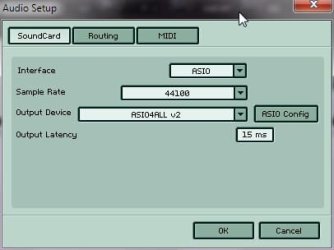
First, go here.... ASIO4ALL - Universal ASIO Driver

Download the ASIO4All driver and set it up the Realtek with a 256 sample buffer.
Most all, if not all of the Virtual Instruments like to see low latency ASIO drivers.

ASIO is a low latency front end for the Realtek drivers... it works better than WDM in WinXP, Vista and Win7.

Here's my setup for Garritan Jazz Orchestra:

Setup.jpg

The Realtec drivers/mixer still work the same except now you have a low latency ASIO driver.

I don't want to get into a MAC/PC thing but I've setup computers for professional studios for years.
While it used to be 80% Mac 20% PC it has changed over the past 6-7 years, now giving a slight edge to PCs.

Also, if you're serious about music, get a decent audio card, the internal devices have limited frequency response, the signal-to-noise ratio is terrible and most suffer from less than stellar drivers.

If you visit the Mac world (I have 2 Macs) as I do you will see they are having some serious problems regarding operating system upgrades, random latency and MIDI jitter... OSX has turned into a hulking monstrous resource hungry beast... it's not pretty over there right now. Apple has had to exclude all of their professional software from the "It Just Works" umbrella.
 

My Computer

Computer Manufacturer/Model Number
Assembled in my workshop
OS
Windows 7 Home Premium
CPU
Intel Core 2 Duo @ 3.00gHz
Motherboard
Gigabyte GA-P35-S3G
Memory
4 GB
Graphics Card(s)
ATI Radeon HD 2600 XT
Sound Card
RME 24/96 Card, Realtek Internal Audio PreSonus FireStudio
Monitor(s) Displays
Acer 1917 (x2)
Screen Resolution
1280 x 1024 on both monitors
Hard Drives
Three 250GB Seagate SATA Barracuda 7200rpm
PSU
Rosewill 500-watt
Case
Rosewill mid-tower
Cooling
Noctua NH-U9B (CPU), PwrSupply fan + single large case Fan
Keyboard
Macally w/2/USB ports.
Mouse
Trackman Wheel
Other Info
Event 20/20 bas studio monitors, Yamaha sub.
Rackmount Korg/Roland/Yamaha synthesizers,
Cubase MIDI/audio recording. Sony Soundforge audio/mastering software. CD Architect Mastering. RME & Presonus audio interfaces.
WIN7 -> Problems with MIDI -> XP rules in this sence!!!

Midi in doesn't work here. I've read that people have been talking about midi out but what about midi in? None of them work. And I can't find how to change it via registry. Don't even know what that is.
Sorry to make another topic but I am a musician and need my keyboard to send information in so I can make music.

The midi mapper etc. is only for midi out.

Thanks all

Hi Ajay,

Did you ever find a solution on this issue,....I have the excact same problem with Windows 7, Sonar 6 and trying to connect my Korg SV-1. Korg midi drivers is installed, Realtek onboard soundcard driver is and Asio4all drivers.

Sonar 6 can not find midi input device. Let me know what you ended up doing,....I'm exstremely frustrated. My setup worked absolutely perfect with Win XP and I can see a lot of people having similar issues with WIN7. Is the solution to go to MAC or selling the WIN7 and install the old XP??

I have an idea that a new soundcard or some other external device could solve this issue, but I'm not sure. Any recommendations, let me know. I'm an amateur musician and will not spend a fortune on external equipment,....but are ofcourse willing to pay something to get op and running with my setup again under WIN7.

I really hope to hear from you!

Best Regards,

Robert
 

My Computer

OS
Danmark
Back
Top