
No Modems Tab In Device Manager; No Driver Installed?

Xylisithe

New member
Local time
4:10 AM
Messages
13
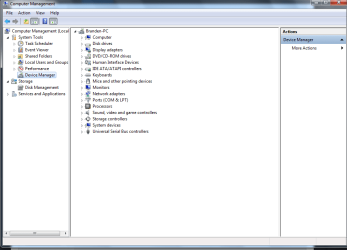
Just looking for information on this. I'm trying to locate my S6 on my computer so I can find it's Com number, however the guide I've read says I need to find my phone underneath the Modems tab in Device Manager. However, I do not have that, nor can I find the phone anywhere else.

I believe it's possible I may not have the driver installed, but to be quite honest, I'm not sure.

I'm running Windows 7 on a dell 780 optiplex. Any more information I should be able to provide.

Also my Skype (If this is allowed to use) is [REMOVED] for anyone that can provide more service if being here doesn't help
 

Attachments
  • DeviceManager.PNG
    DeviceManager.PNG
    26.1 KB · Views: 3
Last edited by a moderator:

My Computer My Computer

Computer type
PC/Desktop
OS
Microsoft Windows 7 Ultimate 64-bit
CPU
Intel(R) Core(TM)2 Duo CPU E4400 @ 2.00GHz
Motherboard
Dell Inc. 0CU409
Memory
2.00 GB
Graphics Card(s)
Intel(R) G33/G31 Express Chipset Family
Sound Card
Intel(R) G33/G31 Express Chipset Family
Antivirus
AVG
Browser
Chrome
Not clear what your doing I assume you mean a galaxy s6 and you connect via a usb cable and it should then show up as a drive if you want to do anything else you need the software
 

My Computer My Computer

Computer type
PC/Desktop
OS
win 8 32 bit
Have a look to see whats listed in
Human Interface Devices.

Roy
 

My Computer My Computer

Computer type
PC/Desktop
Computer Manufacturer/Model Number
medionl/Aspire 6930G/acer x55a
OS
W7 home premium 32bit/W7HP 64bit/w10 tp insider ring
CPU
E5300 dual core
Motherboard
medion MS7366
Memory
3gb
Graphics Card(s)
Nvidia Geforce 7100 Nforce 630i
Monitor(s) Displays
avixc
Internet Speed
n (isp resticted to 72)
Antivirus
mse/pands
Browser
palemoon
Other Info
Belkin Fd7050 n USB using Railink RT2870 drivers, more upto date
It does not appear in Human Interface Devices nor did downloading that software that was suggested.

I'll try posting the current step-by-step process I'm told I need to do;

"5) Right click on my computer and select "Manage". Once it opens click "Device Manager", then "Modems".

6) Under "Modems" you should see a Samsung device. Right click it and then select "Properties".

7) Once the "Properties" window opens, select the "Modem" tab and see what port it is on, like "COM5" for example."

As it is right now, I do not have a location called "Modems" at all. I am unable to locate the phone anywhere in general on the phone.
 

My Computer My Computer

Computer type
PC/Desktop
OS
Microsoft Windows 7 Ultimate 64-bit
CPU
Intel(R) Core(TM)2 Duo CPU E4400 @ 2.00GHz
Motherboard
Dell Inc. 0CU409
Memory
2.00 GB
Graphics Card(s)
Intel(R) G33/G31 Express Chipset Family
Sound Card
Intel(R) G33/G31 Express Chipset Family
Antivirus
AVG
Browser
Chrome
Looking at your steps there, it looks like you are trying to do this,

Universal Samsung FRP Bypass | RootJunky.com

One of the others on there who don't have the modem tab were told to make sure all the Samsung drivers were installed, you said you weren't sure if you do, it can't hurt to try that.
 

My Computer My Computer

Computer type
PC/Desktop
Computer Manufacturer/Model Number
Self Built
OS
Win 10 Pro x64
CPU
Intel I5-2500K @3.3GHz
Motherboard
Asrock P67 Extreme4
Memory
16GB G.Skill Ripjaws X (4x4GB)
Graphics Card(s)
EVGA GeForce 750 Ti SC 2GB
Sound Card
ASUS Xonar DG 5.1 Channels 24-bit 96KHz PCI Interface Sound
Monitor(s) Displays
auria eq2367
Screen Resolution
1920 x 1080
Hard Drives
250GB Samsung 850 EVO SSD
1TB WD Blue
1TB Hitachi
PSU
SeaSonic X 650W 80 Plus Gold
Case
Corsair Obsidian 750D
Cooling
Corsair H60, Three 140mm case fans
Keyboard
Logitech Wireless Keyboard K520
Mouse
Logitech Wireless Mouse M310
Internet Speed
Wave Broadband ~ 100 dn 5 up
Antivirus
Windows Defender, Malwarebytes Premium
Browser
Edge, IE11, Chrome
Other Info
Laptop specs: HP g7-1365dx /
CPU: AMD A6-3420M APU with Radeon(tm) HD Graphics /
RAM: Crucial 8Gb (2x4Gb) /
SSD: Crucial M4-CT128M4SSD2 ATA Device/ FW 000F /
GFX: AMD Radeon HD 6520G /
OS: Windows 10 Pro x64
Looking at your steps there, it looks like you are trying to do this,

Universal Samsung FRP Bypass | RootJunky.com

One of the others on there who don't have the modem tab were told to make sure all the Samsung drivers were installed, you said you weren't sure if you do, it can't hurt to try that.

That is indeed what I was looking to do. Any chance you are able to provide those? Not quite sure where I'd find them
 

My Computer My Computer

Computer type
PC/Desktop
OS
Microsoft Windows 7 Ultimate 64-bit
CPU
Intel(R) Core(TM)2 Duo CPU E4400 @ 2.00GHz
Motherboard
Dell Inc. 0CU409
Memory
2.00 GB
Graphics Card(s)
Intel(R) G33/G31 Express Chipset Family
Sound Card
Intel(R) G33/G31 Express Chipset Family
Antivirus
AVG
Browser
Chrome
Why do you want a modem? On the phone have you set USB debugging on as sometimes that is needed
 

My Computer My Computer

Computer type
PC/Desktop
OS
win 8 32 bit
Why do you want a modem? On the phone have you set USB debugging on as sometimes that is needed

It's not that I want a modem, it's that I'm missing the "Modems" tab in Device Manager which my step-by-step process to unlock my phone has told me to do. Other than that, I'm unable to locate the phone..
 

My Computer My Computer

Computer type
PC/Desktop
OS
Microsoft Windows 7 Ultimate 64-bit
CPU
Intel(R) Core(TM)2 Duo CPU E4400 @ 2.00GHz
Motherboard
Dell Inc. 0CU409
Memory
2.00 GB
Graphics Card(s)
Intel(R) G33/G31 Express Chipset Family
Sound Card
Intel(R) G33/G31 Express Chipset Family
Antivirus
AVG
Browser
Chrome
Looking at your steps there, it looks like you are trying to do this,

Universal Samsung FRP Bypass | RootJunky.com

One of the others on there who don't have the modem tab were told to make sure all the Samsung drivers were installed, you said you weren't sure if you do, it can't hurt to try that.

That is indeed what I was looking to do. Any chance you are able to provide those? Not quite sure where I'd find them

Without knowing more that just S6, I can point you to the Samsung page,

Download Center: Download Software, Firmware, Drivers & Manuals | Samsung

They are going want you to choose your specific model number so it will benefit you to find that out.
 

My Computer My Computer

Computer type
PC/Desktop
Computer Manufacturer/Model Number
Self Built
OS
Win 10 Pro x64
CPU
Intel I5-2500K @3.3GHz
Motherboard
Asrock P67 Extreme4
Memory
16GB G.Skill Ripjaws X (4x4GB)
Graphics Card(s)
EVGA GeForce 750 Ti SC 2GB
Sound Card
ASUS Xonar DG 5.1 Channels 24-bit 96KHz PCI Interface Sound
Monitor(s) Displays
auria eq2367
Screen Resolution
1920 x 1080
Hard Drives
250GB Samsung 850 EVO SSD
1TB WD Blue
1TB Hitachi
PSU
SeaSonic X 650W 80 Plus Gold
Case
Corsair Obsidian 750D
Cooling
Corsair H60, Three 140mm case fans
Keyboard
Logitech Wireless Keyboard K520
Mouse
Logitech Wireless Mouse M310
Internet Speed
Wave Broadband ~ 100 dn 5 up
Antivirus
Windows Defender, Malwarebytes Premium
Browser
Edge, IE11, Chrome
Other Info
Laptop specs: HP g7-1365dx /
CPU: AMD A6-3420M APU with Radeon(tm) HD Graphics /
RAM: Crucial 8Gb (2x4Gb) /
SSD: Crucial M4-CT128M4SSD2 ATA Device/ FW 000F /
GFX: AMD Radeon HD 6520G /
OS: Windows 10 Pro x64

My Computer My Computer

Computer type
PC/Desktop
Computer Manufacturer/Model Number
Self Built
OS
Win 10 Pro x64
CPU
Intel I5-2500K @3.3GHz
Motherboard
Asrock P67 Extreme4
Memory
16GB G.Skill Ripjaws X (4x4GB)
Graphics Card(s)
EVGA GeForce 750 Ti SC 2GB
Sound Card
ASUS Xonar DG 5.1 Channels 24-bit 96KHz PCI Interface Sound
Monitor(s) Displays
auria eq2367
Screen Resolution
1920 x 1080
Hard Drives
250GB Samsung 850 EVO SSD
1TB WD Blue
1TB Hitachi
PSU
SeaSonic X 650W 80 Plus Gold
Case
Corsair Obsidian 750D
Cooling
Corsair H60, Three 140mm case fans
Keyboard
Logitech Wireless Keyboard K520
Mouse
Logitech Wireless Mouse M310
Internet Speed
Wave Broadband ~ 100 dn 5 up
Antivirus
Windows Defender, Malwarebytes Premium
Browser
Edge, IE11, Chrome
Other Info
Laptop specs: HP g7-1365dx /
CPU: AMD A6-3420M APU with Radeon(tm) HD Graphics /
RAM: Crucial 8Gb (2x4Gb) /
SSD: Crucial M4-CT128M4SSD2 ATA Device/ FW 000F /
GFX: AMD Radeon HD 6520G /
OS: Windows 10 Pro x64
I've tried this, no luck =/
 

My Computer My Computer

Computer type
PC/Desktop
OS
Microsoft Windows 7 Ultimate 64-bit
CPU
Intel(R) Core(TM)2 Duo CPU E4400 @ 2.00GHz
Motherboard
Dell Inc. 0CU409
Memory
2.00 GB
Graphics Card(s)
Intel(R) G33/G31 Express Chipset Family
Sound Card
Intel(R) G33/G31 Express Chipset Family
Antivirus
AVG
Browser
Chrome
Back
Top