Solved no network access

c233liu

New member
Local time
2:19 PM
Messages
3
Hello
First, please forgive me with my poor English.I have very common problem that my internet didn't work. I have no router.My network show me "no network access" as the belowing screenshoot , Can you teach me how to fix it?
 

Attachments

  • 1.jpg
    1.jpg
    15.3 KB · Views: 969
  • 2.png
    2.png
    57.6 KB · Views: 33

My Computer

OS
Windows 7 Home Premium 64bit
Welcome c233liu,
first thing you can do is click on yellow triangle (from your image) in network and sharing center to start troubleshooter.
if that doesn't help try unpluging your Modem or cable from telephone line and plug it back.

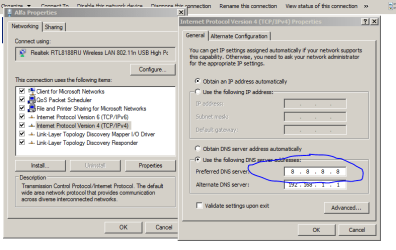
also if still no response try setting your network adapter under Control Panel\Network and Internet\Network Connections >> right click adapter >> properties >> Internet protocol 4 (IPv4) with folowing settings from this image:
Capture2.PNG

if all that does not help press start, type cmd and press enter.
type into console ipconfig /all and post the output :)

Also how are you connected to the net?
I'm assuming all you have is a cable?
 

My Computer

Computer Manufacturer/Model Number
Toshiba Satelite P300D 13J (Short model No: PSPDCE)
OS
Windows 7 Enterprise x64 SP1 Version 6.1 Build 7601
CPU
x64bit AMD Turion(tm) X2 Ultra Dual-Core Mobile ZM-82
Memory
4096 (2048 + 2048) MB, DDR2 RAM (800 MHz), max 8,192 MB
Graphics Card(s)
ATI Mobility Radeon™ HD 3650+HyperMemory™(512MB VRAM+2302MB)
Sound Card
Manufacturer: harman/kardon
Monitor(s) Displays
Generic PnP Monitor (MONITOR\LPLA101)
Screen Resolution
1440 x 900 (19" LCD)
Hard Drives
HDD1: TOSHIBA MK3252GSX ATA Device (IDE 320 GB 5,400 o/min) ,
HDD2: Msft Virtual Disk SCSI Disk Device (Virtual Hard Drive),
HDD3: TOSHIBA MK3263GSX USB Device (USB Mobile HDD) (TakeMS MemLine)
PSU
Batery: technology : lithium-ion
Cooling
integrated cooler + 3x external cooler
Keyboard
USB Logitech S520
Mouse
USB Logitech S520
Internet Speed
WAN: 7,2 Mbit/sec, WLAN: 54 Mbit/sec + Bluetooth®
Hello c233liu,

Welcome to Sevenforums. Along with the steps suggested above, also go to services.msc from the run command and make sure that "Wired Auto Config" and "Wireless Auto Config" services are set to be automatic and enabled. Reboot the computer and do a check.................
 

My Computer

OS
Windows 7 professional 64 bit
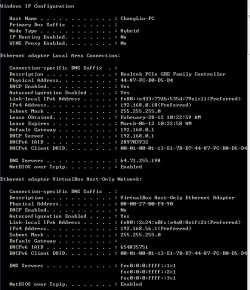
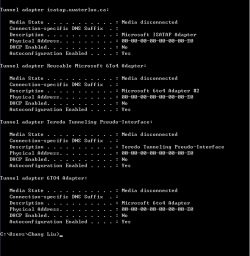
I followed the steps you gave and it didn't work. Now I use the wired network to connect to the net and just my wireless network didn't work. here is the output of my console I got:
 

Attachments

  • 3.png
    3.png
    20.7 KB · Views: 34
  • 4.png
    4.png
    14.4 KB · Views: 20

My Computer

OS
Windows 7 Home Premium 64bit
I don't think this is an adapter issue. I believe that it has more to do with your wireless router. Disconnect the wireless connection and run a net cable direct to the MODEM. Cycle power to the modem, and retry. If you get connectivity, then it will be your router that is causing the issue. If there is still not connectivity, then contact your ISP.

(These are steps that they will want to lead you through anyhow...)

On another note, your router should have a way to administer the net. Before you try the first suggestion, with your current connection, try getting to the web interface by typing "http://192.168.0.1" in the address bar on your browser, and log in to the router. Check your settings.
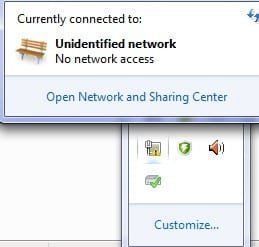
 

My Computer

Computer type
PC/Desktop
Computer Manufacturer/Model Number
iBuyPower NZXT
OS
Microsoft Windows 10 Home Build 15036
CPU
Intel(R) Core(TM) i7-860 @ 2.80GHz
Motherboard
Gigabyte Technology Co., Ltd. P55-UD3L
Memory
4.00 GB
Graphics Card(s)
NVIDIA GeForce GTX 750
Sound Card
(1) Line 6 UX2 (2) Realtek High Definition Audio
Monitor(s) Displays
23" acer
Screen Resolution
1920 x 1080 x 32 bits (4294967296 colors) @ 60 Hz
Hard Drives
(1) WDC WD5000AAKS-00D2B0 ATA Device (2) Seagate FreeAgent Go 250G USB Device
Cooling
Corsair H75 liquid cooler (Very easy to install, actually)
Internet Speed
60M cable modem-->Linksys E1200-->1Gbps net card
Browser
Chrome
Other Info
This is probably the longest I've ever had a Windows machine run without having to restore it to scratch. I'm used to restoring to "factory" about every 2 yrs. I've run with Win7 since new in 2009 and only recently (Nov, '14) restored to clean up the machine from all my 'xperimenting. LOL!! I may never need another machine.

Upgraded to 10 when it was still free, then installed 2017 update.
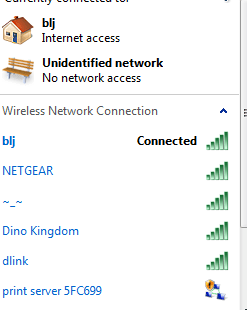
Thx, I have already fix that problem and I want to ask another question that why still there is a unidentified network show up
 

Attachments

  • 5.png
    5.png
    13.5 KB · Views: 927

My Computer

OS
Windows 7 Home Premium 64bit
Hi again,
I'm glad you set your net..

from your output it looks you are using a virtual machine? (Oracle VM VirtualBox, Windows vitual PC, WMWare etc..)
so this Unidentified network is network between your comp and virtual machine :)
to set ip up you'll have to play with VM options.

cheers!
 

My Computer

Computer Manufacturer/Model Number
Toshiba Satelite P300D 13J (Short model No: PSPDCE)
OS
Windows 7 Enterprise x64 SP1 Version 6.1 Build 7601
CPU
x64bit AMD Turion(tm) X2 Ultra Dual-Core Mobile ZM-82
Memory
4096 (2048 + 2048) MB, DDR2 RAM (800 MHz), max 8,192 MB
Graphics Card(s)
ATI Mobility Radeon™ HD 3650+HyperMemory™(512MB VRAM+2302MB)
Sound Card
Manufacturer: harman/kardon
Monitor(s) Displays
Generic PnP Monitor (MONITOR\LPLA101)
Screen Resolution
1440 x 900 (19" LCD)
Hard Drives
HDD1: TOSHIBA MK3252GSX ATA Device (IDE 320 GB 5,400 o/min) ,
HDD2: Msft Virtual Disk SCSI Disk Device (Virtual Hard Drive),
HDD3: TOSHIBA MK3263GSX USB Device (USB Mobile HDD) (TakeMS MemLine)
PSU
Batery: technology : lithium-ion
Cooling
integrated cooler + 3x external cooler
Keyboard
USB Logitech S520
Mouse
USB Logitech S520
Internet Speed
WAN: 7,2 Mbit/sec, WLAN: 54 Mbit/sec + Bluetooth®
Back
Top