
No network because of NVIDIA nForce System Management Controller (?)

TasosGoudas

New member
Local time
9:51 AM
Messages
22
Hello guys,
Some days ago, after a sudden power cut in my area, I noticed that I can't use my network anymore... After some searching, I found out this:
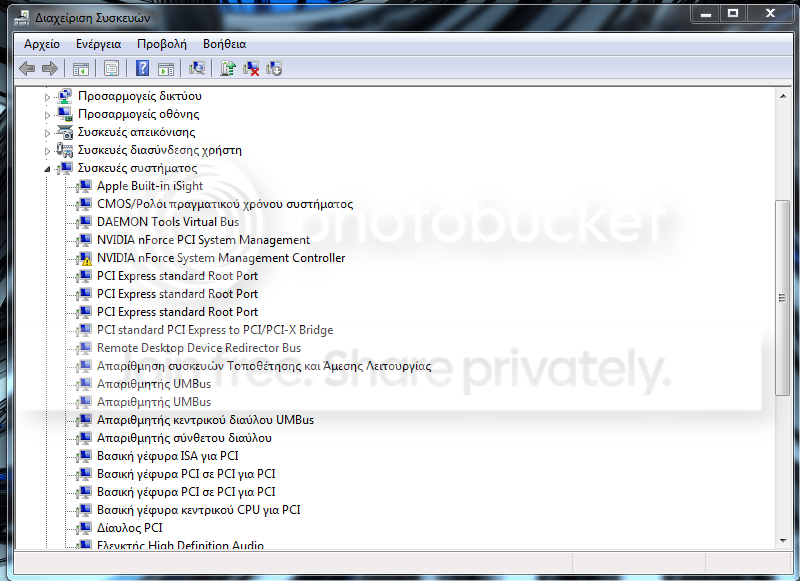
devicemanagerpic.png


NVIDIA nForce system management controller has a yellow sign on the icon.
When I startup my computer, a message pops up in the task bar called Driver Installation (or something similar). It keeps loading, but then it says that it failed, and when I click on it, the driver that Windows was trying to install was:
NVIDIA nForce System management controller

Note:
There is also a red X on the network tray icon on the taskbar, like this:
5154d1264963213-network-icon-showing-red-x-even-though-im-connected-network-problem.jpg


This is not my desktop, but this is an example of how the icon looks like. ONLY the icon, as I said I can't connect nowhere, wireless doesn't detect anything, and wired network doesn't work either, and the icon with the red x is always there...
Thanks for your time.

EDIT:
I uninstalled the nvidia nforce system management controller, and now I 've got some more problematic drivers:
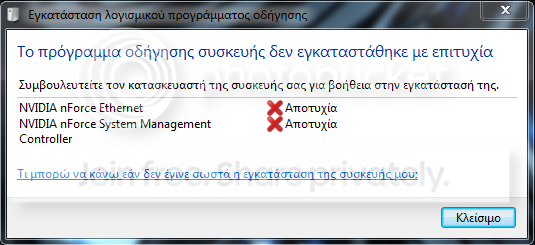
driverslogon.png
 
Last edited:

My Computer My Computer

At a glance

Windows 7 Ultimate
OS
Windows 7 Ultimate
A guess: re-install your nVidia nForce chipset drivers.
 

My Computer My Computer

At a glance

Windows 7 Pro X64 SP1Intel Core I7-3930k16 GB Gskill DDR3-2133eVGA GTX680
Computer Manufacturer/Model Number
homegrown
OS
Windows 7 Pro X64 SP1
CPU
Intel Core I7-3930k
Motherboard
Asus P9X79 Pro
Memory
16 GB Gskill DDR3-2133
Graphics Card(s)
eVGA GTX680
Sound Card
Creative X-Fi Titanium
Monitor(s) Displays
As PA246Q
Screen Resolution
1920 X 1200
Hard Drives
Corsair Force GT, 120 GB
WDC 1.5TB Caviar Black
PSU
PCP&C Silencer 750 Crossfire
Case
Silverstone FT02
Cooling
Noctua NH-D14
Keyboard
cheap Logitech USB
Mouse
Microsoft Intellimouse Explorer (old optical) USB
Internet Speed
6Mb cable
Other Info
Pioneer BDR-205
Samsung SH-203B
Monsoon 5.1 speakers
Hmm good idea...
But what do I uninstall, and what to download so I will be able to reinstall it.
 

My Computer My Computer

At a glance

Windows 7 Ultimate
OS
Windows 7 Ultimate
I uninstalled the nvidia nforce system management controller, I tried to install the nforce chipset from here:
http://www.nvidia.com/object/nforce-vista-win7-32bit-15.56-driver.html , and now I 've got some more problematic drivers:
driverslogon.png

Also, the NVIDIA nForce 10/100/1000 Mbps Ethernet Driver that used to be there, is not anymore.

Any solutions please?
 

My Computer My Computer

At a glance

Windows 7 Ultimate
OS
Windows 7 Ultimate
The latest motherboard driver is 15.58, the latest system tools driver is 6.06, you probably need to reinstall both of them.
 

My Computer My Computer

At a glance

Windows 7 Home Premium 64 bitIntel Core 2 quad Extreme Q9770 @ 3.2 GHz4x2 GB Muskin 1600 MHz ramNVidia GTX 250
Computer Manufacturer/Model Number
Dell XPS 730
OS
Windows 7 Home Premium 64 bit
CPU
Intel Core 2 quad Extreme Q9770 @ 3.2 GHz
Memory
4x2 GB Muskin 1600 MHz ram
Graphics Card(s)
NVidia GTX 250
Sound Card
Soundblaster X-Fi Fatality Champion
Monitor(s) Displays
2 Dell 2007WFP Ultrascans
Screen Resolution
3360 x 1050
Hard Drives
WD Black 1TB sata, 2-WD Black 500 sata, 2-Seagate 500 Go external
PSU
1000 Watt
Cooling
air
Keyboard
MS Natrual Keyboard Pro
Mouse
Logitech Wireless Trackball
Internet Speed
DSL Elite
Yes, but I don't understand how.
Do I have to uninstall anything first and then install the motherboard driver and the latest system tools?
Can you please explain me more and give me links for the latestones?
Thank you!
 

My Computer My Computer

At a glance

Windows 7 Ultimate
OS
Windows 7 Ultimate
Download them and then just double click the file and follow the wizard, they should install right over the top of the one's already installed. Try it and let us know.
 

My Computer My Computer

At a glance

Windows 7 Home Premium 64 bitIntel Core 2 quad Extreme Q9770 @ 3.2 GHz4x2 GB Muskin 1600 MHz ramNVidia GTX 250
Computer Manufacturer/Model Number
Dell XPS 730
OS
Windows 7 Home Premium 64 bit
CPU
Intel Core 2 quad Extreme Q9770 @ 3.2 GHz
Memory
4x2 GB Muskin 1600 MHz ram
Graphics Card(s)
NVidia GTX 250
Sound Card
Soundblaster X-Fi Fatality Champion
Monitor(s) Displays
2 Dell 2007WFP Ultrascans
Screen Resolution
3360 x 1050
Hard Drives
WD Black 1TB sata, 2-WD Black 500 sata, 2-Seagate 500 Go external
PSU
1000 Watt
Cooling
air
Keyboard
MS Natrual Keyboard Pro
Mouse
Logitech Wireless Trackball
Internet Speed
DSL Elite
Nope not working. The loading bar loads, but in the end, it asks me to install something other aswell (can't remember what, is it important to remember?), but it failed...
All in all, it didn't fix my problem.
Strange...
 

My Computer My Computer

At a glance

Windows 7 Ultimate
OS
Windows 7 Ultimate
So...?
 

My Computer My Computer

At a glance

Windows 7 Ultimate
OS
Windows 7 Ultimate
Back
Top