JavaScript is disabled. For a better experience, please enable JavaScript in your browser before proceeding.
You are using an out of date browser. It may not display this or other websites correctly.
You should upgrade or use an
alternative browser .
No network, need do repair
Randomly during day my network will disconnect and appear limited or no network on the network icon. I need to do repair to get it work again. I have Realtek network card and use ADSL connection. The problem did not happen with XP I previously used. Can someone help me fix this it's driving me nuts :shock:
Computer Manufacturer/Model Number IBM OS Windows 7
Device Manager / Network adapter / Properties / Power... Do not allow computer to turn off to save power (remove tick)
Computer Manufacturer/Model Number Asus P5B OS Windows 7 Ultimate CPU Intel Q9550 Motherboard Asus P5B Memory 4x2GB HyperX Graphics Card(s) ATI HD3850 512 Sound Card Creative X-Fi Platinum Monitor(s) Displays Samsung 50 / Samsung 24 Screen Resolution 1920*1080 / 1920*1200 Hard Drives Multiple RAID volumes PSU ThermalTake ToughPower Case Armor Cooling Liquid Keyboard $6 2.4 gHz desktop Internet Speed Just this side of fast enough.
New member
Thread Starter
I don't have there such a setting. There is no Power under Properties...
Computer Manufacturer/Model Number IBM OS Windows 7
Capture.PNG
16 KB
· Views: 3
Computer Manufacturer/Model Number Asus P5B OS Windows 7 Ultimate CPU Intel Q9550 Motherboard Asus P5B Memory 4x2GB HyperX Graphics Card(s) ATI HD3850 512 Sound Card Creative X-Fi Platinum Monitor(s) Displays Samsung 50 / Samsung 24 Screen Resolution 1920*1080 / 1920*1200 Hard Drives Multiple RAID volumes PSU ThermalTake ToughPower Case Armor Cooling Liquid Keyboard $6 2.4 gHz desktop Internet Speed Just this side of fast enough.
New member
Thread Starter
Resources is the last tab for me, no Power Management. :shock:
Computer Manufacturer/Model Number IBM OS Windows 7
Please confirm that we are on the same page. Post a screenshot.
Capture.PNG
32.8 KB
· Views: 10
Computer Manufacturer/Model Number Asus P5B OS Windows 7 Ultimate CPU Intel Q9550 Motherboard Asus P5B Memory 4x2GB HyperX Graphics Card(s) ATI HD3850 512 Sound Card Creative X-Fi Platinum Monitor(s) Displays Samsung 50 / Samsung 24 Screen Resolution 1920*1080 / 1920*1200 Hard Drives Multiple RAID volumes PSU ThermalTake ToughPower Case Armor Cooling Liquid Keyboard $6 2.4 gHz desktop Internet Speed Just this side of fast enough.
New member
Thread Starter
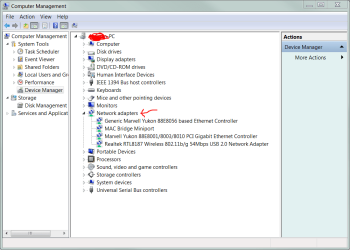
Can this be reason for it to not work? Do I need to reinstall the driver or something?
Capture.jpg
19 KB
· Views: 11
Computer Manufacturer/Model Number IBM OS Windows 7
New member
Thread Starter
Hey, I did remove driver and did scan for new hardware and it installed driver again, the Power Management did appear
But now my adapter is named #2 at end. How do I get rid of that?
Computer Manufacturer/Model Number IBM OS Windows 7
That is so UN-important. Let's attend to that later.
Computer Manufacturer/Model Number Asus P5B OS Windows 7 Ultimate CPU Intel Q9550 Motherboard Asus P5B Memory 4x2GB HyperX Graphics Card(s) ATI HD3850 512 Sound Card Creative X-Fi Platinum Monitor(s) Displays Samsung 50 / Samsung 24 Screen Resolution 1920*1080 / 1920*1200 Hard Drives Multiple RAID volumes PSU ThermalTake ToughPower Case Armor Cooling Liquid Keyboard $6 2.4 gHz desktop Internet Speed Just this side of fast enough.
New member
Thread Starter
So far yes, it haven't been disconnecting. I really hope it's fixed now, but can say for sure tomorrow I guess when it has been on all day.
Thank you very much, you've been really helpful
Computer Manufacturer/Model Number IBM OS Windows 7




 But now my adapter is named #2 at end. How do I get rid of that?