No network or internet connection after upgrade

stuham33

New member
Local time
2:51 AM
Messages
8
Hi, I have just installed windows 7 upgrade, since the install I have had no internet or network access. I have tried installing new drivers but still not working. The connection to the router is showing excellent, unidentified network & no internet access. I have also tried bypassing the router and going straight to the modem with the cable and get the same results.
 

My Computer My Computer

Computer Manufacturer/Model Number
Acer 5735
OS
Win 7
Have you reset the router?

Also you may want to post the details of the router and modem and such
 

My Computer My Computer

Computer Manufacturer/Model Number
Toshiba Satellite C855-1GP
OS
Windows 7 Home Premium 64-bit (6.1, Build 7601)
CPU
Intel(R) Pentium(R) CPU B950 @ 2.10GHz (2 CPUs), ~2.1GHz
Motherboard
Intel Sandy Bridge ID1E59
Memory
6GB DDR3 Dual 6034 Mbytes
Graphics Card(s)
Intel HD Graphics
Sound Card
Realtek High Definition Audio
Monitor(s) Displays
LGD033A
Screen Resolution
1366 x 768 (32 bit) (60Hz)
Hard Drives
Hitachi HTS547575A9E384 600GB
Keyboard
Normal Keyboard
Mouse
Techair 3D Optical Mouse
Internet Speed
4.04mbps download speed 0.54mbps upload speed
Other Info
Awesome Laptop.
Hi, I have just installed windows 7 upgrade, since the install I have had no internet or network access. I have tried installing new drivers but still not working. The connection to the router is showing excellent, unidentified network & no internet access. I have also tried bypassing the router and going straight to the modem with the cable and get the same results.


We could use some info about your network and PC.

Upgrade from?? vista? XP?

Encrypted or not?

Firewall anti virus? etc

Ken
 

My Computer My Computer

Computer Manufacturer/Model Number
HP Pavillion dv-7 1005 Tx
OS
Win 8 Release candidate 8400
CPU
[email protected]
Memory
4 gigs
Graphics Card(s)
Nvidia 9600M
Sound Card
HD built-in
Monitor(s) Displays
17" Wxga
Screen Resolution
1440x900
Cooling
none
Internet Speed
45Mb down 5Mb up
Hi, I have just installed windows 7 upgrade, since the install I have had no internet or network access. I have tried installing new drivers but still not working. The connection to the router is showing excellent, unidentified network & no internet access. I have also tried bypassing the router and going straight to the modem with the cable and get the same results.
Hello stuham33, and welcome to Windows Seven Forums!

There are several things that might be the cause of your issue. Things like Anti-virus, firewall, and browser pop-up blockers sometimes get in the way.

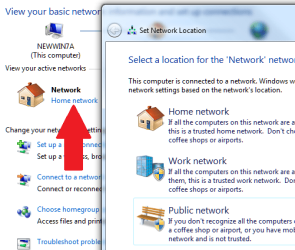
Do you have your "Network Location" set as "Home Network?"

change_network_location.png

You also have some built-in diagnostics for networking that might help you find the problem:

picture.php


Please let us know what you find out?

Cheers!
Robert
 

My Computer My Computer

OS
...
Sorry, yes I have reset the router. My computer is acer 5735 with atheros AR5B91 adapter, and the router is a linksys WRT160n V2.
 

My Computer My Computer

Computer Manufacturer/Model Number
Acer 5735
OS
Win 7
This upgrade problem comes up pretty often. For some reason when people upgrade to Windows 7 from Vista the winsock gets messed up and needs to be reset. To fix that problem follow the simple procedure below.

1. Click start, type cmd in the Start Search box, right-click cmd.exe, click Run as administrator, and then press Continue.


2. Type netsh winsock reset at the command prompt, and then press ENTER.

Note If the command is typed incorrectly, you will receive an error message. Type the command again. When the command is completed successfully, a confirmation appears, followed by a new command prompt. Then, go to step 3.


3. Type exit, and then press ENTER. You should be prompted to reboot, if not you should reboot and test.

After resetting Winsock if you still have the unidentified network problem try the procedure in the link below which should take care of that problem. You should be able to get online again after performing these procedures. ;)

Windows 7 Unidentified Network, Limited Access, No Internet Connection Problem Resolved
 

My Computer My Computer

Computer type
PC/Desktop
Computer Manufacturer/Model Number
Home built
OS
Windows 7 Ult, Windows 8.1 Pro,
CPU
Q9650-4.275GHz, E8600 4.5GHz, E6750-3.8GHz
Motherboard
Evga 780i FTW
Memory
G.Skill PC2 9600 1200Mhz 5 5 5 15 2T
Graphics Card(s)
GTX480
Sound Card
Asus Xonar D2
Monitor(s) Displays
HannsG
Screen Resolution
1680X1050
Hard Drives
GSkill Phoenix Pro 120GB SSD
PSU
ThermalTake Toughpower 1000Watt modular
Case
ThermalTake XaserV
Cooling
Xigmatek S1283
Keyboard
Logitech G15
Mouse
Logitech G9
Internet Speed
T1
Sorry again, I upgraded from vista to win 7. I attempted to set the network to home but it says it is an unidentified network. I have disabled the firewall and uninstalled the anti virus.
 

My Computer My Computer

Computer Manufacturer/Model Number
Acer 5735
OS
Win 7
This upgrade problem comes up pretty often. For some reason when people upgrade to Windows 7 from Vista the winsock gets messed up and needs to be reset. To fix that problem follow the simple procedure below.

1. Click start, type cmd in the Start Search box, right-click cmd.exe, click Run as administrator, and then press Continue.


2. Type netsh winsock reset at the command prompt, and then press ENTER.

Note If the command is typed incorrectly, you will receive an error message. Type the command again. When the command is completed successfully, a confirmation appears, followed by a new command prompt. Then, go to step 3.


3. Type exit, and then press ENTER. You should be prompted to reboot, if not you should reboot and test.

After resetting Winsock if you still have the unidentified network problem try the procedure in the link below which should take care of that problem. You should be able to get online again after performing these procedures. ;)

Windows 7 Unidentified Network, Limited Access, No Internet Connection Problem Resolved
That worked Thanks. I have now connected to the network, and it shows I am connected to the internet but it won't let me show any web pages.
 

My Computer My Computer

Computer Manufacturer/Model Number
Acer 5735
OS
Win 7
That worked Thanks. I have now connected to the network, and it shows I am connected to the internet but it won't let me show any web pages.
Now try resetting your router and Internet modem again. Shutdown computer, router and modem, then start modem and let it fully boot up, then router and let it fully boot up, then computer and check Internet again.

You can still run your Network "Diagnostics", and check to see that your "Network Location" is now set to "Home Network".

Cheers!
Robert
 

My Computer My Computer

OS
...
Thanks for all the help again. I now can connect to my home network and it shows I am connected to the Internet. However when I try to open the browser both firefox and IE it won't connect, on firefox it says server not found and on IE it says it cannot display the page. I have reset the router, modem and rebooted.
 

My Computer My Computer

Computer Manufacturer/Model Number
Acer 5735
OS
Win 7
Thanks for all the help again. I now can connect to my home network and it shows I am connected to the Internet. However when I try to open the browser both firefox and IE it won't connect, on firefox it says server not found and on IE it says it cannot display the page. I have reset the router, modem and rebooted.

Resetting winsock should fix the browser connection problem you are describing.

1. Click start, type cmd in the Start Search box, right-click cmd.exe, click Run as administrator, and then press Continue.


2. Type netsh winsock reset at the command prompt, and then press ENTER.

Note If the command is typed incorrectly, you will receive an error message. Type the command again. When the command is completed successfully, a confirmation appears, followed by a new command prompt. Then, go to step 3.


3. Type exit, and then press ENTER. You should be prompted to reboot, if not you should reboot and test.
 

My Computer My Computer

Computer type
PC/Desktop
Computer Manufacturer/Model Number
Home built
OS
Windows 7 Ult, Windows 8.1 Pro,
CPU
Q9650-4.275GHz, E8600 4.5GHz, E6750-3.8GHz
Motherboard
Evga 780i FTW
Memory
G.Skill PC2 9600 1200Mhz 5 5 5 15 2T
Graphics Card(s)
GTX480
Sound Card
Asus Xonar D2
Monitor(s) Displays
HannsG
Screen Resolution
1680X1050
Hard Drives
GSkill Phoenix Pro 120GB SSD
PSU
ThermalTake Toughpower 1000Watt modular
Case
ThermalTake XaserV
Cooling
Xigmatek S1283
Keyboard
Logitech G15
Mouse
Logitech G9
Internet Speed
T1
Thanks for the reply. I tried this but It is still not letting me connect to the Internet
 

My Computer My Computer

Computer Manufacturer/Model Number
Acer 5735
OS
Win 7
I have bypassed the router and gone directly to the modem with a network cable, and still my browsers wont connect. My network is showing as connected to the internet, and it is sending and receiving bytes. I can ping my router and my loop back address ok but not any addresses.
 

My Computer My Computer

Computer Manufacturer/Model Number
Acer 5735
OS
Win 7
I fixed the problem. I ended up backing up my files and doing a clean install. Everything works perfectly now. Thanks for the help:D
 

My Computer My Computer

Computer Manufacturer/Model Number
Acer 5735
OS
Win 7
I fixed the problem. I ended up backing up my files and doing a clean install. Everything works perfectly now. Thanks for the help:D

Sounds good stuham, sometimes a clean installation is the best way to fix these sorts of problems. Not sure why resetting winsock wasn't working this time but as long as your up and running thats all that matters.
 

My Computer My Computer

Computer type
PC/Desktop
Computer Manufacturer/Model Number
Home built
OS
Windows 7 Ult, Windows 8.1 Pro,
CPU
Q9650-4.275GHz, E8600 4.5GHz, E6750-3.8GHz
Motherboard
Evga 780i FTW
Memory
G.Skill PC2 9600 1200Mhz 5 5 5 15 2T
Graphics Card(s)
GTX480
Sound Card
Asus Xonar D2
Monitor(s) Displays
HannsG
Screen Resolution
1680X1050
Hard Drives
GSkill Phoenix Pro 120GB SSD
PSU
ThermalTake Toughpower 1000Watt modular
Case
ThermalTake XaserV
Cooling
Xigmatek S1283
Keyboard
Logitech G15
Mouse
Logitech G9
Internet Speed
T1
This upgrade problem comes up pretty often. For some reason when people upgrade to Windows 7 from Vista the winsock gets messed up and needs to be reset. To fix that problem follow the simple procedure below.
...snip...

Thanks. This solved my issue, which is slightly different. For posterity and the spiders, here is what was wrong, and now fixed with chev65's solution.

I shut down the PC over night for the first time in weeks. I was going to be gone for a while the next day.

Next day, I come home and boot up like normal, only there is no internet connection. It says there is no internet connection available. I noticed there was an update the day I shut down, so I restored it to 2 days before, and still nothing.

I tried the solution in this thread, and rebooted. It's working! :party:
 

My Computer My Computer

Computer Manufacturer/Model Number
Custom
OS
Windows 7 x64
CPU
AMD Phenom II x4 955 BE
Motherboard
ASUS M3N72-D
Memory
4GB DDR2 800
Graphics Card(s)
ATI Radeon HD 4650 1GB
Monitor(s) Displays
2
Hard Drives
2 Segate 1.5TB 7200.11
These update problems keep coming up and I'm not sure what causes those problems but it seems limited to only certain systems. Nice work on following those procedures PandaMarketer and thanks for the rep. :)
 

My Computer My Computer

Computer type
PC/Desktop
Computer Manufacturer/Model Number
Home built
OS
Windows 7 Ult, Windows 8.1 Pro,
CPU
Q9650-4.275GHz, E8600 4.5GHz, E6750-3.8GHz
Motherboard
Evga 780i FTW
Memory
G.Skill PC2 9600 1200Mhz 5 5 5 15 2T
Graphics Card(s)
GTX480
Sound Card
Asus Xonar D2
Monitor(s) Displays
HannsG
Screen Resolution
1680X1050
Hard Drives
GSkill Phoenix Pro 120GB SSD
PSU
ThermalTake Toughpower 1000Watt modular
Case
ThermalTake XaserV
Cooling
Xigmatek S1283
Keyboard
Logitech G15
Mouse
Logitech G9
Internet Speed
T1
Hi stuham33,

Please check the following to see if it resolves your issue (worked in my case with Linksys WRT4GL router and Windows 7) :

1) Login to the linksys router and type 192.168.1.1 in IE and use admin/admin to log in.)
2) Go to Wireless tab. Note the Wireless Network Mode. Normally it is set as "MIXED"
3) On your laptop, click on wiress icon in taskbar, go to Open Network And Sharing Center>> Change adapter settings>>right click on wireless adapter >> properties >> Configure >> Advanced tab. Scroll down to select "IBSS Mode" and check the Value on right side. It should be same same as that of router (I set to 802.11b/g auto from drop down list). Click Ok to save the settings.
4) Restart your wireless. Hope this would work for you.
 

My Computer My Computer

Computer Manufacturer/Model Number
Dell Inspiron 1525
OS
Windows 7 Ultimate 32-bit
CPU
Intel Core 2 Duo CPU T1800@ 2.10GHz
Memory
3GB
had same problem

I found that eset security was causing the problem, after uninstalling it, internet worked,
Try uninstalling antivirus/firewall
 

My Computer My Computer

Computer type
PC/Desktop
OS
windows 7 ultimate x64
Back
Top