No new events in system log

SevenAndSeven

New member
Local time
12:51 AM
Messages
20
I upgraded recently from Vista to Windows 7 in-place.

Every other day, I wake up in the morning to find that my PC has rebooted.

Looking in the event logs for an explanation, I see that my system log doesn't show any new entries since the middle of June. For two months, my system hasn't recorded any new event logs. This obviously started happening while still running Vista.

Any ideas? TIA.
 

My Computer My Computer

Computer Manufacturer/Model Number
Dell Precision T7400
OS
Windows 7 Ulimate x 64 RTM
CPU
Xeon Quad Core 5450
Memory
32 Gig
Graphics Card(s)
nvidia Quadro F570
Open event viewer, on the right hand side you will find the "Actions" column, click on properties > Make sure that the enable logging box is checked.

That should do it. Tell me if it doesn't.
 

My Computer My Computer

Computer Manufacturer/Model Number
HP compaq Presario CQ60
OS
Windows 7 Home Premium x86
CPU
AMD Athlon
Memory
2.00 GB
Graphics Card(s)
ATI Redon
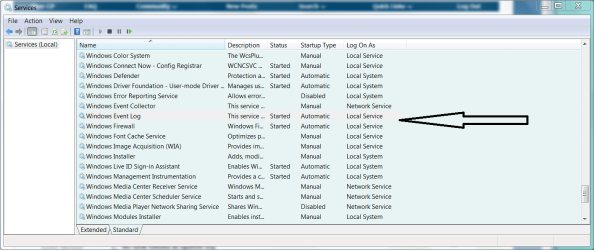
Also, are these services enabled?
 

Attachments

  • Capture.PNG
    Capture.PNG
    45.8 KB · Views: 1,633
Welcome to the forums.

Could you be so kind to fill out your system specs so we know what we're dealing with please.

Thanks.
 

My Computer My Computer

Computer type
PC/Desktop
Computer Manufacturer/Model Number
DELL VOSTRO 3650
OS
Windows 8.1 PRO
CPU
3rd Generation Intel Core i7‐3612QM CPU @ 2.10GHZ
Memory
8GB DDR3
Graphics Card(s)
NVIDIA GeForce GT 525M (128 bit), 1GB Grpahics
Screen Resolution
1920X1080
Hard Drives
750GB 5400RPM
Thanks for the speedy responses.

Event logging is enabled under Actions on the right side. The event log is also set to overwrite.

The Windows Event Log service is started and set for Automatic.

I just cleared the event log using wevtutil even though I have no problems reading the log.

I should add that although I am not seeing any new SYSTEMS events in the log, I am still seeing plenty of APPLICATION events in the log.
 

My Computer My Computer

Computer Manufacturer/Model Number
Dell Precision T7400
OS
Windows 7 Ulimate x 64 RTM
CPU
Xeon Quad Core 5450
Memory
32 Gig
Graphics Card(s)
nvidia Quadro F570
C:\Windows\SoftwareDistribution\ReportingEvents.log

copy and paste that log to desktop.... then you can open and read it tells almost everything tha MS has done to your system. and it also tells if
a REBOOT was required.
 
good tip. I checked the logs and don't see any system maintenance that required a REBOOT before my seeing the PC restarted.

I'll wait a few days and see how my wevtutil works in getting system logs to spit out useful debugging information.
 

My Computer My Computer

Computer Manufacturer/Model Number
Dell Precision T7400
OS
Windows 7 Ulimate x 64 RTM
CPU
Xeon Quad Core 5450
Memory
32 Gig
Graphics Card(s)
nvidia Quadro F570
clearing the system event log with

wevtutil cl System /bu: C:\system.evtx

fixed my problem. I am now seeing events again. The fix was motivated by

Using WEVTUTIL to Manage Event Logs

Thanks to everyone who helped out.
 

My Computer My Computer

Computer Manufacturer/Model Number
Dell Precision T7400
OS
Windows 7 Ulimate x 64 RTM
CPU
Xeon Quad Core 5450
Memory
32 Gig
Graphics Card(s)
nvidia Quadro F570
Back
Top