
Hello, please see my profile for system specs. I am unable to install drivers for NEW usb devices.
I currently am using a MS Natural Ergo 400 keyboard and Logictech MX518 mouse that work fine. I have recently tried to install a Nostromo N52te (old device but "new" to my Win7 system), Logitech G502, Logitech G600, and Razer Orbweaver Stealth as I would like to evaluate them for gaming purposes.
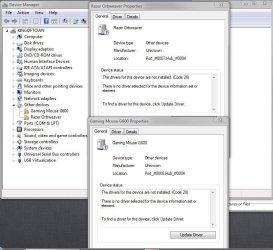
Both Logitech and Razer have their entire bundle of drivers packaged with their respective programs: Logitech Gaming Software and Razer Synapse. I have downloaded the latest versions of both. Device manager always puts them under "Other devices" with their correct name, but a yellow ! with driver could not be found is always there.
The Nostromo is older and has its own software by Belkin, but downloading the latest was exact same experience. Since I like the orbweaver better I'm not going to focus on that. I just wanted to put in a 3rd device with a different driver package than the rest with the same symptoms.
The MX518 (my current mouse) used an older SetPoint driver. This mouse is recognized in the new Logitech Gaming Software and I can remap keys fine. So it would appear at least the Logitech Gaming Software is functional.
I have tried doing a "clean boot" with no success How to perform a clean boot in Windows.
During boot all devices light up with their backlit colors and sometime during the Windows loading screen they "go dark". Additionally, when I go into my BIOS during boot, I am able to use ALL devices. Both mice work I can click around and when I set a password I can enter keys via the orbweaver. Finally, they all work on my Macbook Pro. Given that I am able to use the devices in BIOS on PC and in OSX on the laptop, I feel confident they are not defective.
I have tried both USB 2.0 and USB 3.0 ports as well as plugging in the NEW devices into the ports my old 2.0 mouse/keyboard are using.
But I am stumped as to what to try next to get them to be recognized.
Let me know if I can provide any further information.
I currently am using a MS Natural Ergo 400 keyboard and Logictech MX518 mouse that work fine. I have recently tried to install a Nostromo N52te (old device but "new" to my Win7 system), Logitech G502, Logitech G600, and Razer Orbweaver Stealth as I would like to evaluate them for gaming purposes.
Both Logitech and Razer have their entire bundle of drivers packaged with their respective programs: Logitech Gaming Software and Razer Synapse. I have downloaded the latest versions of both. Device manager always puts them under "Other devices" with their correct name, but a yellow ! with driver could not be found is always there.
The Nostromo is older and has its own software by Belkin, but downloading the latest was exact same experience. Since I like the orbweaver better I'm not going to focus on that. I just wanted to put in a 3rd device with a different driver package than the rest with the same symptoms.
The MX518 (my current mouse) used an older SetPoint driver. This mouse is recognized in the new Logitech Gaming Software and I can remap keys fine. So it would appear at least the Logitech Gaming Software is functional.
I have tried doing a "clean boot" with no success How to perform a clean boot in Windows.
During boot all devices light up with their backlit colors and sometime during the Windows loading screen they "go dark". Additionally, when I go into my BIOS during boot, I am able to use ALL devices. Both mice work I can click around and when I set a password I can enter keys via the orbweaver. Finally, they all work on my Macbook Pro. Given that I am able to use the devices in BIOS on PC and in OSX on the laptop, I feel confident they are not defective.
I have tried both USB 2.0 and USB 3.0 ports as well as plugging in the NEW devices into the ports my old 2.0 mouse/keyboard are using.
But I am stumped as to what to try next to get them to be recognized.
Let me know if I can provide any further information.
Attachments
Last edited:
My Computer
At a glance
Win 7 Pro x64Intel Core i7-3820 Sandy Bridge-E 130W BX8061...2x G.SKILL Ripjaws Series 8GB 240-Pin DDR3 SDRAMEVGA 012-P3-2078-KR GeForce GTX 560 Ti - 448 ...
- Computer type
- PC/Desktop
- OS
- Win 7 Pro x64
- CPU
- Intel Core i7-3820 Sandy Bridge-E 130W BX80619i73820
- Motherboard
- ASRock X79 Extreme4 LGA 2011
- Memory
- 2x G.SKILL Ripjaws Series 8GB 240-Pin DDR3 SDRAM
- Graphics Card(s)
- EVGA 012-P3-2078-KR GeForce GTX 560 Ti - 448 Cores (Fermi)
- Hard Drives
- OCZ Agility 3 AGT3-25SAT3-240G 2.5" 240GB SATA III MLC

