
Hello everybody,
I installed Windows 7 on a used PC (HP XW4600) recently.
This PC contains 2 Harddisks (1 Samsung and 1 WDC).
My idea was to install the OS on the Samsung and to use this drive for data too.
I intended to use the WDC for backup only and to disconnect it normally.
After installation everything works OK untill I take the WDC from the BIOS list of devices to boot from.
Then the computer does not start up: it will give the message "no OS found".
Disk Management gives the results as given in the attachment.
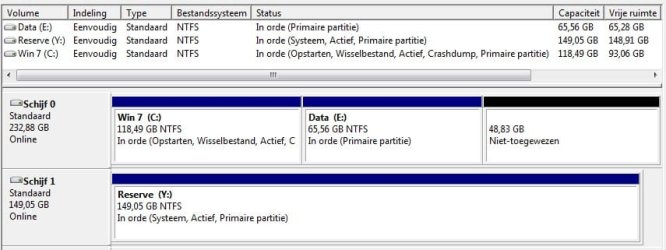
For those who do not speak Dutch:
Schijf 0=Samsung, Schijf 1=WDC, Opstarten=boot.
Note that volume Y (on WDC) is "system" and volume C is "boot"!
My question is:
what should I do to have the computer starting normally with the WDC disk disconnected?
I installed Windows 7 on a used PC (HP XW4600) recently.
This PC contains 2 Harddisks (1 Samsung and 1 WDC).
My idea was to install the OS on the Samsung and to use this drive for data too.
I intended to use the WDC for backup only and to disconnect it normally.
After installation everything works OK untill I take the WDC from the BIOS list of devices to boot from.
Then the computer does not start up: it will give the message "no OS found".
Disk Management gives the results as given in the attachment.
For those who do not speak Dutch:
Schijf 0=Samsung, Schijf 1=WDC, Opstarten=boot.
Note that volume Y (on WDC) is "system" and volume C is "boot"!
My question is:
what should I do to have the computer starting normally with the WDC disk disconnected?
My Computer
- Computer type
- PC/Desktop
- Computer Manufacturer/Model Number
- HP XW4600
- OS
- Windows 7 Home
- CPU
- Intel core2 duo 8400
- Motherboard
- HP
- Memory
- 4Gb
- Graphics Card(s)
- NVidia Quadro FX570
- Hard Drives
- Samsung SP2504C
WDC WD1600
- Antivirus
- AVG
- Browser
- Firefox

