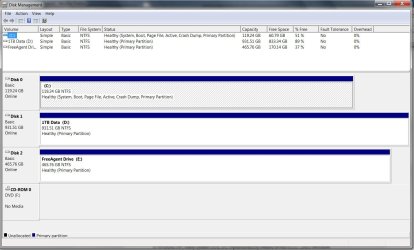
No OS on restart as comp tries to boot from USB drive.

When you reconfigure your BIOS are saving than rebooting?
 

My Computer My Computer

At a glance

ME/XP/Vista/Win7
OS
ME/XP/Vista/Win7
Yep. F10 Exit & Save.
 

Attachments

  • drives-error2.jpg
    drives-error2.jpg
    138.8 KB · Views: 14

My Computer My Computer

At a glance

Win 7 professional 64i7 8204gbnVidia GTX285m
Computer Manufacturer/Model Number
Sager/Midern
OS
Win 7 professional 64
CPU
i7 820
Memory
4gb
Graphics Card(s)
nVidia GTX285m
Monitor(s) Displays
17.3"
Is your clock showing the right time?
 

My Computer My Computer

At a glance

ME/XP/Vista/Win7
OS
ME/XP/Vista/Win7

My Computer My Computer

At a glance

Win 7 professional 64i7 8204gbnVidia GTX285m
Computer Manufacturer/Model Number
Sager/Midern
OS
Win 7 professional 64
CPU
i7 820
Memory
4gb
Graphics Card(s)
nVidia GTX285m
Monitor(s) Displays
17.3"
What year?
 

My Computer My Computer

At a glance

ME/XP/Vista/Win7
OS
ME/XP/Vista/Win7

My Computer My Computer

At a glance

Win 7 professional 64i7 8204gbnVidia GTX285m
Computer Manufacturer/Model Number
Sager/Midern
OS
Win 7 professional 64
CPU
i7 820
Memory
4gb
Graphics Card(s)
nVidia GTX285m
Monitor(s) Displays
17.3"


External isn't plugged - plug it and see if it's still Active. If so mark it Inactive.

Is Disk0 definitely set to boot first? Try removing everything from BIOS boot order but it.

It seems you had it booting correctly until Startup Repair discovered old install on 1tb and Recovered it. Either try removing it from boot order altogether, or as MJF suggested run Startup Repair with it unplugged.

Have you reset the CMOS? I would try reflashing the BIOS from Windows with latest update to be sure it's not corrupt. Go over the settings with a fine tooth comb.

Unfortunately we'll not be able to rule out the ghost OS remaining on 1tb until you move the data off to wipe the HD with Diskpart Clean All command: http://www.sevenforums.com/tutorials/52129-disk-clean-clean-all-diskpart-command.html

Ditto the external.

Others may have fresher ideas.
 
You probably understand this but anyway...
1) There is a big difference between your BIOS seeing your HDDs (you want this!) and the boot order list. The boot list is the "automatic try next" list. You should make this just one entry at this stage, your C: drive. The USB HDD should not appear in this list.
2) The automatic system repair is really quite smart. But, if the OS you really want has an issue that needs addressing it will grab another sound OS if one exists. This sound, but unwanted, OS doesn't need to be in the boot list for the repair function to pick it up.

I have a USB connected laser printer which will cause my BIOS to "hang" in the POST stage - this is a bit unusual though and sometimes USB hubs can be an issue. Try plugging your ext USB HDD in after boot.
 

My Computer My Computer

At a glance

Windows 7x64 Home Premium SP1Intel i7 2600kG.Skill Ripjaws (DDR3-1600) 2x4GBNvidia GeForce GTS 450; Intel HD Graphics 300...
Computer type
PC/Desktop
Computer Manufacturer/Model Number
Own build
OS
Windows 7x64 Home Premium SP1
CPU
Intel i7 2600k
Motherboard
ASUS P8Z68 Deluxe
Memory
G.Skill Ripjaws (DDR3-1600) 2x4GB
Graphics Card(s)
Nvidia GeForce GTS 450; Intel HD Graphics 3000(GT2+)
Monitor(s) Displays
Dell Ultrasharp IPS panel U2311H, Samsung SyncMaster P2350
Screen Resolution
1920x1080
Hard Drives
Samsung 850 Pro SSD 256GB, Samsung SSD 840 120GB, Seagates 1TB Barracuda ST31000528AS x2
PSU
Seasonic M12II 520W
Case
Lian Li Lancool PC-K60
Cooling
Case: 1x120mm, 3x140mm CPU: Hyper 212+
Keyboard
Logitech MK520 (wireless)
Mouse
Logitech MK520
Internet Speed
6-7 Mbps
Antivirus
Norton Security Premium, Malwarebytes on 2 (MSE on 3rd PC)
Browser
FireFox
Other Info
Audio: Logitech Z523 2.1
Check your CMOS battery is tightly fitted.
 

My Computer My Computer

At a glance

ME/XP/Vista/Win7
OS
ME/XP/Vista/Win7
Thanks all, I've done all the suggestions other than flashing the BIOS and reseting the CMOS. At anyrate, with all drives plugged in it seems to be booting correctly--again. Also,I'm pretty sure I reformatted the 1TB drive after removing the OS, and I never had an OS on any other drive. Still, If plugged in, the Boot does show the FreeAgent USB drive as a boot device. Should that be? I even set it to disabled onece. Anyway, I'll keep an eye on things if the erros come back.

There is a BIOS update for my board but the ASUS site says do not update unless necessary. Also the update requires formatting s USB drive with Fat32 and running FreeDOS etc to flash. More work that my current time allows to ensure I do it correctly. When my work slows down I'll look in to the Bios update and installing my new CPU cooler.
 

My Computer My Computer

At a glance

Win 7 professional 64i7 8204gbnVidia GTX285m
Computer Manufacturer/Model Number
Sager/Midern
OS
Win 7 professional 64
CPU
i7 820
Memory
4gb
Graphics Card(s)
nVidia GTX285m
Monitor(s) Displays
17.3"
Just remember if anything goes wrong with the BIOS flash the board will be a brick.
 

My Computer My Computer

At a glance

W 7 64-bit UltimateIntel Q9550 Yorkfield8GB Dominator 8500C5DATI : XFX 5870
Computer Manufacturer/Model Number
* BFK Customs *
OS
W 7 64-bit Ultimate
CPU
Intel Q9550 Yorkfield
Motherboard
ASUS P5Q Pro
Memory
8GB Dominator 8500C5D
Graphics Card(s)
ATI : XFX 5870
Sound Card
Realtek HD Audio 7-1
Monitor(s) Displays
1x 47" LCD HDMI & 3x 26" LCD HDMI
Screen Resolution
1920x1080P & 1920x1200
Hard Drives
1x 80GB Intel X25-M G2 SSD : 1x 500GB & 1x 640GB WD Caviar Black(s)
PSU
Corsair 620HX
Case
Cooler Master RC-690
Cooling
Tuniq Tower 120, 2x 140mm and 3x 120mm case fans
Keyboard
Microsoft 500
Mouse
Razer Diamondback 3G
Internet Speed
14 Mb/s
Other Info
1x Koutech 3Gb/s SATA HDD Hot Swap Rack
I've never flashed my BIOS and would do it with great hesitation.
You may want to post some jpg images of your BIOS screens relevant to the discussion so far.
 

My Computer My Computer

At a glance

Windows 7x64 Home Premium SP1Intel i7 2600kG.Skill Ripjaws (DDR3-1600) 2x4GBNvidia GeForce GTS 450; Intel HD Graphics 300...
Computer type
PC/Desktop
Computer Manufacturer/Model Number
Own build
OS
Windows 7x64 Home Premium SP1
CPU
Intel i7 2600k
Motherboard
ASUS P8Z68 Deluxe
Memory
G.Skill Ripjaws (DDR3-1600) 2x4GB
Graphics Card(s)
Nvidia GeForce GTS 450; Intel HD Graphics 3000(GT2+)
Monitor(s) Displays
Dell Ultrasharp IPS panel U2311H, Samsung SyncMaster P2350
Screen Resolution
1920x1080
Hard Drives
Samsung 850 Pro SSD 256GB, Samsung SSD 840 120GB, Seagates 1TB Barracuda ST31000528AS x2
PSU
Seasonic M12II 520W
Case
Lian Li Lancool PC-K60
Cooling
Case: 1x120mm, 3x140mm CPU: Hyper 212+
Keyboard
Logitech MK520 (wireless)
Mouse
Logitech MK520
Internet Speed
6-7 Mbps
Antivirus
Norton Security Premium, Malwarebytes on 2 (MSE on 3rd PC)
Browser
FireFox
Other Info
Audio: Logitech Z523 2.1
Just set Your PC Boot Priority, First in your Flashdisk :)
 

My Computer My Computer

At a glance

Windows 7 Ultimate x86 + Windows XP Professio...Intel® Pentium® IV 2.80GHzDDR1 2024MB256MB NVIDIA GeForce
OS
Windows 7 Ultimate x86 + Windows XP Professional (All Genuine)
CPU
Intel® Pentium® IV 2.80GHz
Motherboard
ASUS P4V8X-X
Memory
DDR1 2024MB
Graphics Card(s)
256MB NVIDIA GeForce
Sound Card
SoundMAX
Monitor(s) Displays
DELL
Screen Resolution
1024 x 768 (recomended of Windows 7)
Hard Drives
80GB Hard Disk Drive Samsung + 20GB Hard Disk Drive Quantum Fireball
Keyboard
Logitech
Mouse
Logitech
Internet Speed
2,7 GB/s
Other Info
My Own Forum : http://www.sharingwith.us
My Own Windows OS Forum : http://www.sharingwith.us/forumdisplay.php?26-Windows

Join Us! Iam need any Moderator (With Skills) and Members
Thanks all, I've done all the suggestions other than flashing the BIOS and reseting the CMOS. At anyrate, with all drives plugged in it seems to be booting correctly--again. Also,I'm pretty sure I reformatted the 1TB drive after removing the OS, and I never had an OS on any other drive. Still, If plugged in, the Boot does show the FreeAgent USB drive as a boot device. Should that be? I even set it to disabled onece. Anyway, I'll keep an eye on things if the erros come back.

There is a BIOS update for my board but the ASUS site says do not update unless necessary. Also the update requires formatting s USB drive with Fat32 and running FreeDOS etc to flash. More work that my current time allows to ensure I do it correctly. When my work slows down I'll look in to the Bios update and installing my new CPU cooler.

My suggestion was to flash the BIOS from Windows which is safest. If your system is booting correctly now then I would not flash BIOS if your only choice is to flash from DOS, unless you've done this before and are confident of it.

If you're still under warranty, I would have your tech support walk you through flashing BIOS after backing up the BIOS so that they are literally on the hook for any problems which occur.
 
Back
Top