No partitions showing - what am I doing wrong ?

williamb

New member
Local time
1:30 AM
Messages
6
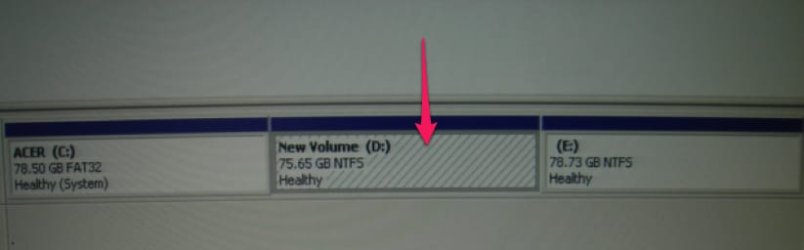
Well ive just got Windows 7, and was looking forward to an easy install, I wanted to use a Dual Boot with the Windows XP . So Ive made a new partition , and the installation goes well until it gets to the part ..

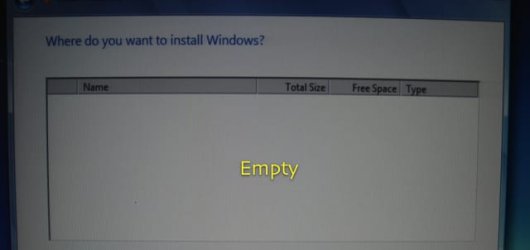
Where do you want to Install Windows?

But there's no partitions showing in the window , its just blank, I tried Refresh but no luck still blank,

This is my computers spec..

ACER E500
Intel Pentium 4 3.06 GHz
ATI RADEON Xpress 200 Graphic Processor
2 GB (DDR2 SDRAM)
Microsoft Windows XP Media Center 2005 Edition
HDD 200 GB ( Serial ATA )


Not sure what to try next , .... any advice please would be most welcome


Thanks :thumbsup:
 

My Computer My Computer

OS
Windows XP
Hi William and Welcome to the Forums.
Well looks like the HDD is not detected by the setup.
To begin with, make sure that the HDD is detected in BIOS.
Also, unplug and replug the hard drive cables.
 

My Computer My Computer

Computer Manufacturer/Model Number
Samsung NP530U4B-S02IN
OS
Windows® 8 Pro (64-bit)
CPU
Intel® Core™ i5 Processor 2467M (1.60GHz, 3MB L3 Cache)
Motherboard
Samsung Electronics
Memory
6GB DDR3 System Memory at 1,333MHz (on BD 4GB + 2GB x 1)
Graphics Card(s)
AMD Radeon™ HD7550M 1GB DDR3 (Ext. Graphic)
Sound Card
Realtek High Definition Audio
Monitor(s) Displays
35.56cm (14.0) SuperBright 300nit HD LED Display
Screen Resolution
1366x768
Hard Drives
1TB S-ATA II Hard Drive (5400RPM) with ExpressCache 16GB SSD
Internet Speed
sucks
Antivirus
Microsoft Security Essentials
Browser
Google Chrome (Sync enabled)

My Computer My Computer

Computer type
PC/Desktop
Computer Manufacturer/Model Number
Built them myself, Science Experiments !
OS
Win7 Enterprise, Win7 x86 (Ult 7600), Win7 x64 Ult 7600, TechNet RTM on AMD x64 (2.8Ghz)
CPU
AMD fx8350 4ghz, AMD-32 2400mhz, AMD-64 3200mhz, AMDx64 2.8G
Motherboard
SIS 755, ECS-K8M890M-M (Ult 7600), GigaByte & others
Memory
2gb, 4gb on the Ult 7600, 4gb on Technet RTM, 32gb on FX8350
Graphics Card(s)
Draw my own Graphics, several nVidia cards
Sound Card
on motherboard
Monitor(s) Displays
19" flat scr, 28" I-Inc widescr,22" Emprex Widescr, 23" Acer
Screen Resolution
1280 x 1024, 1440 x 900, 1920 x 1080
Hard Drives
6 pata Ide HD's & 2 Sata HD's
added 80gb external on Ult 7600 computer,
numerous extra 1tb, 2TB, 3Tb SATA HD's
A collection of ext HD Docks w/ HDs
PSU
430w, 550w, 600w, 700, 800, etc
Case
All Generic Full Towers
Cooling
Open Air & a few fans, some w/ colored LEDs
Keyboard
Compaq & Dell recycled from GoodWill
Mouse
Made in China Optical Wired Mouse
Internet Speed
Fast Cable InterNet
Antivirus
AVG Free on 24 different Desktops, NO Problems!
Browser
IE 8 is preferred, but use FireFox sometimes
Other Info
Linksys Routers, switches, & Hubs
Too Many USB Flash Drives to count, Biggest is 64GB !
Eight computers in my home network.
Sixteen computers at my business network.
Linked via TeamViewer !
Lots of old used spare computer parts everywhere!
Are you installing while your XP is running ?

Ya gotta shut down XP,

then boot the machine from the w7 Install DVD...
 

My Computer My Computer

Computer Manufacturer/Model Number
Gateway GT5056
OS
XP_Pro, W7_7201, W7RC.vhd, SciLinux5.3, Fedora12, Fedora9_2x, OpenSolaris_09-06
CPU
AMD 64x2
Motherboard
Yes
Memory
1 gig
Graphics Card(s)
Dunno
Sound Card
Realtek something
Monitor(s) Displays
Samsung SyncMaster 940MW w/TV
Screen Resolution
1280x1024
Hard Drives
250 GB WD, USB Seagate Freedesk 1.5 T
Internet Speed
Cable modem
Other Info
1 + 1 = 10b,
7 + 7 = 16o,
a + b = 15h.
Thanks guy's for the advice, I am just starting out so some things are new to me. This is what ive done so far

1. made a new Partition

2. set the pc to boot from the internal DVD drive

3. re booted my pc , and I get to the ... Where do you want to Install Windows?

and as you can by the shot ive taken the panel is blank.


Ia now having trouble in finding out how to check if my HDD is being detected in the BIOS , ive tried many combination's of start up key but so far I can't seem to find the right place to check if the HDD is being recognized by the BIOS

any advice would be appreciated


Thanks :thumbsup:
 

Attachments

  • DSC06299.jpg
    DSC06299.jpg
    15.9 KB · Views: 230
  • DSC06298-1.jpg
    DSC06298-1.jpg
    14.1 KB · Views: 159

My Computer My Computer

OS
Windows XP
I hate it when that happens..

Since your drive is SATA you may need to load the proper drivers for your device. Apparently Windows doesn't come with the driver.

What do you guys think?
 

My Computer My Computer

Computer Manufacturer/Model Number
Too many to list.
OS
XP, Seven, 2008R2
CPU
AMD, Intel, VIA
Motherboard
Various
Memory
Corsair, Kingston, etc.
Graphics Card(s)
ATI, NVIDIA
Monitor(s) Displays
Samsung
Hard Drives
Maxtor, Western Digital
Keyboard
qwerty
Internet Speed
22 Mb/s @ home, 1 Gb/s @ server
Other Info
All of my systems still run fastest on XP 32-bit for the most part. Win7 is fun to play with, but I still prefer XP for raw speed, security, and functionality.
Thanks , Ive just tried again to install it, and now when it gets to the ..

Where do you want to Install Windows?

Now at the bottom its showing a Yellow symbol and it say's this ..

No Drives were found. Click Load Driver to provide a mass storage Driver for installation

When I click '' Load Driver '' this is the message I now get ..


To Install the device driver needed to access your hard drive insert the installation media containing the driver files , and then click OK

Note .. The installation media can be a floppy disk . CD , DVD , or USB Flash drive


This computer I am using was given to me , and there were no Disks , so I am still not sure whatto do next ..?


Thanks :cry:
 

My Computer My Computer

OS
Windows XP
Thanks , Ive just tried again to install it, and now when it gets to the ..

Where do you want to Install Windows?

Now at the bottom its showing a Yellow symbol and it say's this ..

No Drives were found. Click Load Driver to provide a mass storage Driver for installation

When I click '' Load Driver '' this is the message I now get ..


To Install the device driver needed to access your hard drive insert the installation media containing the driver files , and then click OK

Note .. The installation media can be a floppy disk . CD , DVD , or USB Flash drive


This computer I am using was given to me , and there were no Disks , so I am still not sure whatto do next ..?


Thanks :cry:

With some more information we can try to help.

DocBrown gave you a link with questions that will help us to understand things better.

Questions to use for help with Installation Issues

Please answer as many of the questions as you can.
This will help us to resolve your issues.
 

My Computer My Computer

Computer type
PC/Desktop
Computer Manufacturer/Model Number
76~2.0
OS
Windows 7 Ult x64 - SP1/ Windows 8 Pro x64
CPU
Intel Core i5-3570K 4.6GHz
Motherboard
Gigabyte GA-Z77X UD3H, f18
Memory
8GB (2X4GB) DDR3 1600 Corsair Vengeance CL8 1.5v
Graphics Card(s)
Sapphire HD 7770 Vapor-X OC 1GB DDR5
Sound Card
Onboard VIA VT2021
Monitor(s) Displays
22" LCD Dell
Screen Resolution
1680x1050
Hard Drives
Samsung 840Pro 128GB SSD,
Seagate Barracuda 500GB SATA2 7200rpm 32MB cache, Seagate Barracuda 1TB SATA2 7200rpm 32MB cache,
PSU
Corsair HX650W
Case
Cooler Master Storm Scout
Cooling
Corsair H80 2x12cm Noctua NF P12 , 2x14cm case fans
Keyboard
Logitech Wave
Mouse
CM Sentinel
Internet Speed
Dismal
Antivirus
Avast
Browser
Opera Next
Other Info
Haswell laptop: HP Envy 17t-j, i7-4700MQ, GeForce 740M 2GB DDR3, 17.3" Full HD 1920x1080, 16GB RAM, Samsung 840 Pro 128GB, 1TB Hitachi 7200 HDD,
Desktop: eSATA ports,
External eSATA Seagate 500GB SATA2 7200rpm,
External WD USB 500GB
Your issue is complex without the HDD status in the BIOS. I would recommend you to disconnect and reconnect the cables of HDD from both ends. Also, to enter BIOS, try keys like F2, F12, Del, Home, Insert, etc.
 

My Computer My Computer

Computer Manufacturer/Model Number
Samsung NP530U4B-S02IN
OS
Windows® 8 Pro (64-bit)
CPU
Intel® Core™ i5 Processor 2467M (1.60GHz, 3MB L3 Cache)
Motherboard
Samsung Electronics
Memory
6GB DDR3 System Memory at 1,333MHz (on BD 4GB + 2GB x 1)
Graphics Card(s)
AMD Radeon™ HD7550M 1GB DDR3 (Ext. Graphic)
Sound Card
Realtek High Definition Audio
Monitor(s) Displays
35.56cm (14.0) SuperBright 300nit HD LED Display
Screen Resolution
1366x768
Hard Drives
1TB S-ATA II Hard Drive (5400RPM) with ExpressCache 16GB SSD
Internet Speed
sucks
Antivirus
Microsoft Security Essentials
Browser
Google Chrome (Sync enabled)

My Computer My Computer

Computer Manufacturer/Model Number
Samsung NP530U4B-S02IN
OS
Windows® 8 Pro (64-bit)
CPU
Intel® Core™ i5 Processor 2467M (1.60GHz, 3MB L3 Cache)
Motherboard
Samsung Electronics
Memory
6GB DDR3 System Memory at 1,333MHz (on BD 4GB + 2GB x 1)
Graphics Card(s)
AMD Radeon™ HD7550M 1GB DDR3 (Ext. Graphic)
Sound Card
Realtek High Definition Audio
Monitor(s) Displays
35.56cm (14.0) SuperBright 300nit HD LED Display
Screen Resolution
1366x768
Hard Drives
1TB S-ATA II Hard Drive (5400RPM) with ExpressCache 16GB SSD
Internet Speed
sucks
Antivirus
Microsoft Security Essentials
Browser
Google Chrome (Sync enabled)
When i created my secondary partition i did not reference any BIOS settings. I used Acronis to resize my c:\ into a new partition and made it also a primary. Even though the resize formatted the secondary partition, i end up need to do the format again (to make the dual boot install work).

Btw, is this a mono HDD system?
 

My Computer My Computer

Computer Manufacturer/Model Number
Lenovo ThinkPad T60
OS
Windows 7 Ultimate 64Bit
CPU
GenuineIntel Intel(R) Core(TM) DuoCore T2400 @ 1.83GHz
Motherboard
Intel(R) 82801G (ICH7 Family)
Memory
2.00 GB
Graphics Card(s)
Mobile Intel(R) 945 Express Chipset
Sound Card
SoundMAX Integrated Digital HD Audio
Monitor(s) Displays
ThinkPad Display
Screen Resolution
1400x1050
Hard Drives
100Gb SATA
Keyboard
Standard Keyboard
Mouse
HID-compliant Mouse
Internet Speed
Cable Broadband - 54Mbps
Other Info
Intel(R) PRO/1000 PL Network Connection
11a/b/g Wireless LAN Mini PCI Express Adapter
Thanks Guy's for all the advice, off now to do a bit more reading up , and try a few things out

regards William
 

My Computer My Computer

OS
Windows XP
williamb,

From your pic, Right click on the drive you want to put 7 on and check what the options are
 

My Computer My Computer

Computer type
PC/Desktop
Computer Manufacturer/Model Number
Built them myself, Science Experiments !
OS
Win7 Enterprise, Win7 x86 (Ult 7600), Win7 x64 Ult 7600, TechNet RTM on AMD x64 (2.8Ghz)
CPU
AMD fx8350 4ghz, AMD-32 2400mhz, AMD-64 3200mhz, AMDx64 2.8G
Motherboard
SIS 755, ECS-K8M890M-M (Ult 7600), GigaByte & others
Memory
2gb, 4gb on the Ult 7600, 4gb on Technet RTM, 32gb on FX8350
Graphics Card(s)
Draw my own Graphics, several nVidia cards
Sound Card
on motherboard
Monitor(s) Displays
19" flat scr, 28" I-Inc widescr,22" Emprex Widescr, 23" Acer
Screen Resolution
1280 x 1024, 1440 x 900, 1920 x 1080
Hard Drives
6 pata Ide HD's & 2 Sata HD's
added 80gb external on Ult 7600 computer,
numerous extra 1tb, 2TB, 3Tb SATA HD's
A collection of ext HD Docks w/ HDs
PSU
430w, 550w, 600w, 700, 800, etc
Case
All Generic Full Towers
Cooling
Open Air & a few fans, some w/ colored LEDs
Keyboard
Compaq & Dell recycled from GoodWill
Mouse
Made in China Optical Wired Mouse
Internet Speed
Fast Cable InterNet
Antivirus
AVG Free on 24 different Desktops, NO Problems!
Browser
IE 8 is preferred, but use FireFox sometimes
Other Info
Linksys Routers, switches, & Hubs
Too Many USB Flash Drives to count, Biggest is 64GB !
Eight computers in my home network.
Sixteen computers at my business network.
Linked via TeamViewer !
Lots of old used spare computer parts everywhere!
Please Help. How?

I know this thread is OLD. But, I have the EXACT same problem. I have no C: drive or whatever. NOTHING. No partition. I can't start up my Wins7. My drives and partitions are gone! It all started when I was installing Ubuntu the advanced way (I didn't know what I was doing) and when it was installing into the partition or something, I pulled the plug. Now I have nothing. I can access the F1-f12 menu Bios thing. But I don't have a partition. I cant start up the laptop. Help...

Now, how can I gain back my C: drive or whatever, main partition!? It says I can insert a disk, USB, or whatever like WIlliamb's.. (sp?) problem. :mad:

I'm sorry, I surfed through many, many threads. No help. No savior. Is there anyone smart enough to help this nub?
 

My Computer My Computer

OS
Linux and Windows 7... problems on my laptop, please help me.. I beg.
Agrh.. if anyone have solutions, email me at: [email removed] let me know
Please, I'd do anything... :(
 
Last edited by a moderator:

My Computer My Computer

OS
Linux and Windows 7... problems on my laptop, please help me.. I beg.
Welcome to SevenForums. You may get more responses by starting your own thread. If you have a windows 7 install disk you could boot from the disk and run start up repair. Read this tutorial for some help with that. Good luck to you with this problem.
http://www.sevenforums.com/tutorials/681-startup-repair.html
 

My Computer My Computer

Computer Manufacturer/Model Number
Gateway GT5692
OS
Windows 7 Ulti. x64
CPU
AMD Phenom 8450 triple-core 2.10 ghz
Memory
4GB
Graphics Card(s)
ATI Radion HD 3200
Monitor(s) Displays
Gateway FPD1775W
Screen Resolution
1280x720
Hard Drives
465.6613 Gibibytes
Back
Top