No program designated to open the .eml file

jdgriff78

New member
Local time
3:51 AM
Messages
4
Shawn,
I am having trouble with .eml files that are attached to emails. Win 7 says that there is no program designated to open the file. I use the information in this thread to gain entry to the list - lo and behold .eml is already listed. So I uncheck it and recheck it and rebuild the file (several times) but, it never shows in the program used to associate it There must be more to the list file. What do you suggest?
 

My Computer My Computer

Computer Manufacturer/Model Number
H-P
OS
windows 7
Hello JD, and welcome to Seven Forums.

What email client program (ex: Windows Live Mail) do you have installed in Windows 7? Whatever one you do have installed, it will need to be made the default program first.

Hope this helps for now,
Shawn
 

My Computer My Computer

Computer type
PC/Desktop
Computer Manufacturer/Model Number
Self built custom
OS
64-bit Windows 11 Pro for Workstations
CPU
Intel i7-8700K OC'd to 5 GHz
Motherboard
ASUS ROG Maximus XI Formula Z390
Memory
64 GB (4x16GB) G.SKILL TridentZ RGB DDR4 3600 MHz
Graphics Card(s)
ASUS ROG-STRIX-GTX1080TI-O11G-GAMING
Sound Card
Integrated
Monitor(s) Displays
2 x Samsung Odyssey G7 27"
Screen Resolution
2560x1440
Hard Drives
1TB Samsung 990 PRO M.2,
4TB Samsung 990 PRO PRO M.2,
TerraMaster F8 SSD Plus NAS
PSU
Seasonic Prime Titanium 850W
Case
Thermaltake Core P3
Cooling
Corsair Hydro H115i
Keyboard
Logitech wireless K800
Mouse
Logitech MX Master 4
Internet Speed
2 Gb/s Download and 100 Mb/s Upload
Antivirus
Malwarebyte Anti-Malware Premium
Browser
Google Chrome
Other Info
Logitech Z625 speaker system,
Logitech BRIO 4K Pro webcam,
HP Color LaserJet Pro MFP M477fdn,
APC SMART-UPS RT 1000 XL - SURT1000XLI,
Galaxy S23 Plus phone
Hi Shawn,
Thanks for the quick comeback. When I open the Default Programs icon and click on the Set your default programs link I get a set number of programs and "Windows Live Mail" is not included. I can see no way to add it. Can you enlighten me?
Thanks a bunch. Don
 

My Computer My Computer

Computer Manufacturer/Model Number
H-P
OS
windows 7
Same problem here.
 

My Computer My Computer

Computer Manufacturer/Model Number
Dell XPS630i
OS
Windows7 Home 64bit
CPU
IntelCore2 Quad Q9650 3.0GHz
Memory
8GB DDR2 - 4X2
Graphics Card(s)
2X-ATI Radeon 4870 - 2048MB total
Monitor(s) Displays
Triple Samsung 191t's
PSU
750W
Keyboard
Logitech Cordless Wave Pro
Mouse
Logitech MX1100 Cordless Laser Mouse

My Computer My Computer

Computer type
PC/Desktop
Computer Manufacturer/Model Number
Dwarf Dwf/11/2012 r09/2013
OS
Windows 8.1 Pro RTM x64
CPU
Intel Core-i5-3570K 4-core @ 3.4GHz (Ivy Bridge) (OC 4.4GHz)
Motherboard
ASRock Z77 Extreme4-M
Memory
4 x 4GB DDR3-1600 Corsair Vengeance CMZ8GX3M2A1600C9B (16GB)
Graphics Card(s)
MSI GeForce GTX770 Gaming OC 2GB
Sound Card
Realtek High Definition on board solution (ALC 898)
Monitor(s) Displays
ViewSonic VA1912w Widescreen (VGA)
Screen Resolution
1440x900
Hard Drives
OCZ Agility 3 SSD 120GB SATA III x2 (RAID 0)
Samsung HD501LJ 500GB SATA II x2
Hitachi HDS721010CLA332 1TB SATA II
Iomega 1.5TB Ext USB 2.0
WD 2.0TB Ext USB 3.0
PSU
XFX Pro Series 850W Semi-Modular
Case
Gigabyte IF233
Cooling
1 x 120mm Front Inlet 1 x 120mm Rear Exhaust
Keyboard
Microsoft Comfort Curve Keyboard 3000 (USB)
Mouse
Microsoft Comfort Mouse 3000 for Business (USB)
Internet Speed
NetGear DG834Gv3 ADSL Modem/Router (Ethernet) ~4.0 Mb/s (O2)
Antivirus
Avast! 8.0.1497
Browser
IE 11
Other Info
Optical Drive: HL-DT-ST BD-RE BH10LS30 SATA Bluray
Lexmark S305 Printer/Scanner/Copier (USB)
WEI Score: 8.1/8.1/8.5/8.5/8.25
Asus Eee PC 1011PX Netbook (Windows 7 x86 Starter)
Hi Dwarf,
Thank you for responding so quickly. However, I did some research in the "Help and Support" section of Win 7. The following is from the help section:

Change the program that opens a type of file
If you double-click a file in Windows and it opens in the wrong software program, follow these steps to choose the program you would prefer to use. You can change this setting for an individual file, or you change this setting so Windows opens all files of the same type in the software program you choose.
  1. Open the folder that contains the file you want to change.
  2. Right-click the file you want to change and then, depending on the type of file, either click Open with or point to Open with and then click Choose default program.
  3. Click the program you want to use to open the file.
  4. Do one of the following:
    • If you want all files of that type to open in the same software program, select the Always use the selected program to open this kind of file check box, and then click OK.
    • If you want only that file to open in the software program this one time, clear the Always use the selected program to open this kind of file check box, and then click OK.
It seems to be workiing fine now. Thanks for your efforts.
Don
 
Last edited by a moderator:

My Computer My Computer

Computer Manufacturer/Model Number
H-P
OS
windows 7
Don and Wombat,

Windows 7 does not have a email client program installed with it by default like Vista did with Windows Mail. Instead you will have to install email client program of your before you will be able to open .eml files. The most common one is Windows Live Mail, but there are many other free ones as well. If you did not install one yet, then you will need to first, then make it your default program as described above. :)
 

My Computer My Computer

Computer type
PC/Desktop
Computer Manufacturer/Model Number
Self built custom
OS
64-bit Windows 11 Pro for Workstations
CPU
Intel i7-8700K OC'd to 5 GHz
Motherboard
ASUS ROG Maximus XI Formula Z390
Memory
64 GB (4x16GB) G.SKILL TridentZ RGB DDR4 3600 MHz
Graphics Card(s)
ASUS ROG-STRIX-GTX1080TI-O11G-GAMING
Sound Card
Integrated
Monitor(s) Displays
2 x Samsung Odyssey G7 27"
Screen Resolution
2560x1440
Hard Drives
1TB Samsung 990 PRO M.2,
4TB Samsung 990 PRO PRO M.2,
TerraMaster F8 SSD Plus NAS
PSU
Seasonic Prime Titanium 850W
Case
Thermaltake Core P3
Cooling
Corsair Hydro H115i
Keyboard
Logitech wireless K800
Mouse
Logitech MX Master 4
Internet Speed
2 Gb/s Download and 100 Mb/s Upload
Antivirus
Malwarebyte Anti-Malware Premium
Browser
Google Chrome
Other Info
Logitech Z625 speaker system,
Logitech BRIO 4K Pro webcam,
HP Color LaserJet Pro MFP M477fdn,
APC SMART-UPS RT 1000 XL - SURT1000XLI,
Galaxy S23 Plus phone
Problem solved

Hi Brink,
Thanks for answering. I have it squared away now. What part of TX are you from? I am an old Houston boy.
Don
 

My Computer My Computer

Computer Manufacturer/Model Number
H-P
OS
windows 7
You're welcome Don. I'm happy to hear that you got it sorted. I'm originally from Dallas, but moved north near the OK border now.
 

My Computer My Computer

Computer type
PC/Desktop
Computer Manufacturer/Model Number
Self built custom
OS
64-bit Windows 11 Pro for Workstations
CPU
Intel i7-8700K OC'd to 5 GHz
Motherboard
ASUS ROG Maximus XI Formula Z390
Memory
64 GB (4x16GB) G.SKILL TridentZ RGB DDR4 3600 MHz
Graphics Card(s)
ASUS ROG-STRIX-GTX1080TI-O11G-GAMING
Sound Card
Integrated
Monitor(s) Displays
2 x Samsung Odyssey G7 27"
Screen Resolution
2560x1440
Hard Drives
1TB Samsung 990 PRO M.2,
4TB Samsung 990 PRO PRO M.2,
TerraMaster F8 SSD Plus NAS
PSU
Seasonic Prime Titanium 850W
Case
Thermaltake Core P3
Cooling
Corsair Hydro H115i
Keyboard
Logitech wireless K800
Mouse
Logitech MX Master 4
Internet Speed
2 Gb/s Download and 100 Mb/s Upload
Antivirus
Malwarebyte Anti-Malware Premium
Browser
Google Chrome
Other Info
Logitech Z625 speaker system,
Logitech BRIO 4K Pro webcam,
HP Color LaserJet Pro MFP M477fdn,
APC SMART-UPS RT 1000 XL - SURT1000XLI,
Galaxy S23 Plus phone
Hi Dwarf,
Thank you for responding so quickly. However, I did some research in the "Help and Support" section of Win 7. The following is from the help section:

Change the program that opens a type of file
If you double-click a file in Windows and it opens in the wrong software program, follow these steps to choose the program you would prefer to use. You can change this setting for an individual file, or you change this setting so Windows opens all files of the same type in the software program you choose.
  1. Open the folder that contains the file you want to change.
  2. Right-click the file you want to change and then, depending on the type of file, either click Open with or point to Open with and then click Choose default program.
  3. Click the program you want to use to open the file.
  4. Do one of the following:
    • If you want all files of that type to open in the same software program, select the Always use the selected program to open this kind of file check box, and then click OK.
    • If you want only that file to open in the software program this one time, clear the Always use the selected program to open this kind of file check box, and then click OK.
It seems to be workiing fine now. Thanks for your efforts.

Don


Thanks for the above information

but my problem is that, the option of "If you want all files of that type to open in the same software program, select the Always use the selected program to open this kind of file check box, and then click OK." is not hilighted and so i have to always right click and select for the program.

Kindly suggest me some option

regards
 
Last edited by a moderator:

My Computer My Computer

OS
windows 7
Hello Mehul, and welcome to Seven Forums.

You may me able to use Default Programs to make that program the default program with all of it's associations set to it as well.

You can also do it manually in this part of Default Programs by selecting the file extension, then selecting the program to open it with by default.

Hope this helps,
Shawn
 

My Computer My Computer

Computer type
PC/Desktop
Computer Manufacturer/Model Number
Self built custom
OS
64-bit Windows 11 Pro for Workstations
CPU
Intel i7-8700K OC'd to 5 GHz
Motherboard
ASUS ROG Maximus XI Formula Z390
Memory
64 GB (4x16GB) G.SKILL TridentZ RGB DDR4 3600 MHz
Graphics Card(s)
ASUS ROG-STRIX-GTX1080TI-O11G-GAMING
Sound Card
Integrated
Monitor(s) Displays
2 x Samsung Odyssey G7 27"
Screen Resolution
2560x1440
Hard Drives
1TB Samsung 990 PRO M.2,
4TB Samsung 990 PRO PRO M.2,
TerraMaster F8 SSD Plus NAS
PSU
Seasonic Prime Titanium 850W
Case
Thermaltake Core P3
Cooling
Corsair Hydro H115i
Keyboard
Logitech wireless K800
Mouse
Logitech MX Master 4
Internet Speed
2 Gb/s Download and 100 Mb/s Upload
Antivirus
Malwarebyte Anti-Malware Premium
Browser
Google Chrome
Other Info
Logitech Z625 speaker system,
Logitech BRIO 4K Pro webcam,
HP Color LaserJet Pro MFP M477fdn,
APC SMART-UPS RT 1000 XL - SURT1000XLI,
Galaxy S23 Plus phone
Hello Mehul, and welcome to Seven Forums.

You may me able to use Default Programs to make that program the default program with all of it's associations set to it as well.

You can also do it manually in this part of Default Programs by selecting the file extension, then selecting the program to open it with by default.

Hope this helps,
Shawn


Thanks shawn

but i had tryed all those things but was of no help. finally i found a software "DefaultProgramsEditor" its a awasome program it solved by problem.

regards

mehul
 

My Computer My Computer

OS
windows 7
Mehul,

I'm happy to hear that you got it sorted. Thank you for posting back with your solution. :)
 

My Computer My Computer

Computer type
PC/Desktop
Computer Manufacturer/Model Number
Self built custom
OS
64-bit Windows 11 Pro for Workstations
CPU
Intel i7-8700K OC'd to 5 GHz
Motherboard
ASUS ROG Maximus XI Formula Z390
Memory
64 GB (4x16GB) G.SKILL TridentZ RGB DDR4 3600 MHz
Graphics Card(s)
ASUS ROG-STRIX-GTX1080TI-O11G-GAMING
Sound Card
Integrated
Monitor(s) Displays
2 x Samsung Odyssey G7 27"
Screen Resolution
2560x1440
Hard Drives
1TB Samsung 990 PRO M.2,
4TB Samsung 990 PRO PRO M.2,
TerraMaster F8 SSD Plus NAS
PSU
Seasonic Prime Titanium 850W
Case
Thermaltake Core P3
Cooling
Corsair Hydro H115i
Keyboard
Logitech wireless K800
Mouse
Logitech MX Master 4
Internet Speed
2 Gb/s Download and 100 Mb/s Upload
Antivirus
Malwarebyte Anti-Malware Premium
Browser
Google Chrome
Other Info
Logitech Z625 speaker system,
Logitech BRIO 4K Pro webcam,
HP Color LaserJet Pro MFP M477fdn,
APC SMART-UPS RT 1000 XL - SURT1000XLI,
Galaxy S23 Plus phone
None of this works for me

Hello,

I have a new computer running on Windows 7 onto which the retailer had already installed Windows Live Mail, and after trying a number of other free email programs, I have come to like Live Mail the best. However, it does not open .eml files no matter what I try doing.

When I go to the Tools and Options choice, it does not have .eml to highlight, this is already my default program, and I'm totally lost about this other idea with the LI class step. Never heard of it and don't know where to find it.

Please help if you can. Thanks.
 

My Computer My Computer

OS
Windows 7
Hello LavenderDaisy, and welcome to Seven Forums.

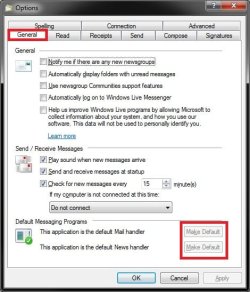
While in WLM, click on Tools (ALT+M + Show menu bar) and Options. Next double check to make sure that both Make Default buttons have been clicked on to gray them out. Afterwards see if .eml files open with WLM.

Options.jpg

Hope this helps,
Shawn
 

My Computer My Computer

Computer type
PC/Desktop
Computer Manufacturer/Model Number
Self built custom
OS
64-bit Windows 11 Pro for Workstations
CPU
Intel i7-8700K OC'd to 5 GHz
Motherboard
ASUS ROG Maximus XI Formula Z390
Memory
64 GB (4x16GB) G.SKILL TridentZ RGB DDR4 3600 MHz
Graphics Card(s)
ASUS ROG-STRIX-GTX1080TI-O11G-GAMING
Sound Card
Integrated
Monitor(s) Displays
2 x Samsung Odyssey G7 27"
Screen Resolution
2560x1440
Hard Drives
1TB Samsung 990 PRO M.2,
4TB Samsung 990 PRO PRO M.2,
TerraMaster F8 SSD Plus NAS
PSU
Seasonic Prime Titanium 850W
Case
Thermaltake Core P3
Cooling
Corsair Hydro H115i
Keyboard
Logitech wireless K800
Mouse
Logitech MX Master 4
Internet Speed
2 Gb/s Download and 100 Mb/s Upload
Antivirus
Malwarebyte Anti-Malware Premium
Browser
Google Chrome
Other Info
Logitech Z625 speaker system,
Logitech BRIO 4K Pro webcam,
HP Color LaserJet Pro MFP M477fdn,
APC SMART-UPS RT 1000 XL - SURT1000XLI,
Galaxy S23 Plus phone
Hi Shawn,

I'm sorry to report that it doesn't help. it continues to tell me I have no program associated with opening the file.
 

My Computer My Computer

OS
Windows 7
Ok. No problem.

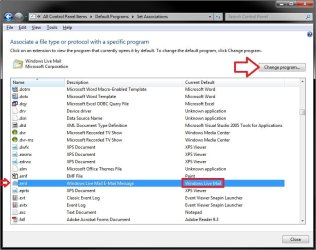
Double check in Default Programs to make sure that the .eml file extenstion has Windows Live Mail (C:\Program Files\Windows Live\Mail\wlmail.exe) set as it's "Current Default" program. If not, then click on change program, and make it so.

EML.jpg
 
Last edited:

My Computer My Computer

Computer type
PC/Desktop
Computer Manufacturer/Model Number
Self built custom
OS
64-bit Windows 11 Pro for Workstations
CPU
Intel i7-8700K OC'd to 5 GHz
Motherboard
ASUS ROG Maximus XI Formula Z390
Memory
64 GB (4x16GB) G.SKILL TridentZ RGB DDR4 3600 MHz
Graphics Card(s)
ASUS ROG-STRIX-GTX1080TI-O11G-GAMING
Sound Card
Integrated
Monitor(s) Displays
2 x Samsung Odyssey G7 27"
Screen Resolution
2560x1440
Hard Drives
1TB Samsung 990 PRO M.2,
4TB Samsung 990 PRO PRO M.2,
TerraMaster F8 SSD Plus NAS
PSU
Seasonic Prime Titanium 850W
Case
Thermaltake Core P3
Cooling
Corsair Hydro H115i
Keyboard
Logitech wireless K800
Mouse
Logitech MX Master 4
Internet Speed
2 Gb/s Download and 100 Mb/s Upload
Antivirus
Malwarebyte Anti-Malware Premium
Browser
Google Chrome
Other Info
Logitech Z625 speaker system,
Logitech BRIO 4K Pro webcam,
HP Color LaserJet Pro MFP M477fdn,
APC SMART-UPS RT 1000 XL - SURT1000XLI,
Galaxy S23 Plus phone
That's strange. The default format for email files in WLM is .eml. Try uninstalling WLM and then reinstall from Download details: Windows Live Mail Save the file to disk and then run the installer. Note that this will also ask to install other items as well, so just select WLM.
 

My Computer My Computer

Computer type
PC/Desktop
Computer Manufacturer/Model Number
Dwarf Dwf/11/2012 r09/2013
OS
Windows 8.1 Pro RTM x64
CPU
Intel Core-i5-3570K 4-core @ 3.4GHz (Ivy Bridge) (OC 4.4GHz)
Motherboard
ASRock Z77 Extreme4-M
Memory
4 x 4GB DDR3-1600 Corsair Vengeance CMZ8GX3M2A1600C9B (16GB)
Graphics Card(s)
MSI GeForce GTX770 Gaming OC 2GB
Sound Card
Realtek High Definition on board solution (ALC 898)
Monitor(s) Displays
ViewSonic VA1912w Widescreen (VGA)
Screen Resolution
1440x900
Hard Drives
OCZ Agility 3 SSD 120GB SATA III x2 (RAID 0)
Samsung HD501LJ 500GB SATA II x2
Hitachi HDS721010CLA332 1TB SATA II
Iomega 1.5TB Ext USB 2.0
WD 2.0TB Ext USB 3.0
PSU
XFX Pro Series 850W Semi-Modular
Case
Gigabyte IF233
Cooling
1 x 120mm Front Inlet 1 x 120mm Rear Exhaust
Keyboard
Microsoft Comfort Curve Keyboard 3000 (USB)
Mouse
Microsoft Comfort Mouse 3000 for Business (USB)
Internet Speed
NetGear DG834Gv3 ADSL Modem/Router (Ethernet) ~4.0 Mb/s (O2)
Antivirus
Avast! 8.0.1497
Browser
IE 11
Other Info
Optical Drive: HL-DT-ST BD-RE BH10LS30 SATA Bluray
Lexmark S305 Printer/Scanner/Copier (USB)
WEI Score: 8.1/8.1/8.5/8.5/8.25
Asus Eee PC 1011PX Netbook (Windows 7 x86 Starter)
Brink, as I said earlier, there is no .eml in my Default Programs.

Dwarf, if I uninstall and reinstall, will that automatically place .eml into my Default Programs?
 

My Computer My Computer

OS
Windows 7
Sorry, I didn't get that from your previous posts somehow.

Are you able to right click on a EML file and use Open With to manually select the Windows Live Mail (C:\Program Files\Windows Live\Mail\wlmail.exe), and check the "Always Use...." box?
 

My Computer My Computer

Computer type
PC/Desktop
Computer Manufacturer/Model Number
Self built custom
OS
64-bit Windows 11 Pro for Workstations
CPU
Intel i7-8700K OC'd to 5 GHz
Motherboard
ASUS ROG Maximus XI Formula Z390
Memory
64 GB (4x16GB) G.SKILL TridentZ RGB DDR4 3600 MHz
Graphics Card(s)
ASUS ROG-STRIX-GTX1080TI-O11G-GAMING
Sound Card
Integrated
Monitor(s) Displays
2 x Samsung Odyssey G7 27"
Screen Resolution
2560x1440
Hard Drives
1TB Samsung 990 PRO M.2,
4TB Samsung 990 PRO PRO M.2,
TerraMaster F8 SSD Plus NAS
PSU
Seasonic Prime Titanium 850W
Case
Thermaltake Core P3
Cooling
Corsair Hydro H115i
Keyboard
Logitech wireless K800
Mouse
Logitech MX Master 4
Internet Speed
2 Gb/s Download and 100 Mb/s Upload
Antivirus
Malwarebyte Anti-Malware Premium
Browser
Google Chrome
Other Info
Logitech Z625 speaker system,
Logitech BRIO 4K Pro webcam,
HP Color LaserJet Pro MFP M477fdn,
APC SMART-UPS RT 1000 XL - SURT1000XLI,
Galaxy S23 Plus phone
Back
Top