no rear surround

moonbeam

New member
Local time
7:47 PM
Messages
16
Hello my names Craig im having a strange issue & im trying to narrow down where the problem is motherboard or some glitch in the drivers

motherboard Asus p9x79 pro

running 5.1 ac3
left & right , center sub woofer work
Rear surround has just stopped working for no reason i do no understand why

i change the plugs around in back on motherboard & it only seems the rear surround plug port is not working . i plug the speaker in & realtek notices that a plug has been pushed in . i test the sound & rears still dont work .

went into playback devices & came across something wierd in picture below shows two 5.1 so i decided i would reformat the computer & see if i still have problem

51surround_zpsae85935c.jpg


okay so computer has been reformated check the settings the two 5.1 surround has gone but still no rear surround .

any suggest please I really love my sound

kind regards
Craig
 

My Computer

OS
windows x64
First question, are you using the correct ASUS supplied sound driver? If not, that is the first step. In most cases the Vendor supplied sound driver is preferred. Non-Vendor drivers can either not work or not work correctly and that includes the generic (basic function) HD Audio Codec that Windows will install.
 

My Computer

Computer type
PC/Desktop
Computer Manufacturer/Model Number
My Own Build
OS
Windows 10 64 bit
CPU
Intel i7 6700K
Motherboard
ASUS ROG Maximus VIII Hero
Memory
16GB Corsair Dominator
Graphics Card(s)
Intel CPU Graphics
Sound Card
RealTek
Monitor(s) Displays
27" Dell S2719dgf
Screen Resolution
2560X1440
Hard Drives
1 TB Samsung 850 EVO SSD for Win 10 Pro
500GB Samsung 850 EVO SSD for Win 10 Insider
2 TB drive for backup
PSU
EVGA Supernova 750G2
Case
BeQuiet Silent Base 600
Cooling
Deepcool Captain 120EX
Keyboard
Microsoft Wireless 2000
Mouse
Microsoft wireless
Internet Speed
100 MB/sec (Cable)
Antivirus
Microsoft Defender and Malwarebytes
Browser
Edge/Firefox
Other Info
Cakewalk (Sonar) by BandLab and Studio One 4.1 Pro recording studio software. MOTU 896Mk3 Hybrid recording interface, Frontier Tranzport wireless control unit, Behringer X-Touch Control Surface.
Five USB connected optical drives for CD Audio production using Nero BurningROM
yep up to date on all drivers double checked them !
 

My Computer

OS
windows x64
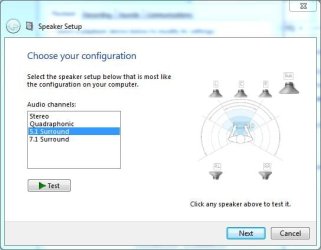
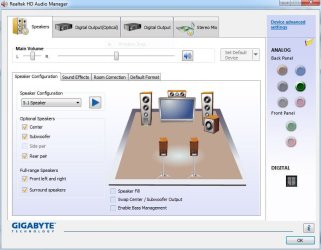
That is the same display I get on my RealTek. I don't have 5.1 so I can't test it. I can also set it up in the RealTek Control panel, listed in the control panel/Hardware and sound. If you have RealTek, check your control panel.
 

Attachments

  • Capture.JPG
    Capture.JPG
    28.2 KB · Views: 8
  • Capture1.JPG
    Capture1.JPG
    60.3 KB · Views: 8

My Computer

Computer type
PC/Desktop
Computer Manufacturer/Model Number
My Own Build
OS
Windows 10 64 bit
CPU
Intel i7 6700K
Motherboard
ASUS ROG Maximus VIII Hero
Memory
16GB Corsair Dominator
Graphics Card(s)
Intel CPU Graphics
Sound Card
RealTek
Monitor(s) Displays
27" Dell S2719dgf
Screen Resolution
2560X1440
Hard Drives
1 TB Samsung 850 EVO SSD for Win 10 Pro
500GB Samsung 850 EVO SSD for Win 10 Insider
2 TB drive for backup
PSU
EVGA Supernova 750G2
Case
BeQuiet Silent Base 600
Cooling
Deepcool Captain 120EX
Keyboard
Microsoft Wireless 2000
Mouse
Microsoft wireless
Internet Speed
100 MB/sec (Cable)
Antivirus
Microsoft Defender and Malwarebytes
Browser
Edge/Firefox
Other Info
Cakewalk (Sonar) by BandLab and Studio One 4.1 Pro recording studio software. MOTU 896Mk3 Hybrid recording interface, Frontier Tranzport wireless control unit, Behringer X-Touch Control Surface.
Five USB connected optical drives for CD Audio production using Nero BurningROM
Are you testing with a 5.1 FILM? ;)

Stereo music mp3's etc are just 2 channels

There are tick/check (for you USA's) boxes which give false 5.1 on muzac files by just multiplying them
ie copying the original two channels to a further two/four.

Check yer tick boxes in the sound menus/sub-menus!
 

My Computer

Computer type
PC/Desktop
Computer Manufacturer/Model Number
D.I.Y.
OS
WIN7 Ultimate 64bit
CPU
AMD FX8150/Trinity A10-5700
Motherboard
Asus Sabertooth v.1 /Asus F2A85-M Pro
Memory
G-Skill 2400 x2 @ 1866 (both pc's)
Graphics Card(s)
Sapphire (factory OC version) AMD 7770
Sound Card
onboard
Monitor(s) Displays
T260 Samsung
Screen Resolution
1920x1080
Hard Drives
Western Digital Sata 2TB/1TB Caviar Blacks
Buffalo 1TB usb (excellent drive)
PSU
Be-Quiet 700W E-9/Be-Quiet 550W E-9(E-9 = built by FSP)
Case
Antec P183/Antec P180mini
Cooling
x2 Xigmatek SXHH7-U01 + C-Master R4-EXBB-20PK-R0 120mm Fans
Keyboard
Cherry
Mouse
MS Explorer 3.0
Other Info
LG Blu ray combo
Pioneer 207D/208 Blu ray burners
i tested a 5.1 movie & found that there might actualy be sound but its extremely soft ,even when i turn the volume button up
 

My Computer

OS
windows x64
There are numerous volume adjusters hidden away in the setup menus.

The rear spkrs are always set softer than the front.
Check the sound icon volume slider + Realtek icon
- plus the others hidden in the sub menus.

Are your cables back in original position?

Start at beginning setup as 2.1/stereo > Test (volume loudness back?)
Reboot pc

Then try 5.1 setup

If you have full range spkrs make sure you adjust it as you go thru spkr setup menus.

Make sure windows media player slider hasn't moved/ditto Media Centre I usually leave these all at 50% default
 
Last edited:

My Computer

Computer type
PC/Desktop
Computer Manufacturer/Model Number
D.I.Y.
OS
WIN7 Ultimate 64bit
CPU
AMD FX8150/Trinity A10-5700
Motherboard
Asus Sabertooth v.1 /Asus F2A85-M Pro
Memory
G-Skill 2400 x2 @ 1866 (both pc's)
Graphics Card(s)
Sapphire (factory OC version) AMD 7770
Sound Card
onboard
Monitor(s) Displays
T260 Samsung
Screen Resolution
1920x1080
Hard Drives
Western Digital Sata 2TB/1TB Caviar Blacks
Buffalo 1TB usb (excellent drive)
PSU
Be-Quiet 700W E-9/Be-Quiet 550W E-9(E-9 = built by FSP)
Case
Antec P183/Antec P180mini
Cooling
x2 Xigmatek SXHH7-U01 + C-Master R4-EXBB-20PK-R0 120mm Fans
Keyboard
Cherry
Mouse
MS Explorer 3.0
Other Info
LG Blu ray combo
Pioneer 207D/208 Blu ray burners
there all fine its something else causing it =(
 

My Computer

OS
windows x64
Try resetting yer Bios - take soundcard out first

Only other thing I can think of is your spkr AMP isn't connected to electric or has died.

The residual low sound is from inbuilt motherboard weak amplification?
 

My Computer

Computer type
PC/Desktop
Computer Manufacturer/Model Number
D.I.Y.
OS
WIN7 Ultimate 64bit
CPU
AMD FX8150/Trinity A10-5700
Motherboard
Asus Sabertooth v.1 /Asus F2A85-M Pro
Memory
G-Skill 2400 x2 @ 1866 (both pc's)
Graphics Card(s)
Sapphire (factory OC version) AMD 7770
Sound Card
onboard
Monitor(s) Displays
T260 Samsung
Screen Resolution
1920x1080
Hard Drives
Western Digital Sata 2TB/1TB Caviar Blacks
Buffalo 1TB usb (excellent drive)
PSU
Be-Quiet 700W E-9/Be-Quiet 550W E-9(E-9 = built by FSP)
Case
Antec P183/Antec P180mini
Cooling
x2 Xigmatek SXHH7-U01 + C-Master R4-EXBB-20PK-R0 120mm Fans
Keyboard
Cherry
Mouse
MS Explorer 3.0
Other Info
LG Blu ray combo
Pioneer 207D/208 Blu ray burners
its the on board motherboard . i was thinking of hitting the cmos button & seeing what would happen , ill give it a go tonight
 

My Computer

OS
windows x64
well did a bios flash didnt work ? grrrr
 

My Computer

OS
windows x64
As a test swap the plugs around. Plug the front into the rear channel and the rears into the front channel jack. Then do a speaker test. If the rear speakers are still low its a problem with your amplifier. If the fronts are now low its a problem with your sound card/motherboard. If the cables that go from your motherboard to your speaker amp have jacks on both ends double check to make sure one end (the amp end) hasn't come loose or been pulled out by accident. It's happened to me once as a result of me using the subwoofer/speaker amp as a footrest. :o;)
 

My Computer

Computer type
PC/Desktop
Computer Manufacturer/Model Number
Home Built
OS
Windows 10 Education 64 bit
CPU
AMD Phenom II X4 980 Black Edition Deneb 3.7GHz
Motherboard
Asus M4N68T-M V2 µATX Motherboard
Memory
8GB 4GBx2 Kingston PC10600 DDR3 1333 Memory
Graphics Card(s)
Zotac NVIDIA Geforce GT640 2 Gig DDR3 PCIe
Sound Card
VIA VT1708s High Definition Audio 8-channel Onboard
Monitor(s) Displays
22" LG E2242 1080p and 2 19" I-INC AG191D
Screen Resolution
1280x1024 - 1920x1080 - 1280x1024
Hard Drives
Crucial M100 256 GB SSD and 500 GB WD Blue SATA
PSU
Thermaltake TR 620
Case
Power Up Black ATX Mid-Tower Case
Cooling
Stock heatsink and fan
Keyboard
Logitech Wireless K350 Wave
Mouse
Logitech Wireless M570 Trackman Wheel
Internet Speed
80 Mbps Down 30 Mbps Up
Antivirus
Windows Defender
Browser
Internet Explorer 11
Other Info
HP DVD1040e Lightscribe - External USB2
i think its the amplifier on the motherboard is the problem , any solutions on increasing the amp on motherboard ?
 

My Computer

OS
windows x64
tell us exactly what colour cables are plugged in at the back from your spkrs and their respective plug colours.

What make/model 5.1 spkrs


Are there any unregistered/yellow highlighted drivers left in "Device Manager"?

If you have a single cable (yellow-end-plug) - you are digital & should be plugged into Yellow? SPDIF socket

Did you stick this 3rd revision sound driver (from asus website > downloads) on your pc or are you using provided cd one?

Realtek Audio Driver V5.10.0.6657 for 32/64bit Windows XP.(WHQL)
Realtek Audio Driver V6.0.1.6657 for 32/64bit Windows Vista, 7 & 8.(WHQL) File Size 140,68 (MBytes) 2012.09.13 update Download from
asus_download_pics01.gif
Global (DLM)
asus_download_pics02.gif
Global
asus_download_pics05.gif
P2P
ASUS - Motherboards- ASUS P9X79 PRO

This too - right up to date

Intel Chipset Software Installation Utility (WHQL)
Support OS : Microsoft Windows 7 & 8 32/64 bit File Size 4,29 (MBytes) 2012.12.11 update
 

My Computer

Computer type
PC/Desktop
Computer Manufacturer/Model Number
D.I.Y.
OS
WIN7 Ultimate 64bit
CPU
AMD FX8150/Trinity A10-5700
Motherboard
Asus Sabertooth v.1 /Asus F2A85-M Pro
Memory
G-Skill 2400 x2 @ 1866 (both pc's)
Graphics Card(s)
Sapphire (factory OC version) AMD 7770
Sound Card
onboard
Monitor(s) Displays
T260 Samsung
Screen Resolution
1920x1080
Hard Drives
Western Digital Sata 2TB/1TB Caviar Blacks
Buffalo 1TB usb (excellent drive)
PSU
Be-Quiet 700W E-9/Be-Quiet 550W E-9(E-9 = built by FSP)
Case
Antec P183/Antec P180mini
Cooling
x2 Xigmatek SXHH7-U01 + C-Master R4-EXBB-20PK-R0 120mm Fans
Keyboard
Cherry
Mouse
MS Explorer 3.0
Other Info
LG Blu ray combo
Pioneer 207D/208 Blu ray burners
cheap brand of speakers XMS . its always worked if i plug speakers into other ports on motherboard it works , can use the front jack for rear speakers as well

uses 3 RCA PLUGS for 5.1

center/subwoofer = yellow
front = green
rears = black
side pairs = grey
mic = pink
line in = blue

old motherboard allowed me to use any port for any equipment i miss that already !

wont allow me to just use the side pair speakers for rear which is a shame . stuck using the ports they designate for front , rears , center & sub .

i see each plug light up in the realtek manager when rca plug is inserted

As for drivers im right up to date & no yellow Astrix's in the device manager (which is nice )


I appreciate the help
 

My Computer

OS
windows x64
uneducated guess

You have driver leftovers on your pc which is why you have multiple 5.1 choices appearing in set-up panel.

The setup software is probably diverting signals to all the wrong ports eg front out etc.

You need to unload realtek then search with special driver clean-up software,
delete realtek driver detritis
then use a registry cleaner (auslogics)

Reboot
> reload Latest realtek driver.

If you look at your panel pic the spkrs shown are totally different order/place to panel pic someone else tried to help you with!
 

My Computer

Computer type
PC/Desktop
Computer Manufacturer/Model Number
D.I.Y.
OS
WIN7 Ultimate 64bit
CPU
AMD FX8150/Trinity A10-5700
Motherboard
Asus Sabertooth v.1 /Asus F2A85-M Pro
Memory
G-Skill 2400 x2 @ 1866 (both pc's)
Graphics Card(s)
Sapphire (factory OC version) AMD 7770
Sound Card
onboard
Monitor(s) Displays
T260 Samsung
Screen Resolution
1920x1080
Hard Drives
Western Digital Sata 2TB/1TB Caviar Blacks
Buffalo 1TB usb (excellent drive)
PSU
Be-Quiet 700W E-9/Be-Quiet 550W E-9(E-9 = built by FSP)
Case
Antec P183/Antec P180mini
Cooling
x2 Xigmatek SXHH7-U01 + C-Master R4-EXBB-20PK-R0 120mm Fans
Keyboard
Cherry
Mouse
MS Explorer 3.0
Other Info
LG Blu ray combo
Pioneer 207D/208 Blu ray burners
i did reformat the pc though ? should that of clean out my drivers ? after i did the format only shows ONE 5.1 in the list like it should
 

My Computer

OS
windows x64
How are you testing the speakers? Are you doing a speaker test from the Realtek app or just playing an audio file. I only ask because if I play an MP3 file on my system it only plays in stereo with the default setup. To get all 4 of my speakers to play it I have to enable speaker fill in my audio control panel.
 

My Computer

Computer type
PC/Desktop
Computer Manufacturer/Model Number
Home Built
OS
Windows 10 Education 64 bit
CPU
AMD Phenom II X4 980 Black Edition Deneb 3.7GHz
Motherboard
Asus M4N68T-M V2 µATX Motherboard
Memory
8GB 4GBx2 Kingston PC10600 DDR3 1333 Memory
Graphics Card(s)
Zotac NVIDIA Geforce GT640 2 Gig DDR3 PCIe
Sound Card
VIA VT1708s High Definition Audio 8-channel Onboard
Monitor(s) Displays
22" LG E2242 1080p and 2 19" I-INC AG191D
Screen Resolution
1280x1024 - 1920x1080 - 1280x1024
Hard Drives
Crucial M100 256 GB SSD and 500 GB WD Blue SATA
PSU
Thermaltake TR 620
Case
Power Up Black ATX Mid-Tower Case
Cooling
Stock heatsink and fan
Keyboard
Logitech Wireless K350 Wave
Mouse
Logitech Wireless M570 Trackman Wheel
Internet Speed
80 Mbps Down 30 Mbps Up
Antivirus
Windows Defender
Browser
Internet Explorer 11
Other Info
HP DVD1040e Lightscribe - External USB2
test speakers using the realtek program clicking on individual speakers
 

My Computer

OS
windows x64
here's something i can only just hear sound in 5.1 while watching movie but cant hear anything at all using the realtek manager
 

My Computer

OS
windows x64
Back
Top