Solved No REG Command in "Open elevated command window here" DOS Box

I think what is happening in 64 bit cmd.exe if the OP is in C:\Windows\SysWow64 and runs reg.exe, the 32 bit emulation copy exists and the command is found. Perhaps it's being redirected to C:\Windows\System32 to use the 64 bit version. If the current directory is C:\Windows\System32 then it should definitely find the 64 bit reg.exe.

First thing I would try is make a batch with the exact path of reg.exe. Like DoReg.cmd with
Code:
@echo off
C:\Windows\System32\reg.exe %*

the %* should pass on the entire command tail unaltered. That way you don't have to worry about how many args the command takes.

That should force cmd.exe to find reg.exe
 

My Computer

Computer Manufacturer/Model Number
HP Media Center
OS
Windows 7 32 bit
CPU
AMD 5200+ dual core
Memory
2 GB
Graphics Card(s)
NVidia GeForce 6150SE 128 MB
Monitor(s) Displays
CRT
Screen Resolution
1280x1024
Hard Drives
500 GB Sata internal :

SIIG USB 3.0 docking stations w/WD Caviar Black 6 Gb/s drives
Keyboard
PS/2
Mouse
PS/2 Wheel Mouse
Other Info
SIIG USB 3.0 PCIexpress card.
I think what is happening in 64 bit cmd.exe if the OP is in C:\Windows\SysWow64 and runs reg.exe, the 32 bit emulation copy exists and the command is found. Perhaps it's being redirected to C:\Windows\System32 to use the 64 bit version. If the current directory is C:\Windows\System32 then it should definitely find the 64 bit reg.exe.

First thing I would try is make a batch with the exact path of reg.exe. Like DoReg.cmd with
Code:
@echo off
C:\Windows\System32\reg.exe %*

the %* should pass on the entire command tail unaltered. That way you don't have to worry about how many args the command takes.

That should force cmd.exe to find reg.exe
If in C:\Windows\System32 => reg.exe 64 bits will run
If in C:\Windows\SysWow64 => reg.exe 32 bits will run

if in C:\whateverelse=> reg.exe isn't there and it performs a path search.
reg.com, reg.exe or reg.bat will run from some folder in path.

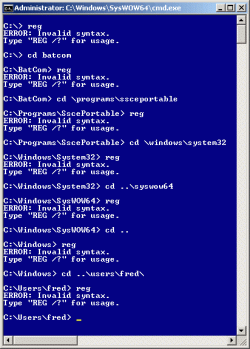
It does run... but doesn't give output. the command runs but simply displays nothing. See screenshot
 

My Computer

Computer type
Laptop
Computer Manufacturer/Model Number
ACER ASPIRE 5742G
OS
Microsoft Windows 7 Home Premium 64-bits 7601 Multiprocessor Free Service Pack 1
CPU
Intel(R) Core(TM) i3 CPU M 370 @ 2.40GHz
Motherboard
Acer Aspire 5742G
Memory
4,00 GB
Graphics Card(s)
ATI Mobility Radeon HD 5400 Series
Sound Card
(1) AMD High Definition Audio Device (2) Realtek High Defi
Screen Resolution
1366 x 768 x 32 bits (4294967296 colors) @ 60 Hz
Hard Drives
WDC WD5000BEVT-22ZAT0
I think what is happening in 64 bit cmd.exe if the OP is in C:\Windows\SysWow64 and runs reg.exe, the 32 bit emulation copy exists and the command is found. Perhaps it's being redirected to C:\Windows\System32 to use the 64 bit version. If the current directory is C:\Windows\System32 then it should definitely find the 64 bit reg.exe.

First thing I would try is make a batch with the exact path of reg.exe. Like DoReg.cmd with
Code:
@echo off
C:\Windows\System32\reg.exe %*

the %* should pass on the entire command tail unaltered. That way you don't have to worry about how many args the command takes.

That should force cmd.exe to find reg.exe
If in C:\Windows\System32 => reg.exe 64 bits will run
If in C:\Windows\SysWow64 => reg.exe 32 bits will run

if in C:\whateverelse=> reg.exe isn't there and it performs a path search.
reg.com, reg.exe or reg.bat will run from some folder in path.

It does run... but doesn't give output. the command runs but simply displays nothing. See screenshot

I saw the screen shot. What I'm saying is use DoReg.cmd to force it to use the one in C:\Windows\System32 and see what happens. It's a diagnostic. Or if it works just use the work-around. Sometimes it's easier to use a work-around than spending 5 days fixing something minor.
 

My Computer

Computer Manufacturer/Model Number
HP Media Center
OS
Windows 7 32 bit
CPU
AMD 5200+ dual core
Memory
2 GB
Graphics Card(s)
NVidia GeForce 6150SE 128 MB
Monitor(s) Displays
CRT
Screen Resolution
1280x1024
Hard Drives
500 GB Sata internal :

SIIG USB 3.0 docking stations w/WD Caviar Black 6 Gb/s drives
Keyboard
PS/2
Mouse
PS/2 Wheel Mouse
Other Info
SIIG USB 3.0 PCIexpress card.
I think what is happening in 64 bit cmd.exe if the OP is in C:\Windows\SysWow64 and runs reg.exe, the 32 bit emulation copy exists and the command is found. Perhaps it's being redirected to C:\Windows\System32 to use the 64 bit version. If the current directory is C:\Windows\System32 then it should definitely find the 64 bit reg.exe.

First thing I would try is make a batch with the exact path of reg.exe. Like DoReg.cmd with
Code:
@echo off
C:\Windows\System32\reg.exe %*

the %* should pass on the entire command tail unaltered. That way you don't have to worry about how many args the command takes.

That should force cmd.exe to find reg.exe
If in C:\Windows\System32 => reg.exe 64 bits will run
If in C:\Windows\SysWow64 => reg.exe 32 bits will run

if in C:\whateverelse=> reg.exe isn't there and it performs a path search.
reg.com, reg.exe or reg.bat will run from some folder in path.

It does run... but doesn't give output. the command runs but simply displays nothing. See screenshot

I saw the screen shot. What I'm saying is use DoReg.cmd to force it to use the one in C:\Windows\System32 and see what happens. It's a diagnostic. Or if it works just use the work-around. Sometimes it's easier to use a work-around than spending 5 days fixing something minor.
He has C:\BatCom\ in front of PATH environment variable. That can cause other problems! Custom commands should be on the end! and he should rename reg.bat to myReg.bat for example so they don't interfere with real windows commands
 

My Computer

Computer type
Laptop
Computer Manufacturer/Model Number
ACER ASPIRE 5742G
OS
Microsoft Windows 7 Home Premium 64-bits 7601 Multiprocessor Free Service Pack 1
CPU
Intel(R) Core(TM) i3 CPU M 370 @ 2.40GHz
Motherboard
Acer Aspire 5742G
Memory
4,00 GB
Graphics Card(s)
ATI Mobility Radeon HD 5400 Series
Sound Card
(1) AMD High Definition Audio Device (2) Realtek High Defi
Screen Resolution
1366 x 768 x 32 bits (4294967296 colors) @ 60 Hz
Hard Drives
WDC WD5000BEVT-22ZAT0
Maybe a file called reg.exe, reg.com, reg.bat is in C:\BatCom\ or C:\Programs\SscePortable? please check that

That's an excellent suggestion, and, if true, would be a ~perfect~ explanation for the behavior - <g>. However, I just checked, and there seems to be no reg.exe, reg.com, or reg.bat anywhere obvious except for the Windows reg.exe's in C:\W\Syytem32 and C:\W\SysWOW64.
 

My Computer

Computer Manufacturer/Model Number
Lenovo ThinkPad T420s
OS
Windows 7 Professional x64 SP1
CPU
Intel Core i5-2540M CPU @ 2.60 GHz
Memory
8 GB
Screen Resolution
1600x900 running at 1366x768
Hard Drives
120 GB SSD
Other Info
Use XP Mode virtual OS for VC6 only
OK, how does ~this~ look ? -

2012-05-16_210110.gif

[The "invalid syntax" is, of course, ~GOOD~ news - i.e., that (correct) error msg is coming from REG.exe, regardless of which directory I am in.]

:D :) ;)

All I did (as far as I know) was to "clean up" the PATH variable, as follows:

1 I removed the entire "C:\Program Files x86)\Windows Live\Shared" mess. It was not a typo (at least not by me) - I've never (intentionally or knowingly) had any Windows Live program on my PC. It must have been left there (garbled) by an install program (or maybe an uninstall program) (?). Anyway, it's gone.

2. I moved both "C:\BatCom" and "C:\Programs\SscePortable" further back in the PATH variable. (Both non-standard directories do exist, and are useful for me.)

3. I removed all of the trailing backslashes. I do believe that a trailing backslash for a directory is optional here, but it is not needed; it does make the PATH (slightly) longer unnecessarily; and it is possible that a trailing backslash might sometimes be read incorrectly in some situations (if it "escaped" a quotation mark right after it, say).

I don't know which of the above (or combination of the above) ended up working (or whether "Windows healed itself" - <g>) ["It's not all ones and zeroes."], but I do want to thank Brink, MilesAhead, and Kaktussoft for all of the help you guys offered - all of it is ~greatly~ appreciated. :geek:
 
Last edited:

My Computer

Computer Manufacturer/Model Number
Lenovo ThinkPad T420s
OS
Windows 7 Professional x64 SP1
CPU
Intel Core i5-2540M CPU @ 2.60 GHz
Memory
8 GB
Screen Resolution
1600x900 running at 1366x768
Hard Drives
120 GB SSD
Other Info
Use XP Mode virtual OS for VC6 only
Fred, I'm happy to hear that these guys were able to help get this sorted for you. :)
 

My Computer

Computer type
PC/Desktop
Computer Manufacturer/Model Number
Self built custom
OS
64-bit Windows 11 Pro for Workstations
CPU
Intel i7-8700K OC'd to 5 GHz
Motherboard
ASUS ROG Maximus XI Formula Z390
Memory
64 GB (4x16GB) G.SKILL TridentZ RGB DDR4 3600 MHz
Graphics Card(s)
ASUS ROG-STRIX-GTX1080TI-O11G-GAMING
Sound Card
Integrated
Monitor(s) Displays
2 x Samsung Odyssey G7 27"
Screen Resolution
2560x1440
Hard Drives
1TB Samsung 990 PRO M.2,
4TB Samsung 990 PRO PRO M.2,
TerraMaster F8 SSD Plus NAS
PSU
Seasonic Prime Titanium 850W
Case
Thermaltake Core P3
Cooling
Corsair Hydro H115i
Keyboard
Logitech wireless K800
Mouse
Logitech MX Master 4
Internet Speed
2 Gb/s Download and 100 Mb/s Upload
Antivirus
Malwarebyte Anti-Malware Premium
Browser
Google Chrome
Other Info
Logitech Z625 speaker system,
Logitech BRIO 4K Pro webcam,
HP Color LaserJet Pro MFP M477fdn,
APC SMART-UPS RT 1000 XL - SURT1000XLI,
Galaxy S23 Plus phone
C:\BatCom\;C:\Programs\SscePortable; was the problem. But I saw you tried REG within those folders. It runs reg.exe in system32 so there's no reg.bat, reg.exe etc in those folders.

Very strange
 

My Computer

Computer type
Laptop
Computer Manufacturer/Model Number
ACER ASPIRE 5742G
OS
Microsoft Windows 7 Home Premium 64-bits 7601 Multiprocessor Free Service Pack 1
CPU
Intel(R) Core(TM) i3 CPU M 370 @ 2.40GHz
Motherboard
Acer Aspire 5742G
Memory
4,00 GB
Graphics Card(s)
ATI Mobility Radeon HD 5400 Series
Sound Card
(1) AMD High Definition Audio Device (2) Realtek High Defi
Screen Resolution
1366 x 768 x 32 bits (4294967296 colors) @ 60 Hz
Hard Drives
WDC WD5000BEVT-22ZAT0
Did other "non built in" commands work when reg.exe was failing?
 

My Computer

Computer type
Laptop
Computer Manufacturer/Model Number
ACER ASPIRE 5742G
OS
Microsoft Windows 7 Home Premium 64-bits 7601 Multiprocessor Free Service Pack 1
CPU
Intel(R) Core(TM) i3 CPU M 370 @ 2.40GHz
Motherboard
Acer Aspire 5742G
Memory
4,00 GB
Graphics Card(s)
ATI Mobility Radeon HD 5400 Series
Sound Card
(1) AMD High Definition Audio Device (2) Realtek High Defi
Screen Resolution
1366 x 768 x 32 bits (4294967296 colors) @ 60 Hz
Hard Drives
WDC WD5000BEVT-22ZAT0
i agree with your suggestions and i think these all are good suggestions for this problem
 

My Computer

OS
win 7
Did other "non built in" commands work when reg.exe was failing?

Yes, as far as I could tell. REG seemed ti be the only problem. I have no specific information as to why "cleaning up" the PATH would "free up" REG but leave everything else unaffected (positively or negatively) Oh, well...

In any event, now everything works OK (as far as I can tell) (and until something else goes wrong - <g>).
 

My Computer

Computer Manufacturer/Model Number
Lenovo ThinkPad T420s
OS
Windows 7 Professional x64 SP1
CPU
Intel Core i5-2540M CPU @ 2.60 GHz
Memory
8 GB
Screen Resolution
1600x900 running at 1366x768
Hard Drives
120 GB SSD
Other Info
Use XP Mode virtual OS for VC6 only
I tried one more little experiment -

I changed the lines in the context menu menu item that say -

@="cmd.exe /s /k pushd \"%V\"

- so as to say -

@="C:\\Windows\\System32\\cmd.exe /s /k \"pushd %V\""

- in order to try to force the System32 version of cmd.exe to be invoked.

If I launched the CMD box from Explorer (a 64-bit app) it worked (but it would have done so anyways, even before my change).

However, if I launched it from PowerDesk (a 32-bit app), the 32-bit Windows redirection caused the SysWOW64 version of cmd.exe to came up.

The good news is that both work just fine, so that, even if my little experiment today was a failure, at least REG will work either way.

2012-05-17_123859.gif2012-05-17_120833.gif

And thanks again for everyone's help !!!
 

My Computer

Computer Manufacturer/Model Number
Lenovo ThinkPad T420s
OS
Windows 7 Professional x64 SP1
CPU
Intel Core i5-2540M CPU @ 2.60 GHz
Memory
8 GB
Screen Resolution
1600x900 running at 1366x768
Hard Drives
120 GB SSD
Other Info
Use XP Mode virtual OS for VC6 only
Not being one that likes to leave enuf alone, I changed that original line from -

@="cmd.exe /s /k pushd \"%V\"

- so as to say -

@="cmd.exe /s /k \"pushd %V && title Elevated Command Prompt\""

This changes the title bar of the CMD window, as -

2012-05-17_141517.gif

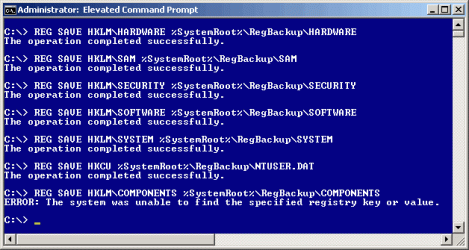
Of course, I usually run the above commands as part of an elevated privilege batch file -

Code:
@echo off
rem RegBackup.BAT backs up the Registry hives to %SystemRoot%\RegBackup\
rem the following command Will usually (but not always) cause the following error -
rem REG SAVE HKLM\COMPONENTS %SystemRoot%\RegBackup\COMPONENTS
rem ERROR: The system was unable to find the specified registry key or value.
cls
echo.
if exist %SystemRoot%\RegBackup\COMPONENTS.OLD del %SystemRoot%\RegBackup\COMPONENTS.OLD
if exist %SystemRoot%\RegBackup\HARDWARE.OLD del %SystemRoot%\RegBackup\HARDWARE.OLD
if exist %SystemRoot%\RegBackup\SAM.OLD del %SystemRoot%\RegBackup\SAM.OLD
if exist %SystemRoot%\RegBackup\SECURITY.OLD del %SystemRoot%\RegBackup\SECURITY.OLD
if exist %SystemRoot%\RegBackup\SOFTWARE.OLD del %SystemRoot%\RegBackup\SOFTWARE.OLD
if exist %SystemRoot%\RegBackup\SYSTEM.OLD del %SystemRoot%\RegBackup\SYSTEM.OLD
if exist %SystemRoot%\RegBackup\NTUSER.DAT.OLD del %SystemRoot%\RegBackup\NTUSER.DAT.OLD
if exist %SystemRoot%\RegBackup\COMPONENTS.BAK ren %SystemRoot%\RegBackup\COMPONENTS.BAK COMPONENTS.OLD
if exist %SystemRoot%\RegBackup\HARDWARE.BAK ren %SystemRoot%\RegBackup\HARDWARE.BAK HARDWARE.OLD
if exist %SystemRoot%\RegBackup\SAM.BAK ren %SystemRoot%\RegBackup\SAM.BAK SAM.OLD
if exist %SystemRoot%\RegBackup\SECURITY.BAK ren %SystemRoot%\RegBackup\SECURITY.BAK SECURITY.OLD
if exist %SystemRoot%\RegBackup\SOFTWARE.BAK ren %SystemRoot%\RegBackup\SOFTWARE.BAK SOFTWARE.OLD
if exist %SystemRoot%\RegBackup\SYSTEM.BAK ren %SystemRoot%\RegBackup\SYSTEM.BAK SYSTEM.OLD
if exist %SystemRoot%\RegBackup\NTUSER.DAT.BAK ren %SystemRoot%\RegBackup\NTUSER.DAT.BAK NTUSER.DAT.OLD
if exist %SystemRoot%\RegBackup\COMPONENTS ren %SystemRoot%\RegBackup\COMPONENTS COMPONENTS.BAK
if exist %SystemRoot%\RegBackup\HARDWARE ren %SystemRoot%\RegBackup\HARDWARE HARDWARE.BAK
if exist %SystemRoot%\RegBackup\SAM ren %SystemRoot%\RegBackup\SAM SAM.BAK
if exist %SystemRoot%\RegBackup\SECURITY ren %SystemRoot%\RegBackup\SECURITY SECURITY.BAK
if exist %SystemRoot%\RegBackup\SOFTWARE ren %SystemRoot%\RegBackup\SOFTWARE SOFTWARE.BAK
if exist %SystemRoot%\RegBackup\SYSTEM ren %SystemRoot%\RegBackup\SYSTEM SYSTEM.BAK
if exist %SystemRoot%\RegBackup\NTUSER.DAT ren %SystemRoot%\RegBackup\NTUSER.DAT NTUSER.DAT.BAK
echo Backing up the Registry hives . . .
echo.
echo Backing up COMPONENTS . . .
REG SAVE HKLM\COMPONENTS %SystemRoot%\RegBackup\COMPONENTS
echo.
echo Backing up HARDWARE . . .
REG SAVE HKLM\HARDWARE %SystemRoot%\RegBackup\HARDWARE
echo.
echo Backing up SAM . . .
REG SAVE HKLM\SAM %SystemRoot%\RegBackup\SAM
echo.
echo Backing up SECURITY . . .
REG SAVE HKLM\SECURITY %SystemRoot%\RegBackup\SECURITY
echo.
echo Backing up SOFTWARE . . .
REG SAVE HKLM\SOFTWARE %SystemRoot%\RegBackup\SOFTWARE
echo.
echo Backing up SYSTEM . . .
REG SAVE HKLM\SYSTEM %SystemRoot%\RegBackup\SYSTEM
echo.
echo Backing up HKCU . . .
REG SAVE HKCU %SystemRoot%\RegBackup\NTUSER.DAT
echo.
 
Last edited by a moderator:

My Computer

Computer Manufacturer/Model Number
Lenovo ThinkPad T420s
OS
Windows 7 Professional x64 SP1
CPU
Intel Core i5-2540M CPU @ 2.60 GHz
Memory
8 GB
Screen Resolution
1600x900 running at 1366x768
Hard Drives
120 GB SSD
Other Info
Use XP Mode virtual OS for VC6 only
If in C:\Windows\System32 => reg.exe 64 bits will run
If in C:\Windows\SysWow64 => reg.exe 32 bits will run

if in C:\whateverelse=> reg.exe isn't there and it performs a path search.
reg.com, reg.exe or reg.bat will run from some folder in path.

It does run... but doesn't give output. the command runs but simply displays nothing. See screenshot

I saw the screen shot. What I'm saying is use DoReg.cmd to force it to use the one in C:\Windows\System32 and see what happens. It's a diagnostic. Or if it works just use the work-around. Sometimes it's easier to use a work-around than spending 5 days fixing something minor.
He has C:\BatCom\ in front of PATH environment variable. That can cause other problems! Custom commands should be on the end! and he should rename reg.bat to myReg.bat for example so they don't interfere with real windows commands

I grokk that. But PATH doesn't come into play if you specify the exact file. That's the diagnostic. If the batch worked then it would prove your theory instead of just making changes on assumptions.

Generally I agree the batch folder should be last in search order if one is too lazy to search and make sure the batch commands are either unique, or not in the path at all. If required to specify explicitly then you eliminate conflicts. I do Everything Search whenever I make a batch file and often use a "Do" prefix to avoid name conflicts.
 

My Computer

Computer Manufacturer/Model Number
HP Media Center
OS
Windows 7 32 bit
CPU
AMD 5200+ dual core
Memory
2 GB
Graphics Card(s)
NVidia GeForce 6150SE 128 MB
Monitor(s) Displays
CRT
Screen Resolution
1280x1024
Hard Drives
500 GB Sata internal :

SIIG USB 3.0 docking stations w/WD Caviar Black 6 Gb/s drives
Keyboard
PS/2
Mouse
PS/2 Wheel Mouse
Other Info
SIIG USB 3.0 PCIexpress card.
Back
Top