Hi folks. Tried to rip a cd using wmp but can't find 'Rip CD' anywhere. Had no problems with XP but the ripping facility seems to have vanished on the Media Player installed on Windows 7 which seems really odd. Any ideas?
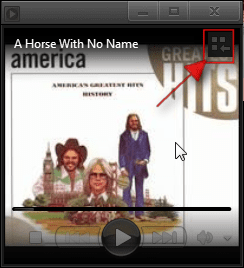
You will need to be in Library mode in the top right corner there is an area to click to get there (look at screenshot) you will have to hover your mouse over that area to get it to show.
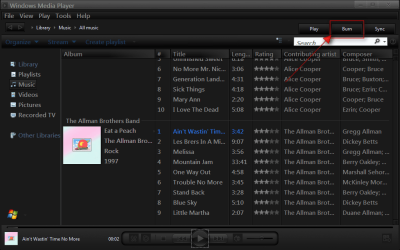
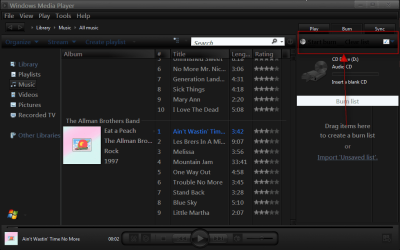
In the library mode you will have a burn button which will give you access to more options (look at screenshots)
I hope this helps you.
Jerry
My Computer
Computer type
Laptop
Computer Manufacturer/Model Number
Sager NP9170
OS
Win 7 Pro x64 / Win 10 Pro
CPU
Intel(R) Core(TM) i7-3630QM CPU @ 2.40GHz
Motherboard
CLEVO P170EM
Memory
12 GB
Graphics Card(s)
(1) Intel(R) HD Graphics 4000 (2) NVIDIA GeForce GTX 675M
Sound Card
(1) Realtek High Definition Audio (2) Intel(R) Display Aud
Monitor(s) Displays
17.3
Screen Resolution
1920x1080
Hard Drives
(1) Samsung 860 EVO 500GB(OS) (1) Samsung 860 EVO 500GB(Data)
Keyboard
Backlite
Antivirus
MSE, Malwarebytes Pro
Browser
Firefox
Other Info
DESKTOP: Custom-built.
OS: Win 10 Pro x64.
CASE: Rosewill R5.
CPU: Intel I5 4670K CPU @ 3.40GHz.
CPU COOLER: Cool Master Hyper 212 EVO.
MOTHERBOARD: Asus Z87-A.
MEMORY: Kingston HyperX 2x4 GB.
GPU: Nvidia Geforce 650 TI.
PSU: Corsair TX750.
DRIVES: (1) Samsung 840 120 GB SSD (2) Western Digital blue 500 GB 7200 RPM.
Thanks for the info Jerry, never thought to look in the burn facility for ripping details. I did what you said and found the ripping settings drop down box, adjusted the settings to what I wanted and, guess what, still cant find the 'Start Rip' button. In the help menue it looks like it should be to the right of 'Create PLaylist' option at the top of the screen but I must be thick because I cant find it anywhere. I've got settings to @start rip automatically when cd is inserted' so I assumed it wouls start to rip when I inserted the cd but nothing. Help
Think I've sussed it. I assumed the cd I was trying to rip from was an audio cd. Just looked at it again and the tracks are already mp3 so I dont need to rip in the first place!Sso the moral here is never to trust your neighbour when she tells you she has an audio cd. Thanks again Jerry