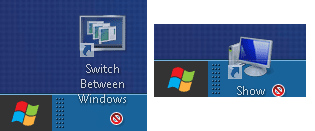
No show desktop and switch screen,unable to drag icon to quicklaunch..

Status
Not open for further replies.

AA light

New member
Power User
Local time
1:11 PM
Messages
54
(No 'show desktop' and 'switch screen', unable to drag any icons to quicklaunch bar)

Hello All,

I install and run window developer preview on Seagate FreeAgent Go external HD using window 7 system. However, when adding quicklauch bar by adding new toolbar "%userprofile%\AppData\Roaming\Microsoft\Internet Explorer\Quick Launch" ,there is no 'show desktop' nor 'switch screen' icon occurs.

Likewise, typing the following in notepad without quotation and save in .scf


" [Shell]desktop icon
Command=2
IconFile=explorer.exe,3
[Taskbar]
Command=ToggleDesktop "
quicklaunch area and show desktop icon.png

Nonetheless, unable to drag the 'show desktop' icon into the quicklaunch bar (unlocked taskbar) , checking with other icons on the desktop also unable to drag into the quicklaunch area.

How could I attain 'show desktop' and 'switch screen' icons and dragable including with be able to drag other selected icons on the desktop to the quicklaunch area, please ?
 
Last edited:

My Computer My Computer

At a glance

Windows 7 Ultimate 32 bit , Window 7Intel(R) Core(TM) i5 CPUM 430 @ 2.27GHz, Inte...2.00 GB,NVIDIA GeForce 310M
Computer type
PC/Desktop
Computer Manufacturer/Model Number
Acer Aspire 4740G , Acer Aspire4930
OS
Windows 7 Ultimate 32 bit , Window 7
CPU
Intel(R) Core(TM) i5 CPUM 430 @ 2.27GHz, Intel core duo pro
Motherboard
Acer Aspire 4740 Acer Aspire4930
Memory
2.00 GB,
Graphics Card(s)
NVIDIA GeForce 310M
Sound Card
(1) Realtek High Definition Audio (2) NVIDIA High Definiti
Monitor(s) Displays
Mobile PC Display
Screen Resolution
1366x768
Hard Drives
WDC WD5000BEVT-22A0RT0 ATA Device , 500 GB
Mouse
TECFON

My Computer My Computer

At a glance

64-bit Windows 11 Pro for WorkstationsIntel i7-8700K OC'd to 5 GHz64 GB (4x16GB) G.SKILL TridentZ RGB DDR4 3600...ASUS ROG-STRIX-GTX1080TI-O11G-GAMING
Computer type
PC/Desktop
Computer Manufacturer/Model Number
Self built custom
OS
64-bit Windows 11 Pro for Workstations
CPU
Intel i7-8700K OC'd to 5 GHz
Motherboard
ASUS ROG Maximus XI Formula Z390
Memory
64 GB (4x16GB) G.SKILL TridentZ RGB DDR4 3600 MHz
Graphics Card(s)
ASUS ROG-STRIX-GTX1080TI-O11G-GAMING
Sound Card
Integrated
Monitor(s) Displays
2 x Samsung Odyssey G7 27"
Screen Resolution
2560x1440
Hard Drives
1TB Samsung 990 PRO M.2,
4TB Samsung 990 PRO PRO M.2,
TerraMaster F8 SSD Plus NAS
PSU
Seasonic Prime Titanium 850W
Case
Thermaltake Core P3
Cooling
Corsair Hydro H115i
Keyboard
Logitech wireless K800
Mouse
Logitech MX Master 4
Internet Speed
2 Gb/s Download and 100 Mb/s Upload
Antivirus
Malwarebyte Anti-Malware Premium
Browser
Google Chrome
Other Info
Logitech Z625 speaker system,
Logitech BRIO 4K Pro webcam,
HP Color LaserJet Pro MFP M477fdn,
APC SMART-UPS RT 1000 XL - SURT1000XLI,
Galaxy S23 Plus phone
Hello Shawn (and everyone) ,

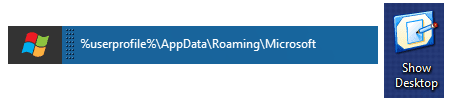
Thank you for the link. What I've actually done is the same way in Quick Launch link in option one . Normally on window 7 installing on the internal HD , using this approach will show the same as in the figure in your link provided .

However, for this window developer preview running on Seagate FreeAgent Go USB external HD using Native VHD Boot, when using the same approach shows just as in the snip without icons.


actual quicklaunch area.png


Also, actually, the snip shown in the first post of 'show desktop' on the right is just to show that 'show desktop' icon could be created from .scf yet unable to drag into the quicklaunch area.

furthermore , trying both

Show Desktop Icon on Taskbar - Windows 7 Forums

Switch Between Windows - Flip 3D Shortcut

able to create shortcut ( thank you for the links ) yet unable to drag into quicklaunch bar as well.


undragable icon.png


(Although, it is able to pin the shortcut on the taskbar ;however, I would prefer to use the quicklaunch bar and also need to add 7 stack application to the quicklaunch area as pinning the application on the taskbar confuse me whether the application is still running and i would not like to check every pinned menu or unpinned every applications everytime before shutting down the system.

Are there any approach to make icons or shortcut draggable to the quicklaunch area , please ?
 

My Computer My Computer

At a glance

Windows 7 Ultimate 32 bit , Window 7Intel(R) Core(TM) i5 CPUM 430 @ 2.27GHz, Inte...2.00 GB,NVIDIA GeForce 310M
Computer type
PC/Desktop
Computer Manufacturer/Model Number
Acer Aspire 4740G , Acer Aspire4930
OS
Windows 7 Ultimate 32 bit , Window 7
CPU
Intel(R) Core(TM) i5 CPUM 430 @ 2.27GHz, Intel core duo pro
Motherboard
Acer Aspire 4740 Acer Aspire4930
Memory
2.00 GB,
Graphics Card(s)
NVIDIA GeForce 310M
Sound Card
(1) Realtek High Definition Audio (2) NVIDIA High Definiti
Monitor(s) Displays
Mobile PC Display
Screen Resolution
1366x768
Hard Drives
WDC WD5000BEVT-22A0RT0 ATA Device , 500 GB
Mouse
TECFON

My Computer My Computer

At a glance

64-bit Windows 11 Pro for WorkstationsIntel i7-8700K OC'd to 5 GHz64 GB (4x16GB) G.SKILL TridentZ RGB DDR4 3600...ASUS ROG-STRIX-GTX1080TI-O11G-GAMING
Computer type
PC/Desktop
Computer Manufacturer/Model Number
Self built custom
OS
64-bit Windows 11 Pro for Workstations
CPU
Intel i7-8700K OC'd to 5 GHz
Motherboard
ASUS ROG Maximus XI Formula Z390
Memory
64 GB (4x16GB) G.SKILL TridentZ RGB DDR4 3600 MHz
Graphics Card(s)
ASUS ROG-STRIX-GTX1080TI-O11G-GAMING
Sound Card
Integrated
Monitor(s) Displays
2 x Samsung Odyssey G7 27"
Screen Resolution
2560x1440
Hard Drives
1TB Samsung 990 PRO M.2,
4TB Samsung 990 PRO PRO M.2,
TerraMaster F8 SSD Plus NAS
PSU
Seasonic Prime Titanium 850W
Case
Thermaltake Core P3
Cooling
Corsair Hydro H115i
Keyboard
Logitech wireless K800
Mouse
Logitech MX Master 4
Internet Speed
2 Gb/s Download and 100 Mb/s Upload
Antivirus
Malwarebyte Anti-Malware Premium
Browser
Google Chrome
Other Info
Logitech Z625 speaker system,
Logitech BRIO 4K Pro webcam,
HP Color LaserJet Pro MFP M477fdn,
APC SMART-UPS RT 1000 XL - SURT1000XLI,
Galaxy S23 Plus phone
Status
Not open for further replies.
Back
Top