No signed drivers message

oldsgold

New member
Local time
9:50 PM
Messages
6
Hi. I am installing a Windows 7 64 bit OS on a refurbished HP Pavilion p6331p AMD Athlon II x4 with a wiped hard drive. The hardrive is a Seagate 750 GB Barracuda.

I have a no signed drivers message. After researching the problem, I downloaded the HP and AMD drivers to a USB stick but none are recognized. The Windows 7 disk is from OEM from Amazon. I've tried all combinations in the BIOS (IDE RAID AHCI). Nothing is working so I'm not sure where to go from here.

Any help is appreciated. Thanks.
 

My Computer

Computer Manufacturer/Model Number
HP Pavilion p6331p Desktop BK150AA
OS
Windows 7 64 bit
CPU
AMD Athlon II x4 630
Motherboard
H-RS880-uATX Aloe
Memory
8 GB
Hard Drives
Seagate 750 gb Barracuda
Hello oldsgold, welcome to Seven Forums!


When you say "a wiped hard drive" what method did you use to wipe it?


If you didn't use the clean all method listed in Option One of this tutorial at the link below, boot the Windows 7 DVD to diskpart and give it a go, it'll take close to 3 hours to complete.

Then use the outline in Option Two #2 of the same tutorial to create and activate a single 100GB partition to do the installation to; try AHCI first then IDE if necessary.

SSD / HDD : Optimize for Windows Reinstallation

DISKPART : At PC Startup


You shouldn't need to add any drivers at all as Windows 7 is all most driver complete and be sure to post back with any further questions you may have and to keep us informed.
 

My Computer

Computer Manufacturer/Model Number
* BFK Customs *
OS
W 7 64-bit Ultimate
CPU
Intel Q9550 Yorkfield
Motherboard
ASUS P5Q Pro
Memory
8GB Dominator 8500C5D
Graphics Card(s)
ATI : XFX 5870
Sound Card
Realtek HD Audio 7-1
Monitor(s) Displays
1x 47" LCD HDMI & 3x 26" LCD HDMI
Screen Resolution
1920x1080P & 1920x1200
Hard Drives
1x 80GB Intel X25-M G2 SSD : 1x 500GB & 1x 640GB WD Caviar Black(s)
PSU
Corsair 620HX
Case
Cooler Master RC-690
Cooling
Tuniq Tower 120, 2x 140mm and 3x 120mm case fans
Keyboard
Microsoft 500
Mouse
Razer Diamondback 3G
Internet Speed
14 Mb/s
Other Info
1x Koutech 3Gb/s SATA HDD Hot Swap Rack
Can you post the HP Pavilion p6331p, driver download link?
 

My Computer

OS
ME/XP/Vista/Win7
Hi. Thanks for the response. I purchased the system through Real Tree/Best Buy so the hard drive was wiped when it was refurbished. No operating system, system restore disks or other documentation were provided. The system boots and gives access to setup and boot orderbut no system restore or other options. In the BIOS, the optical drive didn't respond unless it was set to AHCI instead of IDE or RAID.

During the Windows 7 installation, I tried using the command prompt as shown in the DISKPART tutorial. The hard drive does not show up but the optical drive DVD and USB ports do. When I try some of the system repair options, an X partition with files is shown.

The system specs are here:
HP Pavilion p6331p Desktop PC Product Specifications HP Pavilion p6331p Desktop PC - HP Customer Care (United States - English)

The HP drivers are here:
Software & Driver Downloads HP Pavilion p6331p Desktop PC - HP Customer Care (United States - English)

Thanks for the help.
 

My Computer

Computer Manufacturer/Model Number
HP Pavilion p6331p Desktop BK150AA
OS
Windows 7 64 bit
CPU
AMD Athlon II x4 630
Motherboard
H-RS880-uATX Aloe
Memory
8 GB
Hard Drives
Seagate 750 gb Barracuda
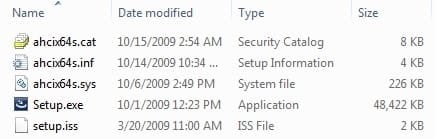
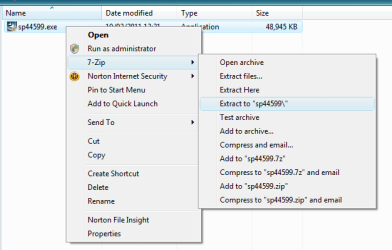
What did you actually place on the flash drive. From what I can see, you need the files in the SRC folder that you extract from the downloaded AHCI SATA sp44599.exe.

sp44599SATA.jpg
 

My Computer

Computer type
PC/Desktop
Computer Manufacturer/Model Number
Lenovo IdeaCenter 450
OS
Windows 10 Pro X64
CPU
Intel Quad Core i7-4770 @ 3.4Ghz
Memory
16.0GB PC3-12800 DDR3 SDRAM 1600 MHz
Graphics Card(s)
Intel Integrated HD Graphics
Sound Card
Realtek HD Audio
Monitor(s) Displays
HP 22" LCD
Screen Resolution
1680 x 1050
Hard Drives
250GB Samsung EVO SATA-3 SSD
2TB Seagate ST2000DM001 SATA-2
1.5TB Seagate ST3150041AS SATA
Keyboard
Dell USB
Mouse
Lenovo USB
Internet Speed
Cable via Road Runner 3MB Upload, 30MB Download
Antivirus
Windows Defender, MBAM Pro, MBAE
Browser
Seamonkey
Other Info
UEFI/GPT
PLDS DVD-RW DH16AERSH
All of the original driver file from the HP dowload site (including sp44599.exe) which show up under windows explorer as exe files. I don't know how to "explore" the sp44599.exe file as shown in your attachment.

Please forgive my inexperience. Thanks.
 

My Computer

Computer Manufacturer/Model Number
HP Pavilion p6331p Desktop BK150AA
OS
Windows 7 64 bit
CPU
AMD Athlon II x4 630
Motherboard
H-RS880-uATX Aloe
Memory
8 GB
Hard Drives
Seagate 750 gb Barracuda
I downloaded 7zip and used it to extract the 44599 file as shown. When I tried installing Windows 7 again, the file only appears when the "Hide drivers that not compatible with hardware on this computer" box is unchecked.

The computer was advertised as Windows 7 64 bit compatible and it has 8 GB ram so I don't believe the software is wrong.

Is it possible to remove the hard drive (HP) and format it in another computer (Dell) to reinstall?

Thanks.
 

My Computer

Computer Manufacturer/Model Number
HP Pavilion p6331p Desktop BK150AA
OS
Windows 7 64 bit
CPU
AMD Athlon II x4 630
Motherboard
H-RS880-uATX Aloe
Memory
8 GB
Hard Drives
Seagate 750 gb Barracuda

My Computer

Computer Manufacturer/Model Number
* BFK Customs *
OS
W 7 64-bit Ultimate
CPU
Intel Q9550 Yorkfield
Motherboard
ASUS P5Q Pro
Memory
8GB Dominator 8500C5D
Graphics Card(s)
ATI : XFX 5870
Sound Card
Realtek HD Audio 7-1
Monitor(s) Displays
1x 47" LCD HDMI & 3x 26" LCD HDMI
Screen Resolution
1920x1080P & 1920x1200
Hard Drives
1x 80GB Intel X25-M G2 SSD : 1x 500GB & 1x 640GB WD Caviar Black(s)
PSU
Corsair 620HX
Case
Cooler Master RC-690
Cooling
Tuniq Tower 120, 2x 140mm and 3x 120mm case fans
Keyboard
Microsoft 500
Mouse
Razer Diamondback 3G
Internet Speed
14 Mb/s
Other Info
1x Koutech 3Gb/s SATA HDD Hot Swap Rack
Hi. Actually, I'm asking if I can remove the HDD from the non working HP computer, move it to a working Dell computer, format or install Windows 7, and then move it back to the non working HP computer?

This thread discusses a simliar problem or solution: No signed device drivers were found

Thanks for the help.
 

My Computer

Computer Manufacturer/Model Number
HP Pavilion p6331p Desktop BK150AA
OS
Windows 7 64 bit
CPU
AMD Athlon II x4 630
Motherboard
H-RS880-uATX Aloe
Memory
8 GB
Hard Drives
Seagate 750 gb Barracuda
Hi. The problem is solved: the hard drive was bad. The install went fine after it was replaced. Thanks for all the help.
 

My Computer

Computer Manufacturer/Model Number
HP Pavilion p6331p Desktop BK150AA
OS
Windows 7 64 bit
CPU
AMD Athlon II x4 630
Motherboard
H-RS880-uATX Aloe
Memory
8 GB
Hard Drives
Seagate 750 gb Barracuda
Good to see you found the issue and thanks for the update.
 

My Computer

Computer Manufacturer/Model Number
* BFK Customs *
OS
W 7 64-bit Ultimate
CPU
Intel Q9550 Yorkfield
Motherboard
ASUS P5Q Pro
Memory
8GB Dominator 8500C5D
Graphics Card(s)
ATI : XFX 5870
Sound Card
Realtek HD Audio 7-1
Monitor(s) Displays
1x 47" LCD HDMI & 3x 26" LCD HDMI
Screen Resolution
1920x1080P & 1920x1200
Hard Drives
1x 80GB Intel X25-M G2 SSD : 1x 500GB & 1x 640GB WD Caviar Black(s)
PSU
Corsair 620HX
Case
Cooler Master RC-690
Cooling
Tuniq Tower 120, 2x 140mm and 3x 120mm case fans
Keyboard
Microsoft 500
Mouse
Razer Diamondback 3G
Internet Speed
14 Mb/s
Other Info
1x Koutech 3Gb/s SATA HDD Hot Swap Rack
Back
Top